REPLACE with COLLATE makes the matching rule explicit before a substring is replaced. I choose whether uppercase and lowercase forms should match. The output can change even when the source and replacement literals stay identical.

Keep the replacement arguments constant
The query searches for lowercase a and replaces it with lowercase x. Every output expression uses those same literals. Only the collation attached to the source expression changes.
The first row supplies AbA. Under the case-insensitive collation, both uppercase A occurrences match the search. The expected output is xbx.
Under the case-sensitive and binary collations, those uppercase letters do not match lowercase a. Both expected outputs remain AbA. This row isolates case matching without adding another replacement rule.
I return the original source text beside all three results. That makes unchanged text an explicit expected outcome. It does not treat a missing replacement as an execution failure.
WITH Inputs AS
(
    SELECT CaseId,TextValue FROM (VALUES
        (1,CAST(N'AbA' AS nvarchar(12))),(2,CAST(N'aba' AS nvarchar(12))),
        (3,CAST(N'XYZ' AS nvarchar(12))),(4,CAST(N'' AS nvarchar(12))),
        (5,CAST(NULL AS nvarchar(12)))) AS v(CaseId,TextValue)
)
SELECT CaseId,TextValue,
    REPLACE(TextValue COLLATE Latin1_General_100_CI_AS,N'a',N'x') AS IgnoreCase,
    REPLACE(TextValue COLLATE Latin1_General_100_CS_AS,N'a',N'x') AS RespectCase,
    REPLACE(TextValue COLLATE Latin1_General_100_BIN2,N'a',N'x') AS BinaryMatch
FROM Inputs ORDER BY CaseId;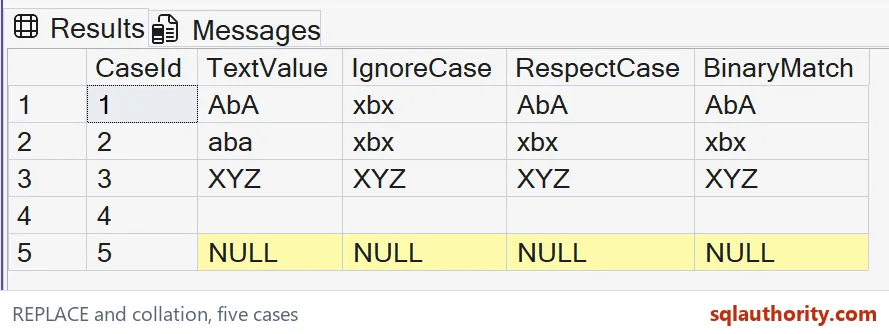
A match replaces every occurrence
The second row supplies aba. All three matching rules find both lowercase a occurrences. Each expected result is xbx.
The function replaces all occurrences of the selected substring. It does not stop after the first match. The two occurrences make that behavior visible in the smallest useful string.
The third row supplies XYZ and has no matching substring. All expected outputs remain XYZ. Collation controls comparison, but it does not invent a match where these characters differ.
The shared-match case belongs beside the case-dependent one. An unchanged uppercase output can otherwise look like a failed replacement. The lowercase input shows that all three selected rules still replace an exact lowercase match.

Keep empty input and missing input separate
The empty-string row remains an empty string under each matching rule. It is present text with nothing to replace. The missing-input row remains SQL NULL in every output.
REPLACE returns NULL when any argument is NULL. This sample makes only the source missing. A missing search or replacement expression would require its own application policy.
The literals use Unicode types throughout. That keeps the comparison focused on matching rather than a conversion into a narrower encoding. The short inputs also avoid any large-value truncation question.
A case-insensitive match does not mean the whole output is normalized to one case. Characters outside the matched substring retain their original content. The lowercase b in these examples is simply carried through.
Select a rule that belongs to the data contract
A user-facing label might permit case-insensitive matching. A case-sensitive token might require preserving distinctions. Neither choice should be inferred solely from how text happens to look in a grid.
The three named collations are expression-level choices. The query does not alter database or server collation. That makes its expected case behavior independent of the database’s default matching rule.
Binary matching is a distinct comparison policy, not a blanket recommendation for every language. Linguistic requirements can include accent and other differences. This example isolates ordinary ASCII letter case only.
The query reads sample values and writes nothing. It does not execute a mass text cleanup or claim performance gains. Before applying a replacement to real data, preview the complete changed values under the intended rule.
Keep both uppercase-only and lowercase matches in that preview. Add a no-match value and a missing source. Those cases reveal whether the replacement contract is broader than the application intended.
Preview the changes first, and the collation will never surprise you.
A replacement is not a matching rule, it is only as precise as its collation.
Published by Pinal Dave on SQLAuthority. More of my work at pinaldave.com.
Discover more from SQL Authority with Pinal Dave
Subscribe to get the latest posts sent to your email.