binary Conversion pads and truncates on different sides depending on the source type. I compare one integer with one string at two target widths. The resulting byte sequences show why width alone is not the complete rule.
Expanding a value can introduce zero bytes. Shortening it can discard bytes without an obvious visual warning. The demonstration keeps both results as hexadecimal witnesses rather than immediately treating them as equivalent identifiers.

Compare expanded and shortened targets
The integer input is explicitly typed as int with value 123456. The string input is explicitly typed as varchar with content ABCD. Both are converted to fixed binary targets of six and two bytes.
The outer conversion uses style two to display hexadecimal text without a prefix. DATALENGTH reports the actual target byte count. The display conversion is only a way to inspect the binary result.
UNION ALL preserves all four cases, and ORDER BY follows their stable identifiers. The SELECT changes no objects, data or session settings. Every source and target length remains visible in the code.
SELECT 1 AS CaseId, 'Integer expanded' AS CaseName,
       CONVERT(varchar(12), CAST(CAST(123456 AS int) AS binary(6)), 2) AS HexBytes,
       DATALENGTH(CAST(CAST(123456 AS int) AS binary(6))) AS ByteCount
UNION ALL
SELECT 2, 'Integer shortened',
       CONVERT(varchar(12), CAST(CAST(123456 AS int) AS binary(2)), 2),
       DATALENGTH(CAST(CAST(123456 AS int) AS binary(2)))
UNION ALL
SELECT 3, 'String expanded',
       CONVERT(varchar(12), CAST(CAST('ABCD' AS varchar(4)) AS binary(6)), 2),
       DATALENGTH(CAST(CAST('ABCD' AS varchar(4)) AS binary(6)))
UNION ALL
SELECT 4, 'String shortened',
       CONVERT(varchar(12), CAST(CAST('ABCD' AS varchar(4)) AS binary(2)), 2),
       DATALENGTH(CAST(CAST('ABCD' AS varchar(4)) AS binary(2)))
ORDER BY CaseId;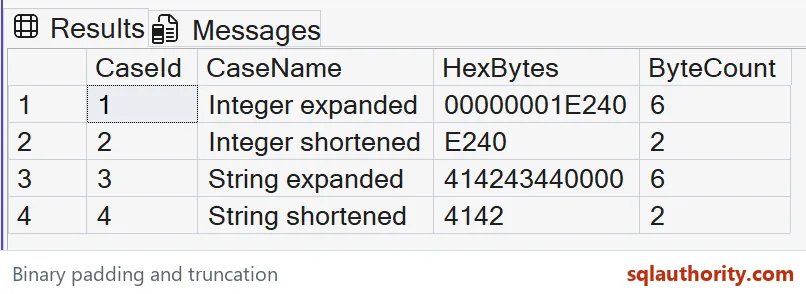
Read the different sides
The expanded integer should produce 00000001E240 with six bytes. Its shortened version should produce E240 with two bytes. The leading bytes are padded or removed for this integer conversion.
The expanded string should produce 414243440000 with six bytes. Its shortened version should produce 4142 with two bytes. The trailing bytes are padded or removed for this character-string conversion.
The character bytes represent the bounded ASCII input ABCD. Different source encodings and types need their own checks. Converting an nvarchar value would not be the same byte-input case as this varchar expression.
Compare both the complete hexadecimal text and the byte count. Equal target lengths do not establish equal content. Omitting the hex witness would hide the direction of the change.

Treat shortening as possible data loss
The two-byte integer result cannot preserve the entire four-byte representation of the original int. Converting a truncated binary result back can therefore produce a different numeric value. A successful conversion does not prove a faithful round trip.
The two-byte string result preserves only the first two characters’ bytes here. Its remaining source content is lost. Padding those two bytes again cannot recover the discarded characters.
I don’t recommend shortening a hash, identifier or serialized record to make it fit. That can create collisions or invalidate the format. Select a target width from the actual payload contract.
Native type-to-binary representations can vary across SQL Server versions. A fixed internal numeric representation should not become a portable file format. Choose an explicit interchange contract instead.
Keep display separate from storage
The hexadecimal output is text describing the result bytes. It is not the original source string and not the stored binary expression itself. Keep those layers distinct when comparing interfaces.
A target binary length is measured in bytes. It is not a promise about the number of source characters or decimal digits. The source type determines how those concepts relate during conversion.
The example makes no performance or storage-efficiency claim. It demonstrates four bounded conversion outcomes. Test both expansion and shortening with the exact types used by a production expression.
Run the four conversions once and the padding rules will start to feel familiar.
A binary width is not a harmless size, it is a rule for padding or losing bytes.
Published by Pinal Dave on SQLAuthority. More of my work at pinaldave.com.
Discover more from SQL Authority with Pinal Dave
Subscribe to get the latest posts sent to your email.