
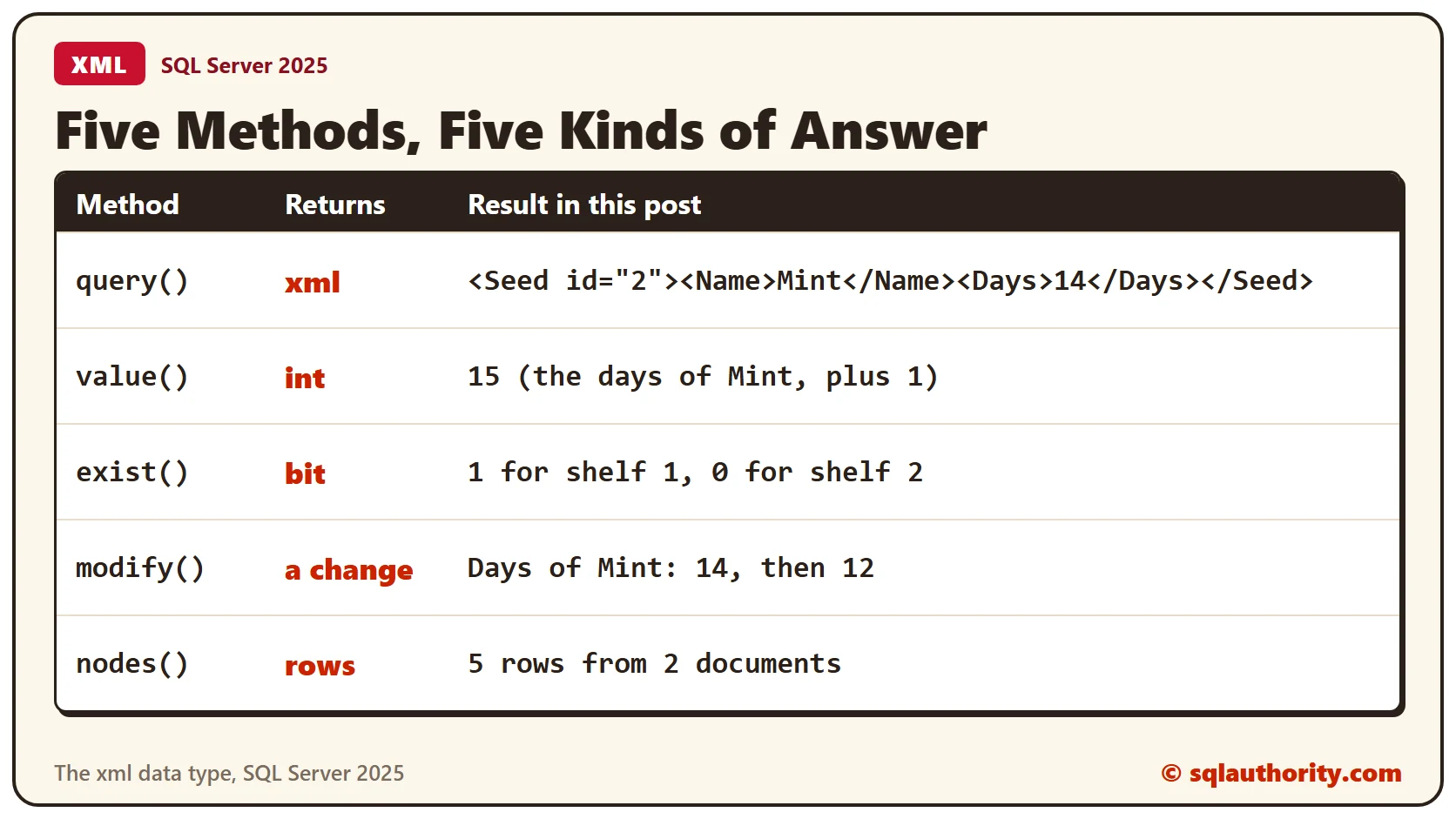
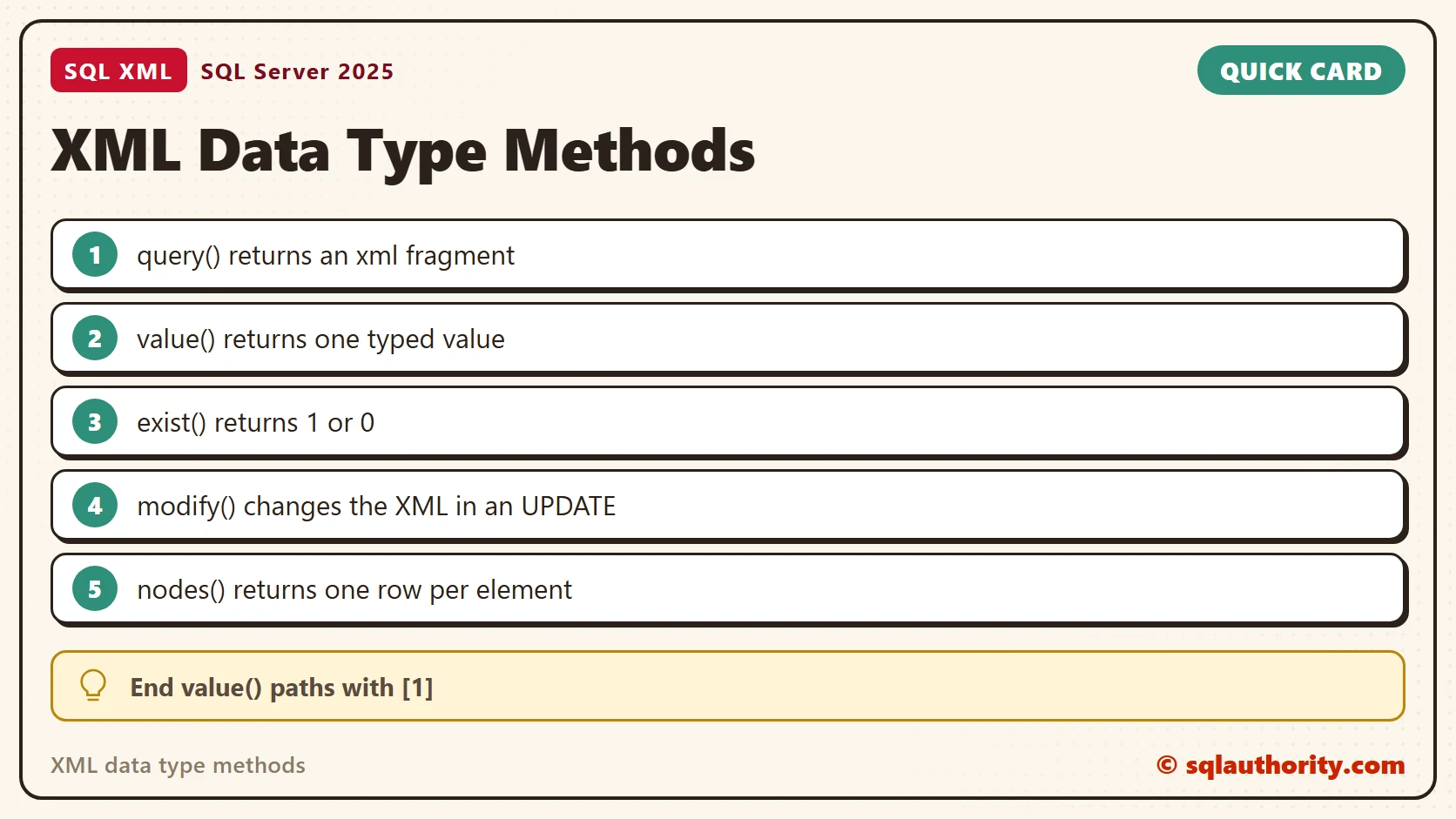
XML data type methods are five functions, and each one answers in a different way. You call them on an xml column or variable. query() returns xml and value() returns a typed value. exist() returns 1 or 0, modify() changes the document and nodes() returns rows.
The Sample Table
Two shelves of seeds, each stored as one XML document. Every seed has an id, a name and the days it needs to sprout. Run this in any test database. Every result in this post comes from SQL Server 2025.
CREATE TABLE Shelves (ShelfID INT PRIMARY KEY, Doc xml NOT NULL);
GO

INSERT INTO Shelves (ShelfID, Doc) VALUES
(1, '<Shelf><Seed id="1"><Name>Basil</Name><Days>10</Days></Seed><Seed id="2"><Name>Mint</Name><Days>14</Days></Seed><Seed id="3"><Name>Chili</Name><Days>21</Days></Seed></Shelf>'),
(2, '<Shelf><Seed id="4"><Name>Thyme</Name><Days>18</Days></Seed><Seed id="5"><Name>Dill</Name><Days>8</Days></Seed></Shelf>');
GO
query(): Get a Piece of XML
query() takes a path and returns the matching XML. This one returns the second seed of shelf 1, with its tags.
SELECT Doc.query('/Shelf/Seed[2]') AS SecondSeed FROM Shelves WHERE ShelfID = 1;The answer is <Seed id="2"><Name>Mint</Name><Days>14</Days></Seed>. Add text() to the path to get only the words, as in the next query.
SELECT Doc.query('(/Shelf/Seed[2]/Name/text())[1]') AS NameOnly FROM Shelves WHERE ShelfID = 1;It shows Mint, but the type is still xml. If you need a real string or number, use value().
value(): Get One Typed Value
value() needs two arguments: a path and the SQL data type you want back. Leave out the type, and SQL Server says so.
SELECT Doc.value('(/Shelf/Seed[2]/Days)[1]') FROM Shelves WHERE ShelfID = 1;The error is message 174: the value function requires 2 argument(s). Add the type and the answer is a real int, so you can calculate with it.
SELECT Doc.value('(/Shelf/Seed[2]/Days)[1]', 'int') + 1 AS DaysPlusOne FROM Shelves WHERE ShelfID = 1;Mint needs 14 days, and the query returns 15. The [1] after the path matters. value() must receive one value, and [1] promises that.
exist(): Ask Yes or No
exist() returns 1 when the path finds something and 0 when it doesn’t. This query asks which shelf holds Chili.
SELECT ShelfID, Doc.exist('/Shelf/Seed[Name="Chili"]') AS HasChili FROM Shelves ORDER BY ShelfID;Shelf 1 returns 1 and shelf 2 returns 0. A WHERE clause is the natural place for it, and a path can compare numbers too.
SELECT ShelfID FROM Shelves WHERE Doc.exist('/Shelf/Seed[Days > 20]') = 1;Only shelf 1 holds a seed that needs more than 20 days. Shelf 2 has none.
modify(): Change the XML
modify() lives in the SET clause of an UPDATE. It changes one node at a time. A path that matches every Days element fails.
UPDATE Shelves SET Doc.modify('replace value of (/Shelf/Seed/Days/text()) with "1"') WHERE ShelfID = 1;The error is message 2337: the target of replace must be at most one node. Point at one element instead, and replace its text.
UPDATE Shelves SET Doc.modify('replace value of (/Shelf/Seed[Name="Mint"]/Days/text())[1] with "12"') WHERE ShelfID = 1;Read the value back to check the change.
SELECT Doc.value('(/Shelf/Seed[Name="Mint"]/Days)[1]', 'int') AS MintDays FROM Shelves WHERE ShelfID = 1;Mint now shows 12 days. The other seeds didn’t change.
nodes(): Turn Elements Into Rows
nodes() returns one row for each element that matches the path. You can’t select it directly. You call it through CROSS APPLY and read the columns with value().
SELECT s.ShelfID, x.n.value('@id', 'int') AS SeedID, x.n.value('(Name)[1]', 'varchar(20)') AS Name, x.n.value('(Days)[1]', 'int') AS Days
FROM Shelves AS s
CROSS APPLY s.Doc.nodes('/Shelf/Seed') AS x(n)
ORDER BY SeedID;
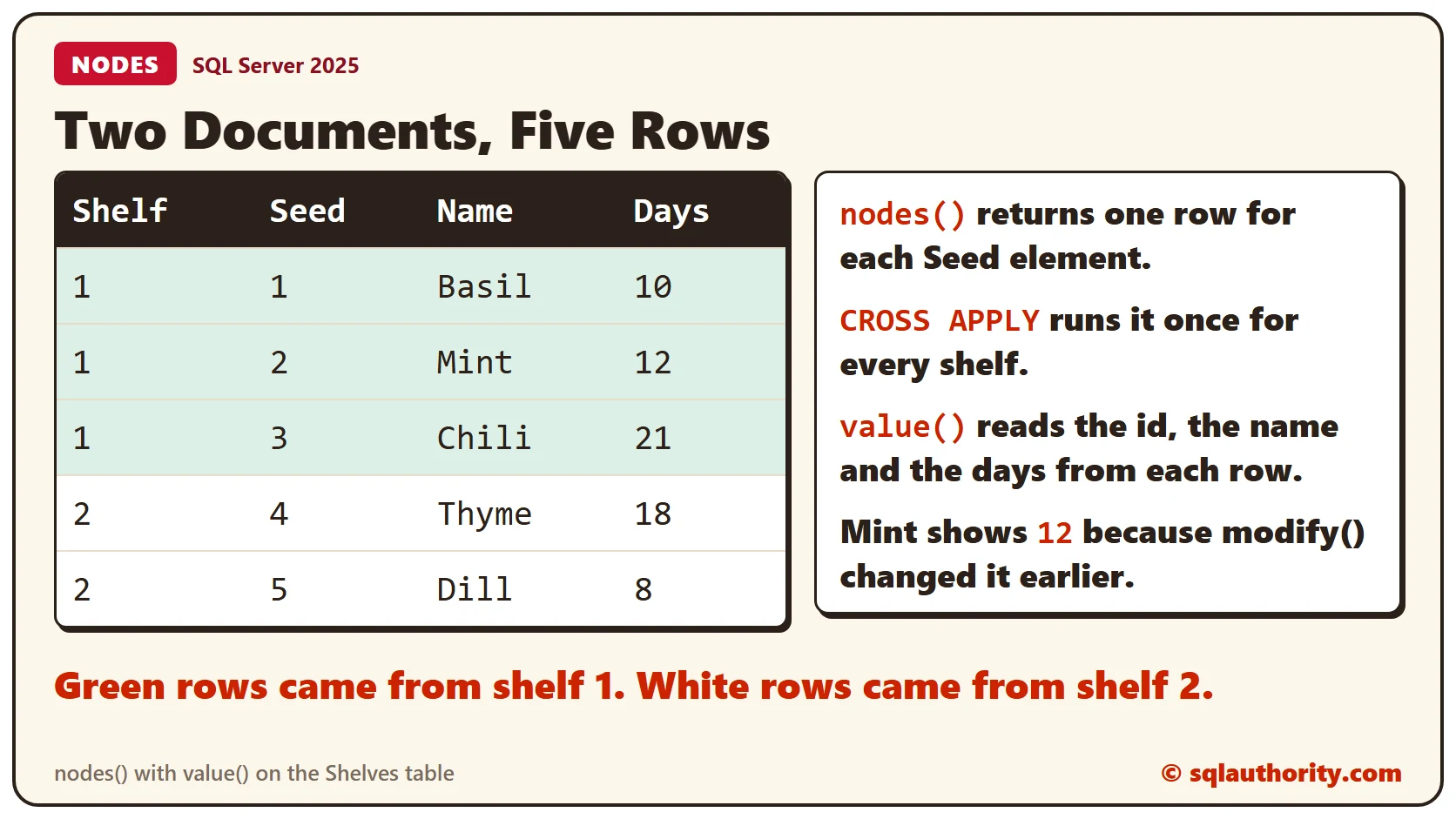
Five rows come back, three from shelf 1 and two from shelf 2. The full recipe, with NULLs, is in Shredding XML in SQL Server: Turn XML Back Into Rows.
Ask SQL Server What Each Method Returns
You don’t have to remember the types. sys.dm_exec_describe_first_result_set describes the columns of any query. Run it on one query() call, one value() call and one exist() call.
SELECT name AS MethodColumn, system_type_name AS ReturnType
FROM sys.dm_exec_describe_first_result_set(N'SELECT Doc.query(''/Shelf/Seed[1]'') AS QueryMethod, Doc.query(''(/Shelf/Seed[1]/Name/text())[1]'') AS QueryText, Doc.value(''(/Shelf/Seed[1]/Days)[1]'', ''int'') AS ValueMethod, Doc.exist(''/Shelf/Seed'') AS ExistMethod FROM Shelves', NULL, 0)
ORDER BY column_ordinal;
The two query() columns are xml, value() is an int and exist() is a bit. nodes() and modify() don’t appear here, because nodes() returns rows and modify() changes data.
Clean Up
Remove the sample table when you finish.
DROP TABLE Shelves;What to Remember
Choose the method by the answer. Use query() for xml and value() for a typed value. Use exist() for a yes or no, modify() to change a node and nodes() for rows. End each value() path with [1], and point modify() at one node.
To go further, read XML modify(): Inserting, Replacing and Deleting Nodes, XML nodes: Turn Repeated Elements Into Rows and XML Data Type Quiz: Which Method Returns a Plain Value?.
An XML method is not a search box, it is a question with a fixed kind of answer.
Published by Pinal Dave on SQLAuthority. More of my work at pinaldave.com.
Discover more from SQL Authority with Pinal Dave
Subscribe to get the latest posts sent to your email.



20 Comments. Leave new
nice step by step explanation
Hi Pinal,
Nice article and write up. I have a question I extracted the PackageSource of SSIS package in XML, The XML is the complete layout of package. I am trying to locate a string in that XML, How would i do that. The XML is in the form
3
Thank You
Hi,
I have a question for you that What is “Dynamic Stored Procedure”? What is this term why not we use SQL Dynamic Query. I am using C#.
Thanks
18
2008
I have a column in my table named XMLTest with xml datatype and it contain the above lnformation
I wish to update the built year node i.e. 2008 to 4 like wise 2010 to 2 etc and there are millions of records.
Actually i wish to replace the given year with difference of current year minus the given year. So the main concern is how to update that in xml.
Hi Pinal,
Is it possible to replace all the occurrences of a particular value in entire XML with something else ?
My XML is dynamically generated and not feasible to provide a XPath in the query or modify.
Wanted to check if there is a way to update the XML in this case.
Thanks,
Parvinder
For value method, the XQuery must return at most one value. Otherwise, an error is returned.
HI it is possible to replace element and their child element in one query
like Abc10Def11
And i want to replace Abc10 with new xml
How to get the entire text of Dynamic query according to the dynamic inputs by Sql query outside the procedure and without executing the procedure
Thanks a lot. This helped tremendously
very nice and helpful article !! thanks a lot !!
Is it possibole to run a query that will read master+child records direct from xml file (C:\test.xml)?
How can I read the below XML to check whether theTO element with particular value lets say LO exists or not…?
LO
EM
Thanx TO ALL. I got my solution by myself its
ChargeTo.exist(‘/ChargeTo[To=”LO”]’)
Hi,
I getting error while i am updating the xml datatype column
update dept set userdata=’ j&j
‘
If i remove ” & ” then its updating. what i need to do if i want to execute with ” & “.
hi,
the following query executes fine.
declare @hexbin varbinary(max);
set @hexbin = 0x5400650073007400 ;
select cast(” as xml).value(‘xs:hexBinary(sql:variable(“@hexbin”) )’, ‘varchar(max)’);
I want to apply this query on a column. Can anyone tell me how can I replace variable @hexbin with a column of type timestamp/varbinary.
Here is an example
select cast(” as xml).value(‘xs:hexBinary(sql:column(“hexbin”) )’, ‘varchar(max)’) from
(
select 0x5400650073007400 as hexbin
) as t;
Hello,
Thanks a lot for this article ! Very helpful for me !
Regards
it is very helpfull , thank you
Glad to hear !!!
Thank you – Very clear
Any Chance to add explanation for XML node()??