XML modify() changes selected nodes inside an XML value, and it fails quietly when it cannot find the node you named. That quiet failure is the part that bites. Watch each step and you will catch a wrong path early.

Three edits, one after another
Say a product feed arrives as XML and you need to fix one item: set the price, add a note, and remove an obsolete flag. The modify() method does all three with XML DML. I run them one at a time on an XML variable and look at the document after each step.
The new price and the note travel in as variables through sql:variable. I never paste values into the XQuery text.
DECLARE @x xml = N'<item><price>10</price><obsolete>yes</obsolete></item>';
DECLARE @price int = 25, @note nvarchar(30) = N'checked';

SET @x.modify('replace value of (/item/price/text())[1] with sql:variable("@price")');
SELECT @x AS AfterReplacement;

SET @x.modify('insert <note>{sql:variable("@note")}</note> as last into (/item)[1]');
SELECT @x AS AfterInsertion;

SET @x.modify('delete /item/obsolete');
SELECT @x AS AfterDeletion;

DECLARE @missing xml = N'<item><cost>10</cost></item>';
SET @missing.modify('replace value of (/item/price/text())[1] with 25');
SELECT @missing AS MissingTargetResult;

DECLARE @null xml = NULL;
BEGIN TRY
    SET @null.modify('delete /item/obsolete');
END TRY
BEGIN CATCH
    SELECT ERROR_NUMBER() AS NullErrorNumber, ERROR_MESSAGE() AS NullErrorMessage;
END CATCH;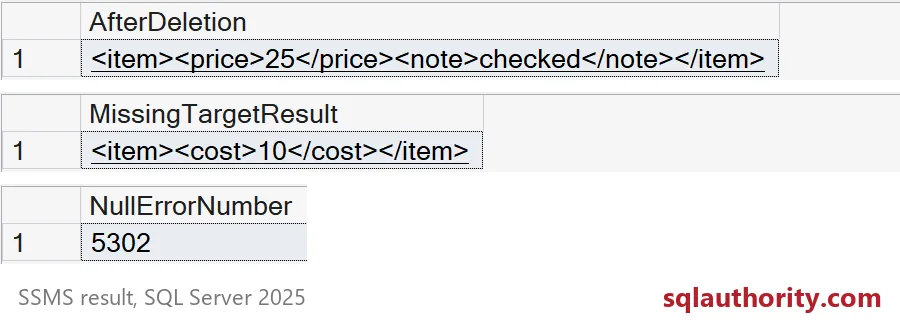
The first three grids walk the document from price 10 to price 25, then add the note, then drop obsolete. The screenshot starts at the third grid. The final document holds price 25 and the checked note, and obsolete is gone.
Now the two grids that matter more. The document with no price node is returned unchanged, with no error and no warning. The edit simply found nothing to do. And a NULL XML value does fail: error 5302, with a message saying modify() cannot be called on a null value.
Check the target before you edit
Silence is dangerous in a data fix. If a hundred documents are missing the node and your script says “done,” you will not know. When a missing target is a problem, test for it first with exist(). It returns 1 when the path finds something and 0 when it does not.
DECLARE @missing xml = N'<item><cost>10</cost></item>';

SELECT @missing.exist('/item/price') AS HasPrice;

IF @missing.exist('/item/price') = 0
    SELECT N'No price node, nothing to update' AS Result;
ELSE
    SET @missing.modify('replace value of (/item/price/text())[1] with 25');
HasPrice is 0, so the script reports the problem instead of skipping it quietly.

Repeated elements need a precise path
The [1] at the end of a path means “the first match.” That is fine for one item. With repeated elements it can edit the wrong one. Here an order has two items, and I want to change item 2.
DECLARE @id int = 2, @newPrice int = 99;
DECLARE @order xml = N'<order><item id="1"><price>10</price></item><item id="2"><price>20</price></item></order>';
DECLARE @firstOnly xml = @order;

SET @order.modify('replace value of (/order/item[@id=sql:variable("@id")]/price/text())[1] with sql:variable("@newPrice")');
SELECT @order AS TargetedEdit;

SET @firstOnly.modify('replace value of (/order/item/price/text())[1] with sql:variable("@newPrice")');
SELECT @firstOnly AS FirstNodeEdit;
The targeted edit changes item 2 from 20 to 99 and leaves item 1 at 10. The first-node edit changes item 1 instead. Same value, wrong item, and no error. Identify the item by its id, as the first statement does.
Updating a whole column
In a table, the same method works inside an UPDATE, and sql:column brings in a value from each row. The table below holds three documents. One of them has no price node.
DROP TABLE IF EXISTS #Items;
CREATE TABLE #Items (ItemId int PRIMARY KEY, Doc xml NOT NULL, NewPrice int NOT NULL);
INSERT #Items VALUES
    (1, N'<item><price>10</price></item>', 15),
    (2, N'<item><cost>10</cost></item>', 25),
    (3, N'<item><price>30</price></item>', 35);

UPDATE #Items
SET Doc.modify('replace value of (/item/price/text())[1] with sql:column("NewPrice")');

SELECT ItemId, Doc, Doc.exist('/item/price') AS HasPrice
FROM #Items
ORDER BY ItemId;
The UPDATE reports 3 rows affected. But item 2 still has cost 10, and HasPrice is 0 for it. The row count counts rows touched, not documents that actually changed. To touch only documents that have the node, add WHERE Doc.exist(‘/item/price’) = 1 to the UPDATE.
An XML edit is also a database write. It uses transactions, locks and the log like any other update. Test on a copy before you change a large set.
Clean up
DROP TABLE IF EXISTS #Items;Next time an XML fix says it worked, check that the node was really there.
An XML edit is not a text replace, it is a change to the nodes you selected.
Published by Pinal Dave on SQLAuthority. More of my work at pinaldave.com.
Discover more from SQL Authority with Pinal Dave
Subscribe to get the latest posts sent to your email.