
Query hint basics start with one idea: a query hint is an instruction you add to one statement. It goes in the OPTION clause and overrides a choice the optimizer would make. It helps when the optimizer works from the wrong information. It doesn’t help when the plan is already right.
The Sample Table
A Tickets table with 50,010 rows. Ten of them are in the Front category, and the rest are Standard. A 200 character Note column makes each row wide, and an index on Category supports the search. Run this in any test database. Every number in this post comes from SQL Server 2025.
CREATE TABLE Tickets (TicketID INT IDENTITY(1,1) PRIMARY KEY, Category VARCHAR(10) NOT NULL, Note CHAR(200) NOT NULL DEFAULT '');
GO

WITH n AS (SELECT TOP (50010) ROW_NUMBER() OVER (ORDER BY (SELECT NULL)) AS i FROM sys.all_objects AS a CROSS JOIN sys.all_objects AS b CROSS JOIN sys.all_objects AS c)
INSERT INTO Tickets (Category)
SELECT CASE WHEN i <= 10 THEN 'Front' ELSE 'Standard' END FROM n;
GO

CREATE INDEX IX_Tickets_Category ON Tickets (Category);
GO
Check the counts.
SELECT Category, COUNT(*) AS Tickets FROM Tickets GROUP BY Category ORDER BY Category;Ten Front rows and 50,000 Standard rows. A search for Front is selective, and a search for Standard isn’t. Turn on the actual plan with Ctrl+M to see the row counts. SET STATISTICS IO ON adds the page reads.
SET STATISTICS IO ON;A Value Gets a Seek
Ask for the rare category with the value written in the query.
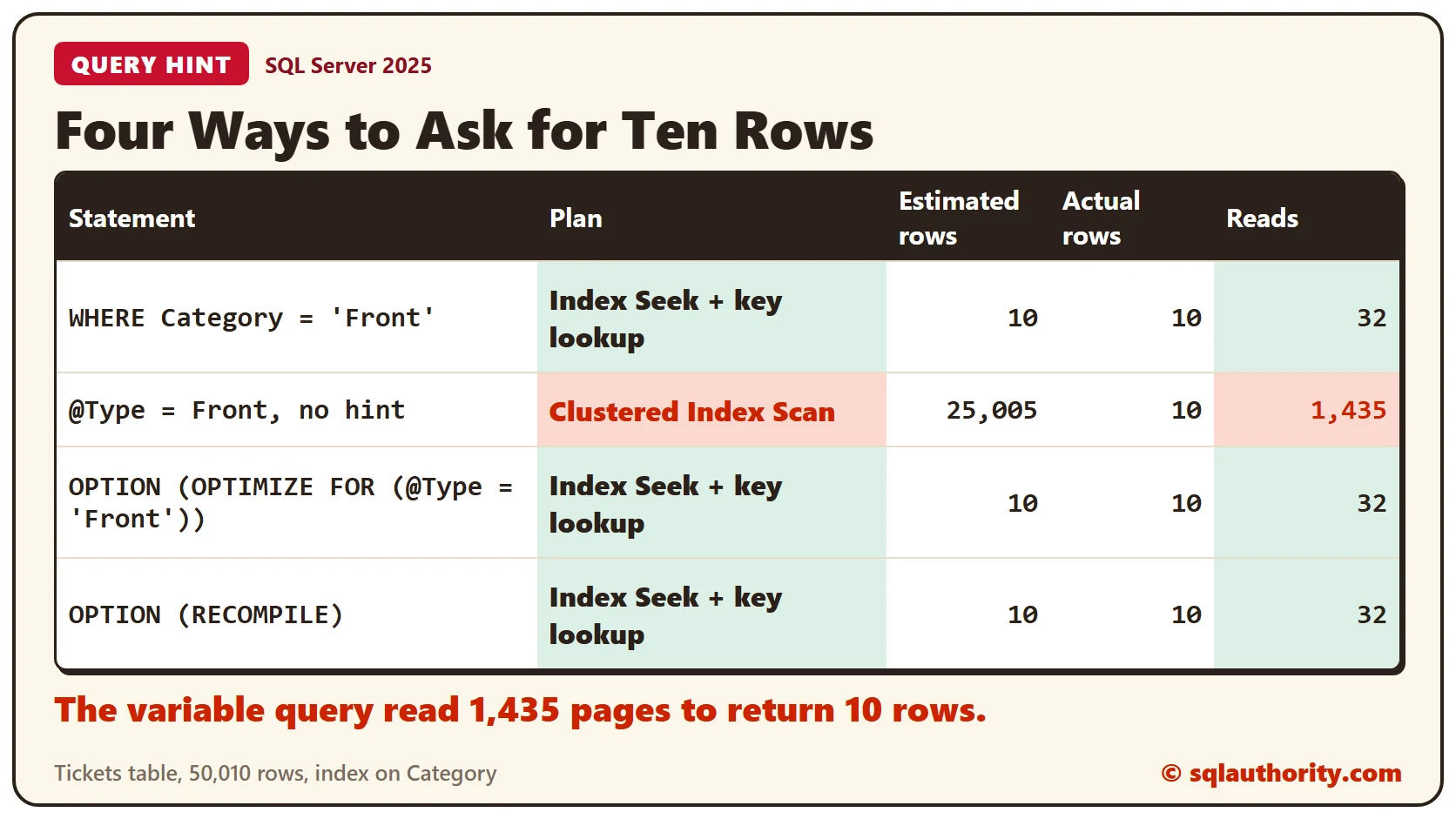
SELECT TicketID, Category, Note FROM Tickets WHERE Category = 'Front';The plan is an Index Seek on the Category index, plus a key lookup for the Note column. The optimizer estimated 10 rows and found 10. The query read 32 pages.
A Variable Gets a Scan
Now put the same value in a variable and run both lines in one batch.
DECLARE @Type VARCHAR(10) = 'Front';
SELECT TicketID, Category, Note FROM Tickets WHERE Category = @Type;
The plan changes to a Clustered Index Scan. The estimate is 25,005 rows, although the query returns 10, and it reads 1,435 pages.
The optimizer compiles the whole batch before the variable gets its value. So it can’t look up Front in the statistics. It uses the average instead: 50,010 rows over 2 values is 25,005. Reading 25,005 rows through a seek and a lookup costs more than one scan, so it scans.
The OPTION Clause
A query hint goes in an OPTION clause at the end of the statement. It applies to the whole statement. OPTIMIZE FOR tells the optimizer to build the plan as if the variable held a value you name.
DECLARE @Type VARCHAR(10) = 'Front';
SELECT TicketID, Category, Note FROM Tickets WHERE Category = @Type
OPTION (OPTIMIZE FOR (@Type = 'Front'));
The seek and the key lookup are back. The estimate is 10 rows, and the query reads 32 pages.
Another Way: RECOMPILE
OPTION (RECOMPILE) asks for a fresh plan at every run, built with the real value of the variable. The price is a compile each time.
DECLARE @Type VARCHAR(10) = 'Front';
SELECT TicketID, Category, Note FROM Tickets WHERE Category = @Type
OPTION (RECOMPILE);
The plan is the same seek and lookup, with 10 estimated rows and 32 reads.
A Hint Is a Bet
OPTIMIZE FOR fixes one value into the plan. If the variable later holds Standard, the plan still expects ten rows. These two queries ask for the 50,000 Standard rows, first without the hint and then with it. They assign the columns to variables, so the grid stays empty and the plan stays the same.
DECLARE @Type VARCHAR(10) = 'Standard', @id INT, @cat VARCHAR(10), @note CHAR(200);
SELECT @id = TicketID, @cat = Category, @note = Note FROM Tickets WHERE Category = @Type;
The same query with the hint still saying Front:
DECLARE @Type VARCHAR(10) = 'Standard', @id INT, @cat VARCHAR(10), @note CHAR(200);
SELECT @id = TicketID, @cat = Category, @note = Note FROM Tickets WHERE Category = @Type
OPTION (OPTIMIZE FOR (@Type = 'Front'));
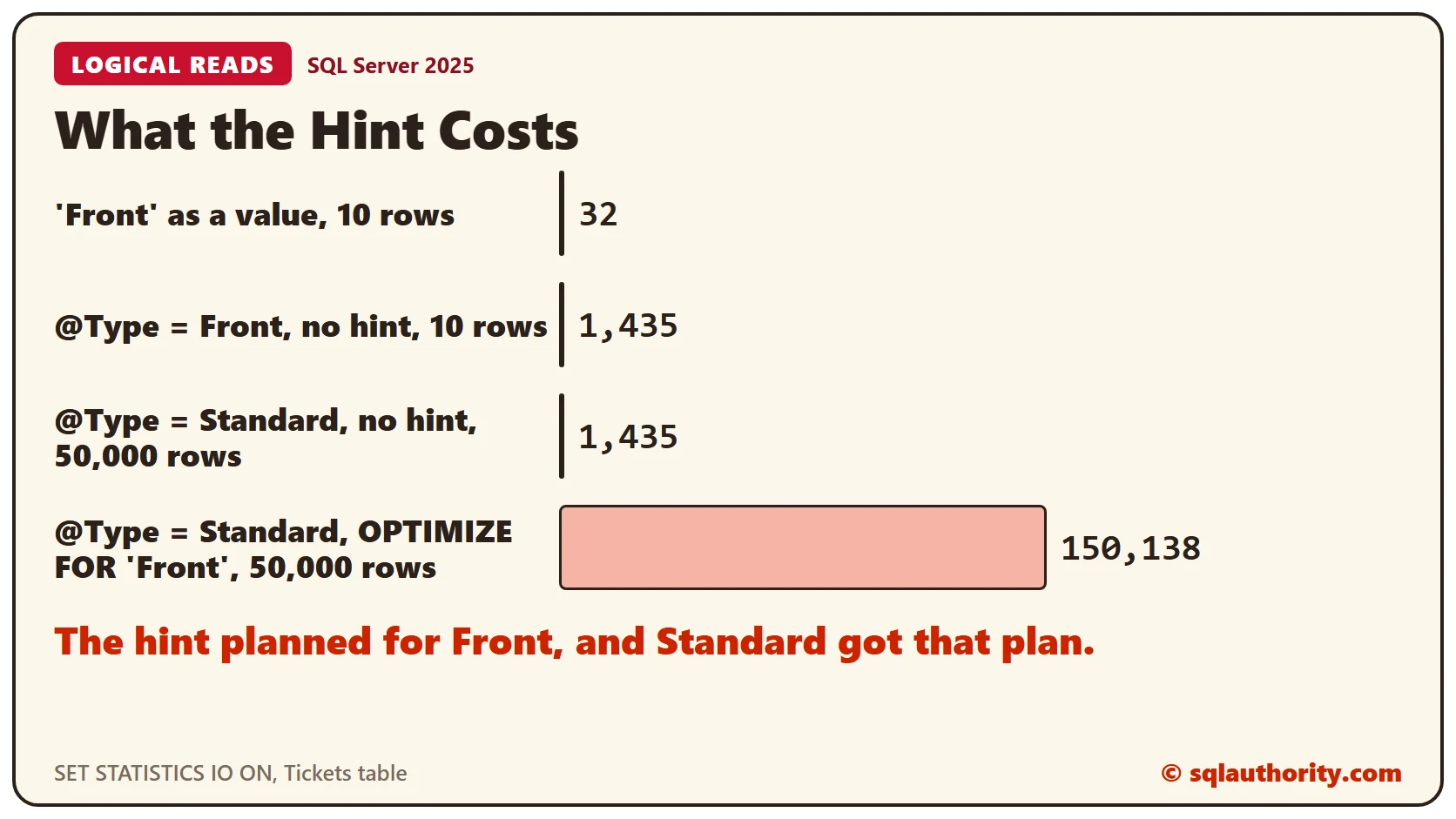
Without the hint the scan reads 1,435 pages. With the hint the seek and lookup run 50,000 times, and the query reads 150,138 pages. The hint made this case read about 105 times as many pages.
Treat a hint as a last resort. Try fresh statistics or a different query first. When you use one, check the plan and the reads before and after. Look at the value again whenever the data changes.
Clean Up
Remove the sample table when you finish.
DROP TABLE Tickets;What to Remember
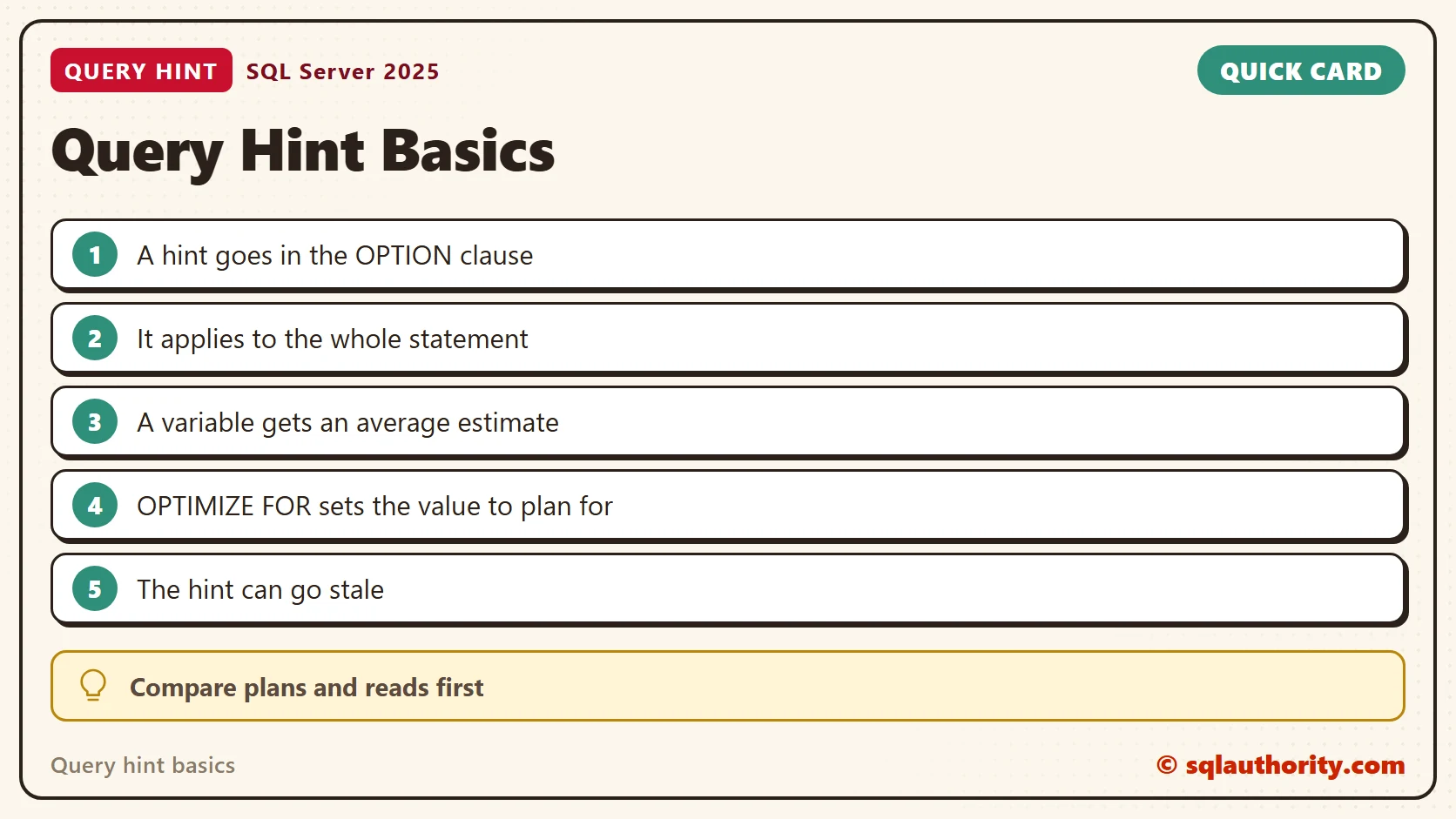
A query hint lives in the OPTION clause and covers one statement. A variable gets an average estimate, and a literal value gets the exact one. OPTIMIZE FOR and RECOMPILE fix the estimate in different ways, and each has a cost.
To go further, read OPTIMIZE FOR and RECOMPILE Hints Compared, Multiple OPTIMIZE FOR Hints in One Query: Value or UNKNOWN and OPTION (RECOMPILE) Hint: When a Fresh Plan Pays Off.
A query hint is not a speed switch, it is a bet on the value you name.
Published by Pinal Dave on SQLAuthority. More of my work at pinaldave.com.
Discover more from SQL Authority with Pinal Dave
Subscribe to get the latest posts sent to your email.



3 Comments. Leave new
If I have another Customer Type Visiting with almost same row of Business type then Can I add another Hint
option(Optimize for (@type=’visting’))
Hi Pinal,
I have applied the same what you explained in the above, still it is going for scan. I am using Sql server 2005.
Hi ,
I am trying to get xml from a location into a table using rowset, the following is the query, but n but its not accepting as valid fiile name. Please help me
CREATE TABLE #XmlImportTest(
xmlFileName VARCHAR(300) NOT NULL,
xml_data XML NOT NULL
)
GO
declare @directory varchar(256) set @directory = ‘”D:\To Folder”‘
declare @filecount int, @fileindex int, @linecount int, @lineindex int
declare @filename varchar(255), @arg varchar(512), @contents varchar(8000)
set @filename = ‘D:\To Folder’
set @arg = ‘dir ‘ + @directory + ‘\ /A-D /B’
declare @dir table (id int not null identity(1,1),[filename] varchar(512))
insert @dir exec master.dbo.xp_cmdshell @arg
DECLARE @ID int
DECLARE IDs CURSOR LOCAL FOR select id from @dir
OPEN IDs
FETCH NEXT FROM IDs into @ID
WHILE @@FETCH_STATUS = 0
BEGIN
SET @filename = @filename + ‘\’+ (select filename from @dir where id = @ID)
print @filename
declare @files table ([xmlFileName] varchar(512), [xml_data] xml null)
INSERT INTO @files(xmlFileName, xml_data)
SELECT ”’ + @filename + ”’, xmlData
FROM(
SELECT *
FROM OPENROWSET (BULK ”’ + @filename +”’, SINGLE_BLOB) AS XMLDATA
) AS FileImport (XMLDATA)
FETCH NEXT FROM IDs into @ID
END
CLOSE IDs
DEALLOCATE IDs