
A hierarchical query using a recursive CTE walks a table that points at itself, one level at a time. An org chart is the classic case. Each row stores the ID of its boss, and the CTE follows those IDs from the top down. This post builds the levels, sorts the tree, walks upward and stops a loop.
The Sample Table
Ten people in a small garden shop. Maya has no boss, so the BossID of that row is NULL. Everyone else points at one person above them. Run this in any test database. Every result in this post comes from SQL Server 2025.
CREATE TABLE Staff (StaffID INT PRIMARY KEY, StaffName VARCHAR(20) NOT NULL, BossID INT NULL);
GO

INSERT INTO Staff (StaffID, StaffName, BossID) VALUES
(1, 'Maya', NULL), (2, 'Arjun', 1), (3, 'Lena', 1), (4, 'Omar', 2), (5, 'Priya', 2),
(6, 'Noah', 3), (7, 'Iris', 4), (8, 'Sam', 4), (9, 'Tara', 6), (10, 'Ben', 7);
GO
The Four Parts
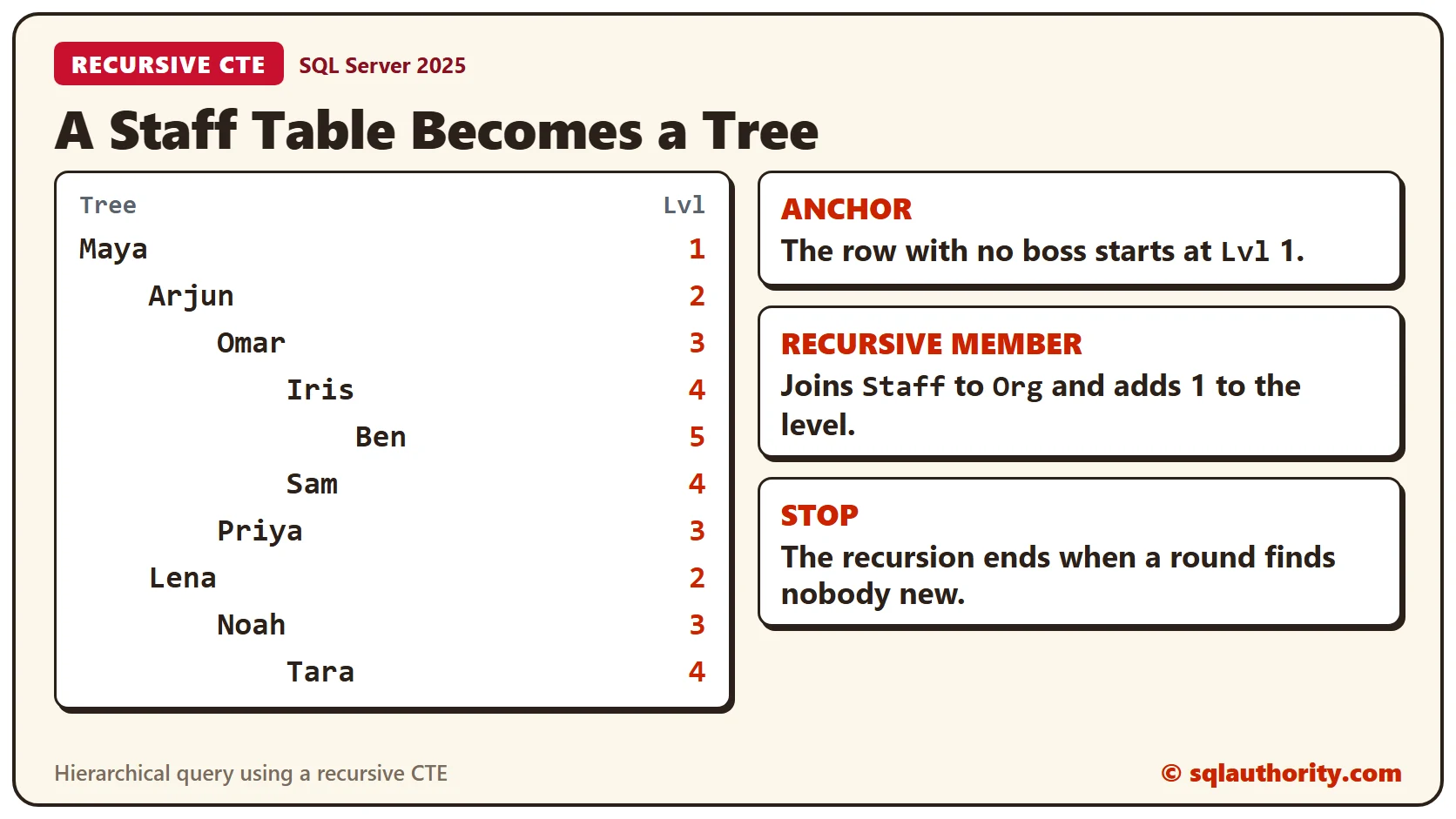
A CTE is a named result that lives for one statement. A recursive CTE refers to itself, so it can repeat. It needs four parts. An anchor query runs once. A recursive member runs again and again. A UNION ALL joins the two, and the recursive member joins back to the CTE.
Here the anchor is the person with no boss. The recursive member finds the people whose boss is already in the result.
Without the Join, Nothing Repeats
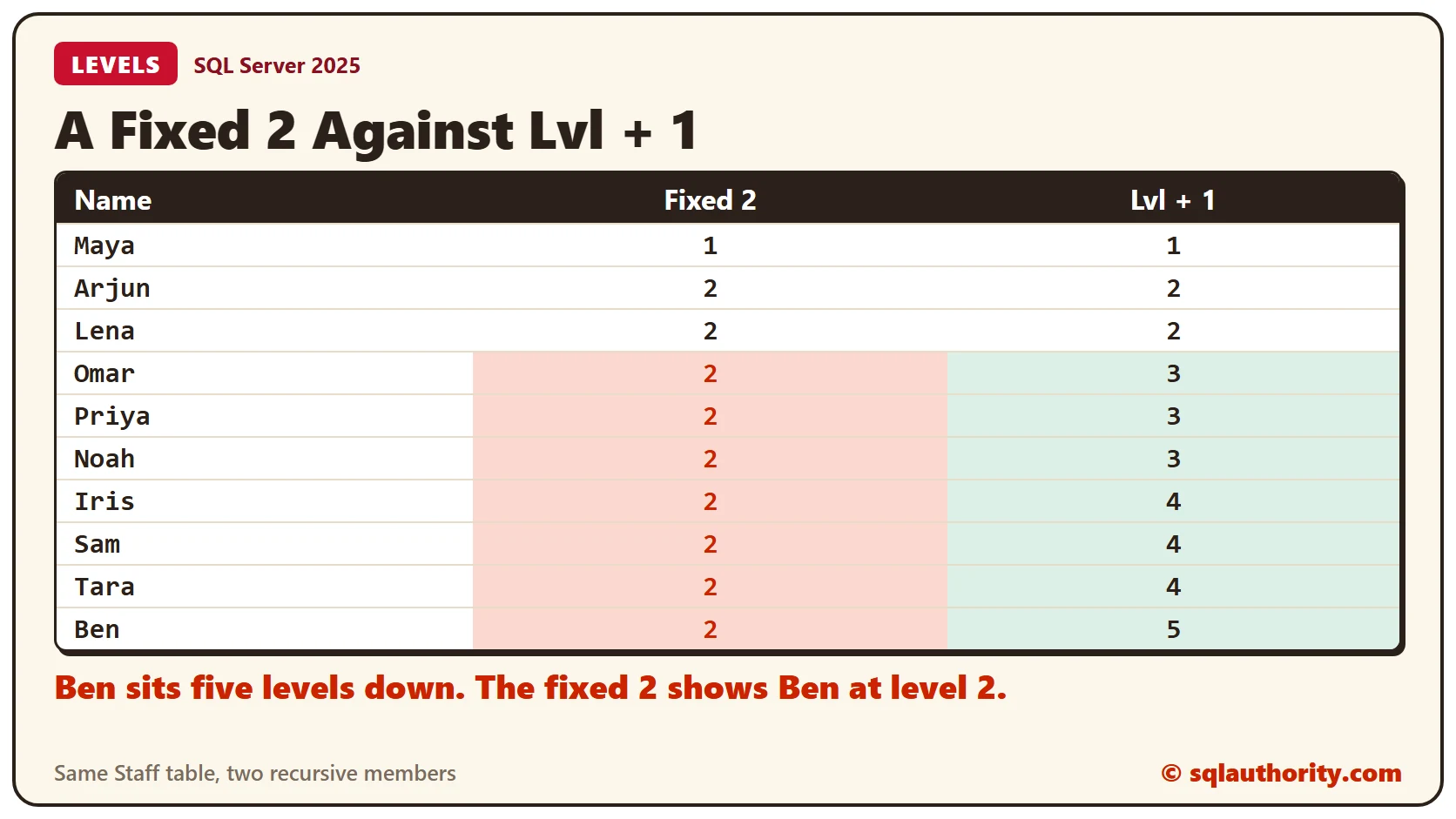
Start with the mistake. This version has an anchor and a second member that never mentions Org, with a fixed 2 for the level.
WITH Org AS (
  SELECT StaffID, StaffName, BossID, 1 AS Lvl FROM Staff WHERE BossID IS NULL
  UNION ALL
  SELECT StaffID, StaffName, BossID, 2 FROM Staff WHERE BossID IS NOT NULL
)
SELECT StaffID, StaffName, Lvl FROM Org;
SQL Server accepts it, but nothing is recursive. The second member runs once, and all 9 other people get level 2, even Ben, who is five levels down.
The Join and Lvl + 1
Join Staff back to Org on the boss column, and add 1 to the level of the boss already found. Each round then lands one level lower.
WITH Org AS (
  SELECT StaffID, StaffName, BossID, 1 AS Lvl FROM Staff WHERE BossID IS NULL
  UNION ALL
  SELECT s.StaffID, s.StaffName, s.BossID, o.Lvl + 1
  FROM Staff AS s INNER JOIN Org AS o ON s.BossID = o.StaffID
)
SELECT StaffID, StaffName, BossID, Lvl FROM Org ORDER BY StaffID;
Now Maya is level 1, and Ben is level 5. The rounds found 1, 2, 3, 3 and 1 people, one level at a time. One more round found nobody, and the recursion stopped.
Sorting the Tree
Sorting by level puts all of level 3 together, not each person under their boss. To fix that, build a path of names in the CTE and sort by it. REPLICATE then indents each name by its level.
WITH Org AS (
  SELECT StaffID, StaffName, 1 AS Lvl, CAST(StaffName AS VARCHAR(200)) AS Path FROM Staff WHERE BossID IS NULL
  UNION ALL
  SELECT s.StaffID, s.StaffName, o.Lvl + 1, CAST(o.Path + '/' + s.StaffName AS VARCHAR(200))
  FROM Staff AS s INNER JOIN Org AS o ON s.BossID = o.StaffID
)
SELECT REPLICATE('    ', Lvl - 1) + StaffName AS Tree, Lvl
FROM Org ORDER BY Path;
Ben appears under Iris, who appears under Omar, under Arjun, under Maya. Lena’s branch follows Arjun’s.
Walking Up Instead
Reverse the join to climb. Start at one person, find their boss, and repeat until there is none.
WITH Chain AS (
  SELECT StaffID, StaffName, BossID, 0 AS Steps FROM Staff WHERE StaffName = 'Ben'
  UNION ALL
  SELECT s.StaffID, s.StaffName, s.BossID, c.Steps + 1
  FROM Staff AS s INNER JOIN Chain AS c ON s.StaffID = c.BossID
)
SELECT Steps, StaffName FROM Chain ORDER BY Steps;
Ben is step 0, then Iris, Omar, Arjun and Maya, in steps 1 to 4. The same pattern lists every manager above one person.
A Loop in the Data
The recursion stops after 100 rounds unless you change it. A loop in the data hits that limit. Make Arjun report to Ben, who works below Arjun, and run the top-down query again.
UPDATE Staff SET BossID = 10 WHERE StaffID = 2;

WITH Org AS (
  SELECT StaffID, StaffName, BossID, 1 AS Lvl FROM Staff WHERE BossID IS NULL
  UNION ALL
  SELECT s.StaffID, s.StaffName, s.BossID, o.Lvl + 1
  FROM Staff AS s INNER JOIN Org AS o ON s.BossID = o.StaffID
)
SELECT StaffID, StaffName, BossID, Lvl FROM Org ORDER BY StaffID;
No error, but only 4 of the 10 people come back. The loop has no top, so the walk from Maya can’t reach it. A walk upward from Ben meets the loop.
WITH Chain AS (
  SELECT StaffID, StaffName, BossID, 0 AS Steps FROM Staff WHERE StaffName = 'Ben'
  UNION ALL
  SELECT s.StaffID, s.StaffName, s.BossID, c.Steps + 1
  FROM Staff AS s INNER JOIN Chain AS c ON s.StaffID = c.BossID
)
SELECT Steps, StaffName FROM Chain ORDER BY Steps;
The error is message 530: the maximum recursion 100 has been exhausted before statement completion. A lower limit stops sooner, with the same message.
WITH Chain AS (
  SELECT StaffID, StaffName, BossID, 0 AS Steps FROM Staff WHERE StaffName = 'Ben'
  UNION ALL
  SELECT s.StaffID, s.StaffName, s.BossID, c.Steps + 1
  FROM Staff AS s INNER JOIN Chain AS c ON s.StaffID = c.BossID
)
SELECT Steps, StaffName FROM Chain ORDER BY Steps
OPTION (MAXRECURSION 20);
The limit only protects you. Fix the data, and the same query returns five rows again.
UPDATE Staff SET BossID = 1 WHERE StaffID = 2;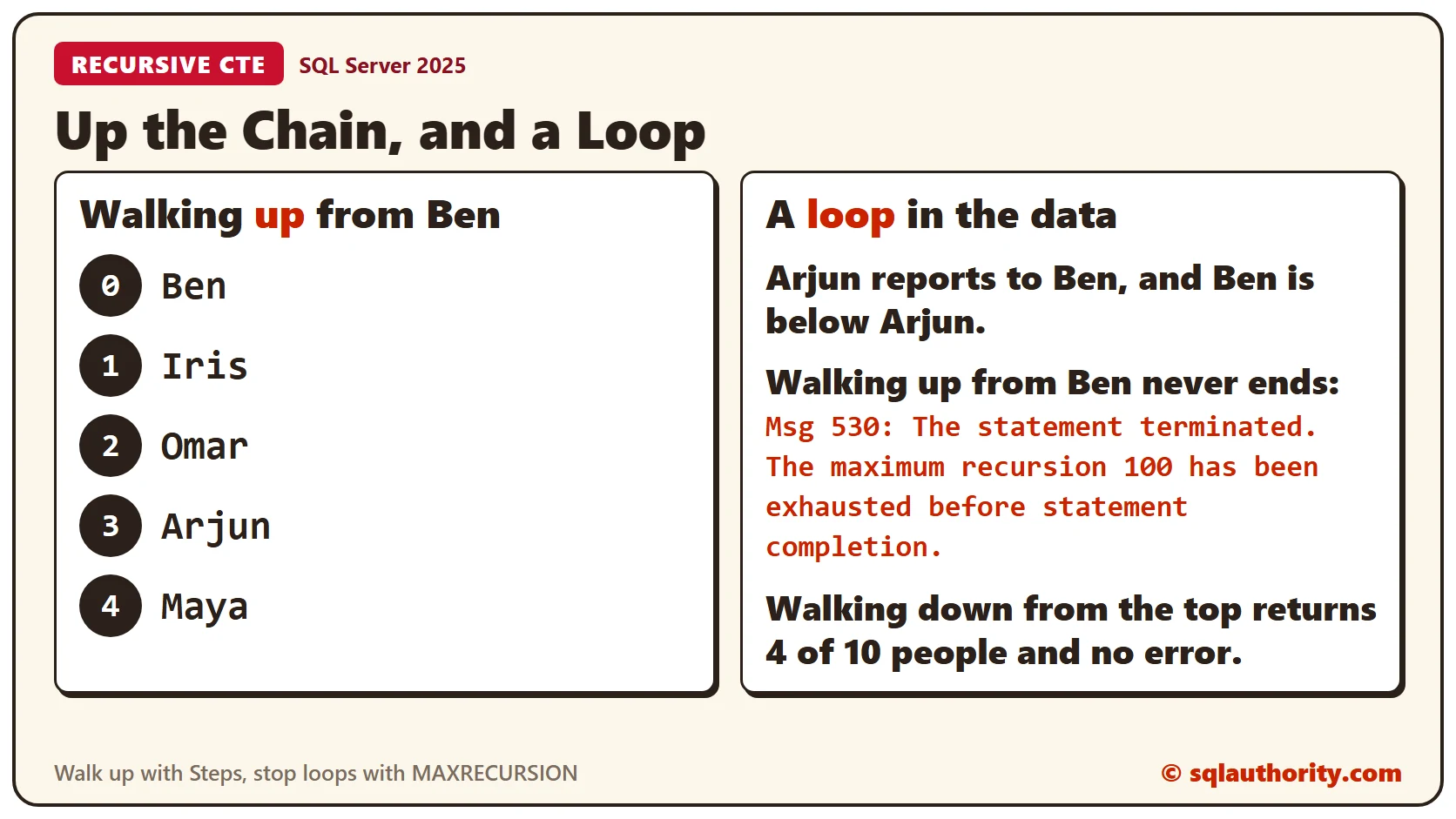
Clean Up
Remove the sample table when you finish.
DROP TABLE Staff;What to Remember
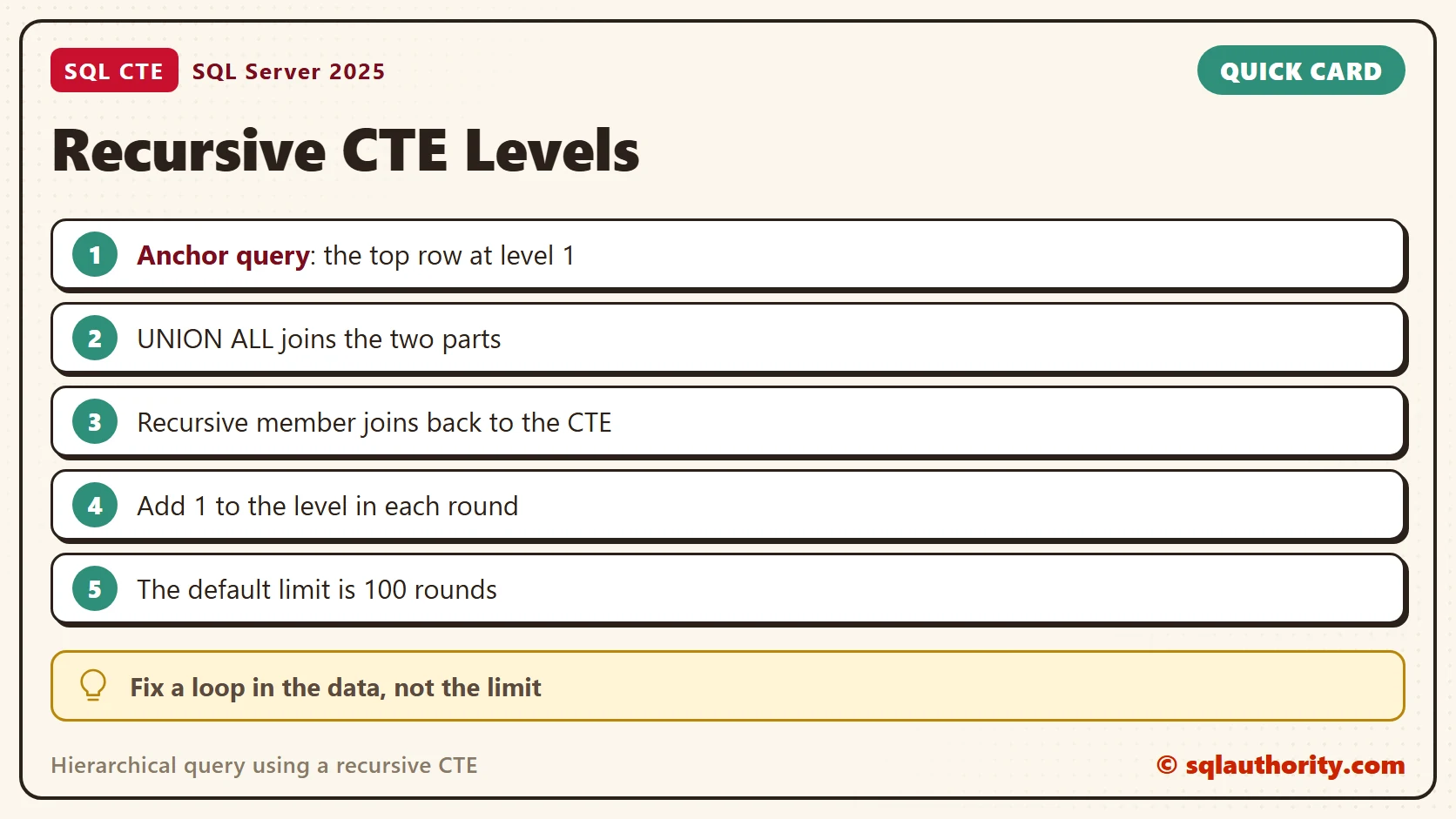
A recursive CTE has an anchor, a recursive member, a UNION ALL and a join back to itself. Add 1 to the level in the recursive member. Sort by a path to keep each person under their boss. A loop in the data hits the recursion limit, so fix the data.
To go further, read Recursive CTE Cycles: Detect Loops and Depth Boundaries, Recursive CTE Performance: Index the Child Lookup and Building an Org Chart Query With hierarchyid.
A recursive CTE is not a loop you write, it is a question you keep asking until nobody answers.
Published by Pinal Dave on SQLAuthority. More of my work at pinaldave.com.
Discover more from SQL Authority with Pinal Dave
Subscribe to get the latest posts sent to your email.




70 Comments. Leave new
Hi, i have a data like this
id, parent id, child id
1,1,2
2,1,3
3,2,4
4,2,5
5,3,6
6,3,7
7,8,9
8,8,10
9,9,11
10,9,12
11,10,13
12,10,14
and I need via a query results like
1|2
1|2|4
1|2|5
1|3
1|3|6
1|3|7
8|9
8|9|11
8|9|12
8|10
8|10|13
8|10|14
Did you manage to get a solution?
Thanks you Pinal, this was very helpful.
Great article Pinal. I have a question. I want to add a new column called ParentId and update it with top level parent I’d (in the above example, all records except EmpId 11 would have ParentId as 11. Can you please help me to do it. (In my table there are millions of records. )
How to achieve below with Common Table Expression (CTE).
Problem –
ParentCustomerNo ChildCustomerNo
123456 343432
343432 888888
888888 999999
999999 666666
777777 111111
111111 222222
787878 898989
898989 656565
656565 454545
Result –
Child Top Parent
222222 777777
666666 123456
999999 123456
888888 123456
454545 787878
656565 787878
898989 787878
Please let me know.
Is it better to use CTE with hierarchical id on the table ?
Could you build this example with hierarchyid ?
Thanks for the example. Should it work equally well when multiple records qualify as anchors – e.g. there is no CEO as such but, for example, half a dozen board members at level 0 where each board member oversees a tree structure of employees – senior managers, manager, base employee etc?
Hi,
I am facing the same scenario.
Please let me know if you have found the resolution on the same.
you are a very best!!!
How can we show the data in a particular order
Kelly Smith
David Kenneson
Lisa Kenson
John
Barabara
what’s logic?
Hi Pinal Thank you for this article. I am looking for the reverse..that is find all recursive children of a parent in the hierarchical data. So in your employee table in the example the recursive children of Sally should be Sally–>David–>Lisa,John,Barbara,Phil
I want to get these in a table along with Employee Level .
Sally 1
David 4
Lisa 3
John 3
Barbara 3
Phil 3
Thanks!
I’ve tried the exact approach as mentioned in the blog but Inner join is not working as expected. After applying inner join between recursive query and CTE it is only showing result for anchor query. Please help
You may want to share more details. Try forums for quicker help.
You probably joined on the EmpId instead of the Parent ID
Awesome work done
Hi, Thanks for a great explanation. I realize that this is an old thread and this has been asked before, but I did not see an answer. How would I then carry down the level 1 manager to all subsequent levels of employees so that I can see whom everyone rolls up to? the assumption being that there are multiple level 1 managers and each has a chain of command.
I am using Microsoft SQL Server Management Studio 2014 to export data. Some of the company names in my database have commas in the name. I am trying to export data into a true .csv file that surrounds each column in quotes. The option within SQL Server Management Studio 2014 doesn’t work. Do you have any suggestions to get around that?
I have also tried to create a .bat file, using the following line, but it is still not capturing the quotes around each column.
sqlcmd -S servername -d databasename -E -i “SQL_Statement.sql” -o “OutputFile.csv” -s”,” -W
Any help is greatly appreciated.
Thank you Pinal. You did simplified CONNECT BY VALUE and START WITH clauses of Oracle into SQL SERVER version.
I was thinking to use HierachyId::GetRoot() method. Thanks a lot. Pradyumna..
Hi, Thanks Dave.
My data has duplicate record in emp id. So when i used above query, i am getting below error. Can you please suggest
“The statement terminated. The maximum recursion 100 has been exhausted before statement completion”
Thank You very much for the explaniation!
Thank you very much. As per usual Pinal comes through.