
SQL Server indexing basics start with one question: which query does this index serve? In this episode of SQL in Sixty Seconds, Vinod Kumar and I discuss why indexing basics matter. I added a test on SQL Server 2025 so you can see the numbers.

Vinod and I have talked about how important practical index knowledge is for database professionals. You do not need to know every detail before you start. Understanding how your queries use an index is a good foundation.
Watch SQL in Sixty Seconds 006
This short video introduces indexing basics. It is part of our SQL in Sixty Seconds series. Each episode shares one focused SQL Server idea.
https://www.youtube.com/watch?v=tR651VGgTB0
Think About the Workload
An index can help SQL Server locate rows or provide an ordering that a query needs. Whether it helps depends on the query, the data and the available indexes. Look at the execution plan and measure the workload before you decide what to change.

A Table to Test With
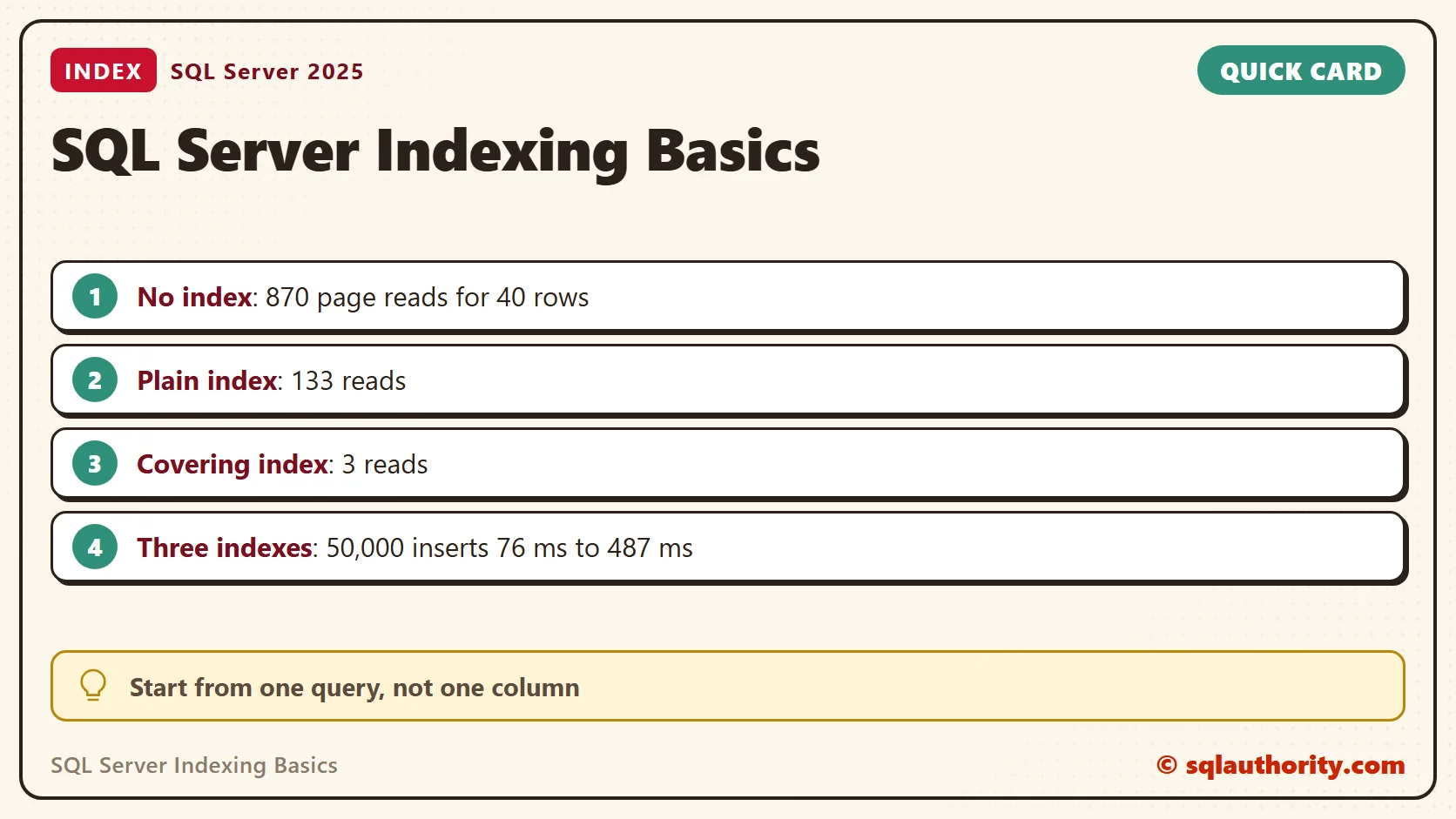
This table holds 200,000 orders from 5,000 customers, 40 orders each. The only index is the clustered primary key, and the table takes 870 pages.
CREATE TABLE dbo.Orders (
  OrderId int IDENTITY(1,1) PRIMARY KEY,
  CustomerId int NOT NULL,
  OrderDate date NOT NULL,
  Item varchar(20) NOT NULL,
  Amount decimal(8,2) NOT NULL);
INSERT dbo.Orders (CustomerId, OrderDate, Item, Amount)
SELECT n % 5000 + 1,
       DATEADD(DAY, n % 365, '20260101'),
       CHOOSE(n % 5 + 1, 'Paneer', 'Lentils', 'Tofu', 'Chickpeas', 'Rice'),
       CAST(5 + n % 97 AS decimal(8,2))
FROM (SELECT TOP (200000) ROW_NUMBER() OVER (ORDER BY (SELECT NULL)) AS n
      FROM sys.all_objects AS a CROSS JOIN sys.all_objects AS b) AS t;
Without an Index
The question is simple: what did customer 1234 order? Without a helpful index, SQL Server read the whole table. The answer was 40 orders, and the cost was 870 logical reads, one for every page.
SET STATISTICS IO ON;
SELECT COUNT(*) AS Orders, SUM(Amount) AS Spent, MAX(OrderDate) AS LastOrder
FROM dbo.Orders WHERE CustomerId = 1234;
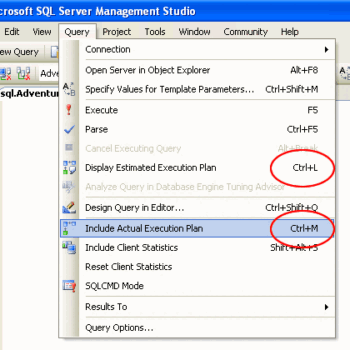
To see the plan yourself, turn on Include Actual Execution Plan (Ctrl+M) in Management Studio before you run the query. The page reads appear on the Messages tab because of SET STATISTICS IO ON.
Add an Index for the Query
An index on CustomerId lets SQL Server seek straight to the 40 rows. The plan changed from a clustered index scan to an index seek. It also needed 40 key lookups, one for each row, to fetch Amount and OrderDate from the table. The reads fell from 870 to 133.
CREATE INDEX IX_Orders_Customer ON dbo.Orders (CustomerId);
SELECT COUNT(*) AS Orders, SUM(Amount) AS Spent, MAX(OrderDate) AS LastOrder
FROM dbo.Orders WHERE CustomerId = 1234;
Cover the Query
An index can carry extra columns with INCLUDE. When it holds every column the query needs, the lookups disappear. The same query read 3 pages, and the plan was a single index seek. The answer stayed the same: 40 orders and 2105.00.
DROP INDEX IX_Orders_Customer ON dbo.Orders;
CREATE INDEX IX_Orders_Customer_Cover ON dbo.Orders (CustomerId) INCLUDE (OrderDate, Amount);
SELECT COUNT(*) AS Orders, SUM(Amount) AS Spent, MAX(OrderDate) AS LastOrder
FROM dbo.Orders WHERE CustomerId = 1234;
| Setup | Plan | Logical reads |
|---|---|---|
| Clustered key only | Clustered index scan | 870 |
| Index on CustomerId | Index seek and key lookups | 133 |
| Index on CustomerId with INCLUDE | Index seek | 3 |
When an Index Does Not Help
Two cases show where an index does not help. First, a column that is only included in an index cannot be searched. A query on OrderDate alone found 548 rows and had to scan the covering index, which cost 548 reads. It was cheaper than the table, but it was still a scan.
Second, an index on a column with few distinct values loses to a scan. Item has five values, and ‘Lentils’ covers 40,000 rows, a fifth of the table. With an index on Item in place, SQL Server still chose the clustered index scan and read 870 pages. Fetching 40,000 rows one by one costs more than reading the table once.
SELECT COUNT(*) AS Rows1 FROM dbo.Orders WHERE OrderDate = '20260615';
CREATE INDEX IX_Orders_Item ON dbo.Orders (Item);
SELECT COUNT(*) AS Orders, SUM(Amount) AS Spent, MAX(OrderDate) AS LastOrder
FROM dbo.Orders WHERE Item = 'Lentils';
DROP INDEX IX_Orders_Item ON dbo.Orders;
SET STATISTICS IO OFF;
What Each Index Costs
Indexes also take space and add work when data changes. I inserted 50,000 rows into two copies of the table inside a transaction. One copy had only the primary key. The other had three nonclustered indexes.
CREATE TABLE dbo.OrdersBare (OrderId int IDENTITY(1,1) PRIMARY KEY, CustomerId int NOT NULL, OrderDate date NOT NULL, Item varchar(20) NOT NULL, Amount decimal(8,2) NOT NULL);
CREATE TABLE dbo.OrdersIndexed (OrderId int IDENTITY(1,1) PRIMARY KEY, CustomerId int NOT NULL, OrderDate date NOT NULL, Item varchar(20) NOT NULL, Amount decimal(8,2) NOT NULL);
CREATE INDEX IX_A ON dbo.OrdersIndexed (CustomerId) INCLUDE (OrderDate, Amount);
CREATE INDEX IX_B ON dbo.OrdersIndexed (Item);
CREATE INDEX IX_C ON dbo.OrdersIndexed (OrderDate);
DECLARE @t0 datetime2, @bytes bigint;
BEGIN TRAN;
SET @t0 = SYSDATETIME();
INSERT dbo.OrdersIndexed (CustomerId, OrderDate, Item, Amount)
SELECT TOP (50000) CustomerId, OrderDate, Item, Amount FROM dbo.Orders ORDER BY OrderId;
SELECT @bytes = database_transaction_log_bytes_used FROM sys.dm_tran_database_transactions
WHERE transaction_id = (SELECT transaction_id FROM sys.dm_tran_current_transaction) AND database_id = DB_ID();
SELECT DATEDIFF(MILLISECOND, @t0, SYSDATETIME()) AS Ms, @bytes / 1024 AS LogKB;
COMMIT;
Run the same insert against dbo.OrdersBare to compare. On my laptop the bare table took 76 ms and wrote about 6,255 KB of log. The indexed table took 487 ms and wrote 22,147 KB. It also grew from 219 to 566 pages. That is one run on one machine, so look at the ratio and not the exact figures.
Adding an index to every column is not a performance strategy. Start with a specific query, check the plan, and weigh the cost to every insert, update and delete. You can also explore more articles in SQL Performance.
Good indexing is not about adding more indexes, it is about supporting the workload.
Published by Pinal Dave on SQLAuthority. More of my work at pinaldave.com.
Discover more from SQL Authority with Pinal Dave
Subscribe to get the latest posts sent to your email.



2 Comments. Leave new
That was funny!!! Great way of doing things for the community :-)
Looking forward to attend this.
hahahahahah you are so funny guys.
nice video and keep funny!
Best regards.