
Detecting a leap year in SQL Server takes one date function and one comparison.

I published this episode on February 29, 2012, a fitting date. The original video uses IIF, EOMONTH and CONCAT, all new in SQL Server 2012. At the time, it was the shortest leap-year function I had written. I tested everything below on SQL Server 2025.
Watch SQL in Sixty Seconds #004
Check the Last Day of February
A leap year has 29 days in February. EOMONTH returns the last date of a month, so it gives a direct test. This example uses DATEFROMPARTS to build February 1 without parsing a date string.
SELECT y.CalendarYear,
       EOMONTH(DATEFROMPARTS(y.CalendarYear, 2, 1)) AS FebruaryEnds,
       IIF(DAY(EOMONTH(DATEFROMPARTS(y.CalendarYear, 2, 1))) = 29,
           1, 0) AS IsLeapYear
FROM (VALUES (1900), (2000), (2012), (2100)) AS y(CalendarYear)
ORDER BY y.CalendarYear;
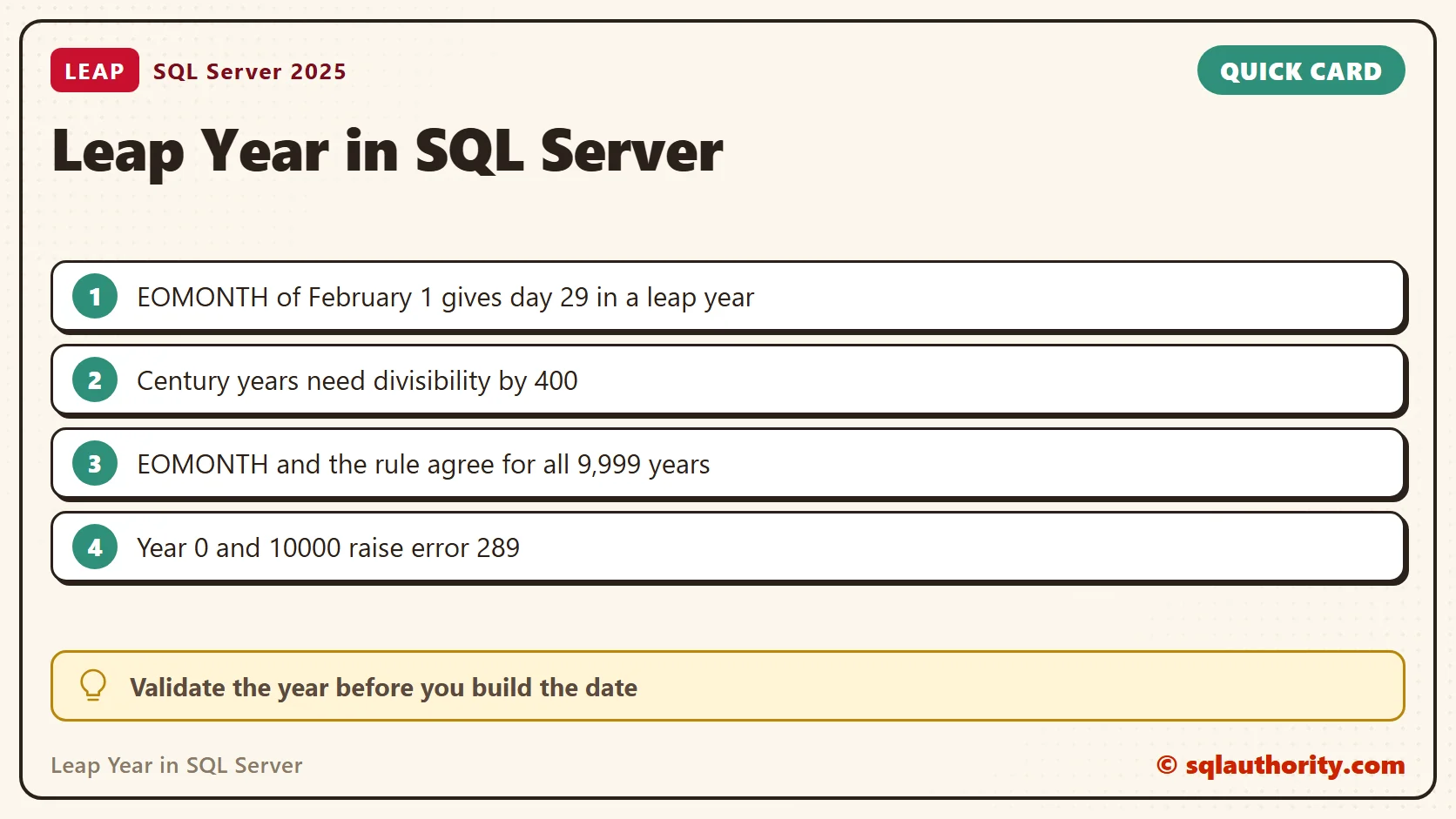
The result is 0 for 1900, 1 for 2000, 1 for 2012 and 0 for 2100. February ended on the 28th in 1900 and 2100, and on the 29th in 2000 and 2012. Here, 1 means leap year and 0 means ordinary year.
The Century Rule
A year divisible by four is usually a leap year. A century year must also be divisible by 400. That is why 2000 qualifies while 1900 and 2100 do not. The same rule fits in one expression, with no date functions.
SELECT y.CalendarYear,
       CASE WHEN (y.CalendarYear % 4 = 0 AND y.CalendarYear % 100 <> 0)
              OR y.CalendarYear % 400 = 0 THEN 1 ELSE 0 END AS ByRule
FROM (VALUES (1900), (2000), (2012), (2023), (2024), (2100)) AS y(CalendarYear);
It returned 0, 1, 1, 0, 1 and 0 for those six years. I keep the EOMONTH version when I need the date itself. I use the rule when I only need a yes or no.
Wrap It in an Inline Function
A small inline function keeps the test in one place. It expands into the calling query, so you can use CROSS APPLY across a whole table of years.
CREATE FUNCTION dbo.IsLeapYear (@Year int)
RETURNS TABLE
AS
RETURN (SELECT CASE WHEN DAY(EOMONTH(DATEFROMPARTS(@Year, 2, 1))) = 29 THEN 1 ELSE 0 END AS IsLeapYear);
GO
SELECT y.CalendarYear, l.IsLeapYear
FROM (VALUES (1900), (2000), (2012), (2100)) AS y(CalendarYear)
CROSS APPLY dbo.IsLeapYear(y.CalendarYear) AS l
ORDER BY y.CalendarYear;
Prove It for Every Valid Year
Four test years are not proof. The date type accepts years 1 through 9999. I compared the function with the divisibility rule for all of them. The query counts the leap years and the disagreements.
WITH Years AS
(
    SELECT TOP (9999) CAST(ROW_NUMBER() OVER (ORDER BY (SELECT NULL)) AS int) AS CalendarYear
    FROM sys.all_objects AS a CROSS JOIN sys.all_objects AS b
)
SELECT COUNT(*) AS YearsChecked,
       SUM(l.IsLeapYear) AS LeapYears,
       SUM(CASE WHEN l.IsLeapYear <> CASE WHEN (y.CalendarYear % 4 = 0 AND y.CalendarYear % 100 <> 0)
                                           OR y.CalendarYear % 400 = 0 THEN 1 ELSE 0 END
                THEN 1 ELSE 0 END) AS Disagreements
FROM Years AS y
CROSS APPLY dbo.IsLeapYear(y.CalendarYear) AS l;
It checked 9,999 years and found 2,424 leap years and no disagreement. Both methods follow the same calendar, so you can trust either one for any date the type allows.
Invalid Years and NULL
DATEFROMPARTS rejects values that do not form a date. Year 0 and year 10000 both raised error 289. So did February 29 in 2025, which is not a date. Validate the year before you call the function when it comes from text input.
SELECT DATEFROMPARTS(0, 2, 1);
GO
SELECT DATEFROMPARTS(10000, 2, 1);
GO
SELECT DATEFROMPARTS(2025, 2, 29);
GO
SELECT * FROM dbo.IsLeapYear(NULL);
A NULL year returned 0, not NULL, because the CASE falls through to its ELSE branch. A missing year then looks like an ordinary year. If that matters, test for NULL before you call the function.
The CONCAT Shortcut and Its Limit
The video builds February 1 from text with CONCAT. That works for a four-digit year. A short year breaks it, because the string is no longer in yyyymmdd order. The year 5 raised error 241. A related trick returns NULL instead of an error for a year that is not a leap year.
SELECT IIF(DAY(EOMONTH(CONCAT(2024, '0201'))) = 29, 1, 0) AS FourDigitYear;
GO
SELECT IIF(DAY(EOMONTH(CONCAT(5, '0201'))) = 29, 1, 0) AS ShortYear;
GO
SELECT y.CalendarYear, TRY_CONVERT(date, CONCAT(y.CalendarYear, '0229')) AS Feb29
FROM (VALUES (1900), (2000), (2023), (2024)) AS y(CalendarYear);
The last query returns a date for 2000 and 2024 and NULL for 1900 and 2023. Boundary years matter more than saving a few characters. Pick the shortest code that stays clear for your data.
A Practical Use: Days in the Year
Leap years matter when you spread an annual amount over the days of a year. The number of days is the gap between January 1 of this year and January 1 of the next. I checked it with 1900, 2000 and 2024.
SELECT y.CalendarYear,
       DATEDIFF(DAY, DATEFROMPARTS(y.CalendarYear, 1, 1), DATEFROMPARTS(y.CalendarYear + 1, 1, 1)) AS DaysInYear
FROM (VALUES (1900), (2000), (2024)) AS y(CalendarYear);
The results were 365, 366 and 366. A daily rate built on a flat 365 days is wrong by a small amount in every leap year. Use the real count when the amount is money.
More on Leap Years and Month Ends
- Four ways to detect a leap year
- An introduction to EOMONTH
- Finding the last day of a month
- A quick introduction to IIF
- A quick introduction to CONCAT
A leap-year test is not only about divisibility by four, it is also about the century exception.
Published by Pinal Dave on SQLAuthority. More of my work at pinaldave.com.
Discover more from SQL Authority with Pinal Dave
Subscribe to get the latest posts sent to your email.



9 Comments. Leave new
I guess this is the easier way to find it…
CREATE FUNCTION dbo.IsLeapYear (@year INT)
RETURNS bit
AS
BEGIN
Declare @Returnvalue bit
IF (@year % 4 = 0)
SET @Returnvalue = 1
ELSE
SET @Returnvalue = 0
RETURN @Returnvalue
END
GO
It is not about easy for difficult. It is about demonstrating how SQL Server 2012 functions works and shortens the code to one line.
Nice introduction, Pinal, but the shortest form I can think of revolves around:
IIF(@year%4=0, 1, 0)
No need to check for February 29; just check to see if the year is evenly divisible by 4.
This rule is not fully correct every time.
any year which is divisible by 4 and also divisible by 100 but not divisible by 400 is not leap year (even if it is evenly divisible by 4)
for example year 1900 was not a leap year, however year 2000 was a leap year.
Hmm, didn’t realize that; learn something new every day :). I guess you could do
IIF((@Year%4=0 AND @Year%100 0) OR @Year%400=0, 1,0)
but that’s probably not any shorter than using the CONCAT and EOMONTH() method.
Here is also another way to find whether a year is leap year or not
Select ISDATE(’02-29-‘+ cast(‘2012’ as varchar(4)))
Isdate() is not reliable
select isdate(‘2006’)
Hi Pinal,
I have sql server 2008 and 2012
and below is my sql server 2012 configuration detail.
Microsoft SQL Server Management Studio 11.0.2100.60
Microsoft Data Access Components (MDAC) 6.1.7601.17514
Microsoft MSXML 3.0 5.0 6.0
Microsoft Internet Explorer 9.0.8112.16421
Microsoft .NET Framework 4.0.30319.17626
Operating System 6.1.7601
I am getting error messages like given below , when we are tr
‘EOMONTH’ is not a recognized built-in function name.
‘CONCAT’ is not a recognized built-in function name.trying to run the above example.
Can you please help me to resolve this issue.
You must be running your database on earlier compatibility version or connected 2008 instance.