CODEPAGE 65001 tells BULK INSERT that the file is UTF-8, so accents survive the import. Whether they still look right afterward depends on the column you load them into.

The customer named Élodie
A colleague imports a customer file and every Élodie turns into something with an odd pair of symbols at the front. The file looked fine in Notepad. The data is not corrupt. SQL Server just read the bytes with the wrong rulebook.
A UTF-8 file stores an accented letter as two bytes, and a Chinese character as three. If BULK INSERT does not know that, it reads each byte as a separate character. CODEPAGE = ‘65001’ is the way to say “this is UTF-8.”
Create the sample file
The demo needs a tiny file with two names: Élodie and 李. SQL Server reads the file from its own disk, so the folder must be one the SQL Server service can read. I use C:\Temp. Create that folder if it is missing.
Open Notepad, type these two lines, and save them as C:\Temp\utf8-names.txt. In the Save dialog, set the encoding to UTF-8, not UTF-8 with BOM.
Élodie
李
The encoding matters. A byte order mark adds an invisible character at the start of the first name, and the code points below would no longer match. Notepad ends each line with the usual Windows line break, and the import code expects exactly that.
Import it two ways
Two destination tables will receive the same file. One column is nvarchar, which stores any Unicode character. The other is a varchar with a Latin1 collation, which has a limited repertoire.
DROP TABLE IF EXISTS dbo.Utf8Good;
DROP TABLE IF EXISTS dbo.Utf8Legacy;

CREATE TABLE dbo.Utf8Good (NameText nvarchar(200));
CREATE TABLE dbo.Utf8Legacy (NameText varchar(200) COLLATE Latin1_General_100_CI_AS);
Both imports ask for UTF-8 decoding. The only thing that differs is where the characters land.
BULK INSERT dbo.Utf8Good
FROM 'C:\Temp\utf8-names.txt'
WITH (DATAFILETYPE = 'char', CODEPAGE = '65001', ROWTERMINATOR = '\n');

BULK INSERT dbo.Utf8Legacy
FROM 'C:\Temp\utf8-names.txt'
WITH (DATAFILETYPE = 'char', CODEPAGE = '65001', ROWTERMINATOR = '\n');
Check the characters, not just the text
A screen can hide a bad import, because fonts substitute characters. So the next query shows the first code point and the stored bytes. The code point is the number behind a character, and it does not lie.
SELECT NameText, UNICODE(SUBSTRING(NameText, 1, 1)) AS FirstCodePoint, DATALENGTH(NameText) AS StoredBytes
FROM dbo.Utf8Good
ORDER BY NameText COLLATE Latin1_General_100_BIN2;

SELECT NameText, UNICODE(SUBSTRING(NameText, 1, 1)) AS FirstCodePoint
FROM dbo.Utf8Legacy
ORDER BY NameText COLLATE Latin1_General_100_BIN2;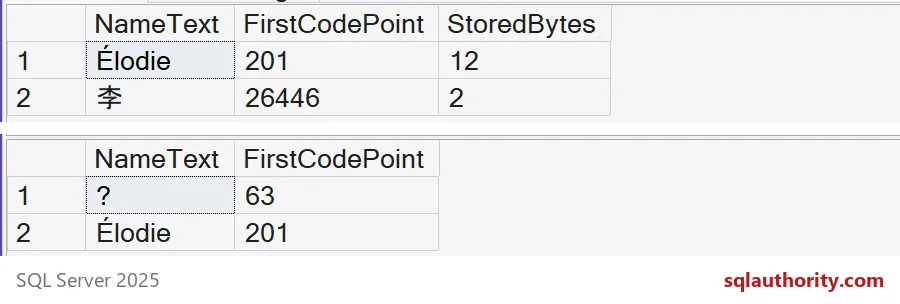
In the Unicode table, Élodie has first code point 201 and uses 12 bytes, six characters at two bytes each. The Chinese character has code point 26446 and uses 2 bytes. Nothing was lost.
In the Latin1 table, Élodie came through, still with code point 201. But the Chinese character became a question mark, code point 63. The decoding worked. The column simply has no room for that character, so SQL Server replaced it.

What happens without CODEPAGE
Now the mistake itself. This import leaves CODEPAGE out and loads into the Unicode column. The query counts characters and bytes.
DROP TABLE IF EXISTS dbo.Utf8Skipped;
CREATE TABLE dbo.Utf8Skipped (NameText nvarchar(200));

BULK INSERT dbo.Utf8Skipped
FROM 'C:\Temp\utf8-names.txt'
WITH (DATAFILETYPE = 'char', ROWTERMINATOR = '\n');

SELECT LEN(NameText) AS Characters, DATALENGTH(NameText) AS StoredBytes
FROM dbo.Utf8Skipped
ORDER BY NameText COLLATE Latin1_General_100_BIN2;
The Chinese name came out as 3 characters, not 1. Élodie came out as 7 characters, not 6. Each extra character is a leftover byte read as a letter of its own. That is your garbled accent. The exact symbols depend on the server code page, so I count characters instead of printing them.
A UTF-8 collation is another way
SQL Server 2019 and later can store UTF-8 in a varchar column if the column has a UTF-8 collation. It is worth knowing when you want smaller storage for mostly English text.
DROP TABLE IF EXISTS dbo.Utf8Column;
CREATE TABLE dbo.Utf8Column (NameText varchar(200) COLLATE Latin1_General_100_CI_AS_SC_UTF8);

BULK INSERT dbo.Utf8Column
FROM 'C:\Temp\utf8-names.txt'
WITH (DATAFILETYPE = 'char', CODEPAGE = '65001', ROWTERMINATOR = '\n');

SELECT NameText, UNICODE(SUBSTRING(NameText, 1, 1)) AS FirstCodePoint, DATALENGTH(NameText) AS StoredBytes
FROM dbo.Utf8Column
ORDER BY NameText COLLATE Latin1_General_100_BIN2;
Now both names survive in a varchar column. The code points are the same as in the Unicode table, 201 and 26446. The stored bytes are 7 for Élodie and 3 for the Chinese character, because UTF-8 uses more than one byte for each of them.
Pick the destination to match what your data really holds. A bigger varchar length does not widen a legacy code page. The last block removes the demo tables. Delete the sample file from C:\Temp yourself when you are done.
DROP TABLE IF EXISTS dbo.Utf8Column;
DROP TABLE IF EXISTS dbo.Utf8Skipped;
DROP TABLE IF EXISTS dbo.Utf8Legacy;
DROP TABLE IF EXISTS dbo.Utf8Good;
Next time an import shows odd symbols, check the file’s encoding before you blame the data.
CODEPAGE 65001 is not Unicode storage, it is the step that reads the file’s bytes.
Published by Pinal Dave on SQLAuthority. More of my work at pinaldave.com.
Discover more from SQL Authority with Pinal Dave
Subscribe to get the latest posts sent to your email.