LEFT boundaries decide what a requested prefix returns. Zero characters, missing text and an oversized request deserve separate tests. I check those cases before using a prefix in a label.

Ask for characters, then inspect the result
LEFT takes a character expression and a requested character count. A request beyond the available text returns the available prefix. It doesn’t extend the text with padding or invent missing characters.
I use Unicode text here and give every test column an explicit type. That keeps the input contract visible inside the VALUES constructor. The inputs are short enough to inspect without hiding characters in a long string.
A prefix can be a useful display label. It cannot establish that the full value has the required length. An oversized request that returns the whole input still needs a separate validation rule.
Keep empty and missing results separate
Requesting zero characters produces an empty string for the supplied text. An empty input also produces an empty string here. NULL input and NULL length represent different missing inputs, although both expected prefixes are NULL.
The following query returns eight cases in CaseId order. ExpectedPrefix and ExpectedBytes state the intended contract beside the computed values. Compare each computed prefix and byte count with the corresponding expected columns.
WITH Cases AS
(
    SELECT CaseId, CaseLabel, InputText, RequestedChars, ExpectedPrefix, ExpectedBytes
    FROM (VALUES
    (1, CAST(N'Two letters' AS nvarchar(40)), CAST(N'ABCDEF' AS nvarchar(40)), CAST(2 AS int), CAST(N'AB' AS nvarchar(40)), CAST(4 AS int)),
    (2, CAST(N'Zero length' AS nvarchar(40)), CAST(N'ABCDEF' AS nvarchar(40)), CAST(0 AS int), CAST(N'' AS nvarchar(40)), CAST(0 AS int)),
    (3, CAST(N'Oversized length' AS nvarchar(40)), CAST(N'ABCDEF' AS nvarchar(40)), CAST(99 AS int), CAST(N'ABCDEF' AS nvarchar(40)), CAST(12 AS int)),
    (4, CAST(N'Empty input' AS nvarchar(40)), CAST(N'' AS nvarchar(40)), CAST(3 AS int), CAST(N'' AS nvarchar(40)), CAST(0 AS int)),
    (5, CAST(N'Missing input' AS nvarchar(40)), CAST(NULL AS nvarchar(40)), CAST(3 AS int), CAST(NULL AS nvarchar(40)), CAST(NULL AS int)),
    (6, CAST(N'Missing length' AS nvarchar(40)), CAST(N'ABCDEF' AS nvarchar(40)), CAST(NULL AS int), CAST(NULL AS nvarchar(40)), CAST(NULL AS int)),
    (7, CAST(N'Trailing blanks' AS nvarchar(40)), CAST(N'A  ' AS nvarchar(40)), CAST(3 AS int), CAST(N'A  ' AS nvarchar(40)), CAST(6 AS int)),
    (8, CAST(N'Unicode letters' AS nvarchar(40)), CAST(N'αβγ' AS nvarchar(40)), CAST(2 AS int), CAST(N'αβ' AS nvarchar(40)), CAST(4 AS int))
    ) AS v(CaseId, CaseLabel, InputText, RequestedChars, ExpectedPrefix, ExpectedBytes)
)
SELECT c.CaseId, c.CaseLabel, c.InputText, c.RequestedChars,
    a.Prefix, DATALENGTH(a.Prefix) AS PrefixBytes, c.ExpectedPrefix, c.ExpectedBytes,
    CAST(CASE WHEN a.Prefix IS NULL AND c.ExpectedPrefix IS NULL THEN 1
        WHEN CONVERT(varbinary(80),a.Prefix)=CONVERT(varbinary(80),c.ExpectedPrefix)
          AND DATALENGTH(a.Prefix)=c.ExpectedBytes THEN 1 ELSE 0 END AS bit) AS MatchesExpected
FROM Cases AS c
CROSS APPLY (VALUES(LEFT(c.InputText,c.RequestedChars))) AS a(Prefix)
ORDER BY c.CaseId;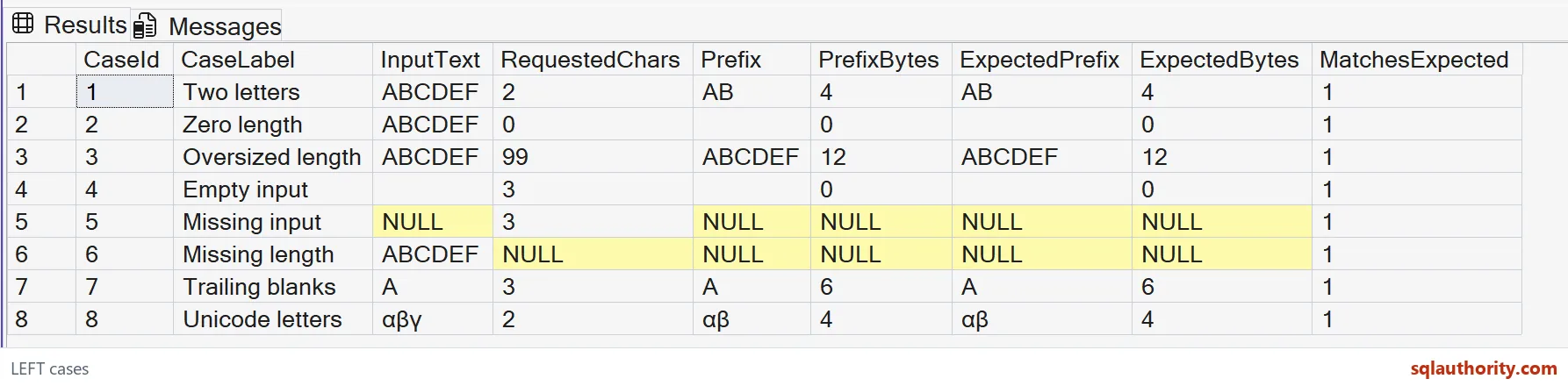
The byte comparison keeps trailing blanks significant. Ordinary text equality alone can hide a difference involving trailing blanks. DATALENGTH also exposes the distinction between a zero-byte empty result and a missing result.
Read the boundaries without guessing
ABCDEF with a request of two returns AB. A request of zero returns an empty string. The request of ninety-nine still returns ABCDEF, so the result has six characters rather than ninety-nine.
The trailing-blank input contains A followed by two spaces. Its expected result retains both spaces and occupies six Unicode bytes. The Greek-letter case uses ordinary Unicode characters, with two letters in its expected prefix.
Supplementary Unicode characters need their own collation-aware test. Supplementary-character collations count a surrogate pair as one character. The eight cases here don’t claim to verify every Unicode representation or collation.

Reject a negative request deliberately
A negative count is an error, rather than another spelling of an empty prefix. Run this deliberately invalid statement separately from the successful examples. Validate caller-supplied lengths before using them in the expression.
SELECT LEFT(CAST(N'ABCDEF' AS nvarchar(40)), -1) AS InvalidPrefix;LEFT is a text operation. Applying it to binary input involves character conversion and cannot serve as a byte-preserving binary slice. Keep this example attached to character data instead of extending its contract to arbitrary bytes.
Use the result in a practical label
For a short product label, I accept a nonnegative requested length and retain the full product name separately. An empty prefix can be an intentional display choice. A missing input remains a separate condition for the caller to handle.
Choose the prefix length on purpose, and check the full value separately.
A prefix is not the whole value, it is only the part you asked for.
Published by Pinal Dave on SQLAuthority. More of my work at pinaldave.com.
Discover more from SQL Authority with Pinal Dave
Subscribe to get the latest posts sent to your email.