Choosing the right data model starts with your questions, not with a product name. One small bookshop shows why. We’ll store the same bookshop four ways and ask each model the question it answers best. SQL Server 2025 can hold all four in one database.

One Bookshop, Four Models
A data model is the shape you give your data, and the shape decides which questions are cheap to ask. The relational model keeps facts in tables joined by keys. The document model keeps one self-contained JSON text per item. The graph model stores things and the links between them. The vector model stores a list of numbers per item, so you can ask which items are alike.
The scripts run on SQL Server 2025 with no server setting changed and no preview switch. The json and vector types work in a new database. The first script creates a database named DataModelDemo, used only for this example, so run it on a test server. On earlier versions, JSON text can sit in an nvarchar(max) column, and JSON_VALUE and OPENJSON work from SQL Server 2016. Graph tables arrived in 2017. The vector type is new in SQL Server 2025.
Relational: Keys and Joins
The relational model is the default for good reason. Each fact lives in one place, and keys connect the places. A foreign key refuses an order for a customer who doesn’t exist. This script builds the customers, books, orders and order lines.
IF DB_ID(N'DataModelDemo') IS NULL CREATE DATABASE DataModelDemo;
GO
USE DataModelDemo;
GO
DROP TABLE IF EXISTS dbo.Bought;
DROP TABLE IF EXISTS dbo.ReaderNode;
DROP TABLE IF EXISTS dbo.BookNode;
DROP TABLE IF EXISTS dbo.BookFeel;
DROP TABLE IF EXISTS dbo.OrderDoc;
DROP TABLE IF EXISTS dbo.OrderLine;
DROP TABLE IF EXISTS dbo.OrderHeader;
DROP TABLE IF EXISTS dbo.Book;
DROP TABLE IF EXISTS dbo.Customer;
CREATE TABLE dbo.Customer (
    CustomerID   int          NOT NULL PRIMARY KEY,
    CustomerName nvarchar(50) NOT NULL
);
CREATE TABLE dbo.Book (
    BookID int           NOT NULL PRIMARY KEY,
    Title  nvarchar(100) NOT NULL,
    Price  decimal(6,2)  NOT NULL
);
CREATE TABLE dbo.OrderHeader (
    OrderID    int  NOT NULL PRIMARY KEY,
    CustomerID int  NOT NULL REFERENCES dbo.Customer (CustomerID),
    OrderDate  date NOT NULL
);
CREATE TABLE dbo.OrderLine (
    OrderID  int NOT NULL REFERENCES dbo.OrderHeader (OrderID),
    BookID   int NOT NULL REFERENCES dbo.Book (BookID),
    Quantity int NOT NULL,
    PRIMARY KEY (OrderID, BookID)
);
INSERT INTO dbo.Customer (CustomerID, CustomerName)
VALUES (1, N'Ana Torres'), (2, N'Ben Wright'), (3, N'Cora Diaz'), (4, N'Dev Patel');
INSERT INTO dbo.Book (BookID, Title, Price)
VALUES (1, N'Garden Notes', 12.50), (2, N'Tea Around the World', 18.00), (3, N'Quiet Mornings', 9.00),
       (4, N'Herb Garden Basics', 14.00), (5, N'The Tea Lover''s Journal', 11.00), (6, N'Slow Evenings', 10.00);
INSERT INTO dbo.OrderHeader (OrderID, CustomerID, OrderDate)
VALUES (101, 1, '2026-09-01'), (102, 2, '2026-09-02'), (103, 3, '2026-09-03'),
       (104, 4, '2026-09-04'), (105, 1, '2026-09-05');
INSERT INTO dbo.OrderLine (OrderID, BookID, Quantity)
VALUES (101, 1, 1), (101, 2, 1), (102, 1, 2), (102, 4, 1), (103, 3, 1),
       (103, 6, 1), (103, 2, 1), (104, 2, 1), (104, 5, 1), (105, 4, 1);
To see what each customer spent, you join the four tables and add up.
SELECT c.CustomerName, COUNT(DISTINCT oh.OrderID) AS Orders, SUM(ol.Quantity * b.Price) AS Spent
FROM dbo.Customer AS c
JOIN dbo.OrderHeader AS oh ON oh.CustomerID = c.CustomerID
JOIN dbo.OrderLine AS ol ON ol.OrderID = oh.OrderID
JOIN dbo.Book AS b ON b.BookID = ol.BookID
GROUP BY c.CustomerName
ORDER BY Spent DESC;
| CustomerName | Orders | Spent |
|---|---|---|
| Ana Torres | 2 | 44.50 |
| Ben Wright | 1 | 39.00 |
| Cora Diaz | 1 | 37.00 |
| Dev Patel | 1 | 29.00 |
The cost is the fixed shape. A new attribute means ALTER TABLE, and every order needs its customer and books to exist first. For money and stock, that strictness is what you want.
Document: One JSON Text per Order
A document stores a whole order as one JSON text, with the customer, lines and notes together. SQL Server 2025 has a native json data type. It checks the text on insert and stores it in a binary format. Reading one order is one row, with no joins.
CREATE TABLE dbo.OrderDoc (
    OrderID int  NOT NULL PRIMARY KEY,
    Doc     json NOT NULL
);
INSERT INTO dbo.OrderDoc (OrderID, Doc)
VALUES (101, N'{"customer":{"name":"Ana Torres","city":"Portland"},
  "lines":[{"title":"Garden Notes","qty":1,"price":12.50},
           {"title":"Tea Around the World","qty":1,"price":18.00}]}'),
       (102, N'{"customer":{"name":"Ben Wright","city":"Austin"},"giftNote":"Happy birthday from all of us",
  "lines":[{"title":"Garden Notes","qty":2,"price":12.50},
           {"title":"Herb Garden Basics","qty":1,"price":14.00}]}'),
       (103, N'{"customer":{"name":"Cora Diaz","city":"Denver"},
  "lines":[{"title":"Quiet Mornings","qty":1,"price":9.00},
           {"title":"Slow Evenings","qty":1,"price":10.00},
           {"title":"Tea Around the World","qty":1,"price":18.00}]}');
Each line copies the title and price into the document. That keeps the order as it was sold, even if the price changes later. The same copy makes corrections harder, because there’s no single place to fix a price.
JSON_VALUE reads one value by its path. A missing path returns NULL, which is where documents get their flexibility. Only order 102 has a gift note, and no table changed.
SELECT OrderID,
       JSON_VALUE(Doc, '$.customer.name')  AS Customer,
       JSON_VALUE(Doc, '$.customer.city')  AS City,
       JSON_VALUE(Doc, '$.lines[0].title') AS FirstBook,
       JSON_VALUE(Doc, '$.giftNote')       AS GiftNote
FROM dbo.OrderDoc
ORDER BY OrderID;| OrderID | Customer | City | FirstBook | GiftNote |
|---|---|---|---|---|
| 101 | Ana Torres | Portland | Garden Notes | NULL |
| 102 | Ben Wright | Austin | Garden Notes | Happy birthday from all of us |
| 103 | Cora Diaz | Denver | Quiet Mornings | NULL |
The type refuses broken text. A missing comma stops the insert.
INSERT INTO dbo.OrderDoc (OrderID, Doc)
VALUES (104, N'{"customer": "Dev Patel" "lines": []}');
Msg 13609, Level 16, State 9, Line 1
JSON text is not properly formatted. Unexpected character '"' is found at position 25.
It checks syntax, not shape. A document with no customer and no lines is valid JSON, and the type accepts it. Totals across orders also need more work, because OPENJSON must unpack each lines array first.
SELECT d.OrderID, SUM(l.qty * l.price) AS OrderTotal
FROM dbo.OrderDoc AS d
CROSS APPLY OPENJSON(d.Doc, '$.lines')
     WITH (qty int '$.qty', price decimal(6,2) '$.price') AS l
GROUP BY d.OrderID
ORDER BY d.OrderID;| OrderID | OrderTotal |
|---|---|
| 101 | 30.50 |
| 102 | 39.00 |
| 103 | 37.00 |
Orders 102 and 103 match what Ben and Cora spent in the relational query. Both models answer the question, but only the relational one enforced the shape on the way in.
Graph: Things and the Links Between Them
A graph model has nodes, which are things, and edges, which are links. SQL Server stores them in ordinary tables created with AS NODE and AS EDGE. Here a reader node links to a book node each time that reader buys the book. The script loads them from the relational tables, so the same data now sits in two shapes.
CREATE TABLE dbo.ReaderNode (CustomerID int NOT NULL, CustomerName nvarchar(50) NOT NULL) AS NODE;
CREATE TABLE dbo.BookNode (BookID int NOT NULL, Title nvarchar(100) NOT NULL) AS NODE;
CREATE TABLE dbo.Bought AS EDGE;
INSERT INTO dbo.ReaderNode (CustomerID, CustomerName) SELECT CustomerID, CustomerName FROM dbo.Customer;
INSERT INTO dbo.BookNode (BookID, Title) SELECT BookID, Title FROM dbo.Book;
INSERT INTO dbo.Bought ($from_id, $to_id)
SELECT DISTINCT r.$node_id, b.$node_id
FROM dbo.OrderHeader AS oh
JOIN dbo.OrderLine AS ol ON ol.OrderID = oh.OrderID
JOIN dbo.ReaderNode AS r ON r.CustomerID = oh.CustomerID
JOIN dbo.BookNode AS b ON b.BookID = ol.BookID;
Now ask the classic question: readers who bought Garden Notes also bought what? MATCH describes the path as a pattern. Start at the book, go back to its readers, then forward to their other books.
SELECT other.Title, COUNT(*) AS Readers
FROM dbo.BookNode AS picked, dbo.Bought AS b1, dbo.ReaderNode AS r, dbo.Bought AS b2, dbo.BookNode AS other
WHERE MATCH(picked<-(b1)-r-(b2)->other)
  AND picked.Title = N'Garden Notes'
  AND other.BookID <> picked.BookID
GROUP BY other.Title
ORDER BY Readers DESC, other.Title;
| Title | Readers |
|---|---|
| Herb Garden Basics | 2 |
| Tea Around the World | 1 |
You could argue that this is only joins. It is, and a plain relational self-join returns the same two rows. Counting distinct customers keeps the result equal to the graph query, even if a reader buys a book twice.
SELECT b2.Title, COUNT(DISTINCT oh1.CustomerID) AS Readers
FROM dbo.OrderHeader AS oh1
JOIN dbo.OrderLine AS l1 ON l1.OrderID = oh1.OrderID AND l1.BookID = 1
JOIN dbo.OrderHeader AS oh2 ON oh2.CustomerID = oh1.CustomerID
JOIN dbo.OrderLine AS l2 ON l2.OrderID = oh2.OrderID AND l2.BookID <> 1
JOIN dbo.Book AS b2 ON b2.BookID = l2.BookID
GROUP BY b2.Title
ORDER BY Readers DESC, b2.Title;
For one hop, the relational version is fine. I’d reach for graph tables when the question is about paths of several hops, such as friends of friends.
Vector: Books Like This One
A vector is a list of numbers, and the vector model asks which lists point the same way. Real embeddings come from an AI model and hold hundreds or thousands of numbers. To keep this runnable with no AI service, The three numbers per book are made up. They say how much it is about gardens, tea and calm mornings.
CREATE TABLE dbo.BookFeel (
    BookID    int       NOT NULL PRIMARY KEY REFERENCES dbo.Book (BookID),
    Embedding vector(3) NOT NULL
);
INSERT INTO dbo.BookFeel (BookID, Embedding)
VALUES (1, '[0.9, 0.1, 0.3]'), (2, '[0.1, 0.9, 0.3]'), (3, '[0.2, 0.3, 0.9]'),
       (4, '[0.8, 0.3, 0.2]'), (5, '[0.1, 0.8, 0.5]'), (6, '[0.1, 0.2, 0.9]');
VECTOR_DISTANCE with the ‘cosine’ metric returns 0 for the same direction and larger values for books that differ more. This query finds the three books closest to Garden Notes.
DECLARE @Target vector(3) = (SELECT Embedding FROM dbo.BookFeel WHERE BookID = 1);
SELECT TOP (3) b.Title,
       CAST(VECTOR_DISTANCE('cosine', f.Embedding, @Target) AS decimal(6,4)) AS Distance
FROM dbo.BookFeel AS f
JOIN dbo.Book AS b ON b.BookID = f.BookID
WHERE f.BookID <> 1
ORDER BY VECTOR_DISTANCE('cosine', f.Embedding, @Target);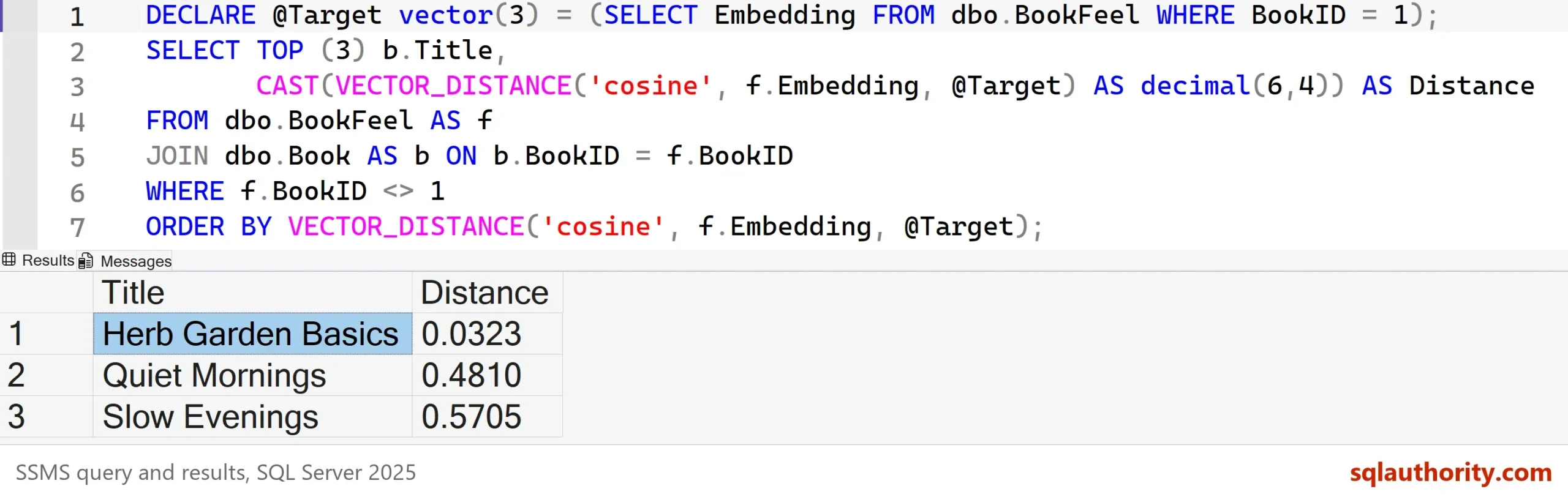
Herb Garden Basics is closest at 0.0323, then Quiet Mornings at 0.4810 and Slow Evenings at 0.5705. Without a vector index, SQL Server computes the distance for every row. That’s fine for six books. Vector indexes exist for large tables, and this post doesn’t use one. The numbers also say how alike two books are, never why, and they’re only as good as whatever produced them.
How to Choose the Right Data Model
Match the model to the question you ask the most.
| Model | Best at | What it costs |
|---|---|---|
| Relational | Who ordered what, and what is the total? | A fixed shape, and joins to put a story back together |
| Document | Show me this whole order in one read | Copied data and weak rules about shape |
| Graph | Who is connected to whom, through whom? | New syntax, and little gain for one hop |
| Vector | What is similar to this? | Numbers that must come from a model |
I start relational, because most business facts need keys and rules. I add a json column when an item is read whole and varies in shape. Graph tables earn their place when paths are the question, and a vector column when similar is the question.
One database held all four here. The vector table even has a foreign key to the book table. You don’t need a separate system for each model before you know the questions.
What to Remember
Pick by question, not by fashion. Relational keeps facts honest, documents keep an item whole, graphs follow links, and vectors find what’s alike. Each one costs something, so name the cost before you choose.
When someone asks me which model to use, I ask for their three most common questions first. The answer follows from those three. When you finish testing, remove the example database.
USE master;
GO
ALTER DATABASE DataModelDemo SET SINGLE_USER WITH ROLLBACK IMMEDIATE;
DROP DATABASE DataModelDemo;
The right data model is not the newest one, it is the one that makes your most common question cheap.
Published by Pinal Dave on SQLAuthority. More of my work at pinaldave.com.
Discover more from SQL Authority with Pinal Dave
Subscribe to get the latest posts sent to your email.