
sp_xml_preparedocument parses an XML document into memory and gives you a handle to it. OPENXML reads the document through that handle, and sp_xml_removedocument releases it. This post walks through all three steps and keeps the handle safe.
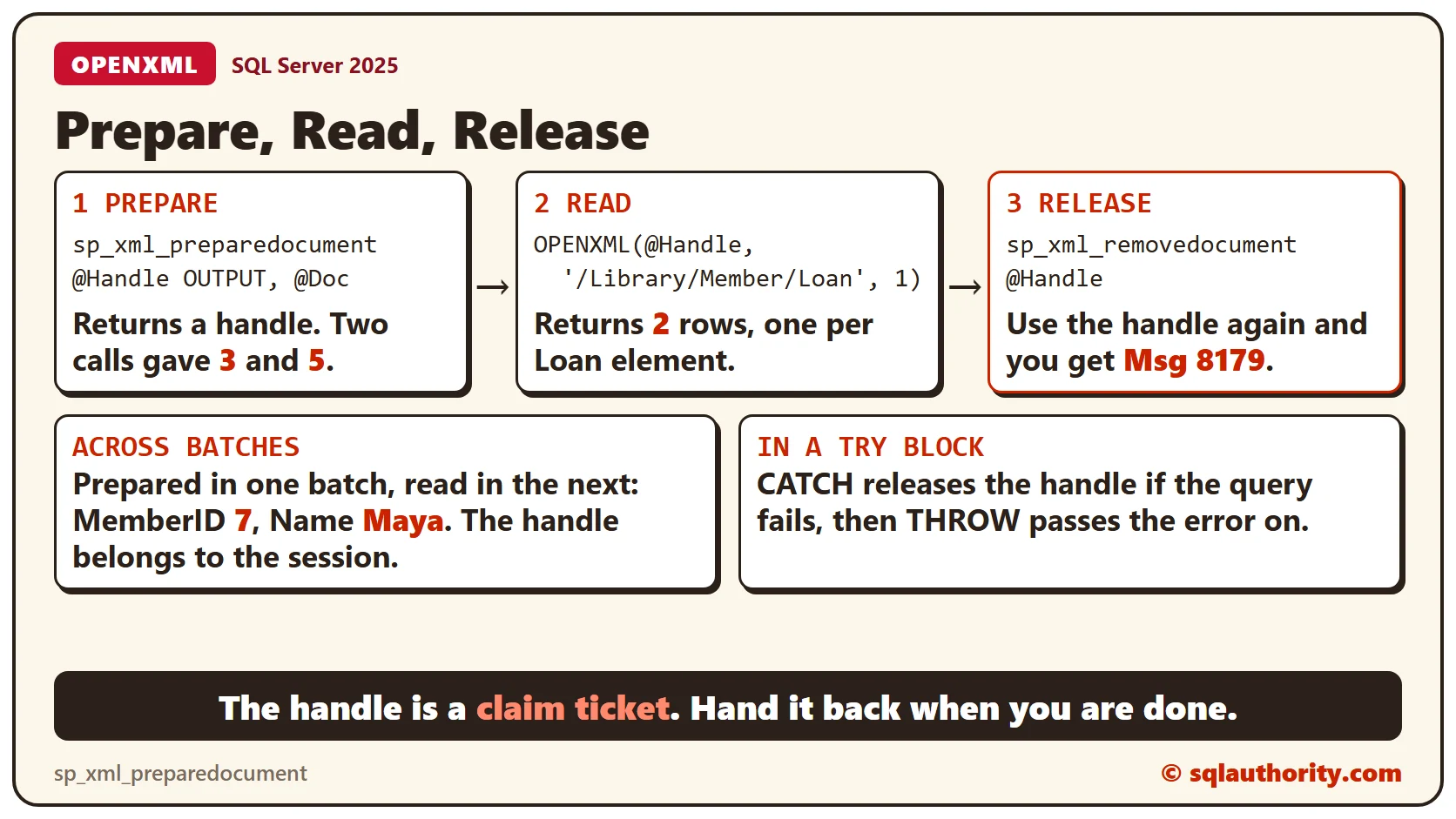
A Claim Ticket for Your Document
Think of a coat check. You hand over a coat and get a numbered ticket. The ticket isn’t the coat. It only lets you ask for the coat back. The handle works the same way: it’s an integer that identifies the parsed document in your session.
Keep the value that the procedure returns. Don’t type a number, because the number is not yours to choose.
The Complete Pattern
The block below uses a small library document supplied inline, so it runs in any database. It prepares the document, reads two loans, and releases the handle. The CATCH block releases it if anything fails, and THROW passes the original error on.
DECLARE @Doc xml = N'<Library>
  <Member MemberID="7" Name="Maya">
    <Loan LoanID="101" BookID="12" Days="14"/>
    <Loan LoanID="102" BookID="31" Days="7"/>
  </Member>
</Library>';
DECLARE @Handle int = NULL;
BEGIN TRY
  EXEC sys.sp_xml_preparedocument @Handle OUTPUT, @Doc;
  SELECT LoanID, BookID, Days
  FROM OPENXML(@Handle, '/Library/Member/Loan', 1)
  WITH (LoanID int '@LoanID', BookID int '@BookID', Days int '@Days');
  EXEC sys.sp_xml_removedocument @Handle;
  SET @Handle = NULL;
END TRY
BEGIN CATCH
  IF @Handle IS NOT NULL EXEC sys.sp_xml_removedocument @Handle;
  THROW;
END CATCH;
The query returns loans 101 and 102. After the release, the script sets the handle to NULL, so CATCH can’t release it twice.
Handles Are Not 1
Every call to sp_xml_preparedocument returns its own handle. This script prepares the same document twice in one session and prints both handles.
DECLARE @Doc xml = N'<Library/>';
DECLARE @First int, @Second int;
EXEC sys.sp_xml_preparedocument @First OUTPUT, @Doc;
EXEC sys.sp_xml_preparedocument @Second OUTPUT, @Doc;
SELECT @First AS FirstHandle, @Second AS SecondHandle;
EXEC sys.sp_xml_removedocument @First;
EXEC sys.sp_xml_removedocument @Second;
The numbers came back as 3 and 5, not 1 and 2. Your numbers will differ. Always read the value from the OUTPUT parameter. A large number isn’t a sign of a leak either. In my run the numbers kept climbing, although every document had been released.
A Released Handle Is Dead
After sp_xml_removedocument, the handle means nothing. OPENXML on it fails with message 8179, which says it could not find the prepared statement for that handle.
DECLARE @Handle int;
EXEC sys.sp_xml_preparedocument @Handle OUTPUT, N'<Library><Member MemberID="7"/></Library>';
EXEC sys.sp_xml_removedocument @Handle;
SELECT MemberID FROM OPENXML(@Handle, '/Library/Member', 1) WITH (MemberID int '@MemberID');
The Handle Outlives the Batch
A handle belongs to the session, not the batch. The script below prepares in one batch and stores the number in a temporary table. It reads the document in the next batch. GO ends the first batch, and the handle still works.
CREATE TABLE #Keep (H int);
DECLARE @Handle int;
EXEC sys.sp_xml_preparedocument @Handle OUTPUT, N'<Library><Member MemberID="7" Name="Maya"/></Library>';
INSERT INTO #Keep (H) VALUES (@Handle);
GO

DECLARE @Handle int = (SELECT H FROM #Keep);
SELECT MemberID, Name FROM OPENXML(@Handle, '/Library/Member', 1) WITH (MemberID int '@MemberID', Name varchar(20) '@Name');
EXEC sys.sp_xml_removedocument @Handle;
That’s why the release matters. A prepared document stays in memory until you release it or the session ends. I didn’t measure the memory, so I won’t put a number on it.
Prove That CATCH Releases It
This script fails on purpose with a divide by zero inside the TRY block. CATCH releases the handle. The second batch then tries the same handle.
CREATE TABLE #Seen (H int);
DECLARE @Handle int = NULL;
BEGIN TRY
  EXEC sys.sp_xml_preparedocument @Handle OUTPUT, N'<Library/>';
  INSERT INTO #Seen (H) VALUES (@Handle);
  SELECT 1 / 0 AS Boom;
  EXEC sys.sp_xml_removedocument @Handle;
  SET @Handle = NULL;
END TRY
BEGIN CATCH
  IF @Handle IS NOT NULL EXEC sys.sp_xml_removedocument @Handle;
  SELECT ERROR_NUMBER() AS ErrorNumber;
END CATCH;
GO

DECLARE @Handle int = (SELECT H FROM #Seen);
SELECT localname FROM OPENXML(@Handle, '/Library');
The first batch returns error 8134, and the second returns 8179. The handle is gone, so the CATCH block did its job.
The WITH Clause and the Flags
Without a WITH clause, OPENXML returns the edge table: one row for each node. A nodetype of 1 is an element, 2 is an attribute and 3 is text. The WITH clause gives you typed columns instead.
DECLARE @Handle int;
EXEC sys.sp_xml_preparedocument @Handle OUTPUT, N'<Library><Member MemberID="7"><Loan LoanID="101"/></Member></Library>';
SELECT id, parentid, nodetype, localname, text FROM OPENXML(@Handle, '/Library/Member/Loan');
EXEC sys.sp_xml_removedocument @Handle;
The third argument of OPENXML is the flags value. Flags 1 maps columns to attributes and flags 2 maps them to child elements. With the wrong flag, the columns come back NULL, as the first row below shows.
DECLARE @Handle int;
EXEC sys.sp_xml_preparedocument @Handle OUTPUT, N'<Library><Loan><LoanID>101</LoanID><Days>14</Days></Loan></Library>';
SELECT 'flags 1' AS Setting, LoanID, Days FROM OPENXML(@Handle, '/Library/Loan', 1) WITH (LoanID int, Days int)
UNION ALL
SELECT 'flags 2', LoanID, Days FROM OPENXML(@Handle, '/Library/Loan', 2) WITH (LoanID int, Days int);
EXEC sys.sp_xml_removedocument @Handle;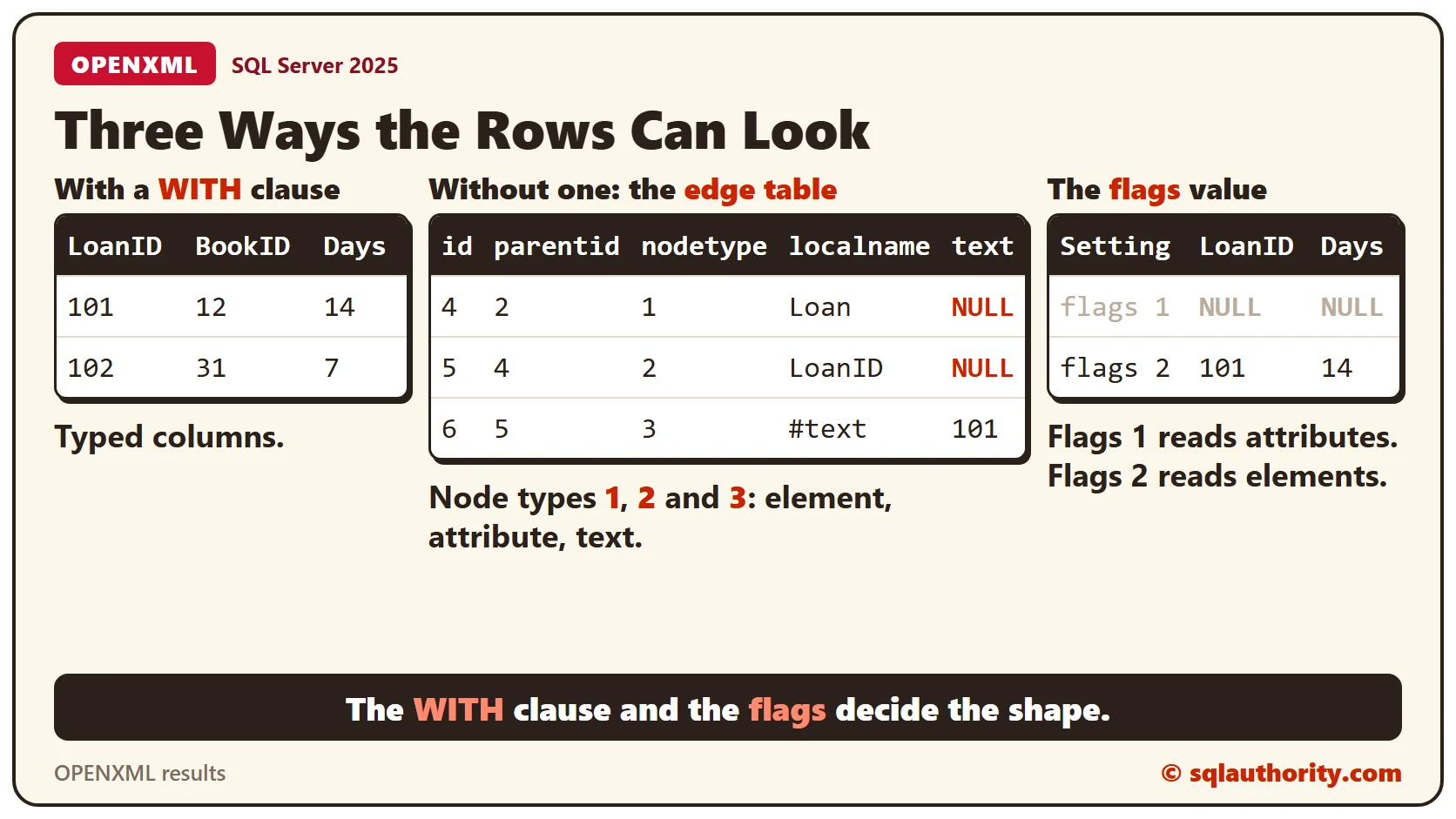
Clean Up
The two temporary tables disappear when the session ends. Drop them now if you want to keep the session tidy.
DROP TABLE #Keep;
DROP TABLE #Seen;
What to Remember
Prepare, read, release. Keep the handle in a variable. Release it in the success path and in the CATCH block. Never reuse it afterward.
To go further, read XML Document Could Not Be Created Because Server Memory Is Low, XML nodes: Turn Repeated Elements Into Rows and Rethrowing Errors With THROW and Keeping the Original Number.
An XML handle is not the document, it is a ticket you have to hand back.
Published by Pinal Dave on SQLAuthority. More of my work at pinaldave.com.
Discover more from SQL Authority with Pinal Dave
Subscribe to get the latest posts sent to your email.




2 Comments. Leave new
The correct option for the above question is Option 1)
The handle as an INT
Explanation
Reads the Extensible Markup Language (XML) text provided as input, then parses the text using the MSXML parser (Msxml2.dll), and provides the parsed document in a state ready for consumption. This parsed document is a tree representation of the various nodes (elements, attributes, text, comments, and so on) in the XML document.
sp_xml_preparedocument returns a handle that can be used to access the newly created internal representation of the XML document. This handle is valid for the duration of the connection to Microsoft® SQL Server™ 2000, until the connection is reset, or until the handle is invalidated by executing sp_xml_removedocument.
Note A parsed document is stored in the internal cache of SQL Server 2000. The MSXML parser uses one-eighth the total memory available for SQL Server. To avoid running out of memory, run sp_xml_removedocument to free up the memory.
Syntax
sp_xml_preparedocument hdoc OUTPUT
[, xmltext]
[, xpath_namespaces]
Arguments
hdoc
Is the handle to the newly created document. hdoc is an integer.
[xmltext]
Is the original XML document. The MSXML parser parses this XML document. xmltext is a text (char, nchar, varchar, nvarchar, text, or ntext) parameter. The default value is NULL, in which case an internal representation of an empty XML document is created.
[xpath_namespaces]
Specifies the namespace declarations that are used in row and column XPath expressions in OPENXML. The default value is .
xpath_namespaces provides the namespace URIs for the prefixes used in the XPath expressions in OPENXML by means of a well-formed XML document. xpath_namespaces declares the prefix that must be used to refer to the namespace urn:schemas-microsoft-com:xml-metaprop, which provides meta data about the parsed XML elements. Although you can redefine the namespace prefix for the metaproperty namespace using this technique, this namespace is not lost. The prefix mp is still valid for urn:schemas-microsoft-com:xml-metaprop even if xpath_namespaces contains no such declaration. xpath_namespaces is a text (char, nchar, varchar, nvarchar, text, or ntext) parameter.
Dilip Kumar Jena
Country : INDIA
I ran the below command many times:
[quote]
Declare @hdoc int
exec sp_xml_preparedocument @hdoc output, @xmlFile
select @hdoc
[/quote]
Resulted in the value of @hdoc variable has been set to 72…
Can you please tell me how can I reset it?