Rethrowing errors with a bare THROW keeps the original error number and the original line. A new THROW or a RAISERROR that copies the message creates a different error. The text looks the same, so the swap is easy to miss.

Why the error number matters
Picture a support ticket. The app shows “Divide by zero error encountered.” The developer searches for the number and finds nothing. The procedure caught the error, logged it, and raised it again as error 50000. The trail was gone before anyone looked.
Callers often decide what to do from the error number. Retry on a deadlock. Show a friendly message on a duplicate key. If your CATCH block changes the number, those decisions quietly break.
Pass the original failure through
The inner CATCH below logs the error details and then runs a bare THROW. The outer CATCH plays the caller. Run it and compare the two result sets.
BEGIN TRY
 BEGIN TRY
  SELECT 1/0 AS IntentionalFailure;
 END TRY
 BEGIN CATCH
  SELECT ERROR_NUMBER() AS LoggedNumber,ERROR_LINE() AS LoggedLine,ERROR_MESSAGE() AS LoggedMessage;
  THROW;
 END CATCH;
END TRY
BEGIN CATCH
 SELECT ERROR_NUMBER() AS CallerNumber,ERROR_LINE() AS CallerLine,ERROR_MESSAGE() AS CallerMessage;
END CATCH;
Both sides see error 8134 on line 3, the line with the division. The THROW on line 7 does not take the blame. The caller receives exactly what the inner block caught.
What a replacement error changes
THROW with a number and a message raises a brand new error. That is fine when you mean it, for example when you want to report a business rule. It is not fine when you only meant to pass an engine error along.
BEGIN TRY
 BEGIN TRY
  SELECT 1/0 AS IntentionalFailure;
 END TRY
 BEGIN CATCH
  THROW 50000,N'This is a replacement error.',1;
 END CATCH;
END TRY
BEGIN CATCH
 SELECT ERROR_NUMBER() AS CallerNumber,ERROR_LINE() AS CallerLine,ERROR_MESSAGE() AS CallerMessage;
END CATCH;
The caller now sees 50000 and line 6, the line of the new THROW. The divide-by-zero is gone from the picture.
RAISERROR that copies the message
Older code often catches the message text and raises it again with RAISERROR. It looks harmless, because the words are the same. The metadata is not.
BEGIN TRY
 BEGIN TRY
  SELECT 1/0 AS IntentionalFailure;
 END TRY
 BEGIN CATCH
  DECLARE @message nvarchar(2048)=ERROR_MESSAGE();
  RAISERROR(N'%s',16,1,@message);
 END CATCH;
END TRY
BEGIN CATCH
 SELECT ERROR_NUMBER() AS CallerNumber,ERROR_LINE() AS CallerLine,ERROR_MESSAGE() AS CallerMessage;
END CATCH;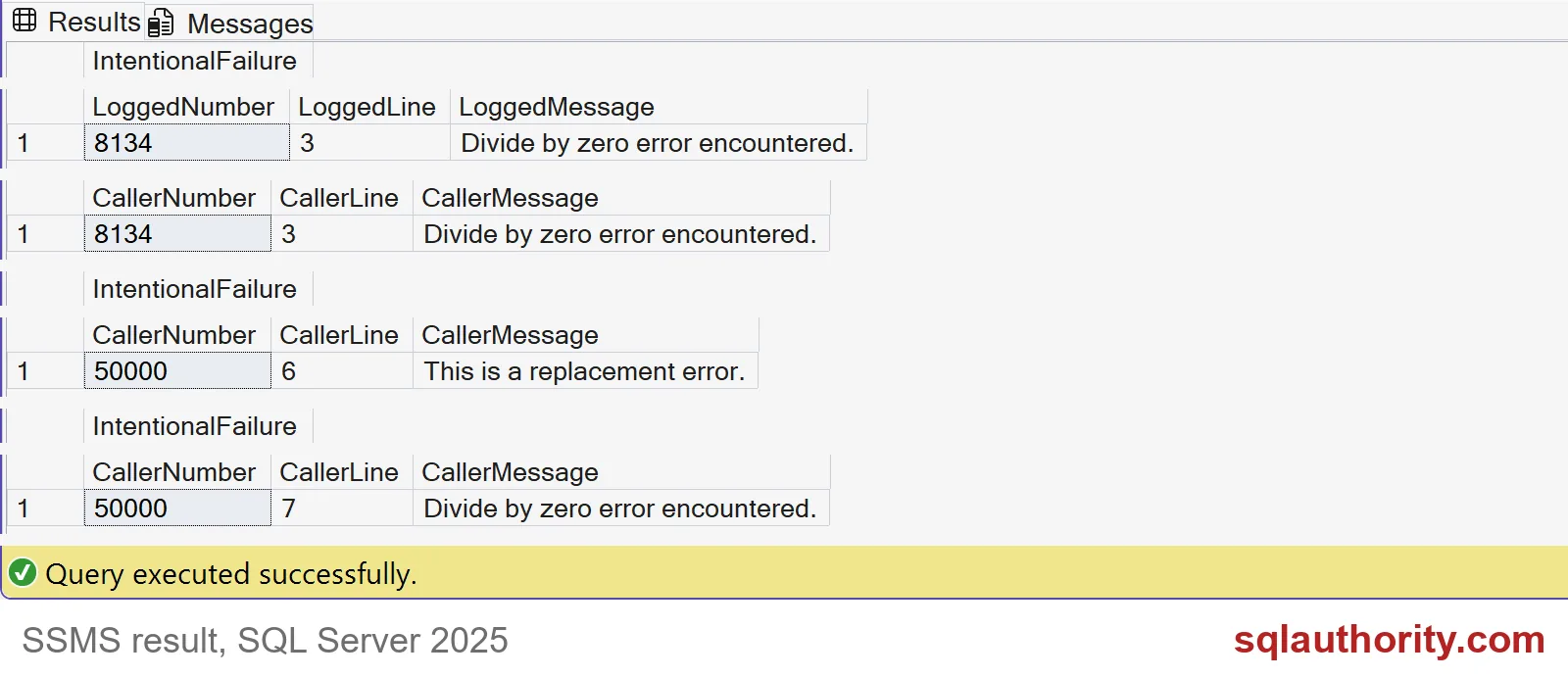
The caller reads “Divide by zero error encountered.” but the number is 50000 and the line is 7, the RAISERROR. Anyone who searches for 8134 finds nothing. The screenshot above puts all three cases side by side.

Use it inside a real procedure
In real code the CATCH block usually has a job: roll back the transaction, then pass the error on. Here is a small procedure that does exactly that. The demo creates one table and one procedure, and the last block removes both.
DROP PROCEDURE IF EXISTS dbo.SaveOrderDemo;
DROP TABLE IF EXISTS dbo.OrderDemo;
CREATE TABLE dbo.OrderDemo (OrderId int PRIMARY KEY, Quantity int NOT NULL);
GO
CREATE PROCEDURE dbo.SaveOrderDemo @OrderId int, @Divisor int
AS
BEGIN
    SET NOCOUNT ON;
    BEGIN TRY
        BEGIN TRANSACTION;
        INSERT dbo.OrderDemo (OrderId, Quantity) VALUES (@OrderId, 100 / @Divisor);
        COMMIT TRANSACTION;
    END TRY
    BEGIN CATCH
        IF @@TRANCOUNT > 0 ROLLBACK TRANSACTION;
        THROW;
    END CATCH;
END;
Now call it with a divisor of zero and look at what the caller learns.
BEGIN TRY
    EXEC dbo.SaveOrderDemo @OrderId = 1, @Divisor = 0;
END TRY
BEGIN CATCH
    SELECT ERROR_NUMBER() AS CallerNumber, ERROR_PROCEDURE() AS CallerProcedure,
           ERROR_LINE() AS CallerLine, ERROR_MESSAGE() AS CallerMessage;
END CATCH;

SELECT COUNT(*) AS RowsSaved FROM dbo.OrderDemo;
The caller gets error 8134 from dbo.SaveOrderDemo on line 7, which is the INSERT. The table holds 0 rows, so the rollback worked. You get the cleanup and the diagnosis, not one or the other.
The semicolon trap
Here is a mistake I see in real code. Someone writes ROLLBACK TRANSACTION without a semicolon and puts THROW on the next line. SQL Server reads THROW as the name of a savepoint, so the rollback fails and the real error is lost.
CREATE PROCEDURE dbo.SaveOrderNoSemicolon @OrderId int, @Divisor int
AS
BEGIN
    SET NOCOUNT ON;
    BEGIN TRY
        BEGIN TRANSACTION;
        INSERT dbo.OrderDemo (OrderId, Quantity) VALUES (@OrderId, 100 / @Divisor);
        COMMIT TRANSACTION;
    END TRY
    BEGIN CATCH
        ROLLBACK TRANSACTION
        THROW;
    END CATCH;
END;
GO
BEGIN TRY
    EXEC dbo.SaveOrderNoSemicolon @OrderId = 1, @Divisor = 0;
END TRY
BEGIN CATCH
    SELECT ERROR_NUMBER() AS CallerNumber, ERROR_MESSAGE() AS CallerMessage;
END CATCH;

SELECT @@TRANCOUNT AS OpenTransactions;
The caller sees error 6401, “Cannot roll back THROW”, not the 8134 that started it. Worse, one transaction is still open. Always end the statement before THROW with a semicolon. Then clean up.
IF @@TRANCOUNT > 0 ROLLBACK TRANSACTION;
DROP PROCEDURE IF EXISTS dbo.SaveOrderNoSemicolon;
DROP PROCEDURE IF EXISTS dbo.SaveOrderDemo;
DROP TABLE IF EXISTS dbo.OrderDemo;
To check your own code, search for CATCH blocks that raise a new error. Ask whether each one meant to. Most of the time the answer is a bare THROW.
Next time a CATCH block needs to pass an error along, let it go through untouched.
A bare THROW is not a new error, it is the original error passed on.
Published by Pinal Dave on SQLAuthority. More of my work at pinaldave.com.
Discover more from SQL Authority with Pinal Dave
Subscribe to get the latest posts sent to your email.