
Windows Authentication by SQLCMD uses the current Windows identity with -E. It does not need a Windows password in the command.

My friend DJ called and said, “Your SQL Server does not like me.” I joked that nobody did. DJ had supplied a Windows username with -U and -P. The command returned error 18456.
I asked whether DJ wanted Windows authentication. The change was small:
sqlcmd -S .\sqlent1 -E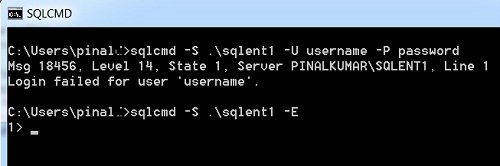
DJ replied, “It works! So you still know SQL Server?” We both laughed. The point was the authentication method, not an unusual failure in the server.
Check the intended identity and instance
The named instance belongs to my original laptop example. Replace it with your intended instance. The Windows identity still needs an allowed SQL Server login path. Windows administrator membership doesn’t automatically guarantee database access.
Client versions can have different encryption defaults. Resolve certificate and connection requirements appropriately instead of adding a trust-bypass option merely to imitate an old command. Don’t put passwords in a command line for this Windows-authentication example.
Reference: sqlcmd utility.
Original video
The login failure is not proof of a broken server, it is a reason to check the authentication method.
Published by Pinal Dave on SQLAuthority. More of my work at pinaldave.com.
Discover more from SQL Authority with Pinal Dave
Subscribe to get the latest posts sent to your email.




12 Comments. Leave new
Thanks for the detailed information.
Tried before but never worked. After reading your blog, Tried and worked.
You know that you always rock, right?
Thanks again.
I’m facing same problem in SSMS for windows authentication mode connection. My new machine having Windows 7 operating system and SQL 2005.
Frist time I can able to connect local database server with windows authentication. After that If I connect to test database with use VPN connection, it’s connected with windows authentication. Then again I CANNOT connect the local database with Windows authentication. I’m getting this error:
Cannot connect to SQL2
Additional Information:
Login failed for user ”. The user is not associated with a trusted SQL server connection. (Microsoft SQL Server, Error:18452)
Pinal,
I am using Windows Server 2008 R2 and I have SQL Server 2008 installed on the machine. I am logged in as the administrator and it is not allowing me to create an ODBC connection. I receive:
Connection Failed
SQLState: ‘28000’
SQL Server Error: 18456
I know it has something to do with Windows Server 2008’s security, because installing SQL Server 2008 R2 on a Windows Server 2003 machine does not give me this headache :-)
You havent explained how it matters. I am facing the same issue, found your solution on it working but not convincing. Why cant I connect using explicit -U and -P parameters to the server?
I agree Amogh a more detailed explanation is required I am trying to create a format file using BCP, I am able to do it with the sa username and password,
If I use the -T switch it works fine as well, however when I try to use the username that connects me to SQL Server with Windows Authentication eg -U Servername\User -P XXX I get error
SQLState = 28000, NativeError = 18456
Error = [Microsoft][SQL Server Native Client 10.0][SQL Server]Login failed for
user ‘Server\User’.
My windows admin username is different from my SQL username however my SQL username uses Windows Authentication to connect to SSMS.
I have the same problem when I use OPENROWSET, if I use the Trusted_Connection=yes option it works but if I use the Windows Authenticated username and password it fails.
Watch SQL in Sixty Seconds Video to resolve connection error http://blog.sqlauthority.com/2012/10/24/sql-server-resolving-sql-server-connection-errors-sql-in-sixty-seconds-030-video/
In real life, we generally connect database which will hosted on different server. I agree that we can connect local database by forcing SQL Server using “-E” but will this help us? no.. then how we can connect the database which are hosted in different server.
I spend more than two days on Google and try all possibility but none of them help me to resolve my issue.
I am able to connect production server database using sql server management studio in my system by inserting servername, username and password but when I try to connect using sqlcmd it always try to select my local database instead of server and throw me error
Login failed for user ‘username’. The user is not associated with a trusted SQL Server connection.
Your any small tip or help will be appreciated!!
I tried may syntex, some of them are.
Sqlcmd –s servername,portnumber –U username –P Password
Sqlcmd –s ServerIP –U username –P Password
Sqlcmd –s serveIP,portnumber –U username –P Password
try using -S instead of -s
Guys, MS says -U and -P switches are for SQL authentication; therefore, you can’t use them with domain logins:
https://docs.microsoft.com/en-us/powershell/module/sqlserver/invoke-sqlcmd?view=sqlserver-ps&viewFallbackFrom=sql-server-2017
Hi Pinal.
I am facing error with SQLCMD(sql 2005 EE)
SQLCMD -E -S
Sqlcmd: Error: Microsoft SQL Native Client : Unable to complete login process du
e to delay in opening server connection.
When I tried
SQLCMD -E -S -l20
it connected.
I tried with sql authentication
SQLCMD -S -U -P
It worked find
issue with windows authentication
One SQL Instance with a TEMPDB set larger than the disk size, restarts. When start, is not possible because can not create the tempdb database. After trying to start sqlserver with -M -F I realize that SQLCMD -S -E do not accept my windows system user (to there change the Tempdb size). There is not available a sql sa user. Any ideia to solve?
My local windows user is a member of Administrator group, tried to sqlcmd with -E and it is connected.
I tried to run a sql script and got the error in logs. Here is the command I used :
>sqlcmd -S Server -E -i script.sql -o output.txt
Here is the error in log :
Msg 916, Level 14, State 1, Server Server\SQLEXPRESS, Line 1
The server principal “Server\User” is not able to access the database “database” under the current security context.
P.S. If I run the same script with “Administrator” user, it worked.
Please help how I can allow my user to run queries and scripts under sqlcmd, as I dont want to use username and password to connect sqlcmd and run scripts.