Force a plan with Query Store when a query that ran fine yesterday turns slow after a plan change. Query Store keeps every plan the query has used, with its numbers. You point at the good one, and SQL Server uses it again.
It takes a minute, and it buys you time to find the real fix. This post builds a regression, forces the good plan, measures what forcing costs and shows when to let it go.

How a Good Query Turns Slow
A stored procedure compiles its plan for the first parameter value it sees. When the plan leaves the cache, the next caller decides the new plan. If that caller is unusual, every normal call after it pays the price. That’s the most common regression I see in health checks, and Query Store catches it well.
The demo builds it on purpose. One customer owns 80,000 of 200,000 orders, and every other customer owns a handful. Query Store is on, and it records every query.
CREATE DATABASE ForcePlanDemo;
GO
USE ForcePlanDemo;
GO
ALTER DATABASE ForcePlanDemo SET QUERY_STORE = ON (OPERATION_MODE = READ_WRITE, QUERY_CAPTURE_MODE = ALL, INTERVAL_LENGTH_MINUTES = 1);
GO
CREATE TABLE dbo.Orders (
    OrderID    int IDENTITY(1,1) NOT NULL CONSTRAINT PK_Orders PRIMARY KEY,
    CustomerID int NOT NULL,
    Amount     decimal(10,2) NOT NULL,
    Note       char(100) NOT NULL DEFAULT 'x'
);
INSERT INTO dbo.Orders (CustomerID, Amount)
SELECT CASE WHEN value <= 80000 THEN 1 ELSE 2 + value % 5000 END, value % 100
FROM GENERATE_SERIES(1, 200000);
CREATE INDEX IX_Orders_Customer ON dbo.Orders (CustomerID);
GO
CREATE OR ALTER PROCEDURE dbo.CustomerTotal @CustomerID int
AS
SELECT COUNT(*) AS Orders, SUM(Amount) AS Total
FROM dbo.Orders
WHERE CustomerID = @CustomerID;
First, a small customer calls twenty times and gets a seek plan. Then the plan leaves the cache and the big customer calls first. The small customer calls twenty more times.
EXEC dbo.CustomerTotal @CustomerID = 42;
GO 20
EXEC sp_recompile N'dbo.CustomerTotal';
EXEC dbo.CustomerTotal @CustomerID = 1;
EXEC dbo.CustomerTotal @CustomerID = 42;
GO 20
Find Both Plans in Query Store
Query Store keeps one row per plan, so the old plan and the new one sit side by side. This query lists them with their average reads.
EXEC sp_query_store_flush_db;
SELECT q.query_id, p.plan_id,
       CASE WHEN CONVERT(nvarchar(max), p.query_plan) LIKE N'%Index Seek%' THEN 'Seek + Key Lookup' ELSE 'Clustered Index Scan' END AS PlanShape,
       SUM(rs.count_executions) AS Runs,
       CONVERT(int, SUM(rs.avg_logical_io_reads * rs.count_executions) / SUM(rs.count_executions)) AS AvgReads,
       p.is_forced_plan AS IsForced
FROM sys.query_store_query AS q
JOIN sys.query_store_plan AS p ON p.query_id = q.query_id
JOIN sys.query_store_runtime_stats AS rs ON rs.plan_id = p.plan_id
WHERE q.object_id = OBJECT_ID(N'dbo.CustomerTotal')
GROUP BY q.query_id, p.plan_id, CONVERT(nvarchar(max), p.query_plan), p.is_forced_plan
ORDER BY p.plan_id;| query_id | plan_id | PlanShape | Runs | AvgReads | IsForced |
|---|---|---|---|---|---|
| 3 | 3 | Seek + Key Lookup | 20 | 74 | 0 |
| 3 | 4 | Clustered Index Scan | 40 | 3138 | 0 |
The small customer used to read 74 pages. With the new plan, every one of its calls reads 3,138, more than forty times as much. Your query and plan numbers will differ, so read them from your own result. In Management Studio the same story shows in the Regressed Queries report, under the database’s Query Store folder.
Force the Good Plan
One procedure call pins the plan. From now on, SQL Server compiles this query with the forced plan, whoever calls first.
EXEC sp_query_store_force_plan @query_id = 3, @plan_id = 3;
To prove it holds, let the big customer compile first again, then call for the small one.
EXEC sp_recompile N'dbo.CustomerTotal';
EXEC dbo.CustomerTotal @CustomerID = 1;
SET STATISTICS IO ON;
EXEC dbo.CustomerTotal @CustomerID = 42;
SET STATISTICS IO OFF;
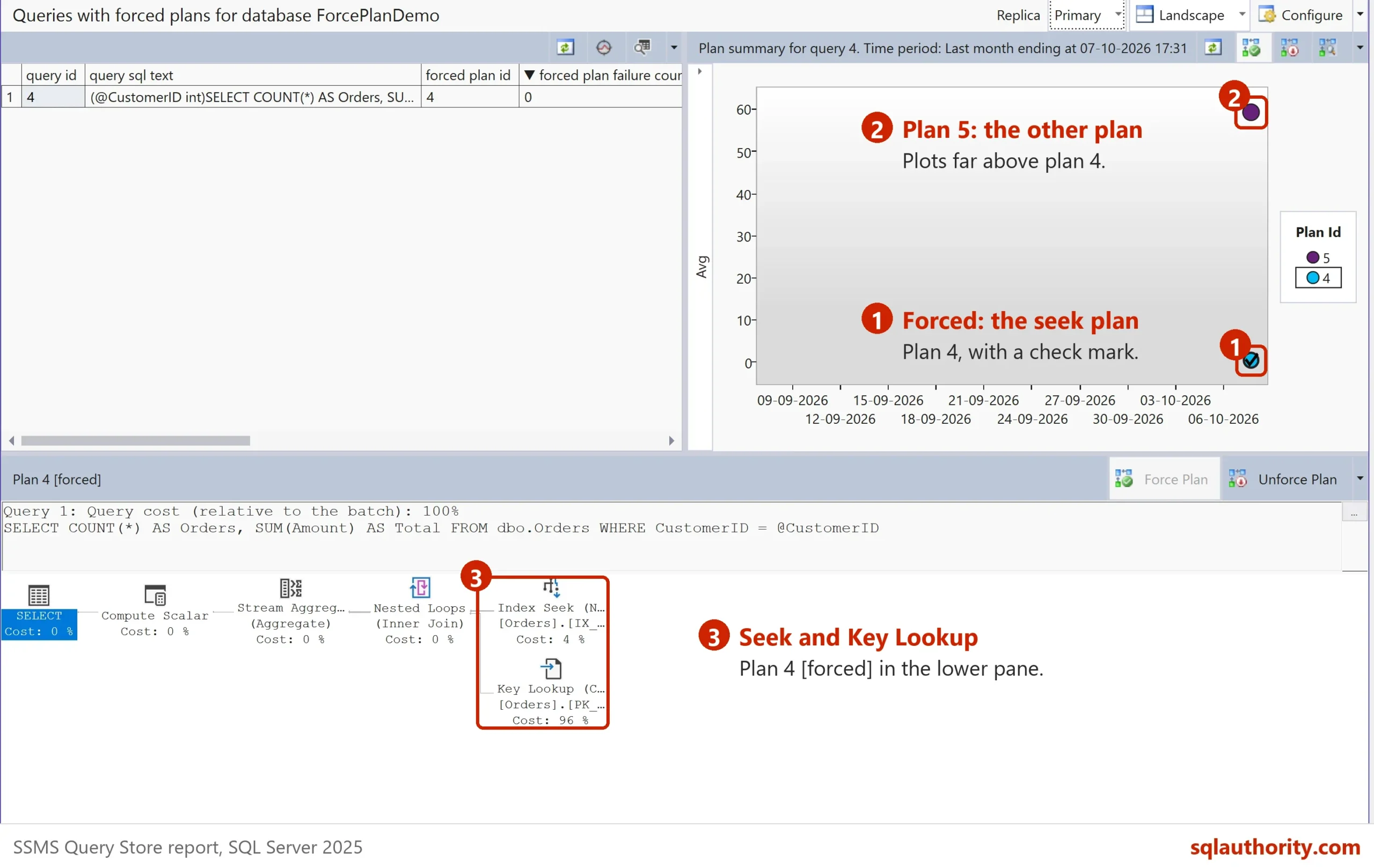
The small customer read 76 pages, back where it started. The plan row now says IsForced 1, with the forcing type MANUAL. The picture shows the Queries With Forced Plans report on a second server. There, the query and the seek plan both got id 4.
What Forcing Costs
Here’s the part that’s easy to miss. The forced plan is a seek with a key lookup, and the big customer runs it too. I measured both customers with each plan.
| Caller | Scan plan | Forced seek plan |
|---|---|---|
| Small customer (24 orders) | 3,138 reads | 76 reads |
| Big customer (80,000 orders) | 3,138 reads | 245,150 reads |
Forcing helped thousands of small calls and made one big call almost eighty times worse. Count the calls before you choose. If the big customer runs a nightly report, forcing is a good trade. If it calls all day, you only moved the pain.
When to Unforce
A forced plan can stop working. When the plan needs an index that’s gone, SQL Server compiles a normal plan and records why it couldn’t force. This drop shows it.
DROP INDEX IX_Orders_Customer ON dbo.Orders;
GO
EXEC dbo.CustomerTotal @CustomerID = 42;
GO
SELECT plan_id, is_forced_plan, force_failure_count, last_force_failure_reason_desc
FROM sys.query_store_plan
WHERE is_forced_plan = 1;
The plan stays marked as forced, with one failure and the reason NO_INDEX. Check this list now and then. A forced plan with failures is doing nothing for you.
Unforce a plan when its index changes, when the data shape changes, or when you ship the real fix. One call does it.
EXEC sp_query_store_unforce_plan @query_id = 3, @plan_id = 3;
Is Forcing the Fix?
You could argue that forcing hides the problem instead of solving it. It does, and that’s fine for a morning when users are waiting. The real cause here is a skewed parameter. Three fixes last longer:
- OPTION (RECOMPILE) Hint: When a Fresh Plan Pays Off
- DISABLE_PARAMETER_SNIFFING Hint: Turn Off Sniffing for One Query
- PSPO Plan Variants: One Query, Several Plans in SQL Server
Force first, then pick one of those, then unforce.
Query Store has to be on for any of this. To check it across all databases, see Query Store Status for Every Database in SQL Server. When you finish testing, drop the demo database.
USE master;
GO
ALTER DATABASE ForcePlanDemo SET SINGLE_USER WITH ROLLBACK IMMEDIATE;
DROP DATABASE ForcePlanDemo;
A forced plan is not a cure, it is a splint that holds things still while you fix the bone.
Published by Pinal Dave on SQLAuthority. More of my work at pinaldave.com.
Discover more from SQL Authority with Pinal Dave
Subscribe to get the latest posts sent to your email.