
I have multiple computer systems at home. I have previously taken a picture of my home office and published it here. Also, I recently had a scenario where I was listing a PowerShell version installed in my computer systems. While searching online, I found two different commands that can determine the version of PowerShell. One of them worked fine in Version 1, while both worked on Version 2.
The commands are:
$PSVersionTable
and
$host
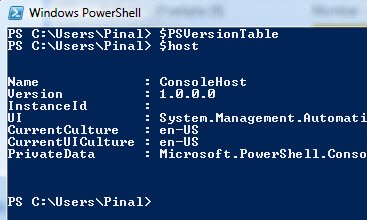
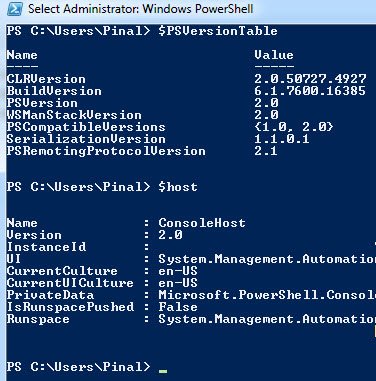
I have run both the commands on different PowerShell versions and found the following output. This is a call to all PowerShell experts to help me out by letting me know the reasons why these became the results. I am sure that I’m missing something very small, so I ask your help to clarify this.
PowerShell Version 1
PowerShell Version 2
Why Two Commands Show a Different PowerShell Version
Here is the answer to my own question. The $PSVersionTable variable was added in PowerShell 2.0. On 1.0 it simply does not exist, so asking for it returns nothing. That explains why only one command worked on the older machine.
The other command, $host, tells you about the host program you are typing in, such as the console or the ISE. On the standard console, its version usually matches the engine, but in other hosts it can show the version of that program instead. So $PSVersionTable.PSVersion is the one to trust.
A few more tips:
- Windows PowerShell 5.1 and PowerShell 7 can live side by side. Run
powershellfor the first andpwshfor the second. - The
PSEditionvalue shows Desktop for Windows PowerShell and Core for PowerShell 6 and later. - For SQL Server work, install the SqlServer module from the PowerShell Gallery rather than using the older SQLPS module.
- A script can refuse to run on an older engine if you put a
#Requires -Versionline at the top.
To check many machines at once, Invoke-Command can run the same line on each remote computer, as long as PowerShell remoting is turned on. It beats walking from desk to desk with a notepad.
When a script behaves differently on two machines, checking the version first saves a lot of head scratching.
Published by Pinal Dave on SQLAuthority. More of my work at pinaldave.com.
Discover more from SQL Authority with Pinal Dave
Subscribe to get the latest posts sent to your email.




2 Comments. Leave new
Hi,
You could try this.
if (Test-Path Variable:PSVersionTable) {$PSVersionTable.PSVersion} else {[Version]”1.0.0.0″}
$PSVersionTable exists only in PowerShell version 2 IIRC.
Also:
(Get-Item HKLM:\Software\Microsoft\PowerShell\1\PowerShellEngine).GetValue(“RuntimeVersion”)