A technical demo breaks for a few predictable reasons. You can fix nearly all of them before you walk on stage. I show SQL Server demos on stage, at conferences such as TechEd, and in classes. These habits work anywhere you show code live, and none of them depends on a particular tool.
Why a Technical Demo Breaks
Don’t trust the code to carry the demo. You’ve tested it more than anything else, so the trouble sits around it. Plan for a database left as your last rehearsal changed it. Plan for a service that doesn’t start, a typo, or a chat pop-up over the screen.
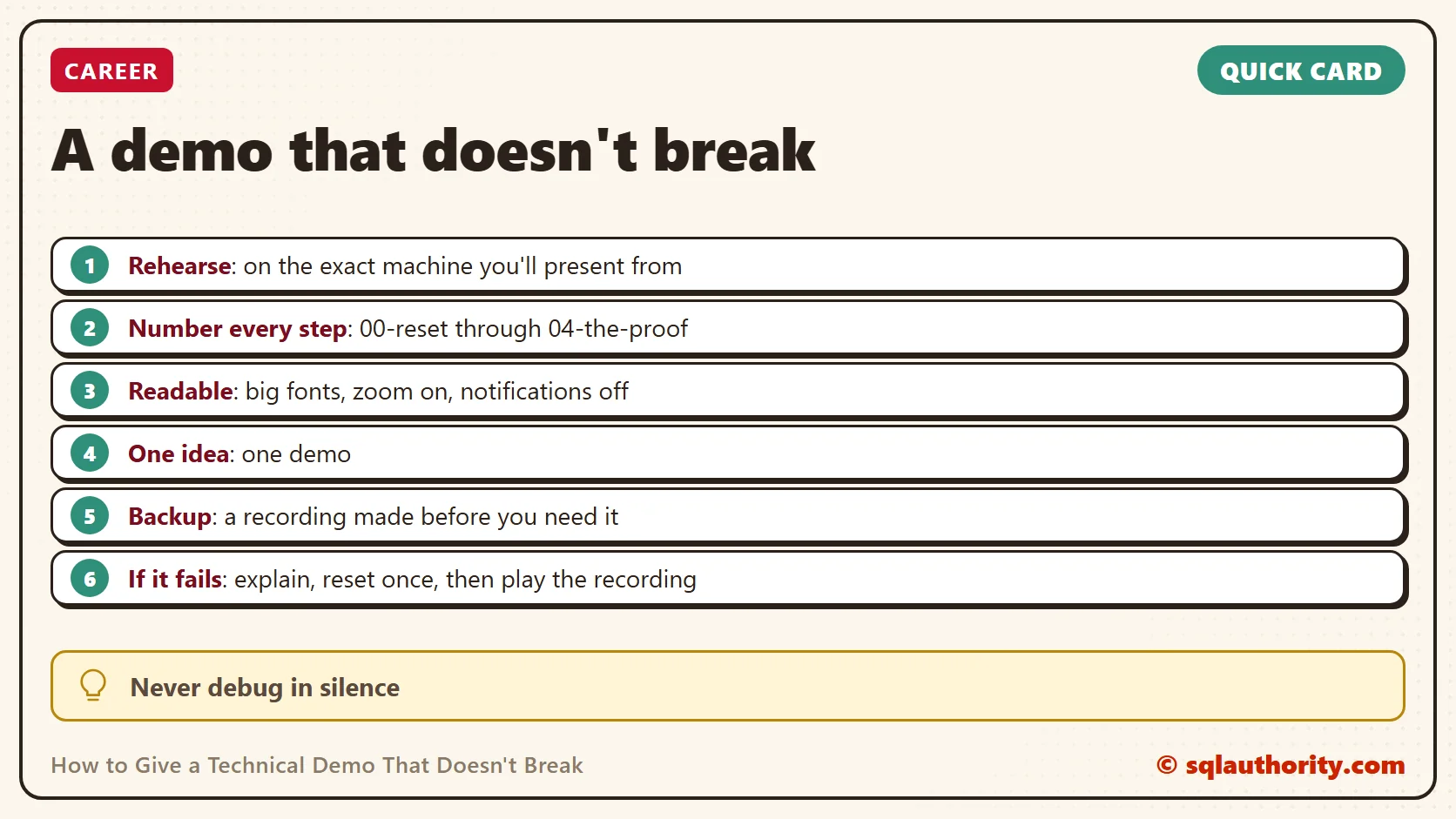
Every habit below answers one of those failures. Prepare the machine and script every step. Make the screen readable, and decide in advance what you’ll do when something goes wrong.
Rehearse on the Exact Machine
Rehearse on the laptop you’ll present from. Use the same screen settings, the same SQL Server version and the same network state you’ll have in the room. A demo that worked on your desk can fail on the stage laptop. A path, a service or a setting differs. Do one full run the day before. Do a short check an hour before you start.
Time the rehearsal with a clock. Expect the live run to take longer, because you’ll talk, answer questions and wait for results. Plan the demo for about two thirds of your slot, and mark one piece you’ll cut if time runs short.
Put Every Step in a Numbered File
Never type a long query on stage. Typing invites typos, and the audience waits while you fix them. Save each step in its own file. Number the files in the order you’ll show them, and open all of them in tabs before you start. A demo folder can look like this.
- 00-reset: brings the demo database back to its starting state
- 01-setup: creates the tables and the sample rows
- 02-the-problem: shows the slow or wrong result
- 03-the-fix: applies the change
- 04-the-proof: shows the better result
The reset file matters most. It drops and rebuilds the demo database, or restores it from a backup, so you can start over in seconds. Run it before every session and after every rehearsal. Make it touch the demo database only, and check the server name in the connection bar before you run it.
Keep the sample data small and plain. A short result fits on one screen, and the audience reads it in the time you take to explain it.
Make the Screen Readable From the Back Row
Set the editor and results fonts large before you walk in. SQL Server Management Studio has a zoom control in the lower left of the query window. Ctrl with the mouse wheel changes the size too. Windows also has a built-in magnifier that opens with the Windows key and the plus key. Keep the working lines in the upper half of the screen, where the back rows can see them.
Then clear the stage. Turn on Do Not Disturb, close chat and email, and quit anything that can pop up. Close every window you won’t use. A notification on a projector is visible to the whole room, and you can’t take it back.
Check the power settings too. Plug in the charger, set the screen to stay on, and turn off the screen saver and the lock screen. Pause automatic restarts for updates until the session ends. A laptop that goes to sleep or restarts mid-demo costs you the audience’s attention.
Check the Room Early
Get into the room before the audience and connect your laptop to the screen. Check the picture and the resolution, and see whether you’re mirroring or extending the display. Bring your own adapter and charger. Test the microphone, and the clicker if you use one.
Don’t count on the internet. Keep everything the demo needs on the laptop: the files, the databases and the slides. If the venue Wi-Fi works, that’s a bonus, not a plan.
Keep Each Demo to One Idea
A demo should prove one idea. Write that idea in one sentence before you build anything. A sentence such as “an index can turn a table scan into a seek” works well. Show the problem, show the change, then show the proof. If a step doesn’t support the sentence, cut it.
Resist the urge to add one more feature at the end. Every extra step is one more place to break and one less minute for questions.
Record a Backup Before You Need One
Record the whole technical demo once, at the screen size you’ll use live. Keep the video on the laptop, not online. If the live run fails, you can play the recording and carry on with your point. Rehearse that switch too, so you know which file to open and where to click.
What to Do When It Fails Live
Stay calm and say what’s happening. Tell the room what you expected, what you saw and what you’ll check first. Silence is what makes an audience nervous, and a calm explanation keeps them with you. Never debug in silence.
Set a limit before you start. Thirty seconds is enough to run the reset file and try once more. If it still fails, switch to the recording and keep going. Fix the cause after the session, not in front of everyone.
An error message is not a disaster. Read it aloud and explain it, and you’ve taught something the slides couldn’t.
Isn’t Live Riskier Than a Recording?
You could argue that a recorded demo is safer, so why take the risk? In some rooms it is. A poor network or a heavy setup is a good reason to play a recording. There’s no shame in it. But a live run shows the audience that the tool does what you claim. It also lets you answer “what if we change this?” on the spot, which a recording can’t do.
What to Remember
Prepare the machine and script every step. Make sure you can reset in seconds, and make the screen readable. A technical demo is won before you start, so check the room early and keep each demo to one idea.
Then plan for failure. Record a backup and set a thirty second limit. Narrate while you fix. If you change only one habit after reading this, build the reset file first. It makes every other habit easier.
A technical demo is not a lucky run, it is a rehearsed one.
Published by Pinal Dave on SQLAuthority. More of my work at pinaldave.com.
Discover more from SQL Authority with Pinal Dave
Subscribe to get the latest posts sent to your email.