
I had previously penned down two popular snippets regarding deleting duplicate rows and counting duplicate rows. Today, we will examine another very quick code snippet where we will delete duplicate rows using CTE and ROW_NUMBER() feature of SQL Server 2005 and SQL Server 2008.
This method is improved over the earlier method as it not only uses CTE and ROW_NUMBER, but also demonstrates the power of CTE with DELETE statement. We will have a comprehensive discussion about it later in this article. For now, let us first create a sample table from which we will delete records.
/*Create Table with 7 entries - 3 are duplicate entries */
CREATE TABLE DuplicateRcordTable (Col1 INT, Col2 INT)
INSERT INTO DuplicateRcordTable
SELECT 1, 1
UNION ALL
SELECT 1, 1 --duplicate
UNION ALL
SELECT 1, 1 --duplicate
UNION ALL
SELECT 1, 2
UNION ALL
SELECT 1, 2 --duplicate
UNION ALL
SELECT 1, 3
UNION ALL
SELECT 1, 4
GO
The above table has total 7 records, out of which 3 are duplicate records. Once the duplicates are removed we will have only 4 records left.
/* It should give you 7 rows */
SELECT *
FROM DuplicateRcordTable
GO

The most interesting part of this is yet to come. We will use CTE that will re-generate the same table with additional column, which is row number. In our case, we have Col1 and Col2 and both the columns qualify as duplicate rows. It may be a different set of rows for each different query like this. Another point to note here is that once CTE is created DELETE statement can be run on it. We will put a condition here – when we receive more than one rows of record, we will remove the row which is not the first one. When DELETE command is executed over CTE it in fact deletes from the base table used in CTE.
/* Delete Duplicate records */
WITH CTE (COl1,Col2, DuplicateCount)
AS
(
SELECT COl1,Col2,
ROW_NUMBER() OVER(PARTITION BY COl1,Col2 ORDER BY Col1) AS DuplicateCount
FROM DuplicateRcordTable
)
DELETE
FROM CTE
WHERE DuplicateCount > 1
GO
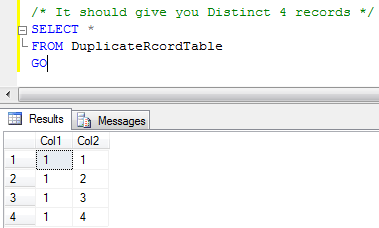
It is apparent that after delete command has been run, we will have only 4 records, which is almost the same result which we would have got with DISTINCT, with this resultset. If we had more than 2 columns and we had to run unique on only two columns, our distinct might have not worked here . In this case, we would have to use above the mentioned method.
/* It should give you Distinct 4 records */
SELECT *
FROM DuplicateRcordTable
GO
This method is a breeze and we can use this for SQL Server version 2005 and the later versions.
Watch the view to see the above concept in action:
Reference : Pinal Dave (https://blog.sqlauthority.com)




146 Comments. Leave new
This new feature is very good.
I use this key word very often.
The other good one is Simple OVER PARTITION BY with out ROW_NUMBER () and RANK.
We extensively use GROUP BY and we all know problem with GROUP BY (We should have all selected column from select clause in group by clause, other wise we cannot use group by). But by using OVER PARTITION BY we can group by few of many selected column in select clause.
I believe this feature was first introduced in ORACLE. And then in SQL Server.
But this is really a cool feature to use.
Thanks.
Imran.
Thanks a Lot!! This post is really helpful.
Don’t forget the KB Article on the same topic:
https://support.microsoft.com/en-us/help/139444/how-to-remove-duplicate-rows-from-a-table-in-sql-server
Pretty nice post. I just stumbled upon your site and wanted to say
that I have really liked browsing your blog posts. In any case
I’ll be subscribing to your blog and I hope you write again soon!
Glad to note that your site is back up.
Shocked at the way customer support reacted…
Take Care
This is a neat mehod, Initially i thought deleting from CTE wouldn’t delete the dup records from the base table, surely it does, thanks a bunch.
Nice method to avoid using temp/derived and group by operation.
Can we perform update operation on cte? will it reflect the base table also?.
Thanks in advance.
I have two smalldatetime fields say validfrom and validtill. how do I query to get results between the both dates??
Select columns from table
where date_col >=ValidFrom and date_col<=Validtill
superb t-sql statement to delete duplicate rows > 1.
This is really a great and simple approach. Thanks for this post.
Very nice…………
Thanks!
Saved me a LOT of time and struggles!
Without a lot introducing a lot of unnecessary complexities, you provide high quality solutions. Thanks, again!
this ERROR OCCURS after executing the above sql
Msg 306, Level 16, State 2, Line 1
The text, ntext, and image data types cannot be compared or sorted, except when using IS NULL or LIKE operator.
name regno
kkk 1111
kkk 1111
kkk 1111
ppp 1110
ppp 1110
how to delete these duplicatess
use CTE(name,regno,duplicate count)
as
(
select name,regno,
row number() over(partition by name,regno order by
name)
from [table name]
)
delete from cte where duplicate count>1
go
@karthikeyan
What are the datatypes of those COLUMNs?
i have Q
how can delete row from tow tables have relationship
between tables
In this case you need to first delete child data before parent data
Thanks! Good Article :)
thnx.. really nice article… good use of ROWNUMBER()…..
You can also generate serial no, delete duplicates, apply pagination using it.
Refer this
Hey Pinal,
loved ur blog..
am a newbie to sql server 2005…nd would really appreciate your help..
i have more columns than 2 that you have(around 6) in which i have the data…am a little confused as to how to write the RowNumber() and Over() methods..
thnx in advance
Yes, I have understood the answer for the above question.
But, I have been trying to import data from an excel table to sql server 2005 with avoiding the duplicate rows. So, how should I be able to implement the above code to a C# program.
Thank You very much
Import data to a staging table
Compare data of staging table with original table and insert only the non duplicate data from staging table
Is there any way that I can be helped upon…thank u very much