
Update: This article is re-written with SQL Server 2008 R2 instance over here: SQL SERVER – 2008 – 2008 R2 – Create Script to Copy Database Schema and All The Objects – Data, Schema, Stored Procedure, Functions, Triggers, Tables, Views, Constraints and All Other Database Objects
Following quick tutorial demonstrates how to create T-SQL script to copy complete database schema and all of its objects such as Stored Procedure, Functions, Triggers, Tables, Views, Constraints etc. You can review your schema, backup for reference or use it to compare with previous backup.
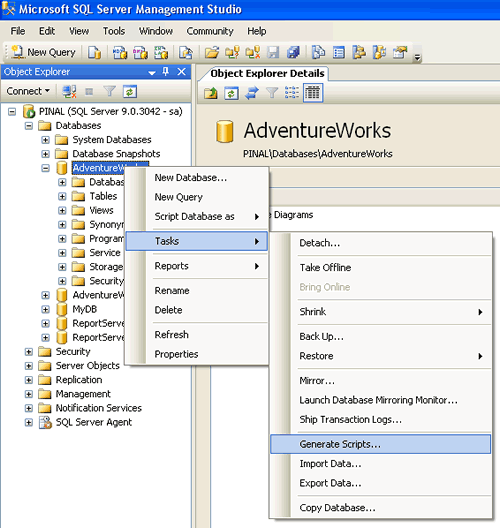
Step 1 : Start
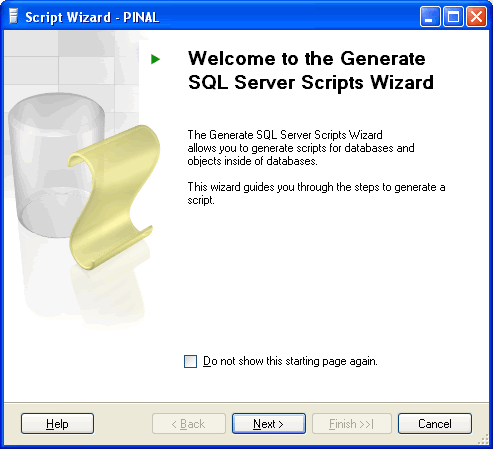
Step 2 : Welcome Screen
Step 3 : Select One or Multiple Database
If Script all objects in the selected database checkbox is not selected it will give options to selected individual objects on respective screen. (e.g. Stored Procedure, Triggers and all other object will have their own screen where they can be selected)

Step 4 : Select database options

Step 5 : Select output option

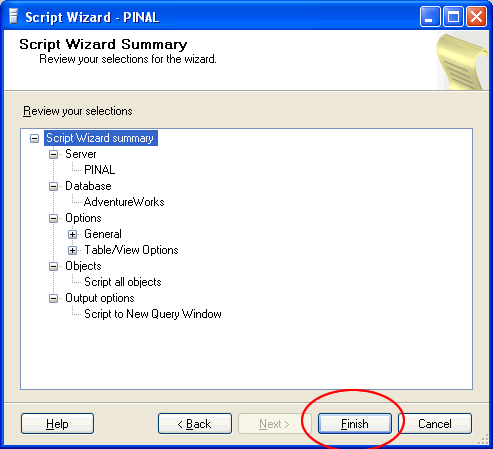
Step 6 : Review Summary
Step 7 : Observe script generation process

Step 8 : Database object script generation completed in new query window

Reference : Pinal Dave (https://blog.sqlauthority.com), All images are protected by copyright owner SQLAuthority.com




673 Comments. Leave new
Would you please be able to email me a copy of the structure copy script too please.
Thanks in advance
I am trying to figure out a stored procedure to take an existing database, which is my base master database, and clone it exactly within the same server but with a new name. I have tried various ways including scripting but that won’t do because several tables in the master have data and need to be included in the clone. I have tried a stored procedure that would detach the master database, copy the mdf/ldf files using xp_cmdShell, then reattach my master and my new database. I have it working on one server but when I try on another, I get access denied errors during the xp_cmdShell copy part.
Do you have any scripts in your toolbox or ideas on how to make this work for me without having to tweak every server I want to run this on.
Thanks
how about objects and data? like the “import/export objects and data” from sql 2000?
You can make use of import or Export data option from Management studio
I do not wish to use the Management Studio as this is to be part of an application. The application is to call the stored procedure to execute the steps to clone my datatbase. As I mentioned, I was able to get it working on one server but because the permissions on the server were played with so much, we are unable to duplicate the settings on a second server. There must be something that can allow the sp to execute all the steps that are necessary.
Is it possible to generate scripts for all objects of any particular schema using the tool “Database Publishing Wizard “?
Thanks.It worked.I guess I saved my time.
Hello Pinal Dave
i have a one quistion
I allready collectd db generated sql script
now i need execute all object on vs memory (not file)
i used ExecuteNonQuery used from richtextedit.text
then incorrect syntax near ‘create’
then incorrect syntax near ‘create’
then incorrect syntax near ‘create’
….
later I paste all script to sql management studio
next run is successfully
why didn’t run it???
Make sure the scripts were seperated by the keyword GO
Pinal Dave,
I need to take a db backup from a SQL server and make a copy to another SQL 2008 Express server on a daily basis.
Could you please send me the details how to create an automated script to import the data?
Your help will be greatly appreciated.
Kate
You can make use of this script and schedule it to run periodically. Refer this post
Thanks Pinal Dave. And do you have a script to import the data? I need to have this script run daily to automatically refresh the data on another SQL 2008 Express server.
I appreciate your help.
Kate
Dear sir…
I want Database Replication…
or i want to run report to different-different Database…
so can a possible that making store procedure using different-different database please quickly reply..
i wait..
Regards
Ashish Singh
Can you be more specific?
What do you want to do with a procedure?
Is it possible to get an answer to my orginal question here? It seems that this post has gotten lost in the other posts.
Here is my post again…..
I am trying to figure out a stored procedure to take an existing database, which is my base master database, and clone it exactly within the same server but with a new name. I have tried various ways including scripting but that won’t do because several tables in the master have data and need to be included in the clone. I have tried a stored procedure that would detach the master database, copy the mdf/ldf files using xp_cmdShell, then reattach my master and my new database. I have it working on one server but when I try on another, I get access denied errors during the xp_cmdShell copy part.
Do you have any scripts in your toolbox or ideas on how to make this work for me without having to tweak every server I want to run this on.
Why do you want to clone the master database?
I need to clone the master database due to a security and confidentiality requirement wherein each client MSUT have their data stored in a separate database. Data from one client cannot be mixed with data for another. And before anyone suggests it, identifying each client’s data in the same database using a unique identifier is NOT an option. (caps are for emphasis only and not to be construed as yelling).
Hope that explains it.
Salhi
Hello Pinal Dave
i have a one quistion
I allready collected db generated sql script
now i need execute all object on vs memory (not file)
i used ExecuteNonQuery used from richtextedit.text
then incorrect syntax near ‘create’
then incorrect syntax near ‘create’
then incorrect syntax near ‘create’
….
later I paste all script to sql management studio
next run is successfully
why didn’t run it???
*
on June 7, 2010 at 12:41 pm | Reply Madhivanan
Make sure the scripts were seperated by the keyword GO
it is too error
Incorrect syntax near ‘GO’.
Incorrect syntax near ‘GO’.
Incorrect syntax near ‘GO’.
Incorrect syntax near ‘GO’.
Incorrect syntax near ‘GO’.
…….
Incorrect syntax near the keyword ‘CREATE’.
Incorrect syntax near the keyword ‘CREATE’.
Incorrect syntax near the keyword ‘CREATE’.
Incorrect syntax near the keyword ‘CREATE’.
Incorrect syntax near the keyword ‘CREATE’.
…….
Can you post some lines of the scripts generated?
I want to create script through coding or with in procedure?
Is it possible??
or i want to create table same as existing table with constrains. how can i do this???
thanks.
hello
i want to create table2 same as table1’s structure with constrains, in procedure
i have one option that first create script for table1 and it’s constrains, then execute that statements in procedure.
but in that each time when i change in table1 i need to change in procedure’s script.
In procedure i have total 12 tables and many constrains.
Is it possible to do this by any other way?
thanks.
hello,
could you please tell me how to script all the database object and table data.
Thanks
If you use version 2008, there is an option
If you use prior versions, generate script and transfer data using import/export wizard
Excellent post for people who need to maintain and backup multiple servers. Its real pain to do everyhing manually !!!
I have to maintain 3 server and my client perchased new server just for Backup :)
I required to take periodic backup. I was doing it manually. I will not automate it using command given by you.
Thank you for sharing…
hi,
could you please tell me how to generate script of multiple table within stored procedure.
tables are predefined. i.e i want to generate tbltest1_112, tbltest2_112, tbltest3_112 same as tbltest1_111, tbltest2_111, tbltest3_111 respectively
i want to do this task when i execute procedure names TestCreate_sp with one parameter, parameter value is 112
so i want to get script of table tbltest1_111, tbltest2_111, tbltest3_111 with constrains.
then i will replace _111 to _112, constrains also have suffix _111
and then execute it.
Have u any suggestion for me?
Thanks in advance
Thanks
Pinal,
we have sql 2000 server as prod and sql 2005 as reporting server. we would like to maintain a copy of the prod databases on reporting server for users to extract reports periodically. what is the most efficient way to do this ?
how can we automate the process to get data worth the whole day on the sql 2005 server ?
Hello Pinal,
That’s a great profile!
Can you please help to generate scripts to copy the data.
Make use of import/export wizard from Management studio
Hi Pinal,
I can not view images in this article
“SQL SERVER – 2005 – Create Script to Copy Database Schema and All The Objects – Stored Procedure, Functions, Triggers, Tables, Views, Constraints and All Other Database Objects”
Could you please send me the details as well, on how to automate this process.
Thanks,
Pakbavil
Thank you! this was awesome