
Answer simple quiz at the end of the blog post and -
Every day one winner from India will get Joes 2 Pros Volume 3.
Every day one winner from United States will get Joes 2 Pros Volume 3.
Sparse Data
Fields with fixed length data types (e.g., int, money) always consume their allotted space irrespective of how much data the field actually contains. This is true even if the field is populated with a null.
Occasionally you will encounter a column in your database which is rarely used. For example, suppose you have a field called [Violation] in a table called [Employee] but very few employees have any violations – perhaps two or three for every 1000 employees. In this case, over 99% of the Violation field values are null. This would be an example of a sparsely populated field.
To demonstrate a sparsely populated field, we will create a simple table with the design shown here. Create and populate the dbo.Bonus table by running this code in the figures below.

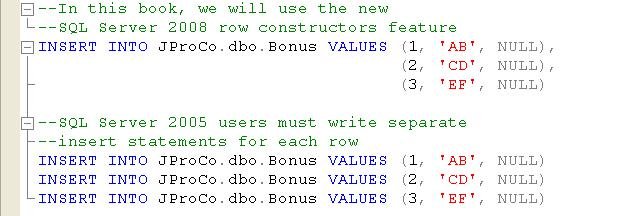
Please note that INSERT statements demonstrated will use row constructors, which debuted as a new feature in SQL Server 2008. However, readers who are running SQL Server 2005 must write their INSERT statements using the alternate syntax shown in the lower portion of the last Figure.
Now look at all the records in the table. Since all fields contain fixed length data types (i.e., int, char(2), money), we could have accurately calculated the per row consumption before we even added any data to the table.

Each row of the Bonus table will consume 21 bytes based on the data below.
- Row Header – 4 bytes (true for all rows).
- Fixed Data – 14 bytes (BonusID is an int (4 bytes) and BonusAmount’s data type is money (8 bytes).
- Null Block (aka Null Bitmap) – 3 bytes
The nulls in the money field do not change the space consumption because fixed length data types always use the full amount of space allocated to them. At 21 bytes per row, 1000 rows of the Bonus table would require 21,000 bytes and fill up about 3 data pages (1 data page = 8060 bytes). Currently there are only three records in this table so just 1 data page of 8K has started to fill up.
Analyzing Space Used
A handy tool for checking the storage amount which an object occupies is sp_spaceused. The figure below shows the Bonus table passed into this stored procedure. We see the Bonus table contains three rows and its data has not yet exceeded its first 8 KB page.

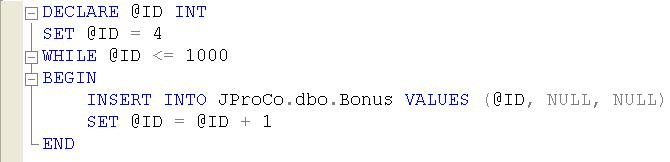
If you added enough records the data space used would need more memory pages. Let’s run a loop to add 997 more records to the Bonus table. The first record populated will be row 4. This loop increments each subsequent BonusID value by 1, and the loop runs as long as the BonusID value is <=1000. Once the row containing BonusID 1000 has been entered into the table, the loop will end. One run the Bonus table contains 1000 records.
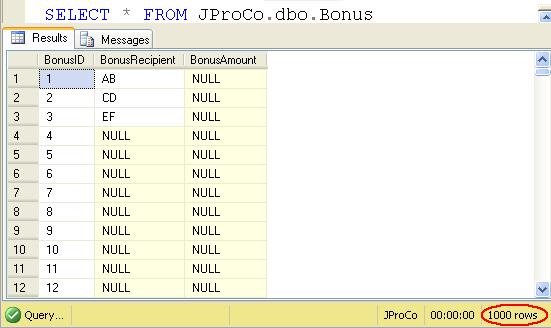
Since one row occupies 21 bytes, we know these 1000 rows will take up 21 KB of space and should fit within three data pages.
[21000 bytes/(8060 bytes/page) = 2.61 pages]
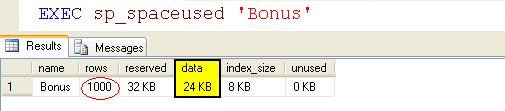
Since you can use half a data page SQL dedicated 3 data pages to the Bonus table. Let’s rerun the sp_spaceused sproc and confirm the number of data pages.
Using the Sparse Data Option
The sparse data option is a new SQL Server 2008 feature for fields you expect to be predominantly null. Using the sparse data option, you can instruct SQL Server to not have nulls consume space in sparsely populated fields.
To test this we’re going to delete the Bonus table and then re-create it using the same steps we took previously. The only difference will be that the BonusAmount field will be created using the sparse option. Recall we expect the BonusAmount field to contain very little actual data – most records will be null.

Recall we expect the BonusAmount field to contain very little actual data – most records will be null. The Bonus table now contains 1000 records and BonusAmount is a sparse field, but so far we don’t see any difference in the appearance of the table or the data.

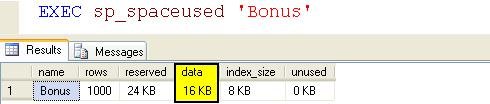
Now let’s review how much space the Bonus table is consuming. Let’s confirm the space usage is less in this example. Had you not used the sparse option the consumption would have been 24KB like in our last example.
Note: If you want to setup the sample JProCo database on your system you can watch this video. For this post you will want to run the SQLArchChapter4.0Setup.sql script from Volume 3.
Question 17
You have two fields, of INT and MONEY, in your Bonus table. You have 1000 records and all instances of the money column are null. When you set up the money field, you used the Sparse option. How much space are the 1000 rows of the money field using?
- None
- 4000 bytes
- 8000 bytes
Do not forget to participate in special question over here: Pluralsight Giving Away Free Subscription to Quiz Participants
Rules:
Please leave your answer in comment section below with correct option, explanation and your country of resident.
Every day one winner will be announced from United States.
Every day one winner will be announced from India.
A valid answer must contain country of residence of answerer.
Please check my facebook page for winners name and correct answer.
Winner from United States will get Joes 2 Pros Volume 3.
Winner from India will get Joes 2 Pros Volume 3.
The contest is open till next blog post shows up at http://blog.sqlauthority.com which is next day GTM+2.5.
Reference: Pinal Dave (http://blog.SQLAuthority.com)


Correct answer is No. 3: The field with MONEY datatype (8 bytes) has been set up using the Sparse option, and all instances are NULL. The field with INT datatype (4 bytes) is fixed-length, so 4 x 1000 is 4000 bytes. Each row has a row header of 4 bytes, so again 4 x 1000 is 4000 bytes. This makes a total of 8000 bytes.
Rene Castro
El Salvador
Correct option should be #3 if table structure is like
(BonusID INT NOT NULL,BonusAmount MONEY NULL)
The correct answer is option 1) none.
1000 rows of the money field which is created using sparse option having the value null takes up no space at all.
because,
The SQL Server Database Engine uses the SPARSE keyword in a column definition to optimize the storage of values in that column. Therefore, when the column value is NULL for any row in the table, the value requires no storage.
Thanks & Regards
Santosh.S
Bangalore, India
You save 8000 bytes… From your example 1000 records with sparse option only use 16k as opposed to 24k with sparse option not used. Useful demo thanks
Matt
US
Hi,
Since ALL values of the column with data-type MONEY are NULL, and the table was set up with the SPARSE option, the NULL values would consume NO SPACE.
Thus, option 1 is right.
–
Ramakrishnan RS
Mysore, India
Correct answer option no – 1) None
shekhar Gurav.
Country : INDIA
Option 1) is correct
1) None
As you have explained the money field will not contribute to the space used as it is all null with sparse option
Leo Pius
USA
Question 17
Ans : None
Chennai,INDIA
[...] Q 17) SQL SERVER – Tips from the SQL Joes 2 Pros Development Series – Sparse Data and Space Used by Sp… [...]
Correct Answer is # 3.
MONEY datatype takes up (8 Bytes) and has been set up using the SPARSE option, and all instances (1000) are NULL. SPARSE column does not take storage space for NULL rows.
INT Datatype is fixed-length and takes (4 Bytes) = 4 * 1000 = 4000 Bytes.
Each row has a row header of (4 Bytes) = 4 * 1000 = 4000 Bytes.
So total bytes occupied by “Bonus” table is 8000 Bytes.
Note: SPARSE option is set only for MONEY column.
Gopalakrishnan Arthanarisamy
Unisys, Bangalore, India
Option 1 is the right answer
Manoj Sahoo
India
Ans is 1) NONE as sparse column means do not use space.
Thanks.
Sudhir Chawla
Delhi, India
Hi,
Correct answer is Option
1)None
explanation :- when “sparse” Used and data in filed is null then is will not take any space in data-base so it is going to be None.
I am from india.
Answer is
1>Null
Bangalore,India
Option 3 is correct.
INT field will consume 4 bytes and every row will consume 4 bytes.
So 8000 Bytes.
INDIA
Since all the values of column BonusAmount is Null and it is assined with SPARSE the correct answer is
NONE
Mumbai :::INDIA
correct option is option 1 ie.
1) None
As you have explained the money field will not contribute to the space used as it is all null with sparse option
so the naswer is 1) None
India
The correct answer, according to this article, is none (1st option). If all records have NULL in the Money field and we set up our table with SPARSE option, the 1000 rows will use 0 bytes for Money field.
I am from USA
Correct answer is option 1 that is
None
Because here we have used parse option while setting money field.
Mahmad Khoja
INDIA
AHMEDABAD
As we are setting up Money Column using Sparse then it will not consume memory. So the correct option is.
1. None.
Thanks….
Rajneesh Verma
(INDIA)
Option 1) is correct
1) None
As you have explained the money field will not contribute to the space used as it is all null with sparse option
Malay Shah
India
You have two fields, of INT and MONEY, in your Bonus table. You have 1000 records and all instances of the money column are null. When you set up the money field, you used the Sparse option. How much space are the 1000 rows of the money field using?
None
4000 bytes
8000 bytes
Solution :
The correct answer is None. When the money column is created with sparse option and all the 1000 rows are Null then no space is used. This is the property of sparse columns.
The second and third options are wrong as they indicate some space occupied which doesn’t apply for sparse columns with all Null values.
Nagaraj Ejanthkar
USA
choice #1 is correct, no space is being used for sparse money data type fields with null value. 0 x 1000 = 0
Chris Lennick
United States
option 1 is correct
because money field is null so it will take no space and you have asked only space used by money field
tej narayan maurya
new delhi, india
none that is option one is correct
because money field is null so it will take no space and you have asked only space used by money field
tej narayan maurya
new delhi, india
Option 3 is the answer as
Integer and header occupies 8bytes and money column is specified as sparse so for 1000 records it will be 8000 bytes
Option 3 is the answer as
Integer and header occupies 8bytes and money column is specified as sparse so for 1000 records it will be 8000 bytes
Purna Magum
India
Correct Ans is Option 1
1. None
Pratik Raval
India
Option 3 8000 bytes is correct.
Rahul Sharma
Noida India
Correct Answer Option #1
SPARSE Column consumes NO SPACE for NULL values.
Cochin,INDIA
correct answer is option #1
i.e: none
money column is specified with sparse..
Azaad mohammed
mumbai,india
Correct Answer is Option 1.
1.None
Country:India
Thanks,
Fazal Vahora
Correct Answer is : Option 1) None
– GVPrabu || Bangalore || India
Correct Ans is 2
2.) 4000 bytes
Reson There is 1000 rows and Every row has a 4 byte header because we are using sparse so sparse column datatype size will be not added here
Abhishek Mishra
INDIA, NOIDA
Correct Option is 1.
Shilpa
India
correct option is
1. None
City: Baroda
Country: India
Thanks
GurjitSingh
The Correct Answer is : #3
Mohd Thoufeek
chennai – india
option 1.
if all value for the money column is null then it will not take any space. as the column is defined as sparse.
ghanshyam
bangalore
The Correct answer is
1.None
Correct option is #1. Money field created with the keyword Sparse and having Null values won’t be using any space.
Correct Option is 1> None
INDIA
correct Option is 1. None
because If the value of a column is NULL, it doesn’t consume space at all
Truptee
India
Correct option is: 2
2. 4000 bytes
As There are two field int(4 bytes) and money(8 Bytes) and there are total 1000 Rows.
money field is declared as sparse and it contains null value so it sapce is not added
So the result is 4(int) * 1000(rows) = 4000 Bytes
karan,
India
Answer is : Option 1 None
Country : India
Hi Sir,
The correct option is Option No 1 : None
Money column is created using sparse data option. Which instructs SQL Server to not have nulls consume space in sparsely populated fields.
So the other two options are not valid in the above question which asks how much space is consumed by the 1000 rows of the money field.
P.Anish Shenoy,
INDIA
Correct Answer: 1. None
Since the column is having Null values, designate it as SPARSE will not consume any space; however not-null values will required additional 4 bytes of storage space along with the normal space required by the data-type.
Sudeepta,
India.
Sparse columns are ordinary columns that have an optimized storage for null values.
Storing a null in a sparse column takes up no space at all.
SO
My answer is 1 (i.e.NONE)
Ans is 1) NONE
Answer – Option 1) None
Country – India
Ans is 1. None
Though money column is as sparse so it will not allocated any space for null.
Though all thousand column is null so this column will not use any space for storing data..
Partha
India
Option# 1 is right
INDIA
Option 1) is correct
1) None
As you have explained the money field will not contribute to the space used as it is all null with sparse option
Correct Option is 1. None.
Because using the sparse data option, we instruct SQL Server not to have nulls consume space in sparsely populated fields, therefore, when the money field was set up with the Sparse option, 1000 rows of the money field will not use any space.
(Sale, Nigeria)
Correct Answer is Option 1
Explanation: As it is described in question that table is created with sparse option for money field. So, it will not consume any space for null values in that field and all the values in that field are NULL. Hence, the space used by 1000 rows of money field is using 0 bytes of space.
Country – INDIA (Gujarat)
Option 1) is the correct answer i.e. none
Since money column is defined as sparse and it holds the null value in your example for all 1000 records, it doesn’t occupy any space.
I’m from UK.
Answer is #1 (none).
To prove, two tables are set-up: one with non-null int column + sparse money column, another with just the non-null int column. After adding 1000 rows to both, sp_spaceused says they match in size.
I am from USA.
Correct answer is #1
NULL = no space used
Using the sparse data option, you can instruct SQL Server to not have nulls consume space in sparsely populated fields.
USA
Mike Michalicek
The table will consume space, but the Money column will not consume any space by itself. Based on the way I read the question, the correct answer should be option 1 None.
Country: United States
The correct answer is number 1.
There will be no space consumed since the money field was created with the sparse option and all 1000 records are null.
Country: USA
If you are using sparse option, and sparse explanation say “Using the sparse data option, you can instruct SQL Server to not have nulls consume space in sparsely populated fields.”
So, the fields use 0 space.
The answer is Option 1 : None
Leonardo
Country: Chile
Correct answer is Option
1)None
Sparse column restrict to use additional memory space…..
Somnath Desai
India
The Correct Answer is Option – 1
Thanks
Narendra(India)
Hi Pinal,
The correct answer for the above question asked is Option #1
Explanation:
In the question you asked “How much space are the 1000 rows of the money field using?”
So we need only the space consumed by the money column as very nicely explained by you that money column with sparse option will never consume any space or no space will be allocated.
Hence the correct Option is 1 NONE
Diljeet Kumari
Country : India
Correct answer is: 1.
As the money field is created with Sparse option.
Thanks,
Basavaraj
India
Correct Answers is Option 1.
Ramdas,NC,USA
The answer is option 1 – none.
Pinal Dave rocks the Earth.
David
USA
Correct answer option 1: If a column is defined as sparse and the data is null it does take up any space.
Uday
USA
Answer: Option 1 : none
Rishi Divecha
Iselin, NJ, USA
Hi Pinal,
Challenge:
Question 17
You have two fields, of INT and MONEY, in your Bonus table. You have 1000 records and all instances of the money column are null. When you set up the money field, you used the Sparse option. How much space are the 1000 rows of the money field using?
1.None
2.4000 bytes
3.8000 bytes
Correct Answer:
The correct answer is the 1st choice: None
Explanation:
When you created this Bonus table (for the question), you have two columns, consisting of a column with an INT Data Type and a column with a MONEY Data Type.
The column with the MoNEY Data Type is using the SPARSE option.
You have 1000 rows. In every row, the column with the MONEY Data Type contains NULL Values.
Since you are using the SPARSE option, SQL Server hasn’t assigned or allocated any space for the column with the MONEY Data Type with the SPARSE option, since all rows contain NULL Values for that column.
Country:
United States
Thanks for the knowledge!
Regards,
Bill Pepping
1.None
Gordon Kane
Allen TX
USA
option 3) true :since header 8*1000
byte store;
kkmjssate
Krishan Kumar mishra
india
The answer is 1
None Because the SPARSE specified column money is not allocated with any space by sqlserver….
USA
Answer is :
1.None
Vinay,
Pune
India
option 1 is the ans….none
when money column is defined as sparse the actual space occupied by money column wont be used as all the values are null….so option1 none is correct
Dharani
INDIA
Option
1.None.
Money fiels is set up with sparse optin and all money column are null.
Thanks
Shree
Bangalore India
correct answer : 1
According to this article, is none (1st option). If all records have NULL in the Money field and we set up our table with SPARSE option, the 1000 rows will use 0 bytes for Money field.
Country : USA
The correct Option for the Question 17 is #1 st option
Explanation:
Asked : How much space are the 1000 rows of the money field using?
Given : We have 1000 records and all instances of the money column are null. When you set up the money field, you used the Sparse option.
Here we require only the space consumed by the money column as just learned that money column with sparse option will never consume any space or no space will be allocated to it until it has some Data in it.
Hence the correct Answer is 1 = NONE
Dilip Kumar Jena
Country : INDIA
1. None – sparse fields that are empty consume no space
Nice article, will be able to use this to save space.
Thom Boiln
TX, USA
In Bonus table, 1000 rows of the money sparce column field with NULL data uses none space.
Answer: 1.None
SPARSE Keyword in a column definition is used to optimize the storage of values in that column. When the column value is NULL for any row in the table, the value requires no storage.
Do make a NOTE that “Sparce columns require more storage space for NON-NULL values than the space required for identical data that is not marked SPARSE. For ‘money’ data type required Nonsparse bytes = 8 and Sparse bytes = 12″
Check out link for estimated space savings by data type: http://msdn.microsoft.com/en-us/library/cc280604.aspx
Savitur Badhwar
Los Angeles, CA
USA
Correct Answers is Option 1.
A sparse column must be nullable.
Correct Answers is Option 1.
A sparse column must be nullable.
Richardson, tx
Answer is #1 None.
Tricky, had to think about that some, but if you are just asking for the amount of space for that column which has all nulls and not the entire table, then the answer would have to be none since SPARSE was used.
USA
Hope I’m not too late, my post from earlier today isn’t in the list (I must have forgotten to click post?) I just remember that I forgot my country and came back in.
Answer is option 1
India
You have two fields, of INT and MONEY, in your Bonus table. You have 1000 records and all instances of the money column are null. When you set up the money field, you used the Sparse option. How much space are the 1000 rows of the money field using?
None
4000 bytes
8000 bytes
Solution :
The correct answer is None. When the money column is created with sparse option and all the 1000 rows are Null then no space is used. This is the property of sparse columns.
The second and third options are wrong as they indicate some space occupied which doesn’t apply for sparse columns with all Null values.
Sreeram
Indian
Question 17
Ans : None
Rajesh
From India
Answer is option 1
Regards
Rajesh
From India
Hi Pinal,
The correct answer is option 1 which is None.
Ques:-You have ask how much space is used by the money column when sparse is used in the Bonus table?
Explanation:-Already you have mentioned in the blog that when any column which contains NULL values of a table if sparse is applied then we are instructing SQL Server to not consume space .
Thanks,
Manik Dey
India
Answer::: 3 (8000 bytes)
here we have two fields one INT and money( sparce)
so here 1000 rows inserted, and money is null
so each row take 4 bytes(header)+4 bytes(Int)+0(money sparse)=8 bytes
total rows=1000
total space=1000* 8=8000 bytes
Answer::: 3 (8000 bytes)
here we have two fields one INT and money( sparce)
so here 1000 rows inserted, and money is null
so each row take 4 bytes(header)+4 bytes(Int)+0(money sparse)=8 bytes
total rows=1000
total space=1000* 8=8000 bytes
thanks,
Bhasker, USA
Answer: 1
The correct answer is none (1st option). If all records have NULL in the Money field and if table column set up with SPARSE option, the 1000 rows will use 0 bytes for Money field.
Country: India
Q 17) SQL SERVER – Tips from the SQL Joes 2 Pros Development Series – Sparse Data and Space Used by Sparse Data – Day 17 of 35
A.) A
Winner from USA: Savitur Badhwar
Winner from India: Santosh.S
I thank you all for participating here. The permanent record of this update is posted on facebook page.
Hello
believe answer 1 (none) is the correct choice here. The money field will not add to the space used because it is a null with sparse option
Eric
(USA)
Answer: Option 1
But the nulls in the money field do not change the space consumption,
because fixed length data types always use the full amount of space allocated to them.
Without Sparse:
——————–
CREATE TABLE BONUS
(
BONUS_ID INT NOT NULL,
BONUS_AMOUNT MONEY NULL
)
GO
DECLARE @ID INT
SET @ID = 1
WHILE @ID <= 1000
BEGIN
INSERT INTO BONUS VALUES (@ID, NULL)
SET @ID = @ID + 1
END
GO
EXEC sp_spaceused 'BONUS'
OUTPUT: BONUS 1000 23688 KB 23680 KB 8 KB 0 KB
Ans : option 1 None
sudhir
Chennai
[...] Q 17) SQL SERVER – Tips from the SQL Joes 2 Pros Development Series – Sparse Data and Space Used by Sp… [...]
NICE INFO. THANKS FOR SHARING SIR
[...] SQL Joes 2 Pros Development Series – Sparse Data and Space Used by Sparse Data [...]

