
I recently downloaded Idera’s SQL virtual database, and tested it. There are a few things about this tool which caught my attention. Let us learn about Retrieve and Explore Database Backup without Restoring Database.
My Scenario
It is quite common in real life that sometimes observing or retrieving older data is necessary; however, it had changed as time passed by. The full database backup was 40 GB in size, and, to restore it on our production server, it usually takes around 16 to 22 minutes, depending on the load server that is usually present. This range in time varies from one server to another as per the configuration of the computer. Some other issues we used to have are the following:
- When we try to restore a large 40-GB database, we needed at least that much space on our production server.
- Once in a while, we even had to make changes in the restored database, and use the said changed and restored database for our purpose, making it more time-consuming.
My Solution
I have heard a lot about the Idera’s SQL virtual database tool.. Well, right after we started to test this tool, we found out that it really delivers what it promises. Using this software was very easy and we were able to restore our database from backup in less than 2 minutes, sparing us from the usual longer time of 16–22 minutes. The needful was finished in a total of 10 minutes. Another interesting observation is that there is no need to have an additional space for restoring the database. For complete database restoration, the single additional MB on the drive is not required anymore. We can use the database in the same way as our regular database, and there is no need for any additional configuration and setup.
Let us look at the most relevant points of this product based on my initial experience:
- Quick restoration of the database backup
- No additional space required for database restoration
- virtual database has no physical .MDF or .LDF
- The database which is restored is, in fact, the backup file converted in the virtual database. DDL and DML queries can be executed against this virtually restored database.
- Regular backup operation can be implemented against virtual database, creating a physical .bak file that can be used for future use.
- There was no observed degradation in performance on the original database as well the restored virtual database.
- Additional T-SQL queries can be let off on the virtual database.
Well, this summarizes my quick review. And, as I was saying, I am very impressed with the product and I plan to explore it more. There are many features that I have noticed in this tool, which I think can be very useful if properly understood.
I had taken a few screenshots using my demo database afterwards. Let us see what other things this tool can do besides the mentioned activities. I am surprised with its performance so I want to know how exactly this feature works, specifically in the matter of why it does not create any additional files and yet, it still allows update on the virtually restored database. I guess I will have to send an e-mail to the developers of Idera and try to figure this out from them.
I think this tool is very useful, and it delivers a high level of performance way more than what I expected. Soon, I will write a review for additional uses of SQL virtual database.. If you are using SQL virtual database in your production environment, I am eager to learn more about it and your experience while using it.
The ‘Virtual’ Part of virtual database
When I set out to test this software, I thought virtual database had something to do with Hyper-V or visualization. In fact, the virtual database is a kind of database which shows up in your SQL Server Management Studio without actually restoring or even creating it. This tool creates a database in SSMS from the backup of the same database. The backup, however, works virtually the same way as original database.

Potential Usage of virtual database:
As soon as I described this tool to my teammate, I think his very first reaction was, “hey, if we have this then there is no need for log shipping.” I find his comment very interesting as log shipping is something where logs are moved to another server. In fact, there are no updates on the database from log; I would rather compare it with Snapshot Replication. In fact, whatever we use, snapshot replicated database can be similarly used and configured with virtual database. I totally believe that we can use it for reporting purpose. In fact, after this database was configured, I think the uses of this tool are unlimited. I will have to spend some more time studying it and will get back to you.
Click on images to see larger images.
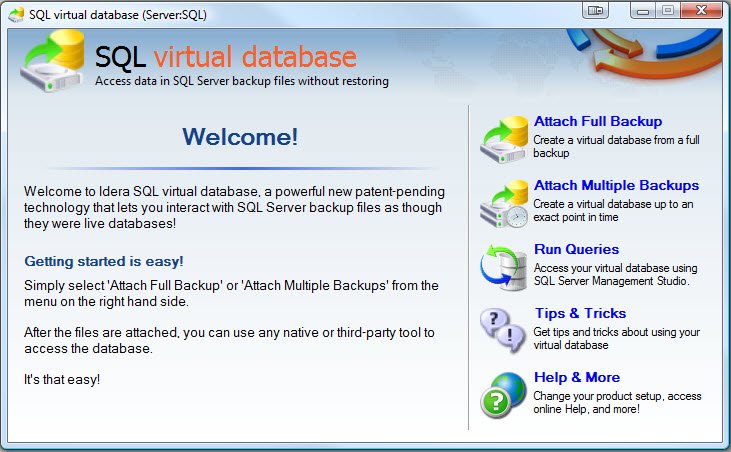
virtual database Console

Harddrive Space before virtual database Setup

Attach Full Backup Screen

Backup on Harddrive

Attach Full Backup Screen with Settings

virtual database Setup – less than 60 sec

virtual database Setup – Online
Harddrive Space after virtual database Setup

Point in Time Recovery Option – Timeline View

virtual database Summary

No Performance Difference between Regular DB vs Virtual DB
Reference: Pinal Dave (https://blog.sqlauthority.com)





13 Comments. Leave new
Great post and Great information. Would be very much interested to know more on Virtual database and its usage.
Thanks for sharing and will follow up often.
Regards,
Manish
Hi Pinal,
Thank you for sharing the information and demo on the Product. This product will have lot of usage when you have space crunch on servers, still need a copy of a production database to work with. As you correctly mentioned seems like an off shoot of the virtualisation concept going on right now.
hey man u saved my life by posting this post.. :)
keep up the good work..
thank you.
Regards
Nitesh Chauhan.
Hello!
As always, great, concise and simply put information. Really appreciate it. Following questions do come to me:
1. Once a Virtual database has been created, can we use the same .bak file to “physically” restore it on a SQL Server?
2. Let’s assume we made a few changes in the “Virtual” database (added a few rows to a table, added/removed a few columns). Now, can we restore this updated .bak file and restore it on a SQL Server?
The above would be interesting experiments to try out.
Have a great day!
Thanks & Regards,
Nakul Vachhrajani
This product looks like it might have great promise for our restore scenarios, great find!
Really usefull information.
I have been experimenting with SQL Virtual Database, and I am simply amazed with this tool.
The skeptic is me says, there have to be some pitfalls to it; eg. how are changes persisted if there are no physical files?
How big can the volume of changes be before there is performance degradation?
This tool seems to be working by pure magic… ;-)
Notice: if you detach and attach the same backup again, all your changes are gone! (which could be the intention)
Also I am hitting the “SQL Server has encountered ## occurences of I/O requests taking longer then ## seconds to complete” on virtual databases. If multiple people are running some queries, performance will drop rapidly.
Dear Sir,
I’ve SQL Server 2005 Database Backup with .bak file, Then I’ve modified some tables in my database like adding some new columns in a table.
, Stored Procedures, Functions etc.
Now, I want to restore Data Only from .bak file.
when I tried to restore , It make old database with Data.
Has anyone used the CLI for this tool? I’m currently trying to use the command line interface to regularly load the latest full, differential, and necessary transaction log files via a job, so the virtual DB is always available (and up-to-date from the log shipped TRN files). However, I can’t get the darn thing to work. Using the GUI worked like a champ of course, but this is useless for automating the process via an Agent job. Anyone?
I realize I’m coming at this thread a few years late, but I want to add a note here to update with a current success story and the problems I dealt with:
I got this SQLVDB utility this year, have great success with it. I use the CLI for VDB attach as part of a larger Powershell script to refresh my ERP dev/test environments, turning what used to be a 22 hour process into 25 minutes for all actions. Most of the time is spent copying the backup files to the test server across the network — I *can* mount the VDB from the remote server but not a good idea to add that latency to every read.
The CLI is thinly documented. I needed a few cases with support to figure out what was missing, to know why my commands didn’t work when scripted according to the available docs and samples.
If using an encrypted backup know that the password has to be specified once for each file in the restore set, this was an undocumented syntax that took me a while to work through. So if mounting FULL + DIFF + 4 LOGs, the password is specified 6 times.
Also, you CANNOT rename the attached database or the database will go suspect, and that’s not documented. The tool doesn’t get notified of the rename from SQL so it loses touch with the DB and can’t be reconnected to the new name. So are far as SQL is concerned it tries to read the data/log files — and they’re not available. This makes SQL mark the attached DB as suspect, and since SQLVDB can’t be fixed, the DB can’t be recovered in any way. All you can do is drop the DB and lose your work, then attach a fresh DB in its place.
So the lesson on this one is: get your DB name right the first time. If you MUST rename, back up the DB, attach that backup as VDB with the new name.
But overall once I got the undocumented things worked out the solution works extremely well. I have all my dev/test environments scripted with Powershell, and have one of them on SQL Agent job to auto-refresh every night and be ready in the morning for working through the next day’s support tickets.
Note that I do use it together with the Idera sqlSafe backup tool. It’s not required, but I do get better compression than SQL native compression. And overall my space savings are huge — the production database would take 600GB for data & log, but the backups only take up 38GB. Multiplied by 6 environments, that’s a lot of disk savings.
The environments are admittedly slower, since it’s reading a backup file, decompressing & unencrypting. The speed is still very usable though, and the benefits far outweigh the problems. And of course once a piece of data is in data cache then speed is no longer a problem. If I really need a speed tweak I could move all the files onto 2 SSDs in RAID1, and they wouldn’t have to be big or expensive SSDs, letting the SSD speed (hopefully) offset the RAID1 write penalty and gaining speed on reads.
Hi, I am late for the thread, but I am trying to figure out a DRP + dev/qa environment for the company, I wonder if somebody had already try use Idera VDB for DRP purpouses?, We already have a Data Domain tool for backup, replicated backups into our secondary datacenter, restore all 27 TB data under DRP scenario, is the challenge about 48-96 hrs, not enough as business is online invoice platform. Also AppDev wants to take advantage of the DRP environment by using restored DB as source for environments, automated the tasks as Tony mentioned before. The matter here is if VDB could be enough in order to support a DRP scenario and compatible with Data Domain backups format…
Hi all,
The most problematic point for me is that idera virtual database does not work with backup that have been compressed when you create your backup file with sql server.