
I have set up replication at many different organization. One error I quite commonly face is after I have removed replication I can not remove database. When I try to remove the database it gives me following error.
Cannot drop the database because it is being used for replication. (Microsoft SQL Server, Error: 3724)
Fix/Workaround/Solution:
The solution is very simple. Create the empty database with the same name on another server/instance first. Take full back of the same and forced restore over this database.
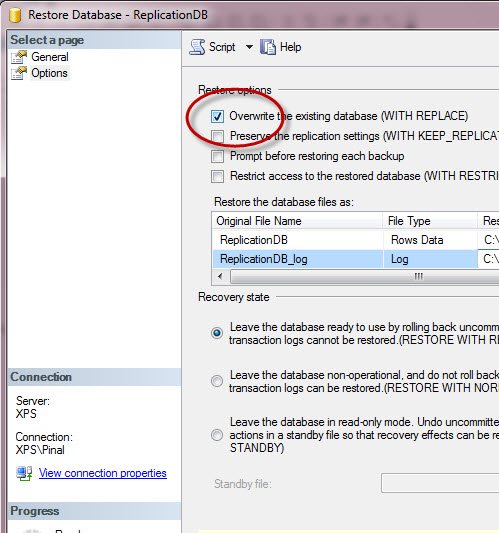
Do let me know if you have any better idea or suggestion.
Reference : Pinal Dave (http://blog.sqlauthority.com)


Believe I had this problem a year ago and the fix was to manually remove the subscriptions. There seemed to be entries left after the SSMS style deletion. Used sp_droppullsubscription on the subscriber and then to follow up cleaning on the publication sp_dropsubscription
I’ll test that out maybe later. This is coming from poor old guy memory ;-)
Hello!
This is a nice, new way to trick the SQL Server into “forgetting” that a database is marked for replication – and is different than the one I am used to using; which has aroused my curiosity.
The databases in the system that I sustain are typically configured in a replicating configuration with one publisher/distributor (our product does not support isolated publisher/distributor configuration) and n number of subscribers (highest count in production is 25). The high-level sequence that we typically follow during a server move and/or server rebuild is:
1. Unregister the subscribers one by one
2. Uninstall the distributor
3. Remove the distribution DB
4. Uninstall publisher
5. Finally run sp_removedbreplication on all servers to remove any meta-data that the server might have remembered
6. Now, backup/remove the databases
My question now is: what is the difference (internally) between sp_removedbreplication and the method described in this article?
Have a great week-end and an exciting week ahead!
Thanks,
Nakul.
Can’t we use this?
EXEC sp_dboption ‘AdventureWorks’,'published’, false
For me, sp_removedbreplication ‘dbname’ usually works.
Excellent!!! This worked for me, thanks.
Gr8….Issue resolved with this.
sp_removedbreplication ‘dbname’ –> worked Thank You.
Thanks…It worked Excellent :)
Hi pinal,
You can try running this sp after removing replication, once the proc is run, try dropping the database.
EXEC sp_replicationdboption @dbname = N’Test_db’, @optname = N’publish’, @value = N’FALSE’ — Remove the replication bit before detaching
GO
Thank you
This is a simple trick but very well-functioning !!!
Thanx a lot…
sp_replicationdboption did the trick.
The SQL Agent has to be started.
Thx
Thanks Ramdas!
(1) Removed the replication using EXEC sp_replicationdboption
(2) Detached the DB
Successful!
EXEC sp_removedbreplication ‘DBName’ did the trick for me as well
Simple solution is to take that database OFFLINE and then delete the database….!
sp_removedbreplication ‘DBName’ ..
Excellent!!! This worked for me, thanks
For remove all objects created by any replication…….
DECLARE @name nvarchar(150), @Tabla Varchar(100), @Instruccion Varchar(250)
DECLARE Objs_cursor CURSOR FOR
SELECT T.Name, O.Name
FROM sys.sysobjects O JOIN sys.tables T On T.object_id=O.parent_obj
WHERE SubString(O.Name,1,7)=’MSmerge’ or SubString(O.Name,1,7)=’repl_id’
order by O.name
OPEN Objs_cursor
FETCH NEXT FROM Objs_cursor
INTO @Tabla, @name
WHILE @@FETCH_STATUS = 0
BEGIN
Set @Instruccion=’ALTER TABLE ['+@Tabla+'] DROP CONSTRAINT ‘+ rtrim(@Name)
Print @Instruccion
Print ‘GO’
FETCH NEXT FROM Objs_cursor
INTO @Tabla, @name
END
CLOSE Objs_cursor
DEALLOCATE Objs_cursor
DECLARE @name nvarchar(150), @Tabla Varchar(100), @Instruccion Varchar(250)
DECLARE Objs_cursor CURSOR FOR
SELECT T.Name, O.Name
FROM sys.sysindexes O JOIN sys.tables T On T.object_id=O.Id
WHERE SubString(O.Name,1,7)=’MSmerge’
order by T.Name, O.name
OPEN Objs_cursor
FETCH NEXT FROM Objs_cursor
INTO @Tabla, @name
WHILE @@FETCH_STATUS = 0
BEGIN
Set @Instruccion=’DROP INDEX ['+ rtrim(@Name)+'] ON [dbo].['+rtrim(@Tabla)+'] WITH ( ONLINE = OFF )’
Print @Instruccion
Print ‘GO’
FETCH NEXT FROM Objs_cursor
INTO @Tabla, @name
END
CLOSE Objs_cursor
DEALLOCATE Objs_cursor
DECLARE @name nvarchar(150), @Tabla Varchar(100), @Instruccion Varchar(250)
DECLARE Objs_cursor CURSOR FOR
SELECT Name B, Name A
FROM sys.sysobjects
WHERE SubString(Name,1,7)=’MSmerge’
order by name
OPEN Objs_cursor
FETCH NEXT FROM Objs_cursor
INTO @Tabla, @name
WHILE @@FETCH_STATUS = 0
BEGIN
Set @Instruccion=’Drop View ['+ rtrim(@Name)+']‘
Print @Instruccion
Print ‘GO’
FETCH NEXT FROM Objs_cursor
INTO @Tabla, @name
END
CLOSE Objs_cursor
DEALLOCATE Objs_cursor
DECLARE @name nvarchar(150), @Tabla Varchar(100), @Instruccion Varchar(250)
DECLARE Objs_cursor CURSOR FOR
SELECT Name
FROM sys.tables
order by name
OPEN Objs_cursor
FETCH NEXT FROM Objs_cursor
INTO @name
WHILE @@FETCH_STATUS = 0
BEGIN
Set @Instruccion=’ALTER TABLE['+ rtrim(@Name)+'] DROP COLUMN rowguid’
Print @Instruccion
Print ‘GO’
FETCH NEXT FROM Objs_cursor
INTO @name
END
CLOSE Objs_cursor
DEALLOCATE Objs_cursor
And for remove replication tables:
SET NOCOUNT ON
DECLARE @tablename NVARCHAR(128)
DECLARE @RC INT
DECLARE curTable CURSOR FOR
SELECT [name] AS tbl
FROM sys.objects
OPEN curTable
FETCH NEXT FROM curTable
INTO @tablename
WHILE @@FETCH_STATUS = 0
BEGIN
EXECUTE @RC = dbo.sp_MSunmarkreplinfo @tablename
FETCH NEXT FROM curTable
INTO @tablename
END
CLOSE curTable
DEALLOCATE curTable
GO
Finaly for permanently remove replication:
exec sp_removedbreplication ‘DB’
Send your comments…. [email removed]
Take the database offline and then delete it using SSMS.

