
I have set up replication at many different organization. One error I quite commonly face is after I have removed replication I can not remove database. When I try to remove the database it gives me following error. Here is the simple fix I use for Error 3724. The message says the database cannot be dropped because it is being used for replication.
Cannot drop the database because it is being used for replication. (Microsoft SQL Server, Error: 3724)
Fix/Workaround/Solution:
The solution is very simple. Create the empty database with the same name on another server/instance first. Take full back of the same and forced restore over this database.
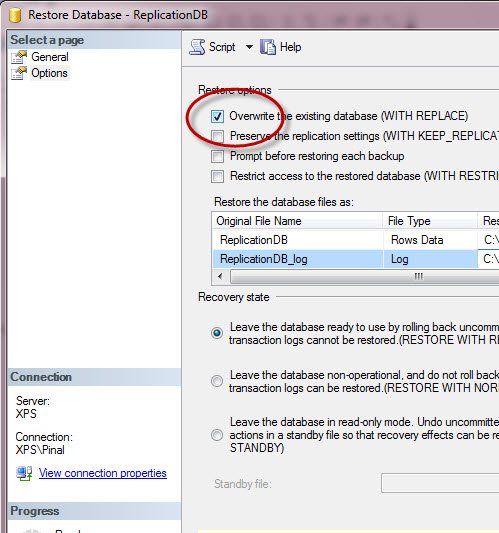
Do let me know if you have any better idea or suggestion.
What to Check When a Database Used for Replication Won’t Drop
Before you try any workaround, find out what SQL Server still believes about the database. The replication flags live in sys.databases. Look at the is_published, is_subscribed, is_merge_published and is_distributor columns. If any of them shows 1, some replication setting is still attached, even after you removed the publication. It takes a few seconds and tells you where to look.
A cleaner route than backup and restore is the system procedure sp_removedbreplication. You pass it the database name, and it removes the replication objects from that database. In many cases the drop goes through right after that. Run it on the correct instance, because it does exactly what its name says. If only the publish flag is stuck, sp_replicationdboption with the publish option set to false can switch it off as well.
A few mistakes I have seen more than once:
- Dropping the database before removing the subscriptions and publications in the proper order.
- Forgetting that the restore trick overwrites everything in that database. If there is any chance you need the data, take a real backup first.
- Running the cleanup on the wrong server. On a busy day, check
@@SERVERNAMEbefore you press F5.
Once the database is gone, open SQL Server Agent and look for any leftover replication jobs that still point to it. Old jobs that fail every night only add noise to your alerts.
Published by Pinal Dave on SQLAuthority. More of my work at pinaldave.com.
Discover more from SQL Authority with Pinal Dave
Subscribe to get the latest posts sent to your email.




41 Comments. Leave new
EXEC sp_replicationdboption’AdventureWorks2014′,’publish’,false
Then we can go ahead and drop the database
I did this: right click on Replication -> Publisher Properties -> Publication Databases -> Un Select the Databases that were throwing error, click Ok. Again try the Delete Database operation, now it’s deleted successfully.
Yes. It worked for me. That’s a simple solution indeed!
Set it offline, then you should be able to drop it.
@Barry – I must say “There are more ways than one to skin a cat” and you found one more.
sp_removedbreplication ‘YourDB’
Go
drop database YourDB
Simply use this system procedure “sp_removedbreplication”
then drop your database normally.
This has worked for me, thanks
sp_removedbreplication databasename
Found a Neat way to do that. its just a single query : exec sp_removedbreplication ‘DB_NAME’
Agreed. Thanks for sharing it.
is there a way to script the process using powershell?
works cool