
Perhaps, the best thing about technical domain is that most of the things can be executed in more than one ways. It is always useful to know about the various methods of performing a single task. Today, we will observe four different ways to find out recovery model for any database.
Method 1
Right Click on Database >> Go to Properties >> Go to Option. On the Right side you can find recovery model.
Method 2
Click on the Database Node in Object Explorer. In Object Explorer Details, you can see the column Recovery Model.

Method 3
This is a very easy method and it gives all the database information in one script.
SELECT name AS [Database Name],

recovery_model_desc AS [Recovery Model]
FROM sys.databases

GO

Method 4
This method provides only one database at a time.
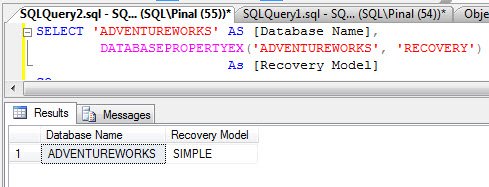
SELECT 'ADVENTUREWORKS' AS [Database Name],

DATABASEPROPERTYEX('ADVENTUREWORKS', 'RECOVERY')

AS [Recovery Model]
GO
My recommendation
Of all the above methods, I prefer Method 3. It is accurate and can be used in T-SQL code. Besides, I can use it for many other purposes as well.
I would like to know which one is your favorite method .
Reference : Pinal Dave (https://blog.sqlauthority.com)




40 Comments. Leave new
Some useful information below:
Databases Default Recovery Model Can we change the recovery model Are backup required? Can be restored? : note: all system databases are version dependants. Can SQL services be started without these databases?
master Simple Yes (Full, Diff, Simple) Yes Conditions Apply: If master becomes unusable, you can return the database to a usable state in either of the following ways: a. Restore master from a current database backup. If you can start the server instance, you should be able to restore master from a full db backup. b. If severe damage to master prevents you from starting SQL Server, you must rebuild master. No
model User Configurable Yes (Full, Diff, Simple) Yes Yes, its possible to restore the model db. If severe damage to master prevents you from starting SQL Server, you must rebuild master. No, it will first started but after few seconds services will gets stopped itself.
msdb Simple (Default) Yes (Full, Diff, Simple) Yes Yes, its possible to restore the model db. If severe damage to master prevents you from starting SQL Server, you must rebuild master. Note: Make sure the collation is same in the backup set. Yes, it will display “Recovery Pending”, it will not logg any server information and SQL agent services will be started somehow it won’t display any job and when try to access any folder located under SQL Server Agent, it will display an error message saying “Failed to retrieve data for this reqeust”. Though we can see the Error log folder, and associated errors occur in the sql server. Once we have msdb files, we need to restart the sql services.
tempdb Simple No, you can’t change the recovery model for tempdb. It will remain “Simple” No No No
resource NA NA No Yes, could be rebuild as well. Yes
Configure Distribution Simple Yes (Full, Diff, Simple) Yes Yes Yes
Will you please explain me, what you have written exactly..
It is very difficult to understand, looks like full of Q and A…
But little bit complex to go through it
really so grate
Good Info , Pinal . Simple and straight forward. I am huge fan of T-SQL ,So , my vote is Option3 .
hello,
I have take database backup but after 2 hour my HD cresh and now I want database recovery please help here .. how can take my database recovery again
my vote is Option3 .
your explanation about any topic is simple and understandable thank you
Option 3 is especially helpful comparing multiple databases that “should” have the same settings. (Dynamics GP multiple companies). Thanks.
I like Method 3 the best.
#3
Pinal, you don’t understand how many times I have come to this site with a question and ended with not only an answer, but a new hindsight of how to achieve my database goals. thank you!
mine are first 3 ways. I didnt understand the ladt one to find out the recovery model.
I can get all status with a glance using Method 3
Thanks
16 years after this post I used method 3 today when moving a MSSQL database from on AWS EC2 to RDS – it came up on a pre-migration check using DMS.