Just a day ago I received a question from a reader who just installed SQL Server 2008. After the installation user did not find any sample database along with installation. The user wants to install the sample database which he is very much used to.
UPDATE: Please watch the updated video of Installing AdventureWorks Sample Database.
Sample database is now moved to Microsoft’s open source site of Codeplex. Visit following link to visit the Sample Database page.
CodePlex SQL Server Sample Database
There are two different methods to set up sample database. 1) Running SQL Script 2) Restoring Database Backup. There are a few common steps in both the process. We will see the common process first and then after see both the method to set up a sample database in detail.
Common Steps:
Download the .msi package from codeplex based on your operating system and your SQL Server version. I have used Adventureworks DB version of 2005 as that is what was questioned from user. If you download version of 2008 it can only be installed in version of 2008.
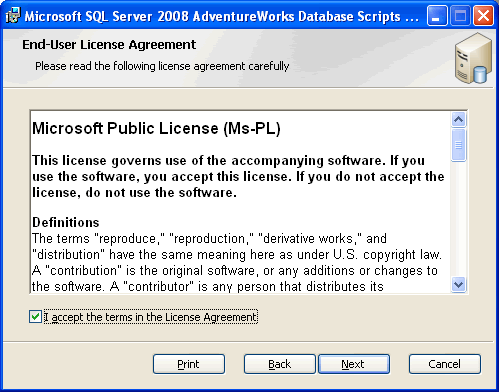
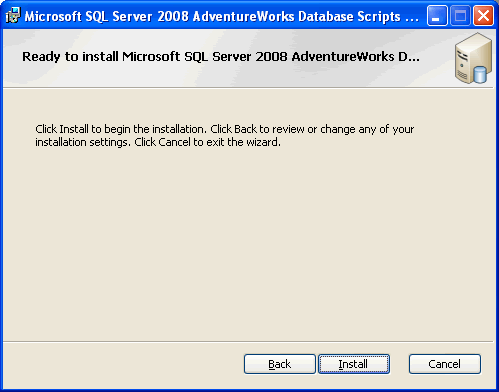
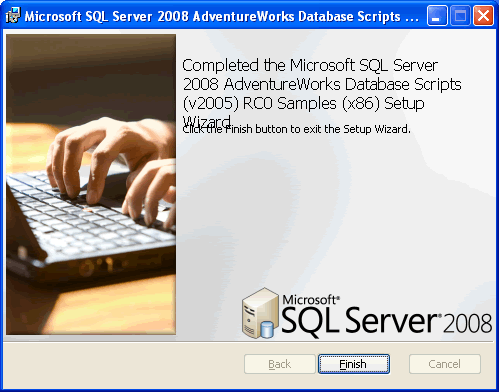
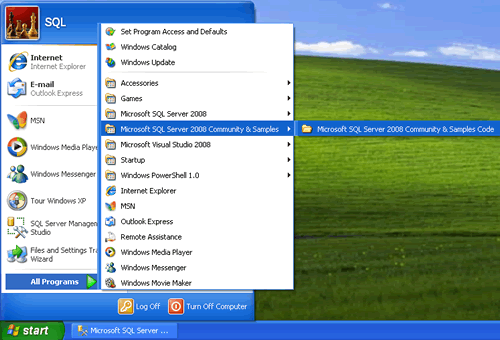
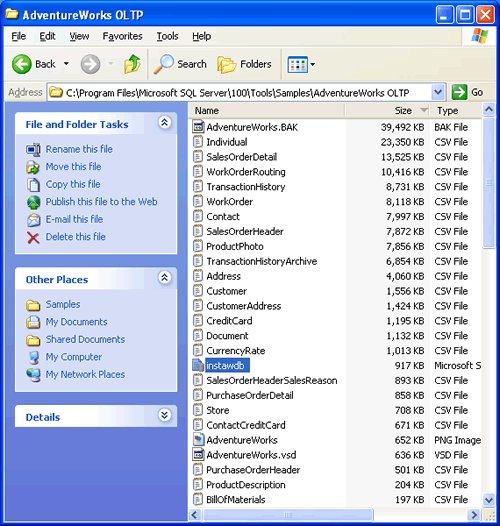
Most of the images are self explanatory so I will let images explain most of the details.
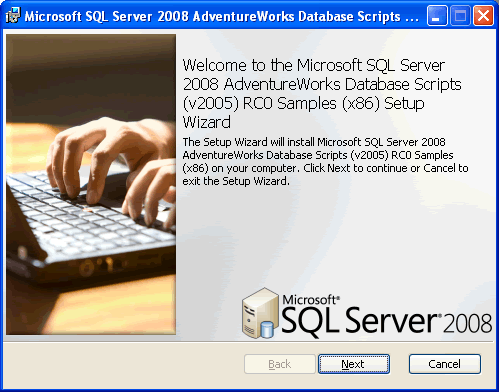


Above image displays the location where Sample Database is installed. Please note the location of the same database as “C:\Program Files\Microsoft SQL Server\100\Tools\Samples\AdventureWorks OLTP“
Method 1 : Using T-SQL Script
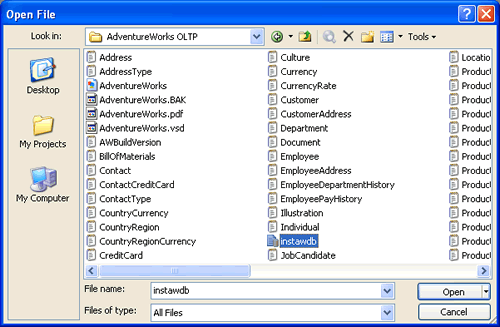
Open SQL Server Management Studio and open the file instawdb from the location where sample database are extracted “C:\Program Files\Microsoft SQL Server\100\Tools\Samples\AdventureWorks OLTP“.
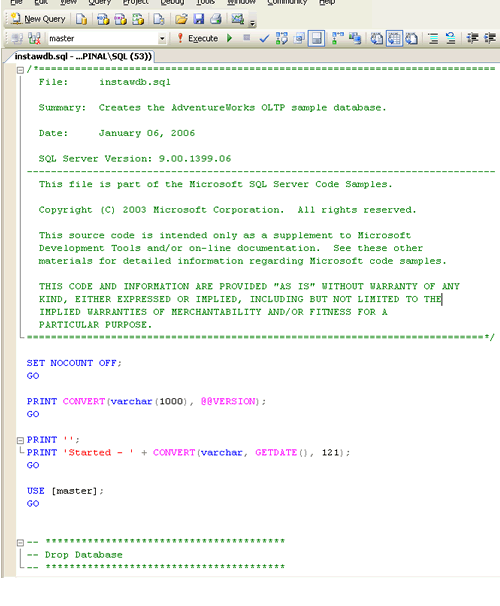
Now make sure that you find variable @data_path and change its values to the location of the database. This is very important task otherwise your database will be created with empty tables.
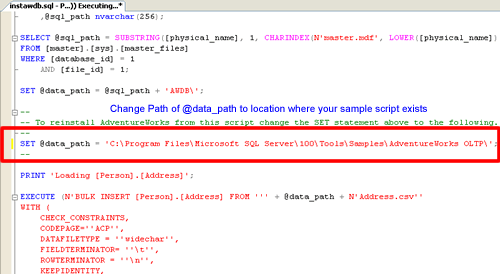
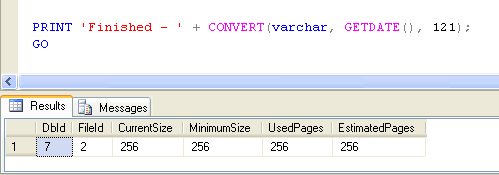
Once the script is successfully running, following result set will be returned.
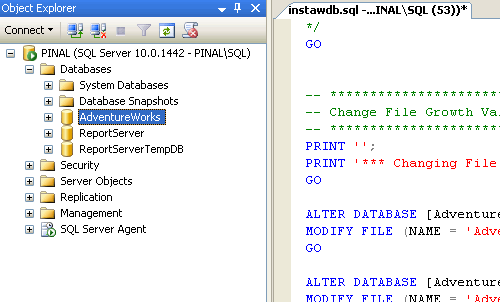
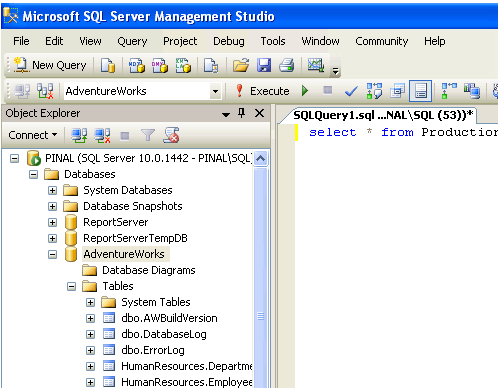
Check AdventureWorks database in object explorer.
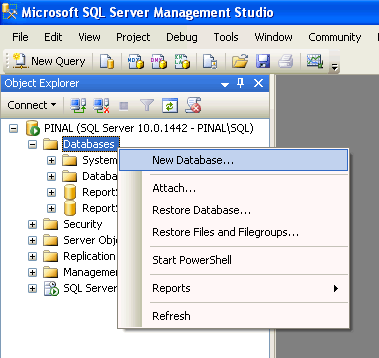
Method 2 : Restoring Database Backup
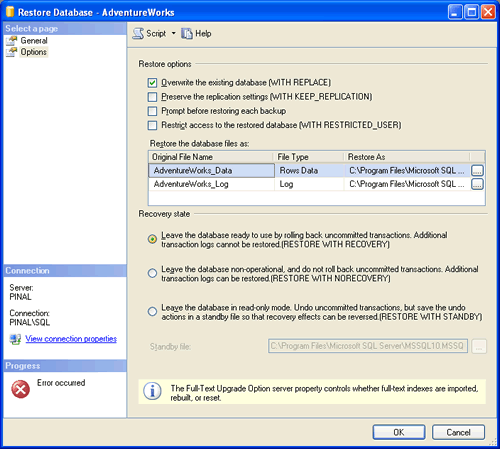
This method requires to create empty database initially and then after restoring it from backup. Please pay attention to radio buttons and checkbox on the screen as it is very important to select the right options when restoring database.
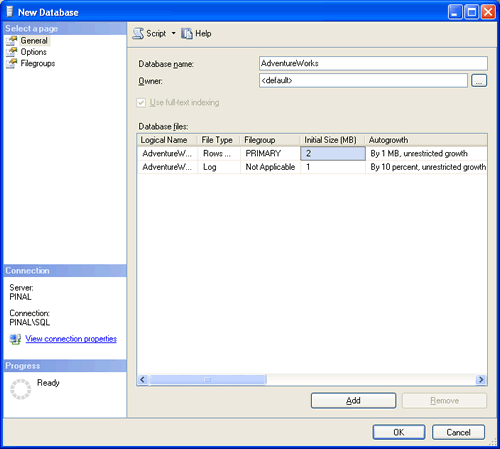
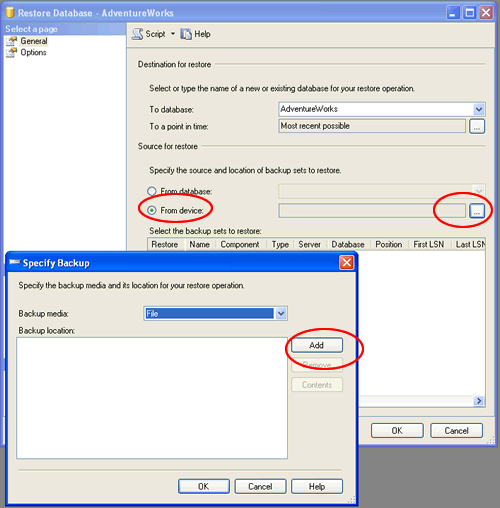
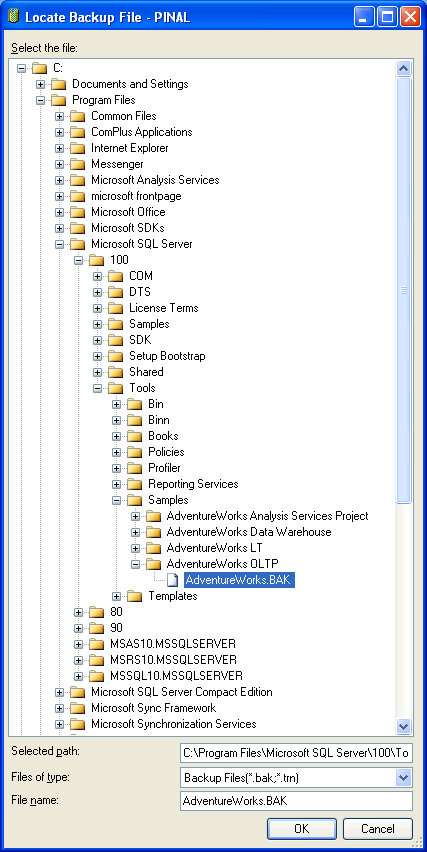
Location of Database backup is where sample database is extracted “C:\Program Files\Microsoft SQL Server\100\Tools\Samples\AdventureWorks OLTP“.
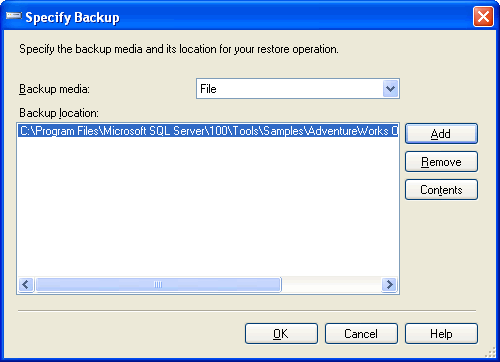
The following screen is most important, make sure to select options displayed in the screen or database will not be restored.
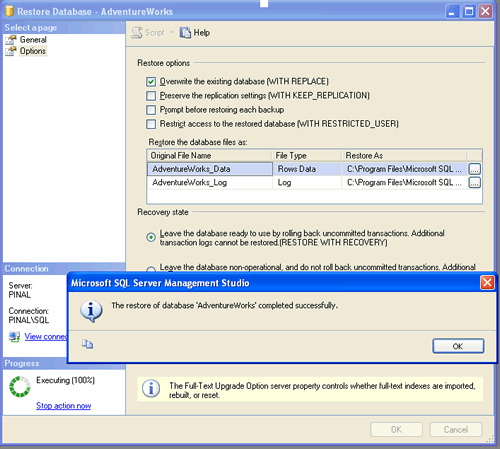
Check AdventureWorks database in the object explorer.
If you want to install AdventureWorks database version 2008, the methods works fine. There is an additional sample database are available in the same package and they can be installed in a similar way. If you want to install Northwind database follow my previous article SQL SERVER – 2005 NorthWind Database or AdventureWorks Database – Samples Databases – Part 2.
Let me know what is your experience while setting up a sample database with SQL Server 2008. Additionally, let me know what you think about this in depth explanation of the process of setting up sample database.
Reference : Pinal Dave (http://blog.SQLAuthority.com)


hi, andar here, i just read your post. i like very much. agree to you, sir.
Very nice
luckyregister is hosting my web site and i have a new web pages getting uploaded this week with forms to collect names emails squeeze pages they are for real estate so the luckyregister.com gives me choices of DATABASES: ACCESS, MYSQL, and SQLSERVER. BUT I DONT know how in the world it works or how to setup anything in the sql server. stuff. like i dont know how to tie the commands queries schemas to work. i dont eve n know what ot ask you thats how confused i am about this when i looked at the databse and what it has in its admin area.. is it easyy to setup but just dont have the directions what do i do if you were me.?????????
Mike
This worked perfectly, even for a novice ;)
Thanks!
J
One thing to add to the docs is that filestreaming needs to be enabled. I’m an oracle person, so not everything is intuitive, and I felt like an idiot for not being able to get the samples installed. So your site was a wonderful resource and the only set of instructions that got me through this (I followed option 2) Thanks much! lc
Thank you for this.
I was so annoyed at the SQL server samples install. It was so stupid. Sometimes I wish there would be a message saying :
“WARNING : Installing the sample databases look easy, but is actually quite difficult. Do not expect a simple wizard. Even though it looks like you are just going to press intall on the MSI package, you actually have to build the database from TSQL an change programming code to match your setting after this wizard has installed the files. Also, this wizard will not help you at all trying to figure out what kind of files you should open or at all how to make sense of this install. The documentation is able to help you, but it is structured in such a way that 90% is irrelevant and it is almost impossible to discern wether what you will be reading is relevant. Do expect loss of hair during this install.”
one things left if i see your pic SQL2008.AdventureWorks_All_DB_Scripts.x86.msi has 80495K but i downloaded it n it has SQL2008.AdventureWorks_OLTP_DB_v2008.x64.msi
source code, 44740K, uploaded Aug 7 – 1240 downloads
getting more confuse…did i miss something?!?
Thanks a lot.
Absolute newby on SQL SERVER and the sample db’s are a nightmare to install when just statring out.
Spent hours trying to work out what I was doing wrong, I did manage to get the blank db’s install then spent ages trying to figure out why empty.
Eventually found a post with a link to this, should really make it a “sticky” on codeplex forum. Luckily I was balding before I started to try and install.
On a serious note for any newby’s something which should be so simple, quick and easy has seemingly been made very complex, hard and long when a guide similar to this is all thats needed.
Many Thanks !!!
Your site is at the top of the list of my “Favorites”. This is the go to place for solutions.
I followed Method 2 to restore database back up,I did the same procedure but I’m getting following error at the end of final step,
System.Data.SqlClient.SqlError:The path that is specified by
C:\Program Files\Microsoft SQL Server\MSSQL10.MSSQLSERVER\MSSQL\DATA\AdventureWorks.Documents’ cannot be used for FILESTREAM files bacause it is not on a supported system.(Microsoft.SqlServer.Smo)
What could be the reason?
I am using sql express and I don’t have the server management studio. I can’t seem to get sqlcmd to work because it can’t find the dql script even though sqlcmd and the script are in the same directory.
Any suggestions would be welcome.
Roger
I am using 2008/Express. A little different from your screenshots, but close enough I could figure this out.
Like many others because it was an MSI I wasn’t expecting to do anything once it finished.
The biggest clue was to click start.
hello,
when I try to install the setup I get this error message
PrepInstance() failed for MSSQL$SQLSERVER2008. the following features are missing: Full Text Search fix the problems and re-run setup
please tell me how to fix it.
thanks
Works like a charm for SQL Server 2008!
[...] For installation instructions please refer my previous article here. [...]
Hi Pinal,
When I am trying to install sample database got error “full text search feature missing” Install first that and installation
didn’t complete (Roll back)
Please let me know what to do
Regards
I have the same problem.. Did you get an answer?
Regards,
MC
I also have the same problem. Full Text Search is installed.
Best Regards,
Salil.
Hi,
The Full Text Search service was stopped , I had to enable it from the
Sql Server Configuration Manager -> Sql Server Services -> Sql Full Text Filter Deamon Launcher ( MSSQLSERVER ).
I installed SQL2008.AdventureWorks_All_Databases.x86.msi and it worked for me.
Best Regards,
Salil.
Hi,
I have installed MS SQL server 2008 express version. I tried to install the Adventureworks sample database from the site you mentioned.
I went through the installation process and at the end it gives the following error
——————————————————————
PrepIndstance() failed for MSSQLSERVER
The following feature are missing : Full Text Search
Fix the problem and re-run the setup
——————————————————————-
I have installed the SQLserver 2008 express on Vista.
So how would I enable the ‘Full Text Search’ ?
Do I have to install it or have to change any swith?
Please let me know,
thanks,
Jay
Hi,
I don’t see the following in my configuration manager,
‘Sql Server Configuration Manager -> Sql Server Services -> Sql Full Text Filter Deamon Launcher ( MSSQLSERVER )’
so i cannot enable it. Does that mean I have to install it?
thanks,
Jay
Hi,
You’ll need to go to windows services and set the following service from disabled to manual then start it:
SQL Full-test Filter Daemon Launcher(MSSQLSERVER).
if you don’t have that installed rerun MSSQL 2008 and make sure you see the full-text search feature enabled…
Pinal,
I’ve googled this for many days and have not found an answer.
When installing SQL Server Express 2008 with Advanced
Services using bootstrapper or running the exe directly
I receive ‘the downloaded file is corrupted’ or .net framework JIT error. Management Studio 2005 installs fine
but 2008 fails to install.
Thanks in advance for your assistance.
Follow these steps to fix the ‘PrepInstance() failed for MSSQLSERVER’ issue…
1. Open SQL Server Configuration Manager
2. Right-click on SQL Full-text Filter Daemon Launcher(MSSQLSERVER) and select ‘Properties’
3. Click on the ‘Service’ tab
4. For Start Mode, select ‘Automatic’, then Apply and OK
5. Click on the Start button
I have been trying to install the Sample Databases for SQL Server 2008 for days and can’t seem to find any relevant information!
I don’t seem to have and .bak files anywhere? If they are not there how can I do a restore? Is there another way round this? Can I run the SQLScript in the database folder?
Any help much appreciated! :)
Ive have the same problem. There is no AdventureWorks.bak file? All other files are present. (it did ask me to debug 5 times during the .msi install.
When trying option 1 instead of the restore option, i fail to find the @data_path in the instawdb file.
A double block for me.
What can i do?????? please help
hey hello pinal sir…
i m trying to install SQL srver 2008 since a log….
but always got stucked at one point….
actully it wants ACCOUNT NAME and PASSWORD for all analysys,reporting and fulltext filter FDHOST services…
but i m not getting tht asking for which account name and password….
can u assist me for tht…
and suoopes i have no account created for thn is there any default account name and password can be used in place..
please provide me the help…
waitintg for response…
is anyone else thn pinal sir have same que and have any solution thn request to help.
@Jigar,
Why don’t you create a local account.
start – (right click) My computer select Manage -Pop up will open – Expand Local Users and Groups – Right Click Users Click New User and provide some basic details and thats it, you will have a local user A/c.
I have just seen screen shots for SQL Server 2008 installation, But in those screen shots I did not see any where it mentioning default built-in administrator account ( 2005, 2000). So I don’t think you have any other option but to create a local or domain user account and have it given appropriate privileges to run that service.
Screen Shots Step by Step Installation of SQL Server 2008:
Link : http://experiencing-sql-server-2008.blogspot.com/2008/09/step-by-step-installation-of-sql-server.html
Regards
~IM
@Jigar,
You can visit my previous article : http://blog.sqlauthority.com/2008/06/12/sql-server-2008-step-by-step-installation-guide-with-images/ for additional information as well.
@Imran,
As usual, I appreciate your comments. You have been most helpful person on this domain.
sir i read your installation guide, i installed it correctly and i found no error but while using i found only system tables. while using method 1 i was unable to find @data_path and i tried for 2 method but i found back file in the folder can u hhelp me out
I followed these steps in the link to install Sample database ino SQL server 2008. In Step 1. I can NOT find @data_path in instawdb.sql. Aslo when I when this script, I got
Msg 102, Level 15, State 1, Line 26
Incorrect syntax near ‘:’.
but ” :on error exit” is correct syntax.
Because Method 1 fails, I chooose Method 2. There is no *.bak file under /100 and its subdirectories.
Please give some help. Thank you
Samething here. I did not find @data_path variable. I downloaded v2008.x86.msi
It also contains the following comments in the script -
– Be sure to enable FILESTREAM before running this script!
– Be sure to enable FULL TEXT SEARCH before running this script!
–>> WARNING: THIS SCRIPT MUST BE RUN IN SQLCMD MODE INSIDE SQL SERVER MANAGEMENT STUDIO. <<–
:on error exit
/*
* NOTE: These environtment variables are set by the installer package (MSI).
* In order to run this script manually, either set the environment variables,
* or uncomment the setvar statements and provide the necessary values if
* the defaults are not correct for your installation.
*/
–:setvar SqlSamplesDatabasePath "C:\Program Files\Microsoft SQL Server\MSSQL10.MSSQLSERVER\MSSQL\DATA\"
–:setvar SqlSamplesSourceDataPath "C:\Program Files\Microsoft SQL Server\100\Tools\Samples\"
Sorry, it’s all set. The AdventureWorks database is already installed. It looks like I don’t need to do the rest of steps. Thanks.
I did not have to do what this site sugests to get my samples database up and running. I downloaded the samples databases from the URL below
http://msftdbprodsamples.codeplex.com/Release/ProjectReleases.aspx?ReleaseId=18407#DownloadId=48051
executed the msi, restarted sql service agent and a bunch of databases got attached to my sql 2008 instance
AdventureWorks
AdventureWorks2008
AdventureWorksDW
AdventureWorksDW2008
AdventureWorksLT
AdventureWorksLT2008
ensure you download SQL2008.AdventureWorks_All_Databases.x86.msi
I am running sql 2008 Microsoft SQL Server Enterprise Evaluation Edition in server 2003 STD
Good luck!
Bulolla
Hi Pinal,
I have installed sql server 2008 and found all the tables of AdventureWorks 2008 are present in the master database. The AdventureWorks sample db which I downloaded do not have any file with extension .Bak and also there is no “@data_path” variable present in the script.The screenshot present in the site is of the old script and I downloaded the updated one.So I request you to explain how to use this script and how to restore db using the updated AdventureWorks 2008 sample db.
Thanks for your help in advance
Hi.
I have installed on my computer visual web developer 2008 express edition, but I when I deploy my web site on the remote server I cannot access my account or any other account. What should I do?
regards
Hi, I don’t see the back up file under C:\Program Files\Microsoft SQL Server\100\Tools\Samples\AdventureWorks OLTP,
What should I do?
Hi,
I am using SQL Server 2008 – Developer Edition [Microsoft SQL Server code name "Katmai" (CTP) - 10.0.1300.13 (Intel X86) Feb 8 2008 00:06:52 Copyright (c) 1988-2007 Microsoft Corporation Developer Edition on Windows NT 6.0 (Build 6001: Service Pack 1) ]
While installing I selected Fulltext Search feature, however when I open the Configuration Manager I do not see any FullText Search Services running.
Thus I am not able to install the sample database using the .msi since it rolls back and asks me to enable Fulltext Search.
I tried to re-install the complete SQL Server and again carefully chose FullText Search, still I do not see the Full Text Search service.
Could anyone help me, how could I overcome this difficulty ?
Also, the setup of this build does not show “Add New features to the existing instance”, thus I am not sure how we can add new features to this instance which were not installed at the first installation.
Thanks,
Nusrath
please contact me on my email address.
i can give you more better solution of your problem.
Please Send me SQL Server 2008 Full Version Dowanload Link
HI,
I hav downloaded the msi file and just instlled it.its created the Adventureworks databases automatcially and I did not followed any method.
thanks a lot for the link.
regards
srini
Dave,
This is a very good article, the key thing it did was get me to the correct download for 2008.
However, this article and a few others fail to mention one thing: After installing SQL 2008 Express with Advanced Services or updating it to have Full Text Search, on a Windows XP workstation, don’t forget to go to the SQL Server Configuration Manager and start the service. :)
The error will come up that Full Text Search is not installed when the AW DB .msi file is run if the service is not running.
I found this when trying to figure out why the AWDB would not install. I knew the dialog saying Full Text Search was not installed wasn’t true: It should read when it IS installed “Please Start the Full Text Service”.
In the process of also verifying that FileStream was enabled, I noted the service was not running. Indeed, during install I did note that the option was fixed at Manual at install time. I figured the .msi package would start it and indeed this probably was the idea.
Anyhow, for anyone who needs the input who is also on an XP Workstation and does not have a separate box to run as a SQL Server … start the ruddy service as above and the AWDB will then successfully install.
Nusrath,
I initially had the same problem with developer. What I did was completely uninstall all editions of SQL (I had some Express versions in there I think). I even deleted any leftover folders after I uninstalled everything. Restart the computer. Once I did that, I created an account with just user privileges. I reinstalled SQL 2008 and made sure that for the full-text daemon login/password I put in my new user with limited privileges (this is during the installation process). I had no errors this time around and was able to install AdventureWorks successfully.
Of course I probably did not need to uninstall everything, but I just wanted to make sure that I started with a clean slate. You could probably be able to do the same thing by simply creating a user with limited privileges and change the server settings from there.
P.S I am using Windows XP Professional
Diana
The step Select local database instance is missing from your screen shot.
I am stuck at that step. When I select SQLSERVER2008(Engine), the Next button still remains disabled.
Hi Pinal,
My issues are identical to Lalit except I have installed SQL Server Express 2008, which doesn’t have AdventureWorks 2008 present in the master database but no .bak file & no “@data_path”. I can’t believe how ridiculously hard it is to install sample DBs compared to 2005!
Lalit
Hi Pinal,
I have installed sql server 2008 and found all the tables of AdventureWorks 2008 are present in the master database. The AdventureWorks sample db which I downloaded do not have any file with extension .Bak and also there is no “@data_path” variable present in the script.The screenshot present in the site is of the old script and I downloaded the updated one.So I request you to explain how to use this script and how to restore db using the updated AdventureWorks 2008 sample db.
Thanks for your help in advance
Nice and good information, i need this info thanks
my sqlserver don’t be installing this masassage always show when i need installing and i can’t solved this problem
the massage is “rule “pervious releases of microsoft visual studio2008″ failed
a pervious realease of microsoft visual studio2008 is installed on this computer . upgrade microsoft visual studio 2008
to the sp1 before installing sql server 2008″
i need help please
Nice write up. Very informative.
Congratulations, very clear your article.
I want to sql server2008 for use my compony
hi thanks for the information placed in ur blog
it helped me a lot in installing adventure works in my sql server data base
i appreciate the way u share data with every one
thx alot
Hi, when installing the AdventureWorks2008_SR4 i have this error:
Fatal error occurred during installation. Details:
Error de la inicializacion del objeto 8ISupportInitialize.EndInit). Error al recuperar un generador de classes COM para el componente con CLSID {4590F811-1D3A-11D0-891F-00AA004B2E24} debido al siguiente error: 80004002. Error en el objeto ‘DatabaseSelection’ en el archivo de marcado ‘DatabaseInstaller;component/databaselection.xaml’ Linea 78 Posicion 3.
Im using win7 ent. 32bit
thank you, this post saved me a lot of time. :)
instructions are precise and concise
tyvm
I just wanted to add my thanks to all the others.
I was in dispair and then found this.
Just one point when the instanwind.sql file was loaded in SQL server there was no occurrence of SET @data_path so I was thinking “oh oh, here I go again”, but being desparate I ran it anyway and it worked.
It was there in my databases and eventually I could connect to it after I had reversed some configuration settings I had tried earlier.
Now I can connect in Visual Studio too.
Thanks again.
Patrick
can’t find the @data_path variable. will u plz mention in which line it is?
thanks in advance,
syamantak
no commamt
[...] SQL SERVER – 2008 – Download and Install Samples Database AdventureWorks 2005 – Detail Tutoria… [...]
i want sql server now
Google it and try downloading it from the one you feel right.
Sorry, but I do not see any of these install files under Downloads & Files as the codeplex site
Thanks
i need download link where is it
I have been trying to install the Sample Databases for SQL Server 2008 as suggested by you. The link “CodePlex SQL Server sample Databases” displays the following message:
“This page has moved, please wait while we redirect you to the new page”.
Please tell me from where I can download the sample databases for SQL Server 2008 Express
I have been searching for AdventureWorks DB and Northwind DB. But I could not find both. Can anybody specify the Link to Download these DBs.
Thanks.
Awesome material, thank you very much for the info.
Can you please give me the link to download AdentureWork Sample Database for SQL 2008, PLEASE.
hello sir,
kindly plz suggest me a site through which i can download the free SQL SERVER..
plz do let me know the full version and the path so that i can download it right away as it seems to very complicated..
Thanking You,
yours sincerely
rebecca gurung
date-31-07-2010
Thanks Pinak for your blog Its amazing.
Just wanted to know what is SQL Server 2008R2
I want to download the sql server 2008 to tral version where cani can the full donwload
Thanks in advance.
Nagesh
Thanks Pinal..
plz sent to me sql server 2008 r2 full source plz
sql server data base
Lots of people complain about ‘Component/databaseselection.xaml line 78 position 3’ problem. I had the same problem, just solved it by stopping all SQL Servers except the one where I supposed to install those examples. Actually I have SQL Server 2008 Express and SQL Server 2008 Standard. They where running under different accounts Network Service and LocalSystem accordingly. Maybe the problem was different accounts, I did not investigated this, I just stopped SQL Server 2008 Express and run installation again – it worked.
Thanks,
Andrey
Hi Pinal,
I upgraded SQL Server 2005 standard edition to SQL Server 2008 Standard edition. But problem is that old version of SQL Server 2005, i can still access it..means it is still there in start>>Programs.
Why is that?
Any help will be highly appretiated.
Thank You.
Dinkar
hello sir,
kindly plz suggest me a site through which i can download the free SQL SERVER..
plz do let me know the full version and the path so that i can download it right away as it seems to very complicated..
Thanking You,
yours sincerely
Hamid Ali
date-31-07-2010
Dave,
I am interested in downloading adventureworks 2008
LT R2. Can you do a manual Command LIne Prompt using Visual studio aspnet_regsql for sql membership (I do not wish to use the wizard? How is this done? Thank you…
Hi Dave,
I am having a devil of a time with the 2008R2 version. There is not a AdventureWorks OLTP file on my AdventureWorks download.
Is this part of the 2008R2 AdventureWorks? Am I missing something from the 2008R2 SQL Server?
Thanks,
Lisa
Thank you sir.
We love you …
bye bye
CodePlex SQL Server Sample Database
link is not working….
I want adventurework database for readin 70-433.
when try to attach Adventureworks in SQL server 2008 Standerd edition this error is occuring :
CREATE FILE encountered operating system error 5(Access is denied.) while attempting to open or create the physical file ‘C:\Program Files\Microsoft SQL Server\MSSQL.1\MSSQL\Data\AdventureWorks_Data.mdf’. (.Net SqlClient Data Provider)
Can you tell me how to solve this problem???
Hi PinalSir,
Hi PinalSir,
i Downloaded Adventure works and now i am going for method two to install it i created a databs manually which is empty now i am trying to pass a file from “FROM DEVICE ” option like you have shown in snap.
but it is asking for BAK file and i dont have bak file as i had .mdf and .log files so can u suggest me how i can get through this??/
THANKS and REGARDS
Kamesh Shah
The database is not available at the link specified here. I want the AdventureWorks Database for SQL Server 2008 and I am using windows 7 64 bit ultimate.. please tell me where can i find it.
Please update with new version
Thank you. Method 1 worked well for me. I could run it after I enabled the environment variables that were commented out at the top of the script. I used the latest 2008 R2 Aventureworks Db.
hi mr pinalsir,
thank you, your article is very helpful. :)
Really This is very nice step by step learning .
thank you.
hi i am kanji
how to download SQL Server managemant studio
and how to instolation to pc
hello sir,
kindly plz suggest me a site through which i can download the free SQL SERVER..
plz do let me know the full version and the path so that i can download it right away as it seems to very complicated..
Thanking You,
yours sincerely
Kanji Dabhi
date-14-03-2011
Here is SQL Server 2008 express link with Management Studio. I know your question was asked a while back, but in case you are still looking, here you go
http://care.dlservice.microsoft.com/dl/download/5/5/8/558522E0-2150-47E2-8F52-FF4D9C3645DF/SQLEXPRWT_x86_ENU.exe
Here is the 64 bit version
http://care.dlservice.microsoft.com/dl/download/5/5/8/558522E0-2150-47E2-8F52-FF4D9C3645DF/SQLEXPRWT_x64_ENU.exe
hi dear i want ur Demo plz Send me this Demo dear ur Demo is very usefull for Every Person
where we can find SQL2008.AdventureWorks DB Script v2008.x86.msi
SQL2008.AdventureWorks DB Script v2008.x86.msi
is not there anymore, anyone can provide a sample to me? plz send to [email removed]
You can find the Adventure Works database here. I think the zip is the light version of the database and you will have to attach it as opposed to restoring it (easier).
http://msftdbprodsamples.codeplex.com/releases/view/37109
Hi All,
Please let me know how can I add server on SQL SERVER CLIENT 2000
Regards,
Sunil kumar Kaushal
Thanks Pinal,
I was trying to attach AdventureWorks2008 OLTP database on SQL Server 2008R2 but there is an incompatible version issue which did not go away even after applying all SPs.
I successfully scripted the database in with the help of this article.
Thanks again,
Sena
Hi
Im having same problem attaching can you please confirm which script you have followed
Thank you very much. You tried using SQL Server 2008? Intellisense drives me mad! Is there any way to deactivate it?
Thanks, Tarrist.
Refer this post to know hot to disable or enable Intellisense
http://beyondrelational.com/blogs/madhivanan/archive/2011/07/04/exploring-ssms-enable-disable-intellisense.aspx
Hi All,
Please let me know how can I add server on SQL SERVER CLIENT 2005
Regards,
jitendra patel
Hi
All
I m finding difficulty to attach all sample databases download from code plex,
Error message displays as version of sql currently is lower version 654 compared to the databases which i have downloaded these were new version 661
any help……….
thanks
i am also facing same problem . can u send me the 661 version DB .
this is very good example
thats the issue im facing any one please help us…………
My sql server 2008 installation stops in between without any error.plss help
I have installed AdventureWorks2008R2_SR1
from http://msftdbprodsamples.codeplex.com/releases/view/55926
its automatically install all sample DB to my local db machine.
no additional setup..
anyway thanks
I tried to access the codeplex site for Adventureworks sample DB’s for a few different types, and each one times out. What’s up with that?
I tired install AdventureWorks2008R2_SR1 but in starting fatel error ocuring and my database some tables are avlable but no data only structur.how happing i dnt knw
how to install full sample database to my database ?
hello sir, this is yeswanth, im working in a small it company, i have a small doubt, can i install sql server 2008 directly by downloading the software
hi i would like if someone can sand me some tutorials or to tell me how to build a database for restaurant :)
Hi Thanks for this
sir while iam opening the sql2005 it will ask the password iam entering the password but it will be closed
sir iam creating a database with name student in sql2008 i got an error at locate back up file iam not getting my data base on that so please help to solve this problem.,,,,,,,,,,,,,,
I installed Microsoft SQL server 2008 I have adventure work database that I want to install, I am not sure how to install it can u give more description of how to do it.
Trying to install the adventure work dbase using the 2nd method however i am not locating the backup file. I am using the installer packaged dwnloaded from codeplex. Is there something i am doing wrong as this is getting VERY frustrating.
need sql server software
Danish Ahmed Siddiqui
Unable to open the physical file “D:\Tech\umbraco\build\App_Data\umbraco.mdf”. Operating system error 5: “5(Access is denied.)”. (Microsoft SQL Server, Error: 5120) please help me on it
Thanks!
Hi want to download SQL Server 2008 Express Edition, how do i go about it please help
link is dead
The specified release was not found. on link
link is down
The links are fixed.
Can any one suggest a good site to learn SQL Server 2008. There are many articles in the web, most of them will jump into conclusion too soon….
Thanks in Advance!!!
Atique
Sir kindly tell me the procedure how i use adventure works sample files in my real environment.Thanks
It is sample files and for practicing only.
i want to download SQ L server 2008
I m finding difficulty to attach all sample databases download from code plex,
Error message displays as version of sql currently is lower version 661
the server supports 654 version .
could u provide Downloadlink .
thanks alot
i want to download adventureworks but i dont now how to download
For all those who want to download SQL Server 2008, Express editions are available for free at Microsoft Download Centre website. Here is the direct link to download SQL Server 2008 R2 Service Pack 2 – http://www.microsoft.com/en-in/download/details.aspx?id=30438
Similarly, R1/SP1 for 2008 and previous versions of SQL Server are also available.
Please read the overview section and the information below that to understand the best product suitable for your use as there are multiple options available for download at each link (for e.g. SQL Server 2008 R2 Express with Tools / with Advanced Services / (Runtime Only) / Management Studio Express)
P.S. – A little bit of google search before asking for help never hurts.