In previous post I have mentioned about SQL SERVER 2005 – Vista Ultimate and SQL Server 2005 DEV Edition. There was one simple issue with the installation. I was not able to login using windows authentication method. I was able to successful login using sa username and password.
I kept on receiving following error.
TITLE: Connect to Server
——————————
Cannot connect to SQLAUTHORITY.
——————————
ADDITIONAL INFORMATION:
Login failed for user ‘SQLAUTHORITY\Pinal’. (Microsoft SQL Server, Error: 18456)
For help, click: http://go.microsoft.com/fwlink?ProdName=Microsoft+SQL+Server&EvtSrc=MSSQLServer&EvtID=18456&LinkId=20476
——————————
BUTTONS:
OK
——————————
After a while I realize that this may be due to one needs Administrator rights to do any task in SQL Server. I added the my current login as administrator in SQL Server and next time I was able to login successfully using Windows Authentication.
Following diagrams explains the fix.
1. Error while using Windows Authentication

2. Login using SA username and password and go to Security >> New Login
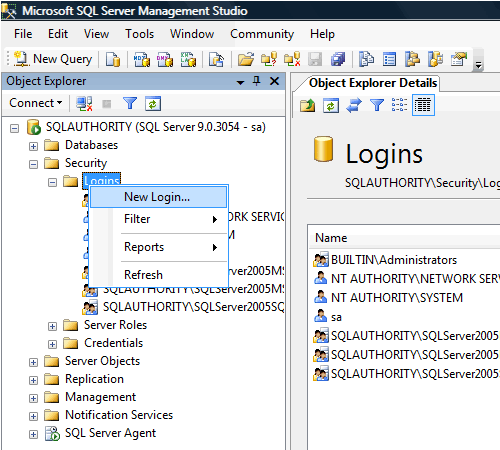
3. Type In Login Name as ComputerName\UserName

4. Click Server Roles and check sysadmin server role, after that click OK.

5. Now login using Windows Authentication and it should work fine.

Reference : Pinal Dave (http://blog.SQLAuthority.com)


Usually during the install on Vista – once completed, you get the “User Provisioning Tool” prompt at the end of the install – this is where you can assign admin privileges to user accounts so that you (and others) can log in after install.
That way you don’t have to know the sa password to create logins.
Makes life much easier when not in Mixed Mode.
Sorry, should have mentioned that you will need to install SP2 in order to get full functionality on Vista. And I’m pretty sure the User Provisioning Tool was introduced in SP2 – but I can’t remember for sure.
Good Solution for Windows Authentication Problem
I have installed SQL Server 2005 Developer edition on a new Vista machine, I have Service pack 1 installed but not 2, had not known of it yet
I have gotten the same erorr message
I am very new to this, I am trying to do an Online course, but cannot get past this install to even try the program
I do not have a network, so how would I be able to set up a SA account and passwerod to go through this fix?
I find this unreal that during setup I was not setup as default admin
Any help or leads would be gratefully used
Hank D
I just right clicked server manager studio and “run as administrator” and it logged in with windows authentication.
Hope it helps someone
I have installed SQL Server 2005 Express Edition with Management Studio Express on my new laptop running Vista Home Premium (ouch) and I am getting authentication errors (18456 ) every time. I tried run as admin with no luck. Both accounts I created have admin rights and both wont work.
I tried reinstalling SQL twice as well. I disabled all security features on Vista thinking that might be the problem. I have this setup running on 2 XP Pro machines and have never seen this error. Anyone have any ideas on how to solve this?
Note: I am just trying to connect to the database engine using Windows authentication, not mixed mode. When trying to setup an account using SQL authentication I receive the same error when testing.
3rd time installing was the charm. I had a currupt CAB file that I think was causing this error connecting to the local machine/DB. Glad that’s gone. I was starting to think that Vista was the problem.
Hi Pinal,
I have selected only Windows Authentication mode and now I am on Vista and not able to login. Is there any way to overcome this probelm or Do I need to re-install SQL Server?? Let me know Thanks
Julian
I just right clicked server manager studio and “run as administrator” and it logged in with windows authentication.
Hope it helps someone
—–
Julian,
It has helped me. THANKS MUCH.
I re-installed 2005 Standard edition and after 2 hrs of breaking my head, I came across your message.
Thanks a ton
if you right click the exe and select properties, then the compatibility tab, at the bottom is a checkbox “Run as Administrator” check that and click apply. Now it wil run as admin every time. No need to right click it again.
Great, thanks!
Thanks,
It was very useful…
Hi Julian,
What a simple solution to my frustrating problem .
Thanx a lot
Hi Jessie,
Nice solution it has helped me a lot
I also right clicked server manager studio and “run as administrator” and then logged in with windows authentication.
I use vista business with sp1.
“you cannot login using SA username and password and go to Security” because in vista ultimate you set up Sql Server 2005 with Windows Authentication.
So if you set up your sql server 2005 with Windows Authentication then you cannot use SQL Server Authentication.
For removing error no 18456 you have to use method listed below.
Use “SQL Server 2005 Surface Area Configuration” to add yourself as an administrator on the SQL Server Instance. In Vista, a Windows admin is not a SQL admin by default – they need to be added.”
I also find method to configure Report Server in Vista Ultimate for SQL Server 2005. If anybody needs it then mail me on “hardikmehta75@yahoo.co.in”
Julian,
thank you so much…was pulling my hair out until you saved the day!
Other posts suggest you go into SQL Server 2005 Surface Area Configuration and select “Add New Administrator” however, when I click “Add New Administrator” nothing happens.
I was able to logon as Julian suggested by right clicking, select “Run as Administrator”.
I have detach the one database from my server using droping all connection to remove the log files (because it was filling up all my database space). Now I cant login to SQL Server from my server using Administrator Account. It gives me “ERROR 18456″. what are my options?
Additional Information
I am using Window Server 2008 and SQL Server 2008 so you know
anil,
change the default database for that login and try again,
may be helpful
This error is easy to solve:
Right click on SQL Server Management Studio and click On “Run As Administrator” which is usually the third option
THANKS JULIAN!!! U’RE SO HELPFUL!!!
Thank you sooooo much
Jolian
right click and run as Admin solve my problem
sql error 18456
[...] Solution to above problem is very simple and I have already posted solution for this in my earlier article. SQL SERVER 2005 – FIX Error: 18456 : VISTA Windows Authentication [...]
thaaaaaaaaaaaaanks alot
Thanks for the article PINAL, it solved my problem! I just had the same problem trying to connect to SQL Server 2005 instance using Windows Athentication. Cheers!
Wow varma helped me after 2 days of nothing..Right click server management studio and run as admin. Then you can connect honly cow..LOL
Julian,
Thanks a lot! You made my day. ^_^
thank you for info.
Hey, who ever thought to try Run AS Administrator…may have remembered something from Microsoft Academy. Thanks for reminding me.
I too am completely new to Management Studion and have no idea how/or where, I would type the SA solution (though I have seen it posted elsewhere also).
Any ideas?
Hi Pinal,
It’s fine that after selecting ‘Run as Administrator’ or by creating an user with Admin rights, we can get rid of this error (18456 and can connect to the SQL Server 2K5 Mgmt Studio.
But there’s another problem which is external to mgmt studio. When you try to connect to the same sql 2k5 db instance from an external source (lets say an SSIS package), then we dont get any databases populated in the db drop down box, in the Connections dialog box in SSIS. Hence, we cannot select any db and set up a connection.
Can you help me solve this problem?
Is it that I need to install a patch or something?
I’m running my SQL Server 2K5 on Windows Vista.
Regards,
Bhushan
I got this problem resolved.
FYI, when we run SQL Server 2k5 on vista, by default, the administrators are not considered as users with admin privileges for the sql db instance. You need to specify yourself as an administrator somewhere within the sql server known area. This is pretty simple (but actually I had to hunt a lot to get this point :-( ).
Click on Start –> Programs –> Microsoft SQL Server 2005 –> Configuration Tools –> SQL Server Surface Area Configuration. After this on the newly opened dialog box, click on the link ‘Add an Administrator’. This tool is termed as an User Provisioning Tool. From here, you can drag the desired user (which should have adminstrative rights) from left list box to right list box.
Now, try connecting to the db instance, without right-clicking and selecting ‘Run as Administrator’. It will get connected as a charm ;-)
Thanks!
Bhushan
Great Work..pinaldave…I was stuck with same thing in Windows 7.
Now all the problem is solved..
Thank you very much.
hi, well I have a problem whit SQL SEVER MANAGEMENT in Windows vista Home premium, ERROR 18456, I try everyting,
example: sa and password, windows authentication mode, sql authentication, nothing works I realy need help…
and 1 question: how can i know what’s instances u have installed in my pc ?
tnks any way :-D
Thanks a lot, It was very helpful.
hey i ve installed visual studio 2005 with sql express 2005 on vista ;but it dont give me permission to do any thing when i connect using windows auth…
i want to change the auth mode to both and i want to enable the sa login
or create a new login
but it says no permission to do such thing…
plz reply me on my email ….
thnx
Thanks for the post!!!