
In the last month, I have received calls from quite a few of my customers about Ransomware. Particularly this weekend it has been very busy with over 8 customers had issues with Ransomware. However, we were lucky enough to have proper database backups and pre-cautions in the place and hence we were able to recover quickly and without downtime. Today, I decided to write up small notes for everyone who wants to protect their database from Ransomware.

SQL SERVER – Management Studio Missing – SSMS 2014 not Installed with SQL Server 2014
Recently I got a message on Skype about SSMS.
Hi Pinal, Need quick suggestion. I am unable to find ssms.exe after installation of SQL Server. Do you know how I can install it?
Initially I thought that since SQL Server 2016 doesn’t come with SQL Server Management Studio, this would be an expected behavior. So, I shared my blog to him.

SQL SERVER – Unable to See Tables (Objects) in SSMS
Once I was thrown into an interesting situation where a client told me that he can see the data from the table but not the table. I asked him to elaborate more and he sent me below screenshots where he was unable to see the table in SSMS.
SQL SERVER – Powershell Script – Remove Old SQL Database Backup Files from Azure Storage
Few days back I wrote blog to help my blog reader and this is follow up on the same post How to Add Date to Database Backup Filename? – Interview Question of the Week #109. In this blog post we will see a powershell script for Removing Old SQL Database Backup Files from Azure Storage.

SQL SERVER – SQL Server: Getting OS information using DMV
I am used to exploring what is available in the technology of love – SQL Server. As I was exploring into one of the simplest set of DMVs which have been available for ages. There are several ways to get the OS information inside SQL Server. One of the ways is to use the DMV as shown below.

SQL SERVER – Script to Find and Monitoring TempDB Space Usage
I have started blogging on my site long ago and my whole idea was to make script repository so that others can reuse it. Now when I look back, there are many scripts and many solutions which I have written. Personally, I have used many of them. Today I am sharing another script which I have used with one of my clients and it was very useful for me in troubleshooting a strange TempDB log file issue. Let us learn about Monitoring TempDB Space Usage.
SQL SERVER – SSMS Tip – Using Drag and Drop Capability
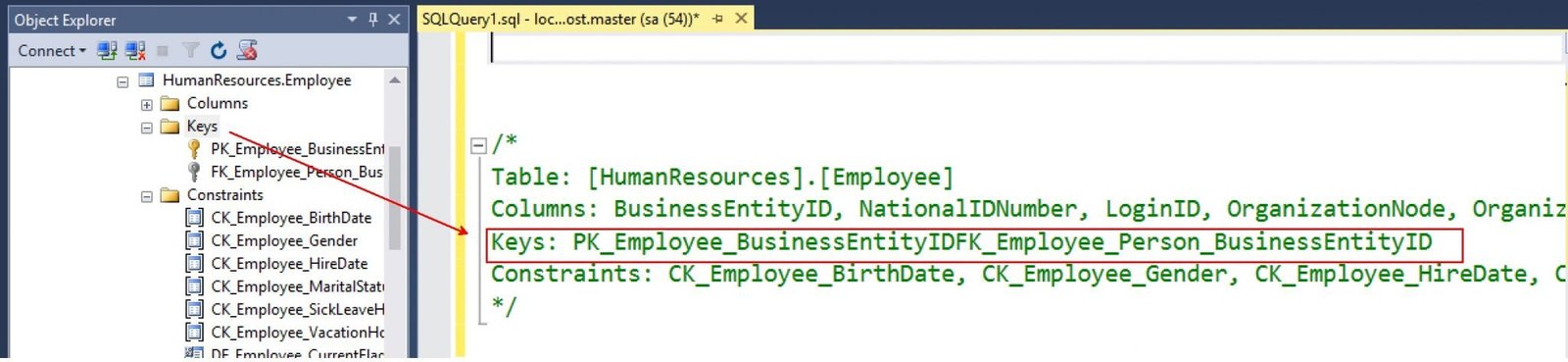
SQL Server Management Studio is an interesting tool. The more you work, the more you discover tricks from it. It doesn’t come as a surprise to how I get to know something new whenever I talk with someone. People have figured out new ways to work with SSMS. In this blog, let me talk about something interesting that has been with SSMS for ages but lesser known. Let us see today a time about SSMS related to Drag and Drop Capability.