geometry STCrosses uses the dimension and interior position of the intersection to define crossing. I compare it with endpoint contact and collinear overlap. A shared point or segment does not automatically satisfy that definition.
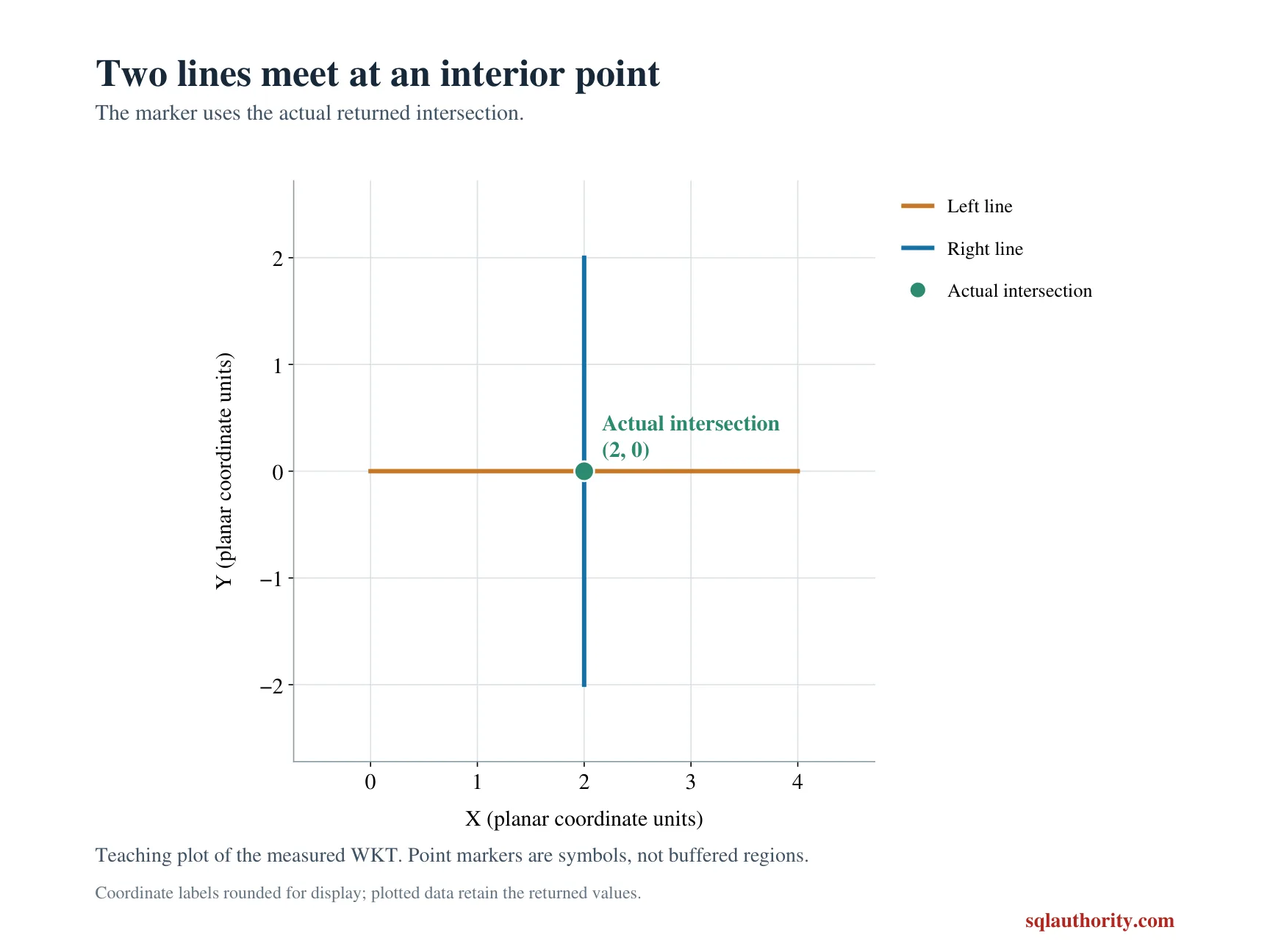
For two lines, an interior crossing can produce one shared point. Two lines meeting at their endpoints can produce the same shared geometry type. The location of that point within the source lines still differs.
Compare four lines against one baseline
The left line extends horizontally from zero to four. A vertical line crosses it at horizontal coordinate two. Another vertical line begins at its right endpoint instead.
The remaining inputs are a separated parallel line and an overlapping collinear segment. Every geometry uses reference identifier zero. All inputs are valid and fixed in the query.
The output combines Crosses, Intersects and the shared geometry kind. These witnesses explain why the predicate changes rather than leaving four unexplained flags. No table, spatial index or session setup is required.
WITH Inputs AS
(
    SELECT CaseId, CaseName, RightWkt
    FROM (VALUES
        (1, CAST('Interior crossing' AS varchar(20)), CAST('LINESTRING(2 -2, 2 2)' AS varchar(200))),
        (2, 'Endpoint contact', 'LINESTRING(4 0, 4 2)'),
        (3, 'Parallel separated', 'LINESTRING(0 2, 4 2)'),
        (4, 'Collinear overlap', 'LINESTRING(2 0, 6 0)')
    ) AS v(CaseId, CaseName, RightWkt)
), Shapes AS
(
    SELECT CaseId, CaseName,
           geometry::STGeomFromText('LINESTRING(0 0, 4 0)', 0) AS LeftShape,
           geometry::STGeomFromText(RightWkt, 0) AS RightShape
    FROM Inputs
), Compared AS
(
    SELECT CaseId, CaseName, LeftShape.STCrosses(RightShape) AS Crosses,
           LeftShape.STIntersects(RightShape) AS Intersects,
           LeftShape.STIntersection(RightShape) AS SharedShape
    FROM Shapes
)
SELECT CaseId, CaseName, Crosses, Intersects,
       CASE WHEN SharedShape.STIsEmpty() = 1 THEN 'Empty' ELSE SharedShape.STGeometryType() END AS SharedKind
FROM Compared
ORDER BY CaseId;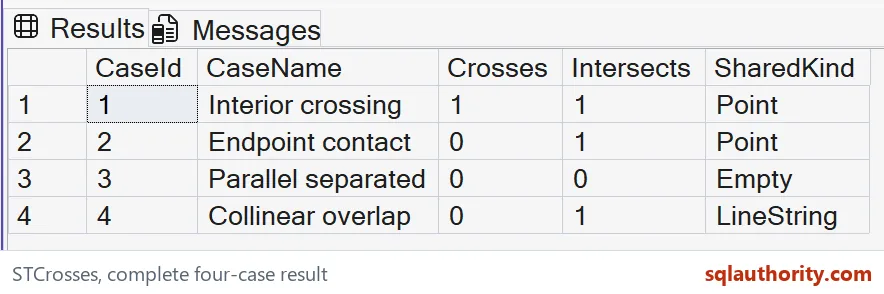
Read the crossing and contact rows
The interior-crossing pair should return one for Crosses and Intersects, with a Point intersection. That point lies inside both source lines. Its dimension is lower than the lines’ dimension.
The endpoint-contact pair should return zero for Crosses and one for Intersects. Its shared geometry is also a Point. The point lies at an endpoint rather than in the interior of both lines.
The parallel separated pair should return zero for both predicates and an Empty shared kind. It has no common points. The query’s Empty label distinguishes that case from a populated point intersection.
The collinear-overlap pair should return zero for Crosses and one for Intersects. Its shared kind is LineString. That common segment has the same dimension as the source lines rather than a lower-dimensional crossing.
Use the complete crossing definition
The intersection dimension must be lower than the maximum source dimension. The shared set must also be interior to both inputs. These examples separate failures of those conditions. A visual interpretation alone can hide the distinction.
The point type is not a sufficient crossing witness. Both the interior-crossing and endpoint-contact rows have that type. Keep the predicate itself alongside any descriptive geometry diagnostics.
Likewise, a general intersection flag is intentionally broader. It includes both endpoint contact and collinear overlap here. Replacing STCrosses with that flag would change the accepted relationships.
I don’t interpret a line crossing as an automatic network connection. Lines can represent separate elevations or business layers that this planar example does not model. A connectivity rule needs those attributes and its own requirements.
Keep the planar example focused
These coordinates use a common abstract plane. They are not a geographic road calculation or a physical elevation model. The query only tests the represented two-dimensional line relationships.
Matching reference identifiers are required for meaningful comparisons. A mismatch can return NULL rather than one of these expected flags. Treat that outcome separately from a definite noncrossing relationship.
The inputs are exact and valid, with no near-contact tolerance. Small coordinate changes can alter their intersection. Applications that treat nearby lines as connected need an explicit tolerance rule outside this demonstration.
The complete four-row result tests crossing, endpoint contact, separation and same-dimensional overlap. Keep those categories when adapting the predicate. A single crossing pair cannot establish that its definition was understood correctly.
Check both the shared shape and where it lies within the inputs before calling a relationship an interior crossing.
Touching is not crossing, it is a shared point at the end of a line.
Published by Pinal Dave on SQLAuthority. More of my work at pinaldave.com.
Discover more from SQL Authority with Pinal Dave
Subscribe to get the latest posts sent to your email.