CAST Without a Length can silently choose a target width that is too short for the source text. I compare omitted and explicit lengths. The same conversion syntax can look harmless while losing the end of a string.
The example uses a 36-character source and a default conversion length of 30. Six characters therefore fall outside the default target. Explicit length 36 preserves this particular source in full.

Use a source with a visible ending
The source contains the uppercase alphabet followed by digits zero through nine. Its last six characters make truncation easy to spot. Both varchar and nvarchar source expressions specify length 36.
The SELECT compares CAST and CONVERT for varchar with omitted length. It also compares default and explicit lengths for nvarchar. Byte-count diagnostics remain beside the complete text values.
Every expression is part of one read-only query over a fixed input. No variable declaration or table definition is involved. That matters because those contexts have a different omitted-length default.
WITH Input AS
(
    SELECT CAST('ABCDEFGHIJKLMNOPQRSTUVWXYZ0123456789' AS varchar(36)) AS V,
           CAST(N'ABCDEFGHIJKLMNOPQRSTUVWXYZ0123456789' AS nvarchar(36)) AS N
)
SELECT CAST(V AS varchar) AS CastVarcharDefault,
       CONVERT(varchar, V) AS ConvertVarcharDefault,
       CAST(V AS varchar(36)) AS VarcharExplicit,
       CAST(N AS nvarchar) AS CastNvarcharDefault,
       CAST(N AS nvarchar(36)) AS NvarcharExplicit,
       DATALENGTH(CAST(V AS varchar)) AS DefaultVarcharBytes,
       DATALENGTH(CAST(N AS nvarchar)) AS DefaultNvarcharBytes,
       DATALENGTH(CAST(V AS varchar(36))) AS ExplicitVarcharBytes,
       DATALENGTH(CAST(N AS nvarchar(36))) AS ExplicitNvarcharBytes
FROM Input;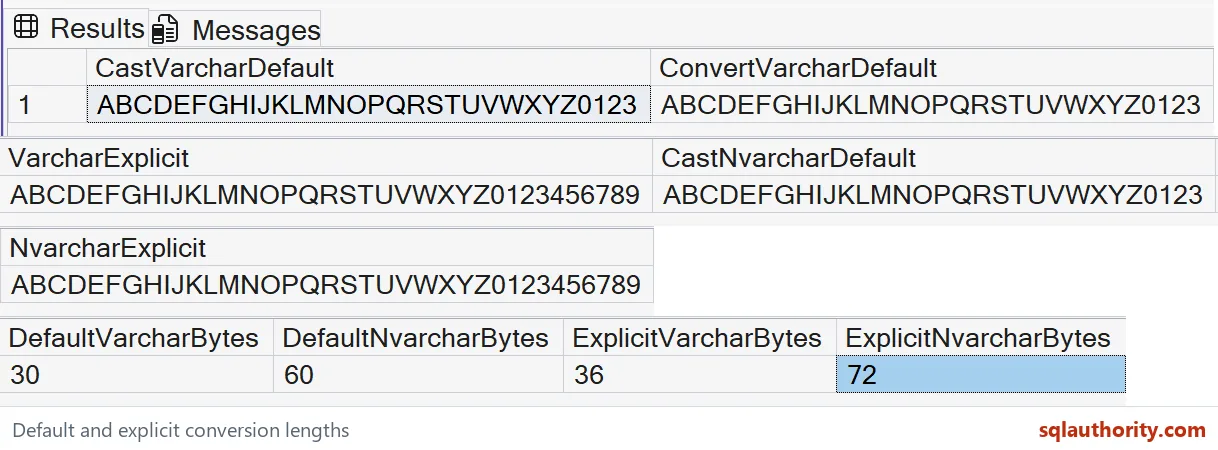
Read the truncated and complete strings
The default varchar conversions should end after digit three. The default nvarchar conversion should do the same. Both target types use length 30 in this CAST or CONVERT context.
The explicitly sized conversions should preserve the alphabet and all ten digits. They should still end with 456789. Compare the full strings rather than abbreviated prefixes.
DefaultVarcharBytes should be 30, and DefaultNvarcharBytes should be 60. The corresponding explicit values should be 36 and 72. These counts apply to the simple ASCII characters used here.
The nvarchar byte count is not the same as its declared character-width number. Its declared length uses byte-pairs. Other character content, especially supplementary characters, needs a separate sizing check.
Distinguish conversion and declaration contexts
CAST and CONVERT default to length 30 when the target length is omitted. A data definition or variable declaration instead defaults to one. Familiarity with one context should not be transferred silently to another.
The query deliberately demonstrates only the conversion case. It does not create a one-character variable or table column. Keeping the scope fixed makes its output directly attributable to the omitted conversion width.
I prefer an explicit target length when the interface needs a known complete string. That makes the choice reviewable in the expression. It also avoids relying on a default that another developer may misremember.
An explicit width is only safe if it covers the allowed source domain. Length 36 works for this fixed input, not every future value. Check the real maximum and encoding requirements before selecting a production width.

Check content as well as length
A byte count alone cannot prove that the right characters survived. Different strings can have equal lengths. Compare the complete source and result when testing a conversion that must preserve content.
Changing a later destination to a larger type cannot recover text already truncated by an earlier CAST. Inspect intermediate expressions as well as final storage. The loss can occur before assignment reaches the destination.
The example makes no performance or schema-migration claim. It isolates an omitted-width conversion choice. Keep a string longer than the default in tests so that truncation remains observable.
Want to run it yourself? Copy the query above into any query window. It needs no tables.
Type the length out once and you never have to remember the default.
A missing length is not neutral, it is a default width that can cut your text.
Published by Pinal Dave on SQLAuthority. More of my work at pinaldave.com.
Discover more from SQL Authority with Pinal Dave
Subscribe to get the latest posts sent to your email.