SUM ROWS versus RANGE distinguishes a row-by-row running total from a total through an ordering peer group. I define the ordering and frame together. Tied business keys need a deliberate rule for individual rows.

Decide whether the running position is a row or a peer group
The sample rows supply four amounts with a repeated OrderKey. The two tied rows carry amounts twenty and thirty. A running balance can advance through them individually or report one total through their shared key.
RowTotal orders by OrderKey and the unique RowId. Its ROWS frame includes each ordered row through the current row. That ordering makes the intended individual progression explicit.
PeerTotal orders only by OrderKey. Its RANGE frame reaches through all rows sharing the current ordering value. The two rows with key two remain peers in that expression.
I keep a third expression using RANGE with the unique ordering tuple. It exposes the effect of the ordering keys separately. A frame keyword alone does not describe the complete peer relationship.
WITH Entries AS
(
    SELECT RowId,OrderKey,Amount
    FROM (VALUES (1,1,10),(2,2,20),(3,2,30),(4,3,40)) AS v(RowId,OrderKey,Amount)
)
SELECT RowId,OrderKey,Amount,
    SUM(Amount) OVER (ORDER BY OrderKey,RowId
        ROWS BETWEEN UNBOUNDED PRECEDING AND CURRENT ROW) AS RowTotal,
    SUM(Amount) OVER (ORDER BY OrderKey
        RANGE BETWEEN UNBOUNDED PRECEDING AND CURRENT ROW) AS PeerTotal,
    SUM(Amount) OVER (ORDER BY OrderKey,RowId
        RANGE BETWEEN UNBOUNDED PRECEDING AND CURRENT ROW) AS UniqueRangeTotal
FROM Entries
ORDER BY OrderKey,RowId;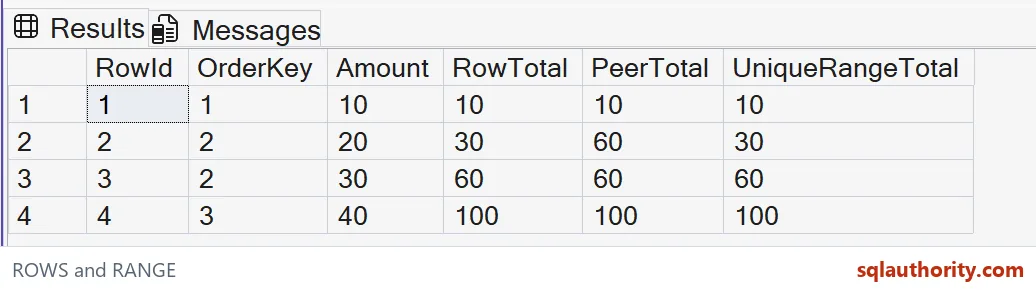
Read the expected accumulation at the tie
The expected RowTotal sequence is ten, thirty, sixty and one hundred. At the second row, only its twenty has been added to the earlier ten. The next row adds thirty afterward.
The expected PeerTotal sequence is ten, sixty, sixty and one hundred. Both tied rows include the complete key-two group. The first displayed peer therefore already shows the amount carried by the other peer.
These expressions use different analytic ordering specifications deliberately. I do not claim that changing only ROWS to RANGE caused every distinction in the grid. The row total needs a unique position, while the peer total retains the shared key.
The final output orders by OrderKey and RowId. That gives the grid a predictable display order. Display ordering alone cannot supply a missing tie rule inside an analytic expression.
Use the unique RANGE column as a control
UniqueRangeTotal includes RowId in its analytic ordering. No two rows share that full tuple. Its expected sequence matches RowTotal in this example.
That control does not make ROWS and RANGE universal synonyms. It shows how peer grouping changes when the ordering tuple becomes unique. A different input or frame extent can produce another sequence.
I’d avoid an individual ROWS progression ordered only by a tied business key. The tied rows would lack a specified internal order. An expected per-row balance could then depend on a choice the query never stated.
A sequence number or event timestamp may also contain ties in real data. Add the actual unique key if individual order matters. Do not assume that an apparently increasing column is guaranteed unique.

Keep the reporting meaning separate from a preferred display
A total through a business period can reasonably assign the same value to every row in that period. A transaction balance may instead need a distinct progression. Choose the result from that requirement rather than which grid looks smoother.
Adding a partition clause starts another accumulation for each group. Filtering the input changes which amounts belong to the supplied sequence. Preserve those population rules beside the ordering and frame.
All amounts in this example are small int values. The query does not test aggregate overflow or claim a storage advantage. A production amount type needs its own range and scale contract.
Keep all three sequences beside the tied ordering keys. The tied pair exposes how a peer group differs from individual row progression. Unique keys alone would hide that contrast.
When reviewing a running total, read the partition, complete ordering tuple and frame together. Then check one tied group by hand. That small comparison is often enough to expose whether the report advances by row or by peer group.
One tied group checked by hand is usually all it takes.
A frame is not the whole ordering contract, it is one part of how peers are defined.
Published by Pinal Dave on SQLAuthority. More of my work at pinaldave.com.
Discover more from SQL Authority with Pinal Dave
Subscribe to get the latest posts sent to your email.