The Messages tab in SSMS tells you what your query did, while the Results tab shows what it returned. Row counts, PRINT output, warnings and errors all land there. Reading it takes a few seconds and saves a lot of guessing.
What the Messages Tab Shows
Every time you run a batch, SQL Server sends back two kinds of output. Rows go to the Results tab. Everything else goes to the Messages tab: how many rows a statement changed, text from PRINT, warnings, errors and timing.
Many beginners stare at an empty Results tab after an INSERT and wonder if anything happened. The answer was in the Messages tab all along. I check it after every run, and I read it before I read the grid.
A Practice Table
The examples use a tea shelf, one small table with a stock column that allows NULL. The script creates a database named SqlBasicsMessages if it’s missing, used only for this example. Then it drops and rebuilds the TeaShelf table inside it. Run it on a test instance, then open the Messages tab.
IF DB_ID(N'SqlBasicsMessages') IS NULL CREATE DATABASE SqlBasicsMessages;
GO
USE SqlBasicsMessages;
GO
DROP TABLE IF EXISTS dbo.TeaShelf;
CREATE TABLE dbo.TeaShelf (
    TeaID int NOT NULL CONSTRAINT PK_TeaShelf PRIMARY KEY,
    TeaName nvarchar(40) NOT NULL,
    BoxesInStock int NULL);
INSERT INTO dbo.TeaShelf (TeaID, TeaName, BoxesInStock) VALUES
    (1, N'Darjeeling', 12), (2, N'Assam', 8), (3, N'Green tea', NULL), (4, N'Masala chai', 20);
The tab reads (4 rows affected). That is the line you will see most. INSERT, UPDATE and DELETE each report a count, and a single row reads (1 row affected).
Rows Affected and Completion Time
A statement that changes data has no rows to show, so the Results tab stays empty. The count in the tab is your confirmation. Compare it with the number you expected before you move on.
UPDATE dbo.TeaShelf SET BoxesInStock = 10 WHERE TeaName = N'Assam';
You should see (1 row affected). A count of 400 where you expected 1 means the WHERE clause missed, and that is the moment to stop. Newer versions of SSMS also add a Completion time line with a timestamp at the end of the output.
Several Statements, One Tab
A batch with several statements gives one entry per statement, in the order they ran. This example keeps going after the error, because a divide-by-zero error ends only its own statement under default settings. Other errors can end the whole batch, the transaction or the connection. Run these three together and read the tab from the top.
UPDATE dbo.TeaShelf SET BoxesInStock = 10 WHERE TeaID = 2;
SELECT 1 / 0 AS Oops;
SELECT TeaName FROM dbo.TeaShelf WHERE TeaID = 2;
You see (1 row affected) for the update. Next comes Msg 8134, Level 16, State 1, Line 2, Divide by zero error encountered. The last SELECT still runs and reports (1 row affected), because SELECT statements report a count too. Line 2 means the second line of the batch, which is where the bad statement sits.
PRINT Output
PRINT sends text to this tab. It’s the easiest way to leave yourself a progress note while a script runs. The text shows up when the batch finishes, or earlier if the server’s buffer fills.
PRINT N'Starting stock check';
DECLARE @Rows int = (SELECT COUNT(*) FROM dbo.TeaShelf);
PRINT N'Rows in the table: ' + CAST(@Rows AS nvarchar(10));
RAISERROR(N'Step 1 finished', 0, 1) WITH NOWAIT;
The last line is the trick for long scripts. RAISERROR with severity 0 and NOWAIT sends its text at once. PRINT can wait for the buffer, so the progress lines appear late. Use NOWAIT when you want to watch a slow script move.
Warnings Are Not Errors
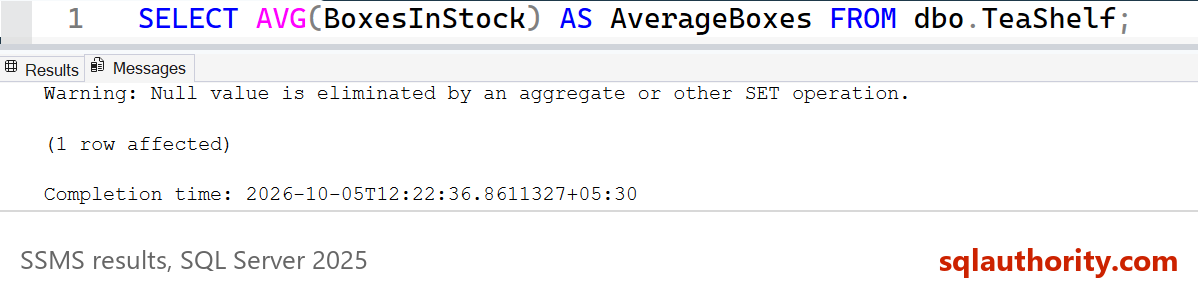
Run an aggregate over a column that holds NULL values. The query works, and the Results tab shows the answer. The Messages tab adds a warning that NULLs were left out. The answer below assumes the earlier UPDATE set Assam to 10, so run it again if you rebuilt the table.
SELECT AVG(BoxesInStock) AS AverageBoxes FROM dbo.TeaShelf;
The warning reads: Warning: Null value is eliminated by an aggregate or other SET operation. Green tea has no stock figure, so the average of 14 comes from three rows, not four. The warning is telling you that. Only you can say whether a NULL means unknown or none left. That decides if 14 is the right answer.
Reading an Error Message Line by Line
Now break something on purpose. The setup script gave the table a TeaID of 1, so this insert repeats a primary key.
INSERT INTO dbo.TeaShelf (TeaID, TeaName, BoxesInStock) VALUES (1, N'Second Darjeeling', 5);
The tab shows red text. SSMS shows this in the Messages tab, and it is output, not code to run:
Msg 2627, Level 14, State 1, Line 1
Violation of PRIMARY KEY constraint 'PK_TeaShelf'. Cannot insert duplicate key in object 'dbo.TeaShelf'. The duplicate key value is (1).
The statement has been terminated.
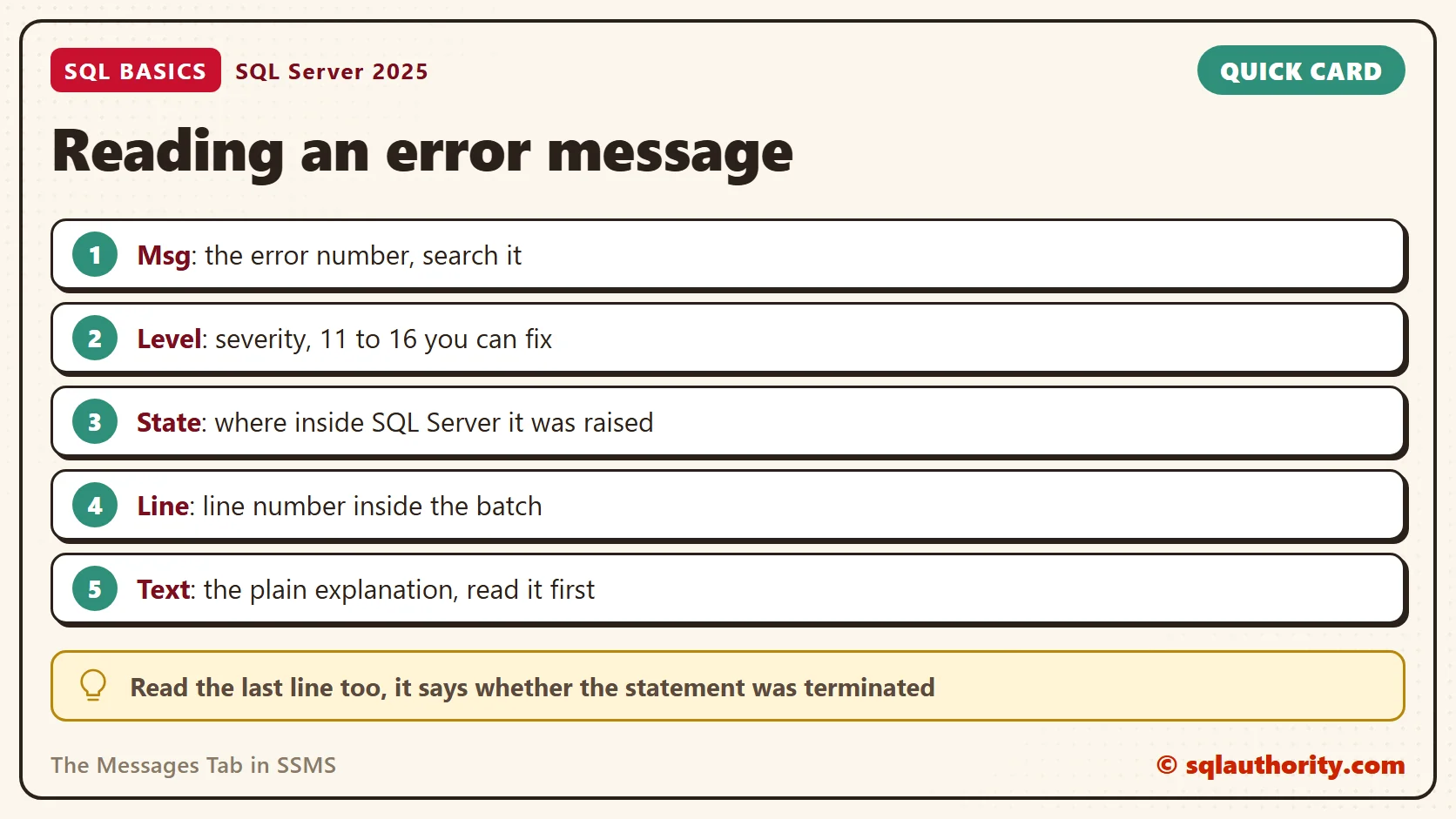
Read it in pieces. Msg is the error number, and it’s the best thing to search for. Level is the severity. Levels 11 to 16 are problems you can fix in your own statement. Levels 17 to 19 point at resources or software, and 20 and above are fatal errors that close the connection. Level 10 and below is information only.
State is a number that separates places inside SQL Server that raise the same error, and it rarely helps you. Line is the line number within the batch. Count from the batch’s first line, not the top of the window. Double-click the red text and SSMS jumps to that line.
Then read the explanation. It names the constraint, the table and the value that clashed. The last line says the statement was terminated, so no row was added. A typo gives a different error. Selecting from dbo.TeaShelves returns Msg 208, Level 16, Invalid object name.
SET NOCOUNT ON
SET NOCOUNT ON stops the (n rows affected) lines for the statements that follow. Many stored procedures and long scripts begin with it, so the client receives fewer messages. It changes only those count messages. Results and errors still arrive, and @@ROWCOUNT still holds the count.
SET NOCOUNT ON;
UPDATE dbo.TeaShelf SET BoxesInStock = BoxesInStock + 1 WHERE TeaID = 1;
SELECT @@ROWCOUNT AS RowsChanged;
SET NOCOUNT OFF;
The tab stays quiet for the UPDATE, and the SELECT returns 1. This raises Darjeeling’s stock by one, so rebuild the table before you repeat the AVG example. Timing and I/O reports from SET STATISTICS TIME and SET STATISTICS IO also arrive here. Look here when you tune a query.
Related reading
Running SQL Code: Execute, Batches and GO in SSMS: how batches decide what the tab reports.
How to Read a SQL Server Error Message: more on the parts of an error.
What Is a Primary Key, and What Happens Without One?: the rule behind error 2627.
A quiet Results tab is not a sign that nothing happened, it is a sign to open the Messages Tab.
Published by Pinal Dave on SQLAuthority. More of my work at pinaldave.com.
Discover more from SQL Authority with Pinal Dave
Subscribe to get the latest posts sent to your email.