BIT_COUNT counts set bits, and the input type determines which representation it examines. I keep that type visible before interpreting the total. The same negative number can produce different counts at different integer widths.

Keep the width beside the number
An integer value and its stored representation answer different questions. Counting active positions concerns the representation. The decimal number alone does not describe the width used for that count.
The first query deliberately presents separate typed expressions. It does not combine all inputs into one VALUES column. Combining them could select one common type before the function sees each value.
The expected totals for negative one are 16, 32 and 64. Those totals correspond to the explicitly selected smallint, int and bigint inputs. They are not three competing answers for one unchanged typed expression.
The binary example adds a one-byte input with every position set. Its expected total is eight. This makes the width distinction visible without converting the payload into decimal text.
SELECT
    BIT_COUNT(CAST(-1 AS smallint)) AS SmallintBits,
    BIT_COUNT(CAST(-1 AS int)) AS IntBits,
    BIT_COUNT(CAST(-1 AS bigint)) AS BigintBits,
    BIT_COUNT(CAST(0xFF AS varbinary(1))) AS ByteBits,
    BIT_COUNT(CAST(NULL AS int)) AS MissingBits;
Count combinations rather than their magnitude
The second query keeps every flag value typed as int. Zero has no active positions, while one has one. Three and five each have two, despite their different numeric values.
Eight has one active position, and fifteen has four. The expected output follows the binary composition of each number. Sorting by numeric magnitude would not arrange these rows by their active count.
I’d use this distinction when inspecting a compact collection of independent flags. A larger number does not necessarily describe more enabled choices. It may simply have a higher position set.
The returned count also does not identify the active choices. Values three and five have the same total but different positions. Keep the original mask when later logic needs the identity of each flag.
WITH Flags AS
(
    SELECT CaseId,FlagValue
    FROM (VALUES (1,0),(2,1),(3,3),(4,5),(5,8),(6,15),(7,CAST(NULL AS int)))
        AS v(CaseId,FlagValue)
)
SELECT CaseId,FlagValue,BIT_COUNT(FlagValue) AS ActiveBits
FROM Flags
ORDER BY CaseId;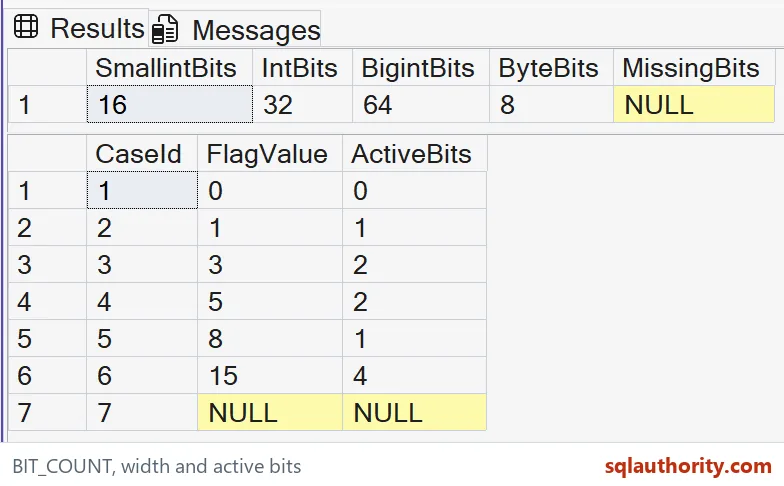
Define what an active position means
A count becomes useful only after the mask has a clear contract. Decide which positions belong to meaningful choices. Reserved or unrelated positions should not silently become additional business events.
For example, a four-choice mask might permit only the lowest four positions. The sample values stay within that small positive range. The query counts them without asserting that a real application uses the same layout.
I don’t treat a negative mask as a shortcut for every valid application choice. Its count includes positions belonging to the selected integer representation. That can differ from the number of positions the application actually assigned.
Changing a column type can therefore affect an interpretation that relies on negative masks. Review the contract before widening a stored flag. Preserving the numeric value alone does not preserve its complete bit pattern.
Keep missing data and unsupported inputs visible
The typed NULL expressions are expected to return NULL. They do not describe a mask with zero active positions. I keep that distinction when missing input means the collection has not been supplied.
This demonstration requires SQL Server 2022 or later. It uses ordinary integer and bounded binary inputs. It does not change engine settings or introduce a table.
The function returns a bigint count. A count is still a separate result from the original mask. Name the result accordingly so another reader doesn’t mistake it for a transformed set of flags.
These examples are deliberately small enough to inspect by eye. When adding another case, write its expected count before running the query. Include zero, a single position and a combination to expose different mistakes.

Small inputs make a function easy to trust.
A bit count is not a flag identity, it is a tally of set positions.
Published by Pinal Dave on SQLAuthority. More of my work at pinaldave.com.
Discover more from SQL Authority with Pinal Dave
Subscribe to get the latest posts sent to your email.