
Performance tuning mistakes are habits, and each of the eleven below comes with a check you can run.
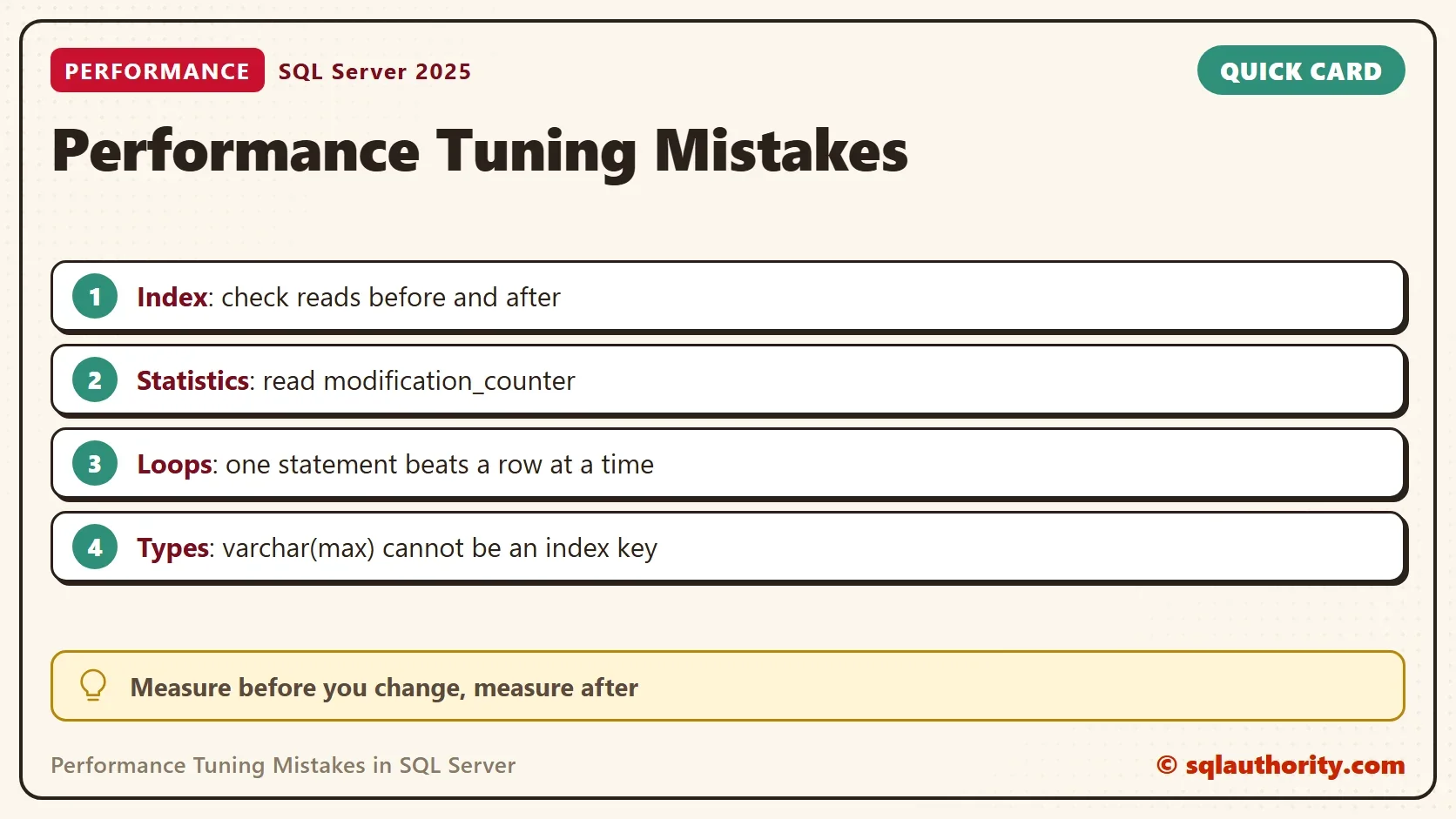
Some of them cost milliseconds. Others cost a weekend. All eleven performance tuning mistakes sit in one table below. Five of them are measured on a small demo database.

The Eleven Habits
| # | Mistake | Check or fix |
|---|---|---|
| 1 | No index on a filter column | Compare the reads of the query before and after an index |
| 2 | Buying hardware before fixing the design | Tune the query and the index first, then measure again |
| 3 | No monitoring | Keep a baseline of counters and waits, and read it when users complain |
| 4 | Stale statistics | Watch modification_counter, and update after a large change |
| 5 | Ignoring normalization | Store each fact once and give every table a key |
| 6 | Oversized or wrong data types | Use the narrowest type that fits the data |
| 7 | Backups nobody checks | Query the last backup date of every database |
| 8 | Cursors and row by row loops | Write one set-based statement |
| 9 | No plan for old data | Move and delete old rows in batches |
| 10 | Too many permissions | Give each user the least permission that works |
| 11 | Untested changes | Test schema and data changes in development first |
The demo database holds 200,000 orders. The first script creates it. Run it on a test server.
IF DB_ID(N'TuningHabitsDemo') IS NULL CREATE DATABASE TuningHabitsDemo;
GO
USE TuningHabitsDemo;
GO
DROP TABLE IF EXISTS dbo.Orders;
CREATE TABLE dbo.Orders (OrderID int IDENTITY(1,1) PRIMARY KEY, CustomerID int NOT NULL, OrderDate date NOT NULL, Amount decimal(10,2) NOT NULL, Status tinyint NOT NULL);
INSERT dbo.Orders (CustomerID, OrderDate, Amount, Status)
SELECT n % 5000 + 1, DATEADD(DAY, n % 1000, '2023-01-01'), n % 97 + 0.5, 0
FROM (SELECT TOP (200000) ROW_NUMBER() OVER (ORDER BY (SELECT NULL)) AS n FROM sys.all_columns AS a CROSS JOIN sys.all_columns AS b) AS t;
A Filter Column With No Index
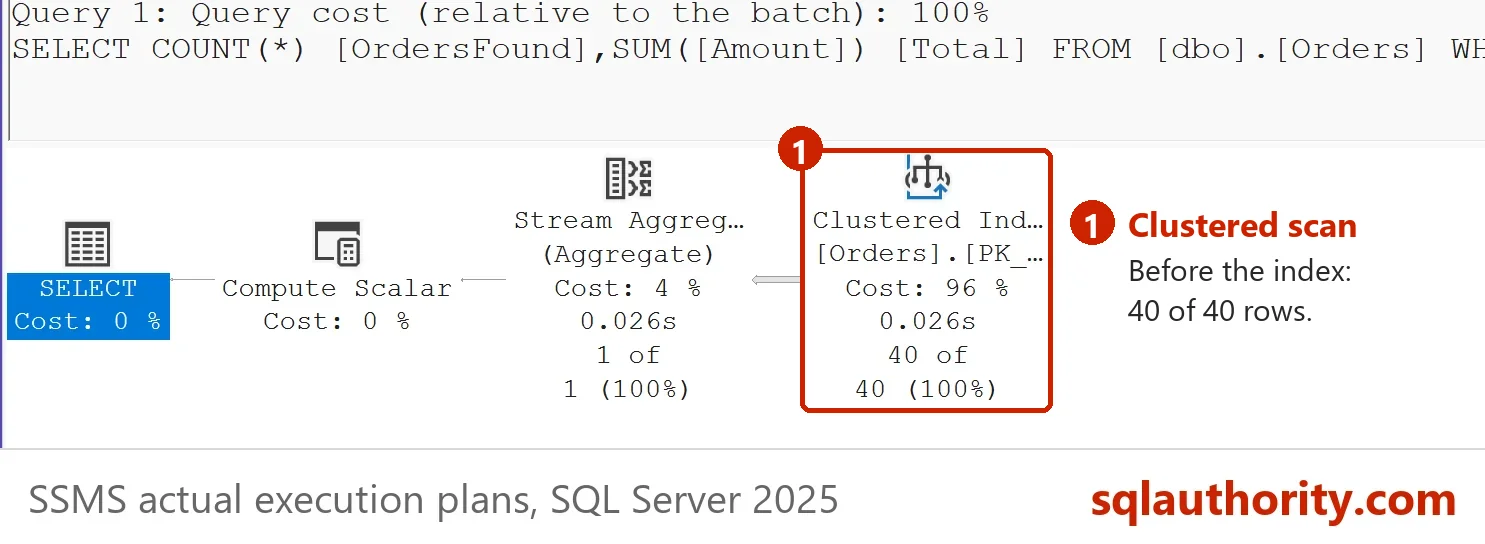
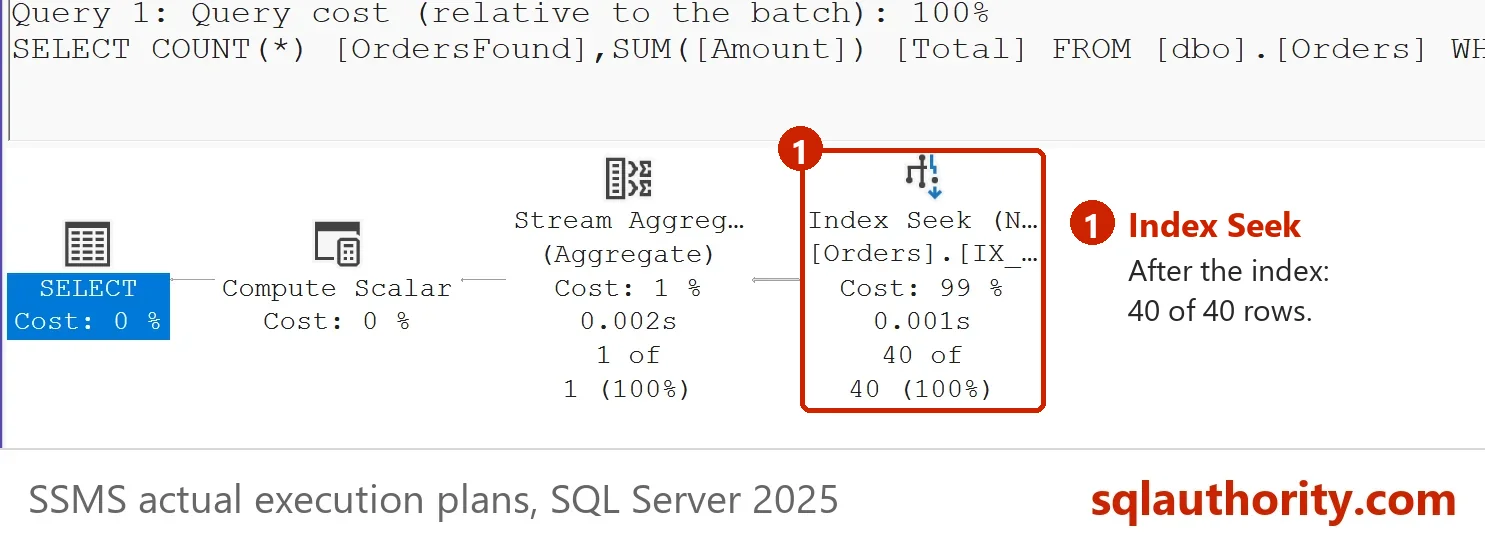
A query for one customer must read the whole table when no index leads with the customer. Count the reads with SET STATISTICS IO, create a covering index, and count again.
SET STATISTICS IO ON;
SELECT COUNT(*) AS OrdersFound, SUM(Amount) AS Total FROM dbo.Orders WHERE CustomerID = 777;
SET STATISTICS IO OFF;
GO
CREATE INDEX IX_Orders_CustomerID ON dbo.Orders (CustomerID) INCLUDE (Amount);
GO
SET STATISTICS IO ON;
SELECT COUNT(*) AS OrdersFound, SUM(Amount) AS Total FROM dbo.Orders WHERE CustomerID = 777;
SET STATISTICS IO OFF;
| Step | Logical reads |
|---|---|
| No index | 748 |
| With the index | 3 |
Both runs return 40 orders. The reads fell from 748 to 3. Do not index every column to get this result. Each index slows inserts and deletes, and updates of its columns. Index the columns that your queries filter and join on. The post Index Design Rules: Ten Don’ts and Where They Break covers the limits.
A Type That Cannot Be Indexed
Choose data types for the data, not for convenience. A column of type varchar(max) holds anything, and it cannot be an index key. A column for a short note belongs in varchar(100).
CREATE TABLE dbo.Notes (NoteID int IDENTITY PRIMARY KEY, Body varchar(max) NOT NULL);
CREATE INDEX IX_Notes_Body ON dbo.Notes (Body);
Msg 1919, Level 16, State 1, Line 2
Column 'Body' in table 'dbo.Notes' is of a type that is invalid for use as a key column in an index.
Statistics Nobody Updates
Do statistics update automatically, and when is a manual update needed? They do update, but only after enough rows change. From SQL Server 2016 (compatibility level 130), the update waits for the smaller of two numbers. One is 500 plus 20 percent of the rows. The other is the square root of 1,000 times the row count. For 200,000 rows that is 14,142 changes. When Are Statistics Updated? What Triggers an Automatic Update explains the rule. The next script changes 5,000 rows, runs a query, and reads the counter.
UPDATE dbo.Orders SET CustomerID = 2 WHERE OrderID % 40 = 0;
SELECT COUNT(*) AS Found FROM dbo.Orders WHERE CustomerID = 2 AND OrderDate >= '2023-06-01';
SELECT s.name, sp.rows, sp.modification_counter, CAST(SQRT(1000.0 * sp.rows) AS int) AS AutoUpdateAfter
FROM sys.stats AS s CROSS APPLY sys.dm_db_stats_properties(s.object_id, s.stats_id) AS sp
WHERE s.object_id = OBJECT_ID(N'dbo.Orders') AND s.name = N'IX_Orders_CustomerID';
UPDATE STATISTICS dbo.Orders IX_Orders_CustomerID WITH FULLSCAN;
SELECT s.name, sp.rows, sp.modification_counter
FROM sys.stats AS s CROSS APPLY sys.dm_db_stats_properties(s.object_id, s.stats_id) AS sp
WHERE s.object_id = OBJECT_ID(N'dbo.Orders') AND s.name = N'IX_Orders_CustomerID';
| name | rows | modification_counter | AutoUpdateAfter |
|---|---|---|---|
| IX_Orders_CustomerID | 200000 | 5000 | 14142 |
| name | rows | modification_counter |
|---|---|---|
| IX_Orders_CustomerID | 200000 | 0 |
The statistic stood at 5,000 changes, well below 14,142, so SQL Server left it alone. Customer 2 now has 5,040 orders, while the statistic still describes the old data. A query for that customer plans from the old picture. The manual update reset the counter to 0. Update by hand after a bulk load or a large delete, before the next big report. Oldest Statistics in SQL Server: Find the Stale Ones First lists the candidates.
One Row at a Time
A loop that updates one row per pass sends 20,000 statements. One statement can do the same work. The script times both on 20,000 rows each.
DECLARE @t0 datetime2(3) = SYSDATETIME(), @id int = 1;
WHILE @id <= 20000
BEGIN
    UPDATE dbo.Orders SET Status = 1 WHERE OrderID = @id;
    SET @id += 1;
END;
SELECT N'One row at a time' AS Method, DATEDIFF(MILLISECOND, @t0, SYSDATETIME()) AS Ms;
GO
DECLARE @t0 datetime2(3) = SYSDATETIME();
UPDATE dbo.Orders SET Status = 2 WHERE OrderID BETWEEN 20001 AND 40000;
SELECT N'One statement' AS Method, DATEDIFF(MILLISECOND, @t0, SYSDATETIME()) AS Ms;| Method | Ms |
|---|---|
| One row at a time | 4499 |
| One statement | 36 |
The table shows one run. Your times differ, and the gap holds. The loop paid for 20,000 separate statements. Cursors and temporary tables are not banned. Use them when a set-based statement cannot express the job.
Archive With One Giant Delete
How do you move 100 million rows into an archive table within a four or five hour window? The answer is batches. One delete of that size holds locks and fills the log for its whole run. A loop of small deletes commits after each batch. The OUTPUT clause copies the rows into the archive in the same step. The script moves the orders of the first six months. It works in batches of 10,000 and stops when a batch is empty.
CREATE TABLE dbo.OrdersArchive (OrderID int NOT NULL, CustomerID int NOT NULL, OrderDate date NOT NULL, Amount decimal(10,2) NOT NULL, Status tinyint NOT NULL);
CREATE INDEX IX_Orders_OrderDate ON dbo.Orders (OrderDate);
GO
DECLARE @batch int = 0, @moved int = 1, @total int = 0;
WHILE @moved > 0 AND @batch < 100
BEGIN
    DELETE TOP (10000) FROM dbo.Orders
    OUTPUT deleted.OrderID, deleted.CustomerID, deleted.OrderDate, deleted.Amount, deleted.Status INTO dbo.OrdersArchive
    WHERE OrderDate < '2023-07-01';
    SET @moved = @@ROWCOUNT;
    IF @moved > 0 SELECT @batch += 1, @total += @moved;
END;
SELECT @batch AS Batches, @total AS RowsMoved;| Batches | RowsMoved |
|---|---|
| 4 | 36200 |
Three full batches and one of 6,200 rows moved 36,200 orders. Time a few batches on your own hardware and divide to estimate the whole job. Pick a batch size that keeps the log small and the locks short. Index the column the delete filters on. Without it every batch scans the table again. The demo is small on purpose, and the loop does not change at 100 million rows. The loop stops after 100 batches in this demo, as a safety cap.
Backups Nobody Checks
A backup job that fails every night looks the same as a good one until the day you need it. Ask msdb for the last full backup of each database. The demo database has none, so its date is empty.
SELECT d.name, MAX(b.backup_finish_date) AS LastFullBackup
FROM sys.databases AS d
LEFT JOIN msdb.dbo.backupset AS b ON b.database_name = d.name AND b.type = 'D'
WHERE d.name = N'TuningHabitsDemo'
GROUP BY d.name;
| name | LastFullBackup |
|---|---|
| TuningHabitsDemo | NULL |
A NULL means no full backup on record. Remove the WHERE line to list every database. Then restore one backup on a test server, because only a restore proves it works.
The Other Habits
The remaining performance tuning mistakes need judgment more than a script. Habit 3 is monitoring. Should you run Performance Monitor all the time or only when troubleshooting? Do both: collect a small baseline of counters and waits on a schedule, and open it when a problem appears. Without a baseline you cannot tell what changed. Habit 2 is the hardware reflex. A faster server makes a bad query faster, and it makes the next bad query affordable. Fix the query and the index first.
Habit 5 is normalization. Store each fact once, so an update changes one row. Habit 10 is permissions. A reporting user needs SELECT, not db_owner. Habit 11 is the test environment. A schema change that works on ten rows can fail on a million. Rehearse it on realistic data.
You could argue that a maintenance job covers most of this list. It covers statistics and backups. It does not design your tables, choose your indexes, or review your loops.
What to Remember
Measure before you change anything, and measure after. The demos above give you the habit. Count the reads, read the counter, time the loop, batch the delete, and check the backup. Every one of the performance tuning mistakes has a check. For a shorter list to start with, read SQL Server Performance Mistakes: Three Checks to Run Today.
When you finish, run the cleanup script.
USE master;
GO
IF DB_ID(N'TuningHabitsDemo') IS NOT NULL
BEGIN
    ALTER DATABASE TuningHabitsDemo SET SINGLE_USER WITH ROLLBACK IMMEDIATE;
    DROP DATABASE TuningHabitsDemo;
END;
A tuning mistake is not a missing tool, it is a check you skipped.
Published by Pinal Dave on SQLAuthority. More of my work at pinaldave.com.
Discover more from SQL Authority with Pinal Dave
Subscribe to get the latest posts sent to your email.



3 Comments. Leave new
Dave,
For #3, do you mean to use perfmon on a regular basis, or just when you are troubleshooting issues?
Also, for #4, i thought stats were updated automatically. What scenario would you have to update them manually?
#9. We have to move like 10 Crore records into Archive table and delete the same amount of record in original table. We have only 4 to 5 hours slot to move and delete the records. Is it possible to complete within duration. or any other alternate ways.
even if basic, good things to remember. For most of these tasks, Ola’s scripts will be sufficient.