A case-sensitive WHERE clause needs a COLLATE on the comparison, but the obvious version gives up the index seek. The fix is one extra condition. A short demo measures the difference in reads. It also shows a cleaner fix, a column that is case-sensitive from the start.

Why a Plain Comparison Ignores Case
The rules for comparing text come from a collation. A collation with CI in its name ignores case, and one with CS respects it. The default on a US English install is SQL_Latin1_General_CP1_CI_AS. It ignores case, so Code = 'jack' matches Jack, jacK and JACK as well. The demo creates a database named CaseMatchDemo with a table of four spellings of one name and 100,000 other rows. It also prints the collation of the database.
IF DB_ID(N'CaseMatchDemo') IS NULL CREATE DATABASE CaseMatchDemo;
GO
USE CaseMatchDemo;
GO
DROP TABLE IF EXISTS dbo.Codes, dbo.CodesCs;
CREATE TABLE dbo.Codes (CodeID int IDENTITY(1,1) NOT NULL CONSTRAINT PK_Codes PRIMARY KEY, Code varchar(20) NOT NULL);
INSERT INTO dbo.Codes (Code) VALUES ('jack'), ('Jack'), ('jacK'), ('JACK');
INSERT INTO dbo.Codes (Code)
SELECT TOP (100000) 'user' + CAST(ROW_NUMBER() OVER (ORDER BY (SELECT NULL)) AS varchar(10))
FROM sys.all_objects AS a CROSS JOIN sys.all_objects AS b CROSS JOIN sys.all_objects AS c;
CREATE INDEX IX_Codes_Code ON dbo.Codes (Code);
SELECT DATABASEPROPERTYEX(DB_NAME(), 'Collation') AS DatabaseCollation;| DatabaseCollation |
|---|
| SQL_Latin1_General_CP1_CI_AS |
Write a Case-Sensitive WHERE Clause
Add a COLLATE clause with a case-sensitive collation to the column. This is how you get a case-sensitive WHERE clause without touching the database. Two kinds work. A name that ends in CS_AS compares letters with their case and their accents. A name that ends in BIN2 compares raw character codes. The query below counts the matches for the database default and for both choices.
SELECT SUM(CASE WHEN Code = 'jack' THEN 1 ELSE 0 END) AS DatabaseDefault,
       SUM(CASE WHEN Code COLLATE Latin1_General_CS_AS = 'jack' THEN 1 ELSE 0 END) AS CaseSensitive,
       SUM(CASE WHEN Code COLLATE Latin1_General_BIN2 = 'jack' THEN 1 ELSE 0 END) AS Binary
FROM dbo.Codes;| DatabaseDefault | CaseSensitive | Binary |
|---|---|---|
| 4 | 1 | 1 |
The default finds four rows, and both other tests find one. For everyday text, I use the CS_AS collation, which also keeps accents apart. The binary one is stricter still. It compares character codes and applies no language rules.
The Hidden Cost: Reads
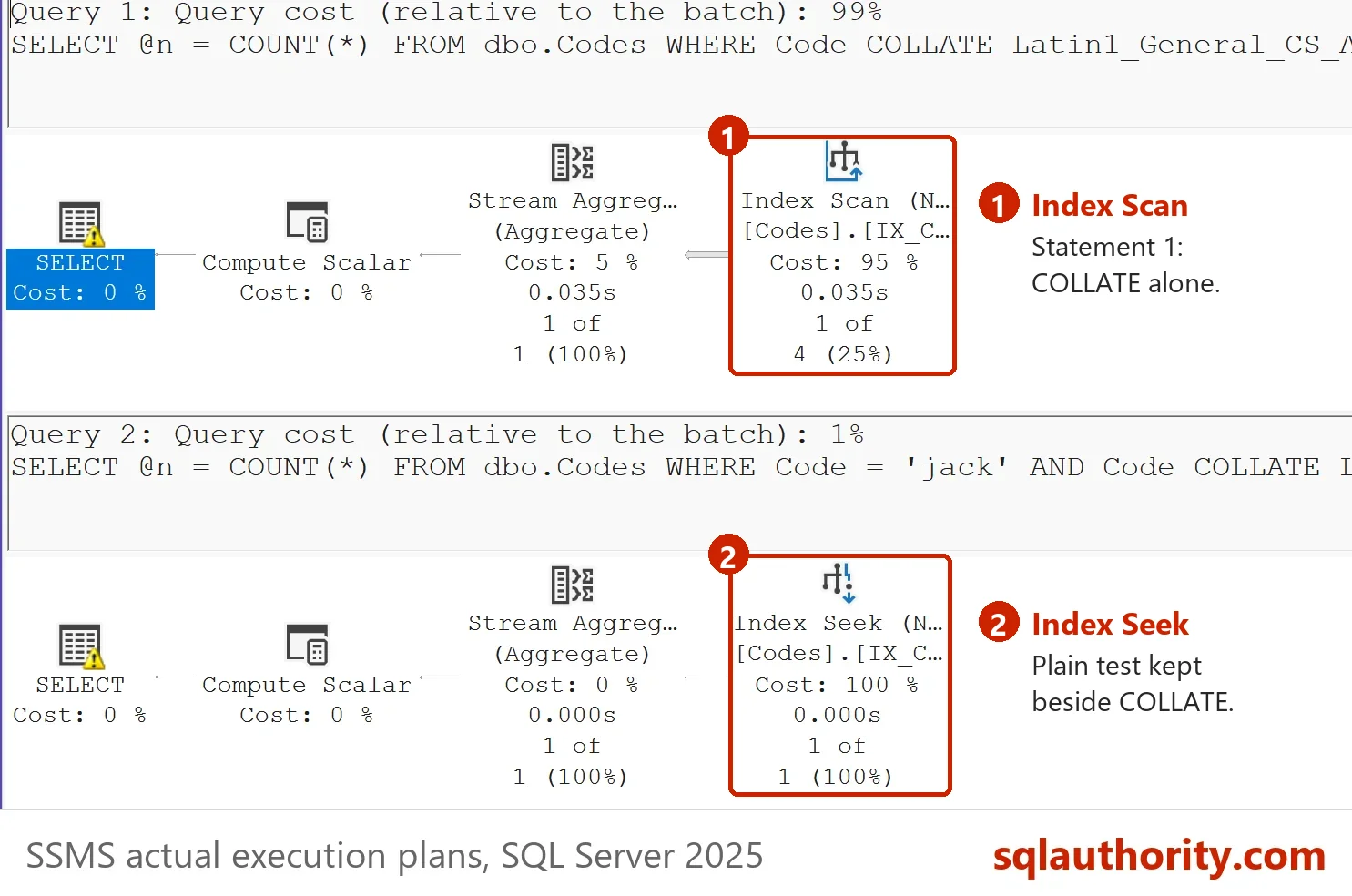
The COLLATE clause is applied to the column, not to the value. SQL Server must convert every stored row before it compares, so it cannot use the index on the column. The next script measures the reads of two versions. The first compares with the collation only. The second keeps the plain test and adds the case test after it.
DECLARE @n int, @r0 bigint, @r1 bigint, @r2 bigint;
SELECT @r0 = logical_reads FROM sys.dm_exec_requests WHERE session_id = @@SPID;
SELECT @n = COUNT(*) FROM dbo.Codes WHERE Code COLLATE Latin1_General_CS_AS = 'jack';
SELECT @r1 = logical_reads FROM sys.dm_exec_requests WHERE session_id = @@SPID;
SELECT @n = COUNT(*) FROM dbo.Codes WHERE Code = 'jack' AND Code COLLATE Latin1_General_CS_AS = 'jack';
SELECT @r2 = logical_reads FROM sys.dm_exec_requests WHERE session_id = @@SPID;
SELECT @r1 - @r0 AS CollateOnlyReads, @r2 - @r1 AS SeekThenFilterReads;
| CollateOnlyReads | SeekThenFilterReads |
|---|---|
| 286 | 2 |
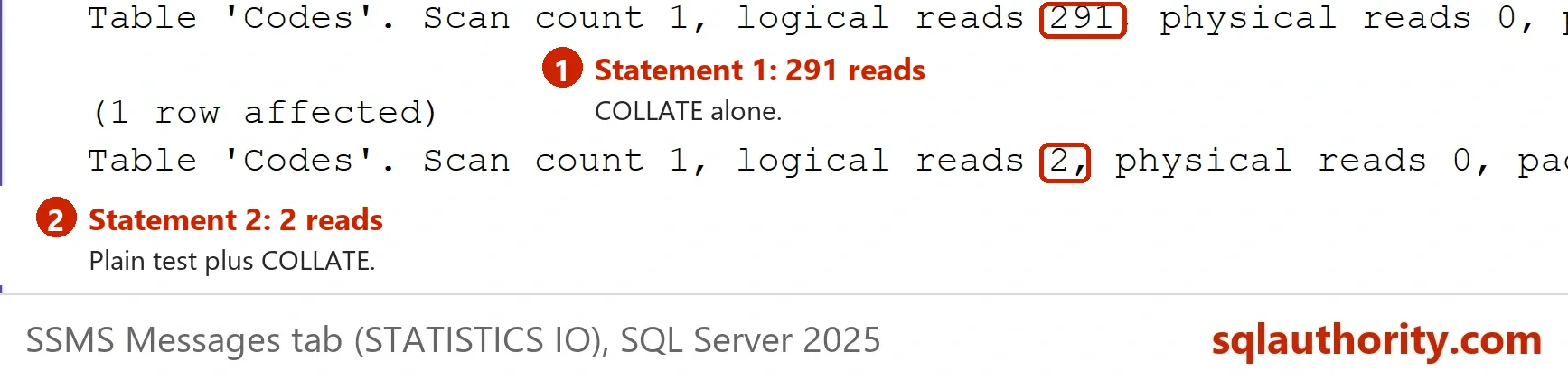
The collation-only version scans the whole index and reads 286 pages. The second version reads 2. The plain test Code = 'jack' uses the index to find the four candidate rows. The case test then keeps only the exact one. Because the plain test already limits the rows, the added condition costs nothing. Write both conditions every time. Putting COLLATE on the value instead does not help. That version scans too and reads 286 pages. The pictures come from a second server, which counted 291 reads for the collation-only version.
The Better Fix: A Case-Sensitive Column
If a column holds codes where case matters, give the column the right collation once. Every comparison then respects case, and the index serves it. The script below creates a second table with a CS column. It copies the rows and runs the plain test.
CREATE TABLE dbo.CodesCs (CodeID int IDENTITY(1,1) NOT NULL CONSTRAINT PK_CodesCs PRIMARY KEY, Code varchar(20) COLLATE Latin1_General_CS_AS NOT NULL);
INSERT INTO dbo.CodesCs (Code) SELECT Code FROM dbo.Codes;
CREATE INDEX IX_CodesCs_Code ON dbo.CodesCs (Code);
GO
DECLARE @n int, @r0 bigint, @r1 bigint;
SELECT @r0 = logical_reads FROM sys.dm_exec_requests WHERE session_id = @@SPID;
SELECT @n = COUNT(*) FROM dbo.CodesCs WHERE Code = 'jack';
SELECT @r1 = logical_reads FROM sys.dm_exec_requests WHERE session_id = @@SPID;
SELECT @n AS Matches, @r1 - @r0 AS Reads;
| Matches | Reads |
|---|---|
| 1 | 2 |
The plain comparison finds one row and reads two pages. No COLLATE clause is needed in any query, which also keeps the code short and hard to get wrong. The price is a collation conflict when you compare it with a column of another collation. An explicit COLLATE removes the conflict. The post Effect of Collation on Result Sets in SQL Server explains that error and its fix.
One detail helps you pick a name. The database here uses a SQL collation, and the demo uses a Windows collation for the case test. Both share the same code page for varchar, so the result is the same. To stay in the same family as the database, use the SQL collation SQL_Latin1_General_CP1_CS_AS instead. It behaves the same here: the seek plus the filter reads 2 pages, and the collation-only version reads 286.
Spaces Are Ignored in Every Collation
One more rule surprises people. SQL Server ignores trailing spaces when it compares text, whatever the collation. A case-sensitive or binary comparison treats the words jack and jack with a trailing space as equal. This query checks both.
SELECT CASE WHEN 'jack ' COLLATE Latin1_General_CS_AS = 'jack' THEN 'equal' ELSE 'different' END AS CaseSensitiveWithTrailingSpace,
CASE WHEN 'jack ' COLLATE Latin1_General_BIN2 = 'jack' THEN 'equal' ELSE 'different' END AS BinaryWithTrailingSpace;| CaseSensitiveWithTrailingSpace | BinaryWithTrailingSpace |
|---|---|
| equal | equal |
If trailing spaces matter, compare DATALENGTH as well, because it counts them. A leading space is never ignored.
Should the Database Be Case-Sensitive?
You could argue that the whole database should use a CS collation, and then no query needs a clause. That works for a new system, and it moves the burden elsewhere. Every table name, column name and comparison then respects case, and the old queries with wrong capitals fail. I keep the default for the database and use a CS column where case carries meaning.
What to Remember
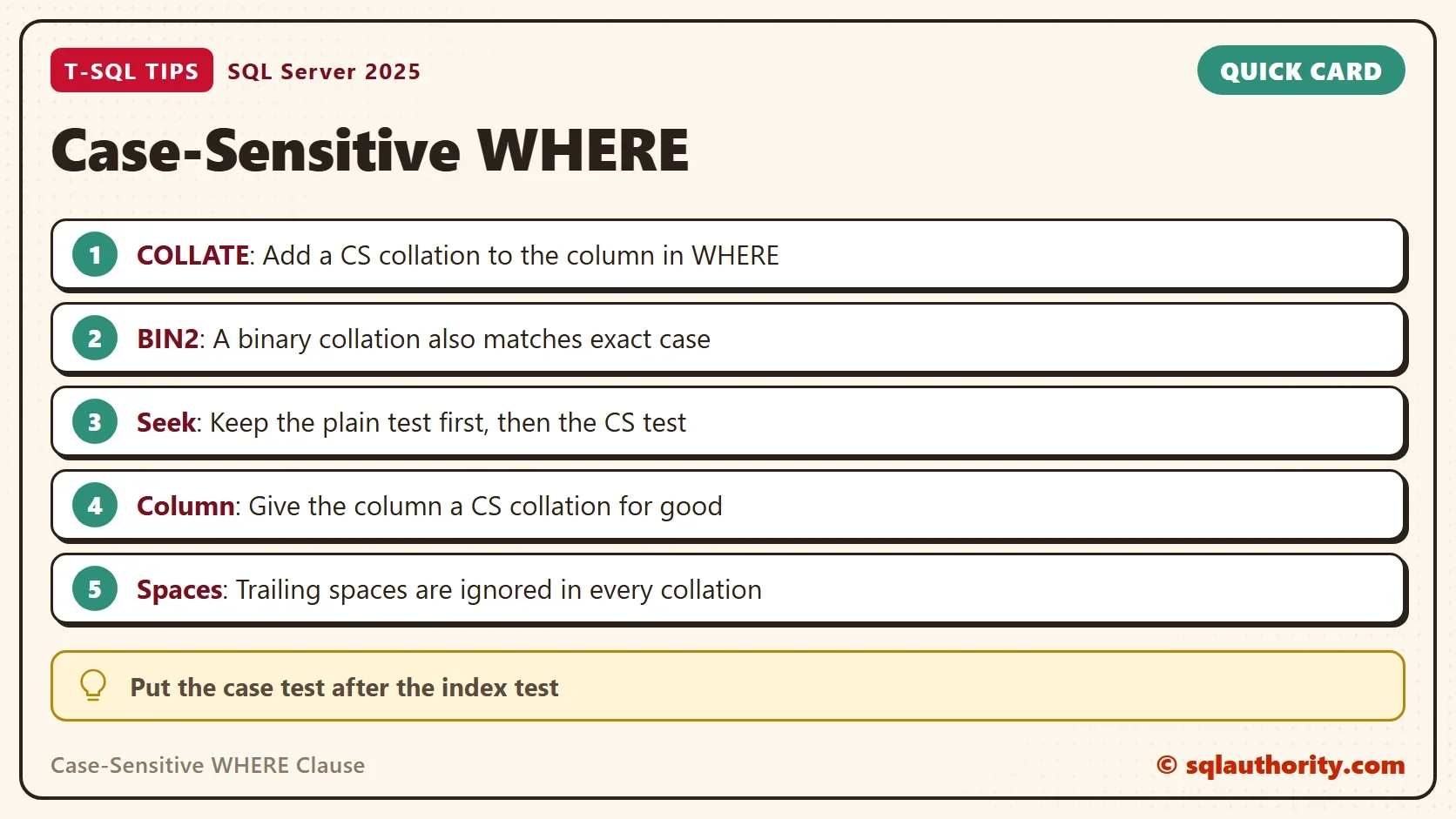
For a case-sensitive WHERE clause, add COLLATE Latin1_General_CS_AS to the column. Keep the plain test beside it to keep the seek. Or give the column the collation once. Remember that trailing spaces never count, and measure the reads when the table is large.
When you finish, run the cleanup script. It removes the demo database.
USE master;
GO
ALTER DATABASE CaseMatchDemo SET SINGLE_USER WITH ROLLBACK IMMEDIATE;
DROP DATABASE CaseMatchDemo;
Case is not a detail of the text, it is a rule of the collation.
Published by Pinal Dave on SQLAuthority. More of my work at pinaldave.com.
Discover more from SQL Authority with Pinal Dave
Subscribe to get the latest posts sent to your email.