
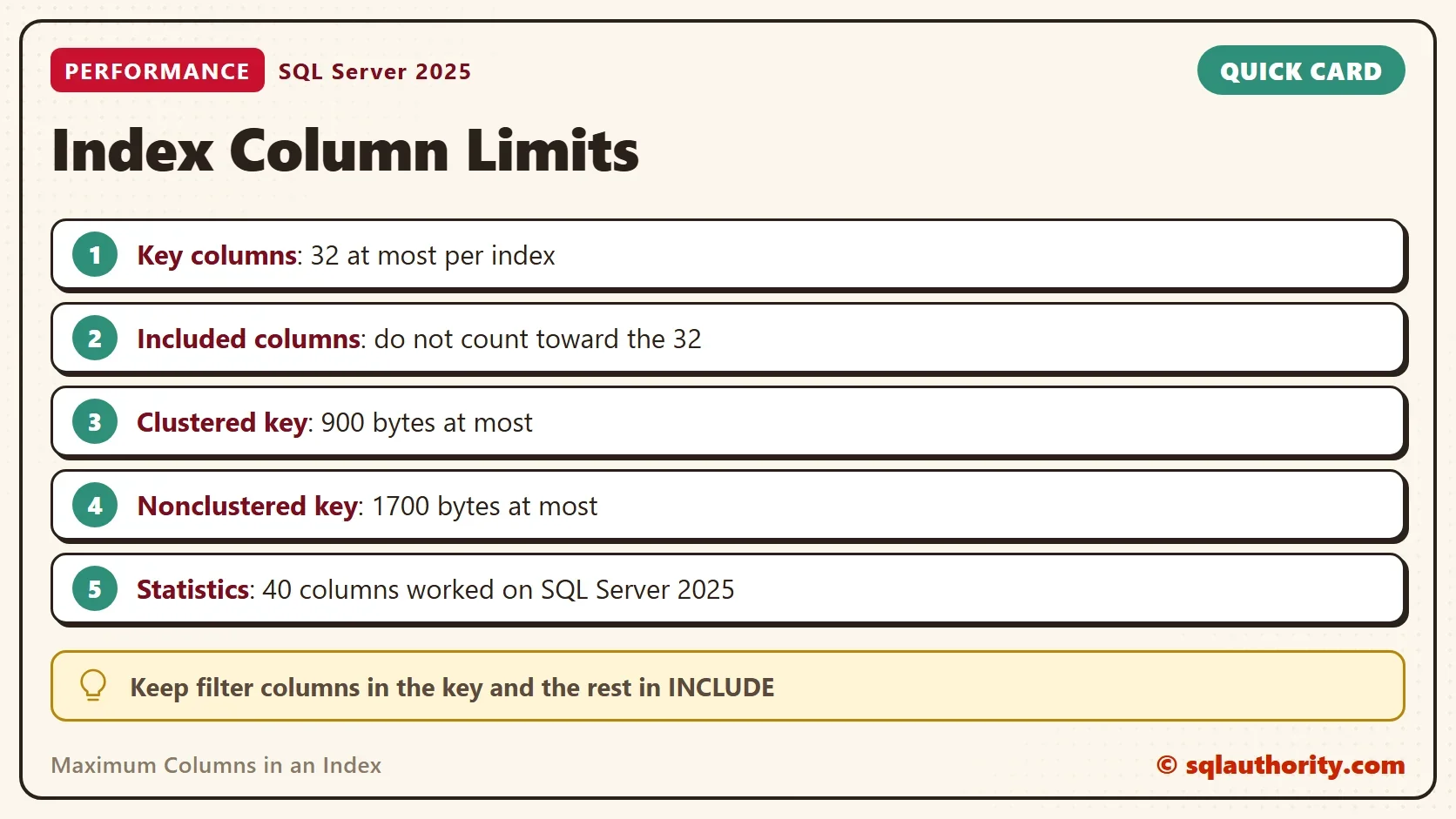
The maximum columns in an index is 32 key columns. SQL Server refuses a 33rd key column with an error. A second limit on key size can stop an index sooner. Included columns are the way around the first limit.

Build a Table With 40 Columns
Typing 33 column names is slow, so the demo script builds the table. It creates a database named IndexColumnLimitDemo and a table with an ID plus 40 integer columns named C1 to C40. The script uses STRING_AGG, which needs SQL Server 2017 or later. The cleanup at the end drops the database.
IF DB_ID(N'IndexColumnLimitDemo') IS NULL CREATE DATABASE IndexColumnLimitDemo;
GO
USE IndexColumnLimitDemo;
GO
DROP TABLE IF EXISTS dbo.Wide;
DECLARE @cols nvarchar(max) = (SELECT STRING_AGG(CONVERT(nvarchar(max), QUOTENAME(N'C' + CONVERT(nvarchar(3), n)) + N' int NOT NULL DEFAULT 0'), N', ') WITHIN GROUP (ORDER BY n)
    FROM (SELECT TOP (40) ROW_NUMBER() OVER (ORDER BY (SELECT NULL)) AS n FROM sys.all_columns) AS t);
EXEC (N'CREATE TABLE dbo.Wide (Id int IDENTITY(1,1) CONSTRAINT PK_Wide PRIMARY KEY, ' + @cols + N');');
SELECT COUNT(*) AS ColumnsInTable FROM sys.columns WHERE object_id = OBJECT_ID(N'dbo.Wide');| ColumnsInTable |
|---|
| 41 |
Maximum Columns in an Index: A 33rd Key Column Fails
The next script builds a CREATE INDEX statement with 33 key columns, C1 to C33, and runs it. The number of columns sits in one variable, so you can change it.
DECLARE @keys int = 33;
DECLARE @list nvarchar(max) = (SELECT STRING_AGG(CONVERT(nvarchar(max), QUOTENAME(N'C' + CONVERT(nvarchar(3), n))), N', ') WITHIN GROUP (ORDER BY n)
    FROM (SELECT TOP (@keys) ROW_NUMBER() OVER (ORDER BY (SELECT NULL)) AS n FROM sys.all_columns) AS t);
EXEC (N'CREATE INDEX IX_Wide_Keys ON dbo.Wide (' + @list + N');');
Msg 1904, Level 16, State 1, Line 1
The index 'IX_Wide_Keys' on table 'dbo.Wide' has 33 columns in the key list. The maximum limit for index key column list is 32.
Change the variable to 32 and the same statement works. The query below counts the key columns of the index that now exists.
DROP INDEX IF EXISTS IX_Wide_Keys ON dbo.Wide;
DECLARE @keys int = 32;
DECLARE @list nvarchar(max) = (SELECT STRING_AGG(CONVERT(nvarchar(max), QUOTENAME(N'C' + CONVERT(nvarchar(3), n))), N', ') WITHIN GROUP (ORDER BY n)
    FROM (SELECT TOP (@keys) ROW_NUMBER() OVER (ORDER BY (SELECT NULL)) AS n FROM sys.all_columns) AS t);
EXEC (N'CREATE INDEX IX_Wide_Keys ON dbo.Wide (' + @list + N');');
SELECT COUNT(*) AS KeyColumns
FROM sys.index_columns
WHERE object_id = OBJECT_ID(N'dbo.Wide')
  AND index_id = INDEXPROPERTY(OBJECT_ID(N'dbo.Wide'), N'IX_Wide_Keys', 'IndexID')
AND is_included_column = 0;| KeyColumns |
|---|
| 32 |
The maximum columns in an index counts key columns only. It applies to clustered and nonclustered indexes, and Msg 1904 leaves nothing behind. Columnstore indexes follow different rules: a clustered columnstore index holds up to 1,024 columns and has no key. A primary key or unique constraint is an index too. A primary key on 33 columns fails with Msg 1904, followed by Msg 1750, and the table is not created. The index name in that message is empty, because the constraint has no index yet.
Statistics Are Not Held to the Same Limit
Older advice says a statistics object has the same 32 column limit. On SQL Server 2025 that is not true. Older versions can still refuse more than 32 columns, so test before you rely on it. This script creates one statistics object with 33 columns and one with 40.
DECLARE @list33 nvarchar(max) = (SELECT STRING_AGG(CONVERT(nvarchar(max), QUOTENAME(N'C' + CONVERT(nvarchar(3), n))), N', ') WITHIN GROUP (ORDER BY n)
    FROM (SELECT TOP (33) ROW_NUMBER() OVER (ORDER BY (SELECT NULL)) AS n FROM sys.all_columns) AS t);
DECLARE @list40 nvarchar(max) = (SELECT STRING_AGG(CONVERT(nvarchar(max), QUOTENAME(N'C' + CONVERT(nvarchar(3), n))), N', ') WITHIN GROUP (ORDER BY n)
    FROM (SELECT TOP (40) ROW_NUMBER() OVER (ORDER BY (SELECT NULL)) AS n FROM sys.all_columns) AS t);
EXEC (N'CREATE STATISTICS ST_Wide_33 ON dbo.Wide (' + @list33 + N');');
EXEC (N'CREATE STATISTICS ST_Wide_40 ON dbo.Wide (' + @list40 + N');');
SELECT s.name AS StatisticsName, COUNT(*) AS ColumnsInStatistics
FROM sys.stats AS s
INNER JOIN sys.stats_columns AS sc ON sc.object_id = s.object_id AND sc.stats_id = s.stats_id
WHERE s.object_id = OBJECT_ID(N'dbo.Wide') AND s.name LIKE N'ST[_]Wide[_]%'
GROUP BY s.name
ORDER BY s.name;| StatisticsName | ColumnsInStatistics |
|---|---|
| ST_Wide_33 | 33 |
| ST_Wide_40 | 40 |
Extra columns add little. SQL Server builds the histogram on the first column only, and the others add density values. The limit that matters is the one on the index.
INCLUDE Is the Way Around the Limit
A common question is whether any index can hold more than 32 columns. For the key, the answer is no, and no setting or edition changes that. For covering a query, the answer is yes, with included columns.
An included column is stored in the leaf level of the index but is not part of the key. It does not count toward the 32. SQL Server documents up to 1,023 included columns. This script keeps 32 key columns and adds 8 included columns. The post Index Key Columns and Included Columns in SQL Server lists both kinds for every index.
DROP INDEX IF EXISTS IX_Wide_Keys ON dbo.Wide;
DROP INDEX IF EXISTS IX_Wide_Covering ON dbo.Wide;
DECLARE @list nvarchar(max) = (SELECT STRING_AGG(CONVERT(nvarchar(max), QUOTENAME(N'C' + CONVERT(nvarchar(3), n))), N', ') WITHIN GROUP (ORDER BY n)
    FROM (SELECT TOP (32) ROW_NUMBER() OVER (ORDER BY (SELECT NULL)) AS n FROM sys.all_columns) AS t);
DECLARE @inc nvarchar(max) = (SELECT STRING_AGG(CONVERT(nvarchar(max), QUOTENAME(N'C' + CONVERT(nvarchar(3), n))), N', ') WITHIN GROUP (ORDER BY n)
    FROM (SELECT TOP (8) 32 + ROW_NUMBER() OVER (ORDER BY (SELECT NULL)) AS n FROM sys.all_columns) AS t);
EXEC (N'CREATE INDEX IX_Wide_Covering ON dbo.Wide (' + @list + N') INCLUDE (' + @inc + N');');
SELECT SUM(CASE WHEN is_included_column = 0 THEN 1 ELSE 0 END) AS KeyColumns,
       SUM(CASE WHEN is_included_column = 1 THEN 1 ELSE 0 END) AS IncludedColumns
FROM sys.index_columns
WHERE object_id = OBJECT_ID(N'dbo.Wide')
AND index_id = INDEXPROPERTY(OBJECT_ID(N'dbo.Wide'), N'IX_Wide_Covering', 'IndexID');| KeyColumns | IncludedColumns |
|---|---|
| 32 | 8 |
To find wide indexes in your own database, count key and included columns for every index. The query only reads the catalog.
SELECT OBJECT_NAME(i.object_id) AS TableName, i.name AS IndexName,
       SUM(CASE WHEN ic.is_included_column = 0 THEN 1 ELSE 0 END) AS KeyColumns,
       SUM(CASE WHEN ic.is_included_column = 1 THEN 1 ELSE 0 END) AS IncludedColumns
FROM sys.indexes AS i
INNER JOIN sys.index_columns AS ic ON ic.object_id = i.object_id AND ic.index_id = i.index_id
WHERE i.index_id > 0 AND OBJECTPROPERTY(i.object_id, 'IsUserTable') = 1
GROUP BY i.object_id, i.name
ORDER BY KeyColumns DESC, IndexName;| TableName | IndexName | KeyColumns | IncludedColumns |
|---|---|---|---|
| Wide | IX_Wide_Covering | 32 | 8 |
| Wide | PK_Wide | 1 | 0 |
The trade is real. SQL Server sorts the key and can seek on it. It cannot seek on an included column. Included columns let the index answer a query without a trip to the table. They also make every row of the index wider.
The Size Limit Stops Wide Keys First
The maximum columns in an index is not the only cap. A clustered index key can be 900 bytes at most. A nonclustered key can be 1,700 bytes. Three fixed columns of 600 characters make a 1,800 byte key, far below 32 columns, and the index is refused.
DROP TABLE IF EXISTS dbo.WideFixed;
CREATE TABLE dbo.WideFixed (Id int IDENTITY(1,1) PRIMARY KEY, A char(600) NOT NULL, B char(600) NOT NULL, C char(600) NOT NULL);
CREATE INDEX IX_WideFixed ON dbo.WideFixed (A, B, C);
Msg 1944, Level 16, State 1, Line 3
Index 'IX_WideFixed' was not created because the index key size is at least 1800 bytes. The nonclustered index key size cannot exceed 1700 bytes. If the index key includes implicit key columns, the index key size cannot exceed 2600 bytes.
Variable length columns get a softer treatment. SQL Server creates the index with a warning, and the first row that is too long fails.
DROP TABLE IF EXISTS dbo.WideVar;
CREATE TABLE dbo.WideVar (Id int IDENTITY(1,1) PRIMARY KEY, A varchar(600) NOT NULL, B varchar(600) NOT NULL, C varchar(600) NOT NULL);
CREATE INDEX IX_WideVar ON dbo.WideVar (A, B, C);
INSERT INTO dbo.WideVar (A, B, C) VALUES (REPLICATE('a', 600), REPLICATE('b', 600), REPLICATE('c', 600));
Warning! The maximum key length for a nonclustered index is 1700 bytes. The index 'IX_WideVar' has maximum length of 1800 bytes. For some combination of large values, the insert/update operation will fail.
Msg 1946, Level 16, State 3, Line 4
Operation failed. The index entry of length 1800 bytes for the index 'IX_WideVar' exceeds the maximum length of 1700 bytes for nonclustered indexes.
The clustered limit works the same way. A key of 900 bytes passes. A key of 901 bytes fails with Msg 1944. The message names the 900 byte limit for clustered keys.
Do You Need Many Key Columns?
You could argue that a wide key is fine, because the limit is high. A wide key makes every level of the index larger, and every nonclustered index repeats the clustered key. Most useful keys hold a few columns. Put the columns you filter and join on in the key, and move the columns you only read into INCLUDE.
Redesign comes before workarounds. If a query needs more than a handful of key columns, check whether the table mixes several concerns. A computed column can sometimes replace a group of columns.
What to Remember
The maximum columns in an index is 32 key columns. The key size must also stay within 900 bytes for a clustered index and 1,700 bytes for a nonclustered one. Included columns do not count toward the 32. Statistics have no such limit here, but they add little beyond the first column. Run the cleanup script when you finish.
USE master;
GO
IF DB_ID(N'IndexColumnLimitDemo') IS NOT NULL
BEGIN
    ALTER DATABASE IndexColumnLimitDemo SET SINGLE_USER WITH ROLLBACK IMMEDIATE;
    DROP DATABASE IndexColumnLimitDemo;
END;
The index limit is not the problem, it is the warning that the design has grown too wide.
Published by Pinal Dave on SQLAuthority. More of my work at pinaldave.com.
Discover more from SQL Authority with Pinal Dave
Subscribe to get the latest posts sent to your email.


1 Comment. Leave new
is there any way to create an index with more than 32 columns?