
The effect of collation on result sets is easy to state. The same query returns different rows, in a different order, when the collation changes. A collation is the set of rules SQL Server uses to compare and sort text. Most people never choose one, and the default is chosen for them.

What a Collation Decides
A collation answers questions like these. Is Apple equal to apple? Does café match cafe? Which comes first, a capital letter or a lowercase one? The name encodes the answers. CI means case insensitive and CS means case sensitive. AI means accent insensitive and AS means accent sensitive. A name ending in BIN2 skips language rules and compares raw character codes.
A collation lives at three levels: the server, the database and the column. The column wins over the database, and the database wins over the server. You can also override all three for one expression with a COLLATE clause. That’s the lever the examples below use.
The demo creates a database named CollationEffectDemo with a case sensitive default. Its table stores the same six words twice. One column is case insensitive and the other is case sensitive. Accents come later, in their own section.
IF DB_ID(N'CollationEffectDemo') IS NULL CREATE DATABASE CollationEffectDemo COLLATE Latin1_General_CS_AS;
GO
USE CollationEffectDemo;
GO
DROP TABLE IF EXISTS dbo.Produce;
CREATE TABLE dbo.Produce (
    ProduceID int IDENTITY(1,1) NOT NULL PRIMARY KEY,
    NameCI    varchar(20) COLLATE Latin1_General_CI_AS NOT NULL,
    NameCS    varchar(20) COLLATE Latin1_General_CS_AS NOT NULL
);
INSERT INTO dbo.Produce (NameCI, NameCS)
VALUES ('Apple', 'Apple'), ('apple', 'apple'), ('Pineapple', 'Pineapple'),
       ('pineapple', 'pineapple'), ('Banana', 'Banana'), ('banana', 'banana');
Sorting Changes With the Collation
The first query sorts the case insensitive column. The second sorts the case sensitive one. The third sorts the same case sensitive column with a binary collation.
SELECT ProduceID, NameCI FROM dbo.Produce ORDER BY NameCI;

SELECT ProduceID, NameCS FROM dbo.Produce ORDER BY NameCS;

SELECT ProduceID, NameCS FROM dbo.Produce ORDER BY NameCS COLLATE Latin1_General_BIN2;
| ProduceID | NameCI |
|---|---|
| 1 | Apple |
| 2 | apple |
| 5 | Banana |
| 6 | banana |
| 3 | Pineapple |
| 4 | pineapple |
| ProduceID | NameCS |
|---|---|
| 2 | apple |
| 1 | Apple |
| 6 | banana |
| 5 | Banana |
| 4 | pineapple |
| 3 | Pineapple |
| ProduceID | NameCS |
|---|---|
| 1 | Apple |
| 5 | Banana |
| 3 | Pineapple |
| 2 | apple |
| 6 | banana |
| 4 | pineapple |
Read the three lists side by side. In the first, Apple and apple count as equal, so they sit together. SQL Server doesn’t promise an order inside that tie. In this run, ID 1 came before ID 2, but you shouldn’t build on it. Add a tie breaker such as ProduceID to the ORDER BY when the order matters.
In the second list the lowercase word comes first, because this collation sorts lowercase before uppercase. The third list is the binary order. Every capital letter sorts before every lowercase letter, and Pineapple comes before apple. Three collations gave three orders from one set of words.
Comparing and Grouping Change Too
Sorting is the visible part of the effect of collation. The quieter part is what counts as a match. This script compares the same word in both columns, then counts distinct values.
SELECT 'CI' AS Col, COUNT(*) AS Matches FROM dbo.Produce WHERE NameCI = 'apple'
UNION ALL
SELECT 'CS', COUNT(*) FROM dbo.Produce WHERE NameCS = 'apple';

SELECT COUNT(DISTINCT NameCI) AS DistinctCI, COUNT(DISTINCT NameCS) AS DistinctCS FROM dbo.Produce;
| Col | Matches |
|---|---|
| CI | 2 |
| CS | 1 |
| DistinctCI | DistinctCS |
|---|---|
| 3 | 6 |
The case insensitive search finds two rows and the case sensitive one finds one. The same six words make three distinct values in one column and six in the other. GROUP BY follows the same rule, so a report can show three groups or six for the same data. Totals that disagree between two systems can trace back to this.
Accents work the same way. The next script adds two rows: Jalapeno without an accent, and jalapeño with a tilde. Then two queries search for the unaccented word. The second adds COLLATE Latin1_General_CI_AI to the literal, which makes the comparison accent insensitive for that expression only.
INSERT INTO dbo.Produce (NameCI, NameCS) VALUES ('Jalapeno', 'Jalapeno'), ('jalapeño', 'jalapeño');

SELECT ProduceID FROM dbo.Produce WHERE NameCI = 'jalapeno';

SELECT ProduceID FROM dbo.Produce WHERE NameCI = 'jalapeno' COLLATE Latin1_General_CI_AI;| ProduceID |
|---|
| 7 |
| ProduceID |
|---|
| 7 |
| 8 |
The first query returns row 7, the plain word. The second returns rows 7 and 8, because the accent no longer matters. A search box that forgives missing accents needs the second form. A column with an accent insensitive collation does the same.
The Collation Conflict
Two columns with different collations can’t both win in one comparison. SQL Server stops with message 468 unless you say which rules apply. The most common source is a temporary table. A temp table lives in tempdb, and its text columns take the collation of tempdb, which follows the server collation. Here the server collation is case insensitive and the database is not. On a server whose collation matches the database, this join runs without error.
DROP TABLE IF EXISTS #Staging;
CREATE TABLE #Staging (Name varchar(20) NOT NULL);
INSERT INTO #Staging VALUES ('apple');
SELECT p.ProduceID FROM dbo.Produce AS p JOIN #Staging AS s ON s.Name = p.NameCS;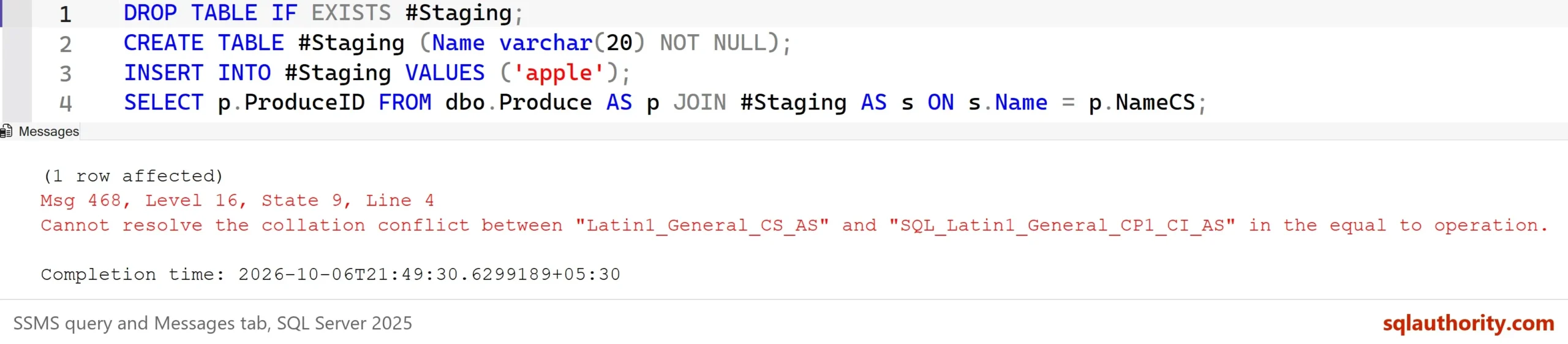
Msg 468, Level 16, State 9, Line 4
Cannot resolve the collation conflict between "Latin1_General_CS_AS" and "SQL_Latin1_General_CP1_CI_AS" in the equal to operation.
The join failed because the two sides carry different collations. The cleanest fix is to give the temp table column the database’s collation when you create it. The quick fix is COLLATE DATABASE_DEFAULT on the temp table side of the comparison, as in the next script.
SELECT p.ProduceID FROM dbo.Produce AS p JOIN #Staging AS s ON s.Name COLLATE DATABASE_DEFAULT = p.NameCS;

DROP TABLE #Staging;
| ProduceID |
|---|
| 2 |
The join runs and finds the lowercase apple. Fixing it in the join is fine for one query. If the same mismatch repeats, fix the column definition instead, so every later query works.
Find Out Which Collation You Have
Check before you guess. This script reads the database and server collations, then the collation of each text column in the demo table.
SELECT DATABASEPROPERTYEX(N'CollationEffectDemo', 'Collation') AS DatabaseCollation, CONVERT(sysname, SERVERPROPERTY('Collation')) AS ServerCollation;

SELECT name, collation_name FROM sys.columns WHERE object_id = OBJECT_ID(N'dbo.Produce') AND collation_name IS NOT NULL ORDER BY column_id;| DatabaseCollation | ServerCollation |
|---|---|
| Latin1_General_CS_AS | SQL_Latin1_General_CP1_CI_AS |
| name | collation_name |
|---|---|
| NameCI | Latin1_General_CI_AS |
| NameCS | Latin1_General_CS_AS |
You could argue that case sensitivity is the safer choice, since it never confuses two different strings. It is safer for code that must tell Apple from apple. It is also less friendly. People type names in any case and expect a search to find them. Choose the collation that matches the question your users ask.
What to Remember
The effect of collation reaches the order, the matches, the groups and the joins. Treat it as part of your schema. Check it with DATABASEPROPERTYEX and sys.columns. Add a tie breaker to every sort. Use a COLLATE clause for a single expression, not for a whole application.
Changing a collation later is expensive. A change to the server collation means rebuilding the system databases. Changing a database default affects new objects only, not the columns that already exist. Decide early, and test any restore onto a server with a different collation before you need it. When you finish, run the cleanup script.
USE master;
GO
ALTER DATABASE CollationEffectDemo SET SINGLE_USER WITH ROLLBACK IMMEDIATE;
DROP DATABASE CollationEffectDemo;
A collation is not a setting you can ignore, it is a rule that every comparison in your database follows.
Published by Pinal Dave on SQLAuthority. More of my work at pinaldave.com.
Discover more from SQL Authority with Pinal Dave
Subscribe to get the latest posts sent to your email.




1 Comment. Leave new
Happy Vinayaka Chavithi Pinal…
Thanks for your valuable posts….