IsMemoryGrantFeedbackAdjusted values tell you what SQL Server did with the memory grant of one run. The property sits in the actual plan, and it takes six values. Each one answers a different question.

Where to Find the Property
Turn on Include Actual Execution Plan and run a query that has a sort or a hash. Click the top operator, open Properties, and expand Memory Grant Info. The IsMemoryGrantFeedbackAdjusted values sit in that list, written without spaces, such as YesAdjusting. The plan stores sizes in kilobytes.
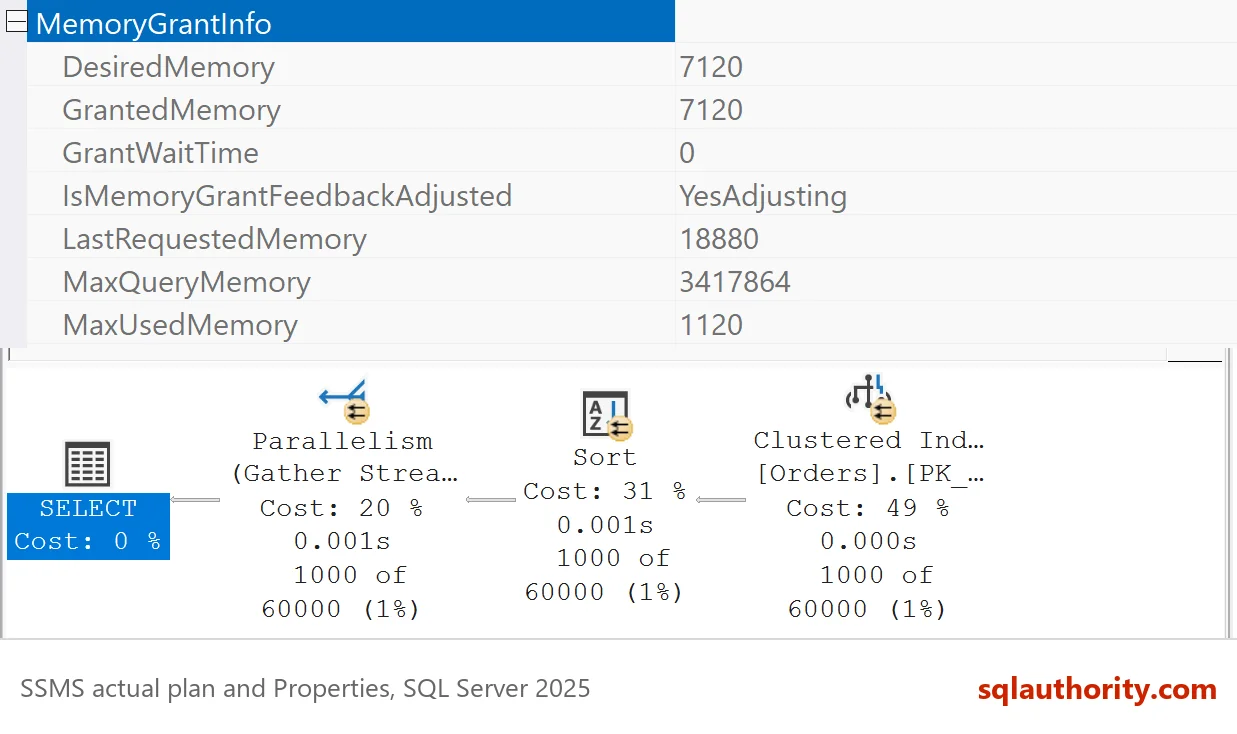
| Property | What it holds |
|---|---|
| RequestedMemory | The memory the query asked for. |
| GrantedMemory | The memory SQL Server gave it. |
| MaxUsedMemory | The most memory the query used. |
| LastRequestedMemory | What the previous run asked for. |
| IsMemoryGrantFeedbackAdjusted | The feedback state for this run. |
Read the first three before you read the status. A grant many times larger than the use is the problem. The status explains why the grant moved. The loop itself is explained in Memory Grant Feedback Explained: How SQL Server Learns.
Build the Demo
The script creates a database named GrantInfoDemo with 200,000 orders and two procedures. OrdersOverGuess copies its parameter into a local variable, so SQL Server guesses the row count. OrdersSwing uses its parameter directly, and the calls below change that value on purpose.
IF DB_ID(N'GrantInfoDemo') IS NULL CREATE DATABASE GrantInfoDemo;
GO
USE GrantInfoDemo;
GO
DROP TABLE IF EXISTS dbo.Orders;
CREATE TABLE dbo.Orders (
    OrderID int IDENTITY(1,1) NOT NULL PRIMARY KEY,
    Remarks varchar(200) NOT NULL
);
INSERT INTO dbo.Orders (Remarks)
SELECT REPLICATE(CONVERT(varchar(36), NEWID()), 3)
FROM GENERATE_SERIES(1, 200000) AS s;
CREATE OR ALTER PROCEDURE dbo.OrdersOverGuess @MinID int AS DECLARE @Floor int = @MinID; SELECT OrderID, Remarks FROM dbo.Orders WHERE OrderID > @Floor ORDER BY Remarks; GO CREATE OR ALTER PROCEDURE dbo.OrdersSwing @MinID int AS SELECT OrderID, Remarks FROM dbo.Orders WHERE OrderID > @MinID ORDER BY Remarks;
Steady Over-Grant: Three Statuses
The first scenario asks for the last 1,000 orders four times. SQL Server guesses 60,000 rows each time, so the first grant is far too big.
DROP TABLE IF EXISTS #sink;
CREATE TABLE #sink (OrderID int, Remarks varchar(200));
GO
INSERT #sink EXEC dbo.OrdersOverGuess @MinID = 199000;
GO 4
| Run | GrantedKB | MaxUsedKB | IsMemoryGrantFeedbackAdjusted |
|---|---|---|---|
| 1 | 13256 | 160 | No: First Execution |
| 2 | 1536 | 160 | Yes: Adjusting |
| 3 | 1536 | 160 | Yes: Stable |
| 4 | 1536 | 160 | Yes: Stable |
The table comes from the plan of each run. Run one has no history, so the status says first execution. Run two gets the corrected grant, and the status says adjusting. Run three finds the grant right, and the status says stable. The sizes in your plan can differ by a few kilobytes on another build.
A Swinging Parameter: Two More Statuses
The second procedure sees a big call and a small call, one after the other. Twenty rounds give forty runs. These are the first eight. The swing needs SQL Server 2022 or later.
TRUNCATE TABLE #sink;
INSERT #sink EXEC dbo.OrdersSwing @MinID = 0;
TRUNCATE TABLE #sink;
INSERT #sink EXEC dbo.OrdersSwing @MinID = 199000;
GO 20
| Run | GrantedKB | MaxUsedKB | IsMemoryGrantFeedbackAdjusted |
|---|---|---|---|
| 1 | 42944 | 31384 | No: First Execution |
| 2 | 42944 | 160 | No: Accurate Grant |
| 3 | 1536 | 1536 | Yes: Adjusting |
| 4 | 6816 | 160 | Yes: Percentile Adjusting |
| 5 | 6576 | 6576 | Yes: Percentile Adjusting |
| 6 | 10888 | 160 | Yes: Percentile Adjusting |
| 7 | 10664 | 10656 | Yes: Percentile Adjusting |
| 8 | 14840 | 160 | Yes: Percentile Adjusting |
Run two says accurate grant, although it granted 42944 KB and used 160 KB. The status describes the decision made before the run, from the run before it. Run one was a big call that used its grant well, so nothing needed changing yet. The small call in run two then showed the waste, and run three got a small grant.
From run four on, the status reads percentile adjusting. SQL Server 2022 and later look at a percentile of the memory used over recent runs. The grant stays near the big call’s need. Over runs 31 to 40 it stayed between about 43,000 and 46,000 KB, and the status never changed to disabled.
The Last Status: Feedback Disabled
The classic loop had no percentile. The big call shrank the grant, the small call grew it, and the cycle repeated until SQL Server gave up. The next script switches percentile and persistence off in this demo database, clears its plans, and repeats the swing. The cleanup turns both settings back on.
ALTER DATABASE SCOPED CONFIGURATION SET MEMORY_GRANT_FEEDBACK_PERCENTILE_GRANT = OFF;
ALTER DATABASE SCOPED CONFIGURATION SET MEMORY_GRANT_FEEDBACK_PERSISTENCE = OFF;
ALTER DATABASE SCOPED CONFIGURATION CLEAR PROCEDURE_CACHE;
GO
TRUNCATE TABLE #sink;
INSERT #sink EXEC dbo.OrdersSwing @MinID = 0;
TRUNCATE TABLE #sink;
INSERT #sink EXEC dbo.OrdersSwing @MinID = 199000;
GO 20
The status turns to disabled on run 33 and stays there. The plan falls back to the first grant, and 42,944 KB is that grant. The post on Memory Grant Feedback Loop: When SQL Server Stops Adjusting goes deeper into what happens next.
The Six Values
This table lists the six IsMemoryGrantFeedbackAdjusted values the demo produced, in the form the plan prints them.
| Printed value | Meaning |
|---|---|
| No: First Execution | The plan has no history yet. |
| No: Accurate Grant | The last run used its grant well, so nothing changes. |
| Yes: Adjusting | This run got a changed grant, and learning continues. |
| Yes: Stable | The grant matches the use, and nothing is left to change. |
| Yes: Percentile Adjusting | The grant follows a percentile of recent use. |
| No: Feedback Disabled | Feedback gave up, and the plan uses its first grant. |
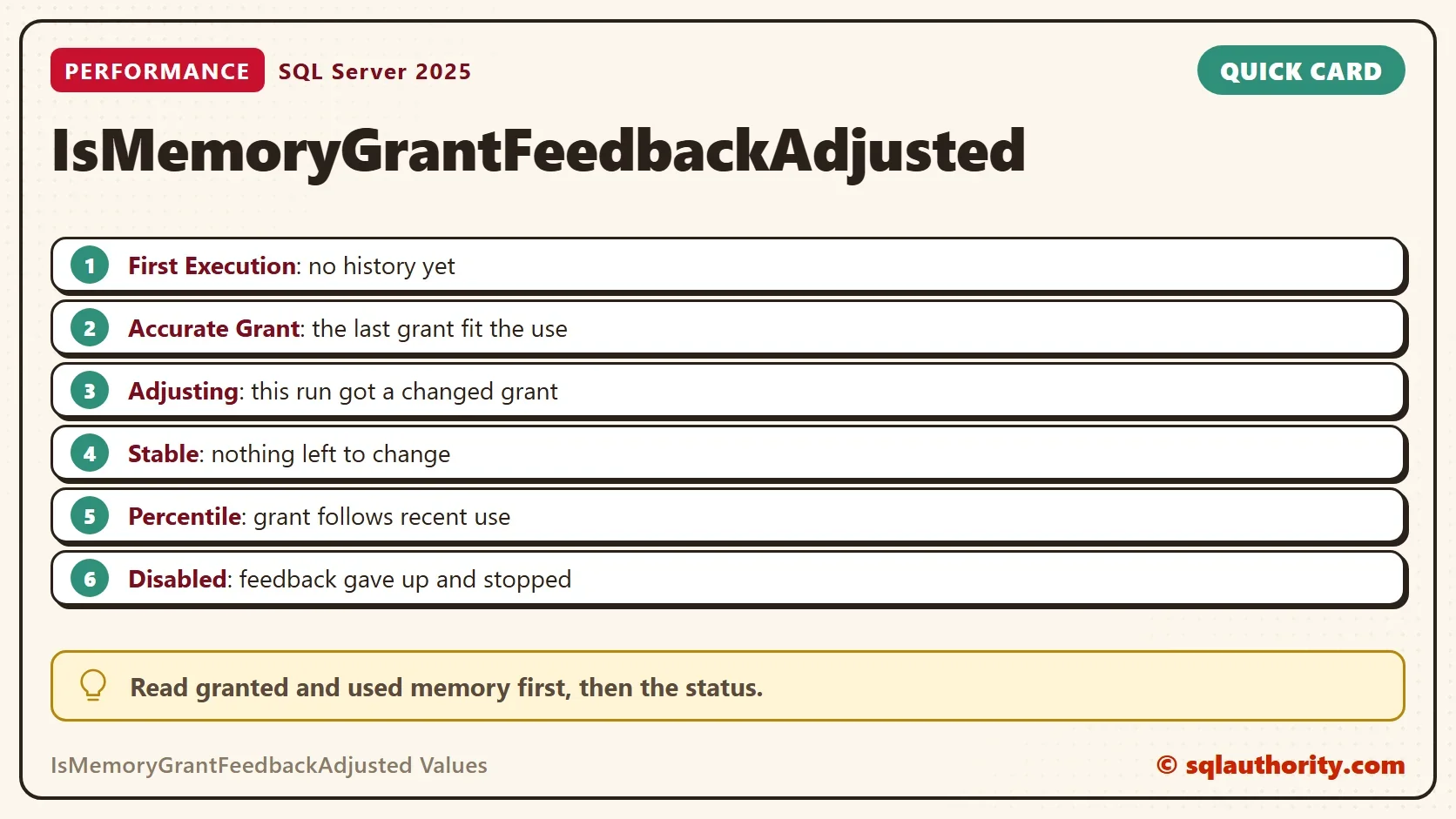
Older builds and older articles print these words without spaces, such as NoFirstExecution and YesAdjusting. The meaning is the same.
What to Do With Each Status
First execution means wait: run the query again before you judge the grant. Accurate grant and stable mean leave it alone. Adjusting for a few runs is normal, but a plan that never leaves adjusting is seeing a workload that swings.
Percentile adjusting means the grant follows recent use. Expect a grant that moves toward the big call’s need over many runs. Disabled means the plan stopped learning. Fix the estimate that keeps changing, because a bigger grant only hides it.
Is the Status Worth Reading?
You could argue that the status is trivia and the sizes tell the whole story. Mostly they do. A grant of 13,256 KB for 160 KB of use is clear without any label. The status earns its place when the grant moves and you need to know why. It also tells you when feedback has given up.
What to Remember
Read GrantedMemory and MaxUsedMemory first, and the IsMemoryGrantFeedbackAdjusted values second. Then read the status to see which stage of the loop the plan is in. A plan that shows disabled needs a better estimate, not a bigger grant.
When you finish testing, run the cleanup. It restores the two settings and drops the demo database.
USE GrantInfoDemo;
GO
ALTER DATABASE SCOPED CONFIGURATION SET MEMORY_GRANT_FEEDBACK_PERCENTILE_GRANT = ON;
ALTER DATABASE SCOPED CONFIGURATION SET MEMORY_GRANT_FEEDBACK_PERSISTENCE = ON;
GO
USE master;
GO
IF DB_ID(N'GrantInfoDemo') IS NOT NULL
BEGIN
    ALTER DATABASE GrantInfoDemo SET SINGLE_USER WITH ROLLBACK IMMEDIATE;
    DROP DATABASE GrantInfoDemo;
END;
A status is not a score, it is a note about the last decision SQL Server made.
Published by Pinal Dave on SQLAuthority. More of my work at pinaldave.com.
Discover more from SQL Authority with Pinal Dave
Subscribe to get the latest posts sent to your email.