
A local dynamic SQL temp table disappears when the dynamic batch ends. A global temp table is the quickest way to keep it. The price is a shared name, so the name needs care.

What Goes Wrong
A client’s code built a dynamic SQL temp table, and the rest of the procedure needed to read it. Start with what works. A temp table created and read inside the same dynamic batch behaves normally.
DECLARE @sql nvarchar(max) = N'CREATE TABLE #PackedBoxes (BoxID int, Item nvarchar(30));
INSERT INTO #PackedBoxes VALUES (1, N''Mint'');
SELECT BoxID, Item FROM #PackedBoxes;';
EXEC sys.sp_executesql @sql;
| BoxID | Item |
|---|---|
| 1 | Mint |
Now move the SELECT out of the dynamic part. The table is created in the dynamic batch and read in the main batch.
DECLARE @sql nvarchar(max) = N'CREATE TABLE #PackedBoxes (BoxID int, Item nvarchar(30));
INSERT INTO #PackedBoxes VALUES (1, N''Mint'');';
EXEC sys.sp_executesql @sql;
SELECT BoxID, Item FROM #PackedBoxes;
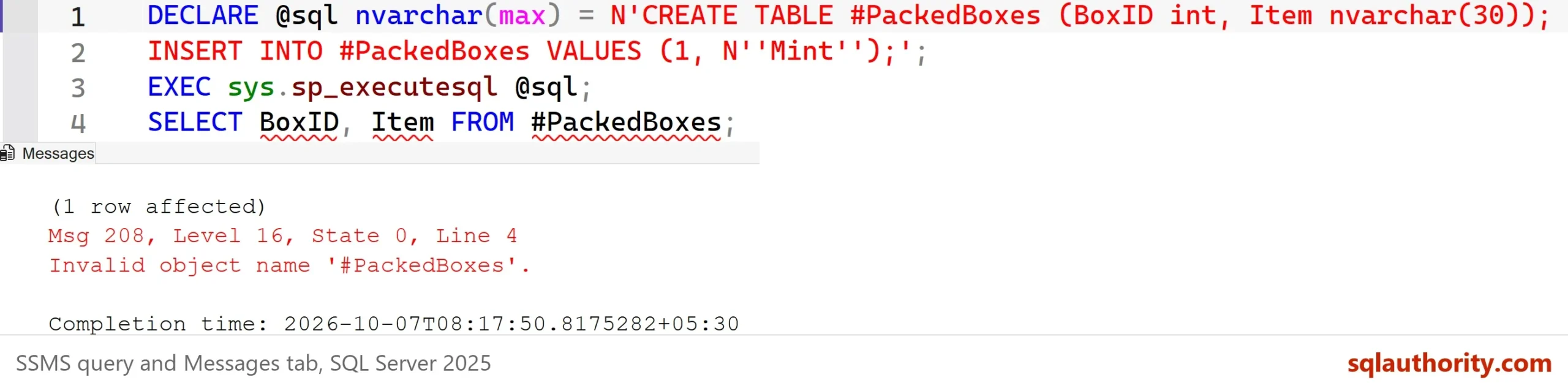
The dynamic batch reports one row affected for its INSERT. Then SQL Server stops with Msg 208, Invalid object name #PackedBoxes. The table existed during the dynamic batch and is gone when the main batch asks for it.
Why the Table Vanishes
The procedure sp_executesql runs its text as a separate batch. That is why a dynamic SQL temp table has a short life. A local temp table, the kind with one hash sign, belongs to the batch that created it. When that batch ends, SQL Server drops the table. The main batch then asks for a table that no longer exists, and the error says so. Any dynamic SQL temp table follows the same rule, whether the text runs through sp_executesql or EXEC.
Keep It With a Global Temp Table
Two hash signs make a table global. A global temp table survives the end of the dynamic batch. It lives until the session that created it ends and no other session still uses it. That rule explains why a leftover table can outlive a script. A script that ends in an error can leave its global table behind in a pooled session.
DROP TABLE IF EXISTS ##PackedBoxes;
DECLARE @sql nvarchar(max) = N'CREATE TABLE ##PackedBoxes (BoxID int, Item nvarchar(30));
INSERT INTO ##PackedBoxes VALUES (1, N''Mint'');';
EXEC sys.sp_executesql @sql;
SELECT BoxID, Item FROM ##PackedBoxes;
| BoxID | Item |
|---|---|
| 1 | Mint |
The main batch reads the rows with no error. That solves the original problem. It also opens a new one, because a global name belongs to the whole server.
The Risk of a Shared Name
Every session can read a global temp table. In a test with two sessions, the second session selected the first session’s row. The second session also failed to create a table of the same name. A procedure that many users run at once, such as one behind a website, hits this at once. The second caller fails or reads the first caller’s data.
DECLARE @sql nvarchar(max) = N'CREATE TABLE ##PackedBoxes (BoxID int, Item nvarchar(30));';
EXEC sys.sp_executesql @sql;
Msg 2714, Level 16, State 6, Line 1
There is already an object named '##PackedBoxes' in the database.
Here the second creation ran in the same session, but another session gets the same error. To see it yourself, open two query windows. Run the creating block in the first window. Run the same statements in the second window while the first stays open. The fix is a name that no other session shares. The session ID is a simple choice. The script below builds the name, creates the table, reads it and drops it. Quote the name with QUOTENAME before it enters the statement.
DECLARE @name sysname = N'##Packed_' + CAST(@@SPID AS nvarchar(10));
DECLARE @sql nvarchar(max) = N'CREATE TABLE ' + QUOTENAME(@name) + N' (BoxID int, Item nvarchar(30));
INSERT INTO ' + QUOTENAME(@name) + N' VALUES (1, N''Mint'');';
EXEC sys.sp_executesql @sql;
SET @sql = N'SELECT BoxID, Item FROM ' + QUOTENAME(@name) + N'; DROP TABLE ' + QUOTENAME(@name) + N';';
EXEC sys.sp_executesql @sql;
| BoxID | Item |
|---|---|
| 1 | Mint |
The explicit DROP matters. A connection pool can reuse a session for the next request, and the table would still be there. A GUID in the name also works. A name built from the session ID is easier to read in a trace.
Find a Leftover Global Table
A global table that nobody dropped stays in tempdb until its session ends. This query lists the global tables whose names start with a prefix. Change the prefix to match your own naming.
SELECT name, create_date FROM tempdb.sys.tables WHERE name LIKE N'##Packed%' ORDER BY name;
The result shows the global table that the earlier examples created. Its create date is the moment you ran them. A table that is days old points to a session that never closed. A name in the list is also a name that no one else can create.
When a Local Table Is Better
You could argue that a global temp table is always a smell. Mostly it is. If the main batch can create the table first, a local temp table is safer. No other session can see it. A procedure you call from your own code can read your local temp table. A nested call needs no global table. Temp Table Scope in Dynamic SQL: Who Can See What shows that pattern. It also covers the case where the table shape is not known in advance.
What to Remember
A dynamic SQL temp table lives only as long as the dynamic batch. Use a global temp table when the main code must read what dynamic code made. Give it a name that no other session can share, and drop it when the work is done.
Run the cleanup script when you finish with the demo. It removes the global table that the examples left behind.
DROP TABLE IF EXISTS ##PackedBoxes;
A global temp table is not a shortcut around scope, it is a shared place you must keep tidy.
Published by Pinal Dave on SQLAuthority. More of my work at pinaldave.com.
Discover more from SQL Authority with Pinal Dave
Subscribe to get the latest posts sent to your email.



3 Comments. Leave new
I had a similar requirement to use temporary table in nested procedures for some calculations. Since the data in a temporary table won’t be available outside the session, i had to go with global temporary table option.
when we create the above illustrated query as stored procedure and accessed by multiple users from website. Will this cause any trouble, Since we are accessing global temp table?
CREATE TABLE #TempTable (ID INT);
DECLARE @SQLStatement NVARCHAR(1000);
SET @SQLStatement = ”INSERT INTO #TempTabld(ID) Select 20200819;
EXEC sp_executesql @SQLStatement;
SELECT ID FROM #TempTable;