
PAGELATCH_UP waits mean that sessions queue for the same page in memory, and that page can be named. The sessions show the status suspended, and the server feels slow although the disk is quiet. Read the page from the wait, and you know which database to fix.

What These Waits Mean
A latch is a short lock that protects a page in memory while a task reads or changes it. A PAGELATCH wait is a wait for that protection. It is about a page that is already in the buffer pool, so it is not a disk wait. The letters at the end name the kind of latch: SH for shared, UP for update and EX for exclusive.
A task that waits for a resource has the status suspended. A few suspended tasks are normal. Many of them on the same page are a queue at one door. The first query counts the suspended requests by latch type.
SELECT wait_type,
       COUNT(*) AS Requests,
       MAX(wait_time) AS LongestWaitMs
FROM sys.dm_exec_requests
WHERE status = N'suspended'
  AND wait_type LIKE N'PAGELATCH%'
GROUP BY wait_type;
A quiet server returns no rows. During a slowdown, read the same query again and again, for a minute. The same latch type with the same count in every reading is a sign of a real queue.
Turn the Wait Into a Page
The view sys.dm_os_waiting_tasks shows what each task waits for. For a PAGELATCH wait, the resource is three numbers: the database id, the file id and the page id. This query splits them and names the database. It also names the page kind, which the next section explains.
SELECT wt.session_id,
       wt.wait_type,
       wt.wait_duration_ms,
       DB_NAME(CONVERT(int, PARSENAME(REPLACE(wt.resource_description, N':', N'.'), 3))) AS DatabaseName,
       p.PageId,
       CASE WHEN p.PageId = 1 OR p.PageId % 8088 = 0 THEN N'PFS page'
            WHEN p.PageId = 2 OR p.PageId % 511232 = 0 THEN N'GAM page'
            WHEN p.PageId = 3 OR p.PageId % 511232 = 1 THEN N'SGAM page'
            ELSE N'Ordinary page' END AS PageKind
FROM sys.dm_os_waiting_tasks AS wt
CROSS APPLY (SELECT CONVERT(bigint, PARSENAME(REPLACE(wt.resource_description, N':', N'.'), 1)) AS PageId) AS p
WHERE wt.wait_type LIKE N'PAGELATCH%'
ORDER BY wt.wait_duration_ms DESC;
A busy server returns one row per waiting task. To see the page kind without a live queue, the next query feeds six sample resources through the same arithmetic. The strings are made up, so no real wait is needed.
SELECT v.resource_description,
       DB_NAME(CONVERT(int, PARSENAME(REPLACE(v.resource_description, N':', N'.'), 3))) AS DatabaseName,
       p.PageId,
       CASE WHEN p.PageId = 1 OR p.PageId % 8088 = 0 THEN N'PFS page'
            WHEN p.PageId = 2 OR p.PageId % 511232 = 0 THEN N'GAM page'
            WHEN p.PageId = 3 OR p.PageId % 511232 = 1 THEN N'SGAM page'
            ELSE N'Ordinary page' END AS PageKind
FROM (VALUES (N'2:1:1'), (N'2:1:2'), (N'2:1:3'), (N'2:3:16176'), (N'2:1:1022464'), (N'2:1:4100')) AS v(resource_description)
CROSS APPLY (SELECT CONVERT(bigint, PARSENAME(REPLACE(v.resource_description, N':', N'.'), 1)) AS PageId) AS p;| resource_description | DatabaseName | PageId | PageKind |
|---|---|---|---|
| 2:1:1 | tempdb | 1 | PFS page |
| 2:1:2 | tempdb | 2 | GAM page |
| 2:1:3 | tempdb | 3 | SGAM page |
| 2:3:16176 | tempdb | 16176 | PFS page |
| 2:1:1022464 | tempdb | 1022464 | GAM page |
| 2:1:4100 | tempdb | 4100 | Ordinary page |
The row for page 1022464 follows the documented layout. The tempdb files of the test server are too small to hold that page. The server could not confirm it.
Check the Page Type Against the Server
The page kinds follow a fixed layout. A PFS page tracks free space and repeats every 8,088 pages. A GAM page and an SGAM page track extents and repeat every 511,232 pages. The server can confirm the first three for you. The next query asks for pages 1, 2 and 3 of the first tempdb file.
SELECT p.page_id, p.page_type_desc
FROM (VALUES (1), (2), (3)) AS v(page_id)
CROSS APPLY sys.dm_db_page_info(2, 1, v.page_id, 'DETAILED') AS p
ORDER BY p.page_id;
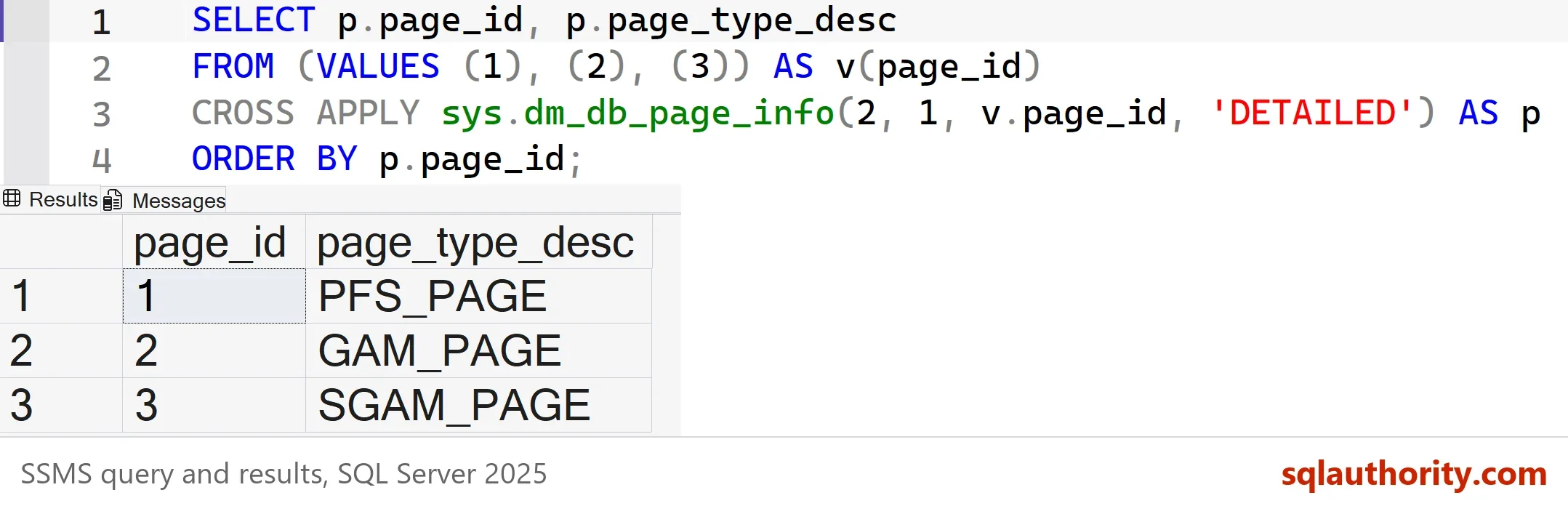
Use the mode DETAILED. The mode LIMITED returns NULL for the page type. A page that is not an allocation page can also be named. The same function gives its object id, which tells you the table.
Fix Allocation Page Waits in TempDB
A PFS, GAM or SGAM page in database 2 points here. Sessions that create and drop temp tables at once wait on the same few allocation pages. More data files give each session another set of pages. The files must have the same size and growth, so SQL Server fills them evenly. I cover that layout in TempDB Performance: Five Settings to Check in SQL Server.
SQL Server 2019 and later can also keep tempdb metadata in memory. That removes the contention on system table pages in tempdb. It needs a restart. This query shows whether it is on.
SELECT name, value_in_use
FROM sys.configurations
WHERE name = N'tempdb metadata memory-optimized';
The test server reads 0, so the feature is off there. Change it only after a test, with the old value written down.
When the Page Is in Your Own Database
PAGELATCH_UP waits on an ordinary page of a user database have a different cause. Many sessions insert into the last page of one index, or they update the same few rows. Ask the page for its object id, and look at the table that owns it. The fix is in the design. Use a different key, spread the inserts, or update a hot row less. A wait that disappears after a statistics update points at a plan change, so compare the plan before and after.
You could argue that a restart or a bigger server clears the waits, because the queue disappears for a while. It returns with the next burst. The page number is the better lead for PAGELATCH_UP waits, because it names the exact place where the sessions meet.
What to Remember
PAGELATCH_UP waits are a queue at one page in memory. Read the resource, name the database and the page, and decide whether it is an allocation page. In tempdb, add equal data files. In a user database, fix the design that sends everyone to one page.
Take several readings, a few seconds apart, before you change anything. A single reading shows a moment. Three readings show a pattern.
A latch wait is not a slow disk, it is a queue at one page in memory.
Published by Pinal Dave on SQLAuthority. More of my work at pinaldave.com.
Discover more from SQL Authority with Pinal Dave
Subscribe to get the latest posts sent to your email.




5 Comments. Leave new
Hi Sir,
we are getting more PAGELATCH_EX and PAGELATCH_SH wait type for Update query during the peak hours .
due to this backlog is reaching 7L and update query getting the query has timed out.
Error: sqlserver.jdbc.sqlserverException: The Query has timed out.
could you help me on this sir.
Your queries need to be tuned.
Thank you so much for your reply.
mine is direct update query sir
Thank you so much for your reply.
mine is direct update query sir
HI,
update statements are getting block with this Pagelatch_up and as soon as stats are updated then they work fine, can you please provide your suggestions here and this is reoccurring every day.