XML index size is easy to miss because it lives outside the base table. A primary XML index stores a shredded copy of every document. Look at the table alone and you will undercount the space.

Why the table looks small and the database does not
Here is a call I get now and then. “Our order table is small, but the database keeps growing.” You check the table size and it looks fine. Then you notice the table has an XML column with an XML index.
An XML index does not point into the document. It stores the document broken into nodes, one row per element or attribute. A secondary PATH index adds another structure on top. Both live in internal tables, so the usual table size report does not show them.
Let me build a tiny example. A clustered primary key is required before you can create a primary XML index. The demo creates one table, and the last block drops it.
DROP TABLE IF EXISTS dbo.XmlSizeDemo;

CREATE TABLE dbo.XmlSizeDemo (Id int PRIMARY KEY CLUSTERED, Document xml);

INSERT dbo.XmlSizeDemo
VALUES (1, N'<order><line sku="A" qty="2"/><line sku="B" qty="3"/></order>');

CREATE PRIMARY XML INDEX PXML_Size ON dbo.XmlSizeDemo (Document);

CREATE XML INDEX PATH_Size ON dbo.XmlSizeDemo (Document)
    USING XML INDEX PXML_Size FOR PATH;
Measure the base table and each XML index
Three small queries tell the story. The first lists the XML indexes. The second adds up pages for each XML index through its internal table. The third measures the base table itself, meaning the clustered index.
SELECT index_id, name, secondary_type_desc
FROM sys.xml_indexes
WHERE object_id = OBJECT_ID(N'dbo.XmlSizeDemo')
ORDER BY index_id;

SELECT i.name AS XmlIndexName,
       SUM(CONVERT(bigint, p.used_page_count)) * 8192 AS XmlIndexBytes
FROM sys.internal_tables AS it
JOIN sys.dm_db_partition_stats AS p ON p.object_id = it.object_id
JOIN sys.indexes AS i ON i.object_id = p.object_id AND i.index_id = p.index_id
WHERE it.parent_id = OBJECT_ID(N'dbo.XmlSizeDemo')
  AND it.internal_type_desc = N'XML_INDEX_NODES'
GROUP BY i.name
ORDER BY i.name;

SELECT SUM(CONVERT(bigint, used_page_count)) * 8192 AS BaseTableBytes
FROM sys.dm_db_partition_stats
WHERE object_id = OBJECT_ID(N'dbo.XmlSizeDemo') AND index_id IN (0, 1);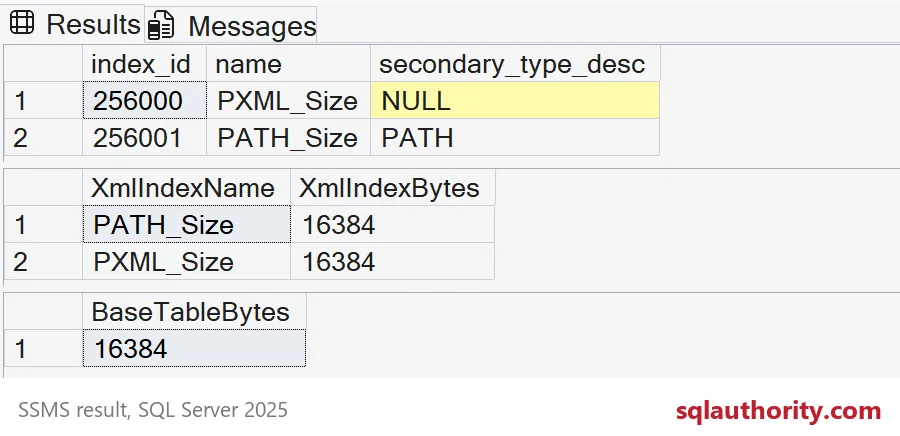
Read the grids from top to bottom. The primary XML index shows NULL in secondary_type_desc, because it is the primary one. The PATH index is the secondary one. In this one-row sample, the primary index, the PATH index and the base table each use 16,384 bytes, which is two 8 KB pages.
That equal split is an accident of a tiny table. Every structure needs at least a couple of pages, so one row says almost nothing about real life.
Same table, more documents
Let me add 2,000 more orders and measure again. The five-line orders are still small documents. Real XML is usually bigger.
INSERT dbo.XmlSizeDemo (Id, Document)
SELECT TOP (2000) 1 + ROW_NUMBER() OVER (ORDER BY (SELECT NULL)),
    CONVERT(xml, N'<order><line sku="A" qty="2"/><line sku="B" qty="3"/>
<line sku="C" qty="1"/><line sku="D" qty="7"/><line sku="E" qty="4"/></order>')
FROM sys.all_objects AS a
CROSS JOIN sys.all_objects AS b;

SELECT i.name AS XmlIndexName,
       SUM(CONVERT(bigint, p.used_page_count)) * 8192 AS XmlIndexBytes
FROM sys.internal_tables AS it
JOIN sys.dm_db_partition_stats AS p ON p.object_id = it.object_id
JOIN sys.indexes AS i ON i.object_id = p.object_id AND i.index_id = p.index_id
WHERE it.parent_id = OBJECT_ID(N'dbo.XmlSizeDemo')
  AND it.internal_type_desc = N'XML_INDEX_NODES'
GROUP BY i.name
ORDER BY i.name;

SELECT SUM(CONVERT(bigint, used_page_count)) * 8192 AS BaseTableBytes
FROM sys.dm_db_partition_stats
WHERE object_id = OBJECT_ID(N'dbo.XmlSizeDemo') AND index_id IN (0, 1);
Now the picture changes. In my run, the primary XML index was several times bigger than the base table. The PATH index was also bigger than the base table. Your byte counts will differ, but expect the same shape: the indexes outweigh the data they index.
Keep the denominator honest. BaseTableBytes covers the heap or clustered index only. It does not include ordinary nonclustered indexes. So read these numbers as a comparison for XML storage, not a full table budget.
Before you drop an XML index
Big index, tempting target. Do not drop it on size alone. Collect the XQuery predicates your application really runs, with their plans. Then test a copy without the index and compare reads, CPU and correctness.
Include the monthly and year-end queries in your test. A query that runs once a quarter is exactly the one that will hurt after the index is gone. Also check write cost, because every insert and update has to maintain these structures.
One more surprise. When you drop an index, the pages return to the database, not to Windows. The data file stays the same size until you decide to shrink it.
DROP TABLE IF EXISTS dbo.XmlSizeDemo;
Measure your own XML indexes once, and the growth question gets easier.
An XML index is not a small pointer list, it is a second copy of your document.
Published by Pinal Dave on SQLAuthority. More of my work at pinaldave.com.
Discover more from SQL Authority with Pinal Dave
Subscribe to get the latest posts sent to your email.