This Blocking and Deadlock Quiz asks which of the two problems SQL Server solves without any help. Both look like a query that has stopped moving. Only one of them is fixed for you. The other waits until the lock is released.

The Quiz
In blocking, one session waits for a lock that another session holds. In a deadlock, two sessions each hold a lock the other one needs. In both cases, a query sits and waits.
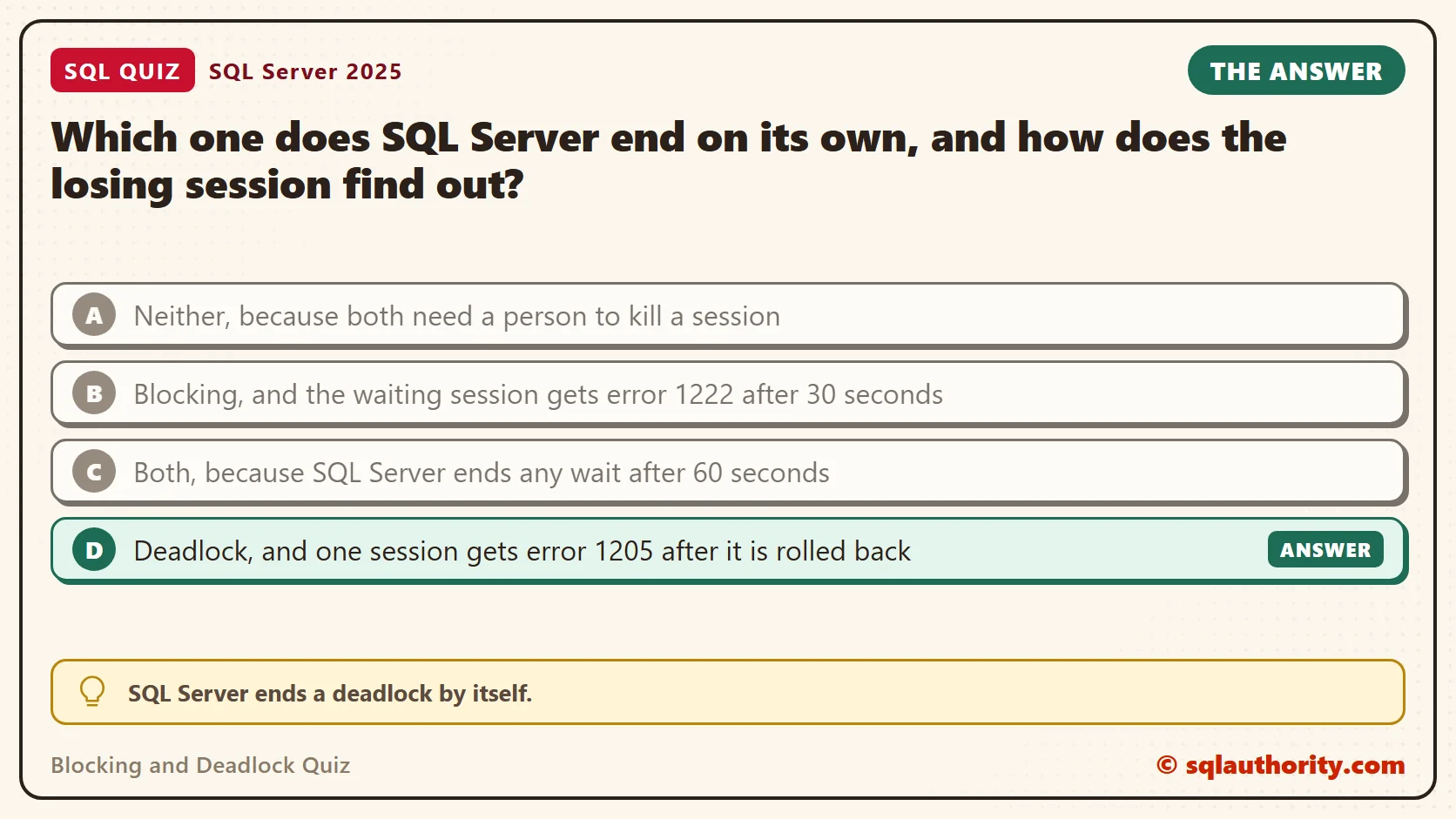
Which one does SQL Server end on its own, and how does the losing session find out?
A. Neither, because both need a person to kill a session
B. Blocking, and the waiting session gets error 1222 after 30 seconds
C. Both, because SQL Server ends any wait after 60 seconds
D. Deadlock, and one session gets error 1205 after it is rolled back
Pick one before you read on.
The Answer
The answer is D. SQL Server ends a deadlock by itself. A background task called the deadlock monitor looks for sessions that wait on each other in a circle. When it finds one, it picks a victim, rolls that transaction back and sends it error 1205. The other session then continues.
Blocking has no such rescue. A blocked session waits until the blocking lock is released. That happens when the other session commits or rolls back. SQL Server can’t tell a slow transaction from a stuck one, so it keeps waiting. A lock timeout that you set ends the wait with error 1222. A cancel from the client ends it too.
Prove It
This test uses two query windows connected to the same server. Run each step in the window named, in the order shown. The scripts use a small test database, so use a test server.
Step 1, in Window 1: create two small account tables.
IF DB_ID(N'SqlQuizBlockingAndDeadlock') IS NULL CREATE DATABASE SqlQuizBlockingAndDeadlock;
GO
USE SqlQuizBlockingAndDeadlock;
GO
DROP TABLE IF EXISTS dbo.QuizSavings;
DROP TABLE IF EXISTS dbo.QuizChecking;
CREATE TABLE dbo.QuizSavings (AccountID int PRIMARY KEY, Balance decimal(10,2) NOT NULL);
CREATE TABLE dbo.QuizChecking (AccountID int PRIMARY KEY, Balance decimal(10,2) NOT NULL);
INSERT INTO dbo.QuizSavings (AccountID, Balance) VALUES (1, 500.00), (2, 500.00);
INSERT INTO dbo.QuizChecking (AccountID, Balance) VALUES (1, 200.00), (2, 200.00);
Step 2, in Window 1: start a transaction, change one savings row and leave the transaction open.
USE SqlQuizBlockingAndDeadlock;
BEGIN TRANSACTION;
UPDATE dbo.QuizSavings SET Balance = Balance - 10 WHERE AccountID = 1;
Step 3, in Window 2: try to change the same row, with a lock timeout of 2 seconds.
USE SqlQuizBlockingAndDeadlock;
SET LOCK_TIMEOUT 2000;
UPDATE dbo.QuizSavings SET Balance = Balance + 10 WHERE AccountID = 1;
After 2 seconds, this is the text SSMS shows in the Messages tab. It is output, not code to run.
Msg 1222, Level 16, State 51, Line 3
Lock request time out period exceeded.
The statement has been terminated.
Step 4, in Window 2: run the update again with no limit. It doesn’t finish, so leave it running.
SET LOCK_TIMEOUT -1;
UPDATE dbo.QuizSavings SET Balance = Balance + 10 WHERE AccountID = 1;
Step 5, in Window 1: find out who is waiting, and for whom.
SELECT session_id, blocking_session_id, wait_type, wait_time AS WaitMs
FROM sys.dm_exec_requests
WHERE blocking_session_id <> 0;
| session_id | blocking_session_id | wait_type | WaitMs |
|---|---|---|---|
| 92 | 52 | LCK_M_X | 2001 |
Session 92 is Window 2. It waits for an exclusive lock (LCK_M_X), and session 52, Window 1, is the one blocking it. Your session numbers will differ, and the wait time grows with every second you wait.
Step 6, in Window 1: end the transaction. The waiting update in Window 2 finishes at once.
ROLLBACK TRANSACTION;
That is blocking. Window 2 waited as long as Window 1 kept its transaction open. Nothing in SQL Server stepped in.
Now Make a Deadlock
A deadlock needs two sessions that lock the same two rows in opposite order. Step 7, in Window 1: repeat step 2, so Window 1 holds the savings row.
Step 8, in Window 2: play a nightly job. Set its deadlock priority to LOW, so it is the one that loses, and lock the checking row.
SET DEADLOCK_PRIORITY LOW;
BEGIN TRANSACTION;
UPDATE dbo.QuizChecking SET Balance = Balance - 10 WHERE AccountID = 1;
Step 9, in Window 2: now ask for the savings row. Window 1 holds it, so this update waits.
UPDATE dbo.QuizSavings SET Balance = Balance + 10 WHERE AccountID = 1;
Step 10, in Window 1: ask for the checking row. Window 2 holds it, and each window now waits for the other.
UPDATE dbo.QuizChecking SET Balance = Balance + 10 WHERE AccountID = 1;
Wait a moment. SQL Server breaks the circle. Window 1 finishes its update, and Window 2 shows this in its Messages tab. It is output, not code to run.
Msg 1205, Level 13, State 51, Line 1
Transaction (Process ID 92) was deadlocked on lock resources with another process and has been chosen as the deadlock victim. Rerun the transaction.
Nobody killed anything. The monitor chose Window 2 because of its LOW priority, rolled it back and sent the error. Step 11, in Window 1: finish the transaction. Then, in Window 2, check what is left open.
COMMIT TRANSACTION;
SELECT @@TRANCOUNT AS OpenTransactions;
| OpenTransactions |
|---|
| 0 |
The count is 0. The victim’s transaction is already rolled back, and its checking update is gone. The error is the only sign that it ran.
Why the Other Answers Are Wrong
A is half right. Blocking doesn’t need a kill, because it ends when the blocker commits or rolls back. But SQL Server won’t end it for you. Only a cancel or a timeout you set stops the wait sooner. A deadlock needs no person at all, as the test showed.
B invents a limit. The default lock timeout is -1, which means wait with no end. Step 3 stopped after 2 seconds only because the script asked for it. An application can give up after 30 seconds, since that’s the default command timeout in .NET. That is the application cancelling its own query, and it isn’t error 1222.
C invents a second limit. SQL Server has no 60 second rule for waits. A blocked session can wait for hours if the other transaction stays open.
Keep Deadlocks Rare and Retry the Rest
You can’t remove every deadlock, but you can make them rare. Touch tables in the same order in every procedure, keep transactions short, and index the columns your updates filter on. In the test, the two windows took the tables in opposite order, and that alone built the circle.
For the rest, retry. Error 1205 says to rerun the transaction, and a rerun usually works. This script retries up to three times, and it stops on any other error. It also sets LOW priority, as the nightly job did.
SET DEADLOCK_PRIORITY LOW;
DECLARE @Attempt int = 1, @Done bit = 0;
WHILE @Done = 0 AND @Attempt <= 3
BEGIN
    BEGIN TRY
        BEGIN TRANSACTION;
        UPDATE dbo.QuizChecking SET Balance = Balance - 10 WHERE AccountID = 1;
        UPDATE dbo.QuizSavings SET Balance = Balance + 10 WHERE AccountID = 1;
        COMMIT TRANSACTION;
        SET @Done = 1;
    END TRY
    BEGIN CATCH
        IF XACT_STATE() <> 0 ROLLBACK TRANSACTION;
        IF ERROR_NUMBER() <> 1205 OR @Attempt = 3 THROW;
        SET @Attempt += 1;
        WAITFOR DELAY '00:00:01';
    END CATCH;
END;
SELECT @Attempt AS AttemptsUsed;
To test it, repeat step 7 in Window 1. Run this script in Window 2 instead of steps 8 and 9. Then repeat step 10 in Window 1, wait for it to finish, and commit with step 11. The first attempt in Window 2 is the victim, and the second one succeeds.
| AttemptsUsed |
|---|
| 2 |
What to Remember
Blocking ends when the blocking lock is released, or when a cancel or a lock timeout stops the waiting request. A deadlock is found and ended by SQL Server, with error 1205 for the loser. When a query hangs, find the blocker first with the query from step 5. That tells you which session to look at before anything gets cancelled.
When an application reports error 1205, I check the order its procedures touch their tables first. That order is usually the whole story. When you finish testing, remove the example database.
USE master;
GO
ALTER DATABASE SqlQuizBlockingAndDeadlock SET SINGLE_USER WITH ROLLBACK IMMEDIATE;
DROP DATABASE SqlQuizBlockingAndDeadlock;
A deadlock is not a stuck query, it is a circle that SQL Server can see and break.
Published by Pinal Dave on SQLAuthority. More of my work at pinaldave.com.
Discover more from SQL Authority with Pinal Dave
Subscribe to get the latest posts sent to your email.