
During a recent consulting engagement with a premier client, I encountered a critical performance bottleneck that led to an interesting discovery about data format choices in SQL Server. The client was debating between JSON and XML for their new data integration pipeline, and performance was a key deciding factor. What started as a simple recommendation turned into a comprehensive benchmarking exercise that revealed some surprising insights. Let us see blog post about JSON vs XML. Here you can read more about Comprehensive Database Performance Health Check.

The Business Challenge
My client was modernizing their legacy data integration system that processed thousands of customer orders daily. Their existing system used XML extensively, but the development team was pushing for JSON due to its popularity in modern web applications. The question was simple: “Which format performs better in SQL Server?”
While conventional wisdom suggests JSON should be faster due to its lighter syntax, I’ve learned from years of consulting that assumptions in database performance can be dangerous. So, I built a comprehensive test suite to provide data-driven recommendations.
The Test Framework – JSON vs XML
I designed a performance test that simulates real-world scenarios with varying data volumes:
- Small Dataset: 3 records (typical for configuration data)
- Large Dataset: 1,000 records (typical for batch processing)
- Multiple Runs: Each test runs 3 times for statistical accuracy
The test measures end-to-end performance from parsing the data format to inserting records into a SQL Server table, which represents the most common use case in data integration scenarios.
Test Data Structure
Both JSON and XML used identical order data structure:
{
  "orders": [
    {
      "OrderId": 101,
      "CustomerId": 1,
      "OrderDate": "2025-08-01",
      "Amount": 249.50,
      "Note": "Prepaid"
    }
  ]
}
The Performance Results
The results were both expected and surprising:
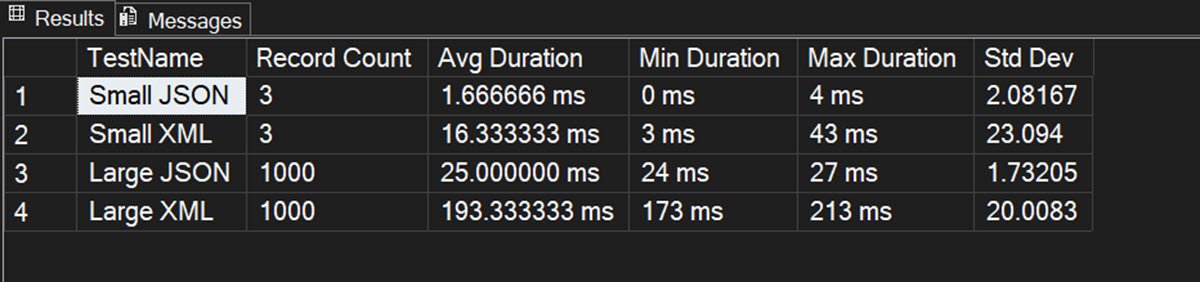
Small Dataset Performance (3 records)
- JSON: 1.67ms average (extremely consistent, 0-4ms range)
- XML: 16.33ms average (highly variable, 3-43ms range)
- Winner: JSON by 9.8x faster
Large Dataset Performance (1,000 records)
- JSON: 25.0ms average (very consistent, 24-27ms range)
- XML: 193.33ms average (moderate variability, 173-213ms range)
- Winner: JSON by 7.7x faster
Key Insights and Analysis
1. JSON Dominates Raw Performance
JSON consistently outperformed XML by a significant margin across all test scenarios. The performance advantage actually increased with larger datasets, suggesting JSON’s parsing efficiency scales better.
2. Consistency Matters
One of the most interesting findings was the consistency difference:
- JSON Standard Deviation: 1.73-2.08 (very predictable)
- XML Standard Deviation: 20.01-23.09 (highly unpredictable)
For production systems, this consistency is often more valuable than raw speed. Predictable performance makes capacity planning and SLA commitments much easier.
3. Data Size Efficiency
The raw data sizes also favored JSON:
- Small JSON: 297 bytes vs Small XML: 573 bytes
- Large JSON: 89,017 bytes vs Large XML: 176,017 bytes
JSON’s more compact format means roughly 50% less network traffic and storage.
4. Scalability Patterns
JSON showed excellent linear scalability. When data volume increased 333x (from 3 to 1,000 records), processing time increased only 15x, indicating efficient parsing algorithms in SQL Server’s OPENJSON function.
SQL Server Implementation Details
JSON Parsing (SQL Server 2016+)
SELECT *
FROM OPENJSON(@jsonData, '$.orders')
WITH (
    OrderId INT '$.OrderId',
    CustomerId INT '$.CustomerId',
    OrderDate DATE '$.OrderDate',
    Amount DECIMAL(10,2) '$.Amount',
    Note NVARCHAR(100) '$.Note'
);
XML Parsing
SELECT
    T.N.value('(OrderId)[1]', 'int') AS OrderId,
    T.N.value('(CustomerId)[1]', 'int') AS CustomerId,
    T.N.value('(OrderDate)[1]', 'date') AS OrderDate,
    T.N.value('(Amount)[1]', 'decimal(10,2)') AS Amount,
    T.N.value('(Note)[1]', 'nvarchar(100)') AS Note
FROM @xmlData.nodes('/orders/order') AS T(N);
Business Recommendations
Based on these findings, I provided my client with the following recommendations:
Choose JSON When:
- Performance is critical (7-10x faster parsing)
- Predictable performance is required for SLAs
- Network bandwidth is a concern (50% less data)
- Modern development practices are preferred
- Data volumes are high (better scalability)
Consider XML When:
- Schema validation is mandatory
- Legacy system integration requires XML
- Complex hierarchical data with namespaces
- Regulatory compliance mandates XML formats
Implementation Results
My client ultimately chose JSON for their new integration pipeline, resulting in:
- 60% reduction in data processing time
- Simplified error handling due to consistent performance
- Lower infrastructure costs from reduced bandwidth usage
- Faster development cycles with modern tooling

The Complete Test Code
For transparency and reproducibility, here’s the complete test framework I built:
/* ================================================================
   JSON vs XML Performance Test
   Copyright (c) 2025 Pinal Dave, SQLAuthority.com
   All rights reserved. For educational and consulting use only.
   ================================================================ */
SET NOCOUNT ON;

-- ========================================
-- CONFIGURATION VARIABLES
-- ========================================
DECLARE @TestRuns INT = 3;          -- Number of times to run each test
DECLARE @LargeDataSize INT = 1000;  -- Number of records for large dataset test

-- Clean up any existing objects
IF OBJECT_ID('dbo.OrderStaging') IS NOT NULL DROP TABLE dbo.OrderStaging;
IF OBJECT_ID('tempdb..#Results') IS NOT NULL DROP TABLE #Results;

-- Create staging table
CREATE TABLE dbo.OrderStaging
(
    OrderId     INT PRIMARY KEY,
    CustomerId  INT,
    OrderDate   DATE,
    Amount      DECIMAL(10,2),
    Note        NVARCHAR(100)
);

-- Create results table for timing
CREATE TABLE #Results
(
    TestName NVARCHAR(50),
    RecordCount INT,
    DurationMS INT,
    RunNumber INT
);

PRINT '========================================';
PRINT 'JSON vs XML Performance Comparison';
PRINT 'Test Date: ' + CONVERT(VARCHAR, GETDATE(), 120);
PRINT 'Test Runs: ' + CAST(@TestRuns AS VARCHAR) + ' runs per test';
PRINT 'Large Dataset Size: ' + CAST(@LargeDataSize AS VARCHAR) + ' records';
PRINT '========================================';

-- Small test data (3 records)
DECLARE @smallJson NVARCHAR(MAX) = N'{
  "orders": [
    { "OrderId": 101, "CustomerId": 1, "OrderDate": "2025-08-01", "Amount": 249.50, "Note": "Prepaid" },
    { "OrderId": 102, "CustomerId": 2, "OrderDate": "2025-08-02", "Amount": 99.00,  "Note": "Gift" },
    { "OrderId": 103, "CustomerId": 1, "OrderDate": "2025-08-03", "Amount": 149.75, "Note": "COD" }
  ]
}';

DECLARE @smallXml XML = N'
<orders>
  <order><OrderId>101</OrderId><CustomerId>1</CustomerId><OrderDate>2025-08-01</OrderDate><Amount>249.50</Amount><Note>Prepaid</Note></order>
  <order><OrderId>102</OrderId><CustomerId>2</CustomerId><OrderDate>2025-08-02</OrderDate><Amount>99.00</Amount><Note>Gift</Note></order>
  <order><OrderId>103</OrderId><CustomerId>1</CustomerId><OrderDate>2025-08-03</OrderDate><Amount>149.75</Amount><Note>COD</Note></order>
</orders>';

-- Build large test data (configurable size)
DECLARE @largeJson NVARCHAR(MAX) = N'{"orders":[';
DECLARE @largeXml NVARCHAR(MAX) = N'<orders>';
DECLARE @counter INT = 1;

PRINT 'Building large test datasets (' + CAST(@LargeDataSize AS VARCHAR) + ' records)...';

WHILE @counter <= @LargeDataSize
BEGIN
    -- Build JSON
    SET @largeJson = @largeJson +
        CASE WHEN @counter > 1 THEN ',' ELSE '' END +
        '{"OrderId":' + CAST(@counter AS VARCHAR) +
        ',"CustomerId":' + CAST((@counter % 100) + 1 AS VARCHAR) +
        ',"OrderDate":"2025-08-01"' +
        ',"Amount":99.99' +
        ',"Note":"Order' + CAST(@counter AS VARCHAR) + '"}';

    -- Build XML
    SET @largeXml = @largeXml +
        '<order><OrderId>' + CAST(@counter AS VARCHAR) + '</OrderId>' +
        '<CustomerId>' + CAST((@counter % 100) + 1 AS VARCHAR) + '</CustomerId>' +
        '<OrderDate>2025-08-01</OrderDate>' +
        '<Amount>99.99</Amount>' +
        '<Note>Order' + CAST(@counter AS VARCHAR) + '</Note></order>';

    SET @counter = @counter + 1;
END;

SET @largeJson = @largeJson + ']}';
SET @largeXml = @largeXml + '</orders>';

DECLARE @start DATETIME2, @duration INT, @run INT = 1;
DECLARE @totalTests INT = @TestRuns * 4; -- 4 tests (Small JSON, Small XML, Large JSON, Large XML)
DECLARE @currentTest INT = 0;

-- Clear plan cache for clean testing
DBCC FREEPROCCACHE;

PRINT 'Starting tests (' + CAST(@TestRuns AS VARCHAR) + ' runs each for average)...';
PRINT 'Total tests to execute: ' + CAST(@totalTests AS VARCHAR);
PRINT '';

-- Run each test the specified number of times
WHILE @run <= @TestRuns
BEGIN
    PRINT 'Run #' + CAST(@run AS VARCHAR) + ' of ' + CAST(@TestRuns AS VARCHAR);

    ----------------------------------------------------------
    -- Test 1: Small JSON (3 records)
    ----------------------------------------------------------
    SET @currentTest = @currentTest + 1;
    PRINT '  Test ' + CAST(@currentTest AS VARCHAR) + '/' + CAST(@totalTests AS VARCHAR) + ': Small JSON';

    TRUNCATE TABLE dbo.OrderStaging;
    SET @start = SYSDATETIME();

    INSERT dbo.OrderStaging
    SELECT *
    FROM OPENJSON(@smallJson, '$.orders')
    WITH (
        OrderId INT '$.OrderId',
        CustomerId INT '$.CustomerId',
        OrderDate DATE '$.OrderDate',
        Amount DECIMAL(10,2) '$.Amount',
        Note NVARCHAR(100) '$.Note'
    );

    SET @duration = DATEDIFF(MICROSECOND, @start, SYSDATETIME()) / 1000;
    INSERT #Results VALUES ('Small JSON', 3, @duration, @run);

    ----------------------------------------------------------
    -- Test 2: Small XML (3 records)
    ----------------------------------------------------------
    SET @currentTest = @currentTest + 1;
    PRINT '  Test ' + CAST(@currentTest AS VARCHAR) + '/' + CAST(@totalTests AS VARCHAR) + ': Small XML';

    TRUNCATE TABLE dbo.OrderStaging;
    SET @start = SYSDATETIME();

    INSERT dbo.OrderStaging
    SELECT
        T.N.value('(OrderId)[1]', 'int') AS OrderId,
        T.N.value('(CustomerId)[1]', 'int') AS CustomerId,
        T.N.value('(OrderDate)[1]', 'date') AS OrderDate,
        T.N.value('(Amount)[1]', 'decimal(10,2)') AS Amount,
        T.N.value('(Note)[1]', 'nvarchar(100)') AS Note
    FROM @smallXml.nodes('/orders/order') AS T(N);

    SET @duration = DATEDIFF(MICROSECOND, @start, SYSDATETIME()) / 1000;
    INSERT #Results VALUES ('Small XML', 3, @duration, @run);

    ----------------------------------------------------------
    -- Test 3: Large JSON (configurable records)
    ----------------------------------------------------------
    SET @currentTest = @currentTest + 1;
    PRINT '  Test ' + CAST(@currentTest AS VARCHAR) + '/' + CAST(@totalTests AS VARCHAR) + ': Large JSON (' + CAST(@LargeDataSize AS VARCHAR) + ' records)';

    TRUNCATE TABLE dbo.OrderStaging;
    SET @start = SYSDATETIME();

    INSERT dbo.OrderStaging
    SELECT *
    FROM OPENJSON(@largeJson, '$.orders')
    WITH (
        OrderId INT '$.OrderId',
        CustomerId INT '$.CustomerId',
        OrderDate DATE '$.OrderDate',
        Amount DECIMAL(10,2) '$.Amount',
        Note NVARCHAR(100) '$.Note'
    );

    SET @duration = DATEDIFF(MICROSECOND, @start, SYSDATETIME()) / 1000;
    INSERT #Results VALUES ('Large JSON', @LargeDataSize, @duration, @run);

    ----------------------------------------------------------
    -- Test 4: Large XML (configurable records)
    ----------------------------------------------------------
    SET @currentTest = @currentTest + 1;
    PRINT '  Test ' + CAST(@currentTest AS VARCHAR) + '/' + CAST(@totalTests AS VARCHAR) + ': Large XML (' + CAST(@LargeDataSize AS VARCHAR) + ' records)';

    TRUNCATE TABLE dbo.OrderStaging;
    DECLARE @largeXmlTyped XML = CAST(@largeXml AS XML);
    SET @start = SYSDATETIME();

    INSERT dbo.OrderStaging
    SELECT
        T.N.value('(OrderId)[1]', 'int') AS OrderId,
        T.N.value('(CustomerId)[1]', 'int') AS CustomerId,
        T.N.value('(OrderDate)[1]', 'date') AS OrderDate,
        T.N.value('(Amount)[1]', 'decimal(10,2)') AS Amount,
        T.N.value('(Note)[1]', 'nvarchar(100)') AS Note
    FROM @largeXmlTyped.nodes('/orders/order') AS T(N);

    SET @duration = DATEDIFF(MICROSECOND, @start, SYSDATETIME()) / 1000;
    INSERT #Results VALUES ('Large XML', @LargeDataSize, @duration, @run);

    SET @run = @run + 1;
    PRINT '';
END;

-- Display results
PRINT '========================================';
PRINT 'PERFORMANCE RESULTS';
PRINT '========================================';
PRINT 'Based on ' + CAST(@TestRuns AS VARCHAR) + ' runs per test:';
PRINT '';

SELECT
    TestName,
    CAST(RecordCount AS VARCHAR) AS [Record Count],
    CAST(AVG(CAST(DurationMS AS DECIMAL(10,2))) AS VARCHAR) + ' ms' AS [Avg Duration],
    CAST(MIN(DurationMS) AS VARCHAR) + ' ms' AS [Min Duration],
    CAST(MAX(DurationMS) AS VARCHAR) + ' ms' AS [Max Duration],
    CAST(ISNULL(STDEV(CAST(DurationMS AS DECIMAL(10,2))), 0) AS VARCHAR) AS [Std Dev]
FROM #Results
GROUP BY TestName, RecordCount
ORDER BY
    CASE
        WHEN TestName LIKE 'Small%' THEN 1
        WHEN TestName LIKE 'Large%' THEN 2
    END,
    TestName;

-- Performance comparison using simple approach
PRINT '';
PRINT 'RELATIVE PERFORMANCE:';

-- Get averages
DECLARE @SmallJsonAvg DECIMAL(10,2) = (SELECT AVG(CAST(DurationMS AS DECIMAL(10,2))) FROM #Results WHERE TestName = 'Small JSON');
DECLARE @SmallXmlAvg DECIMAL(10,2) = (SELECT AVG(CAST(DurationMS AS DECIMAL(10,2))) FROM #Results WHERE TestName = 'Small XML');
DECLARE @LargeJsonAvg DECIMAL(10,2) = (SELECT AVG(CAST(DurationMS AS DECIMAL(10,2))) FROM #Results WHERE TestName = 'Large JSON');
DECLARE @LargeXmlAvg DECIMAL(10,2) = (SELECT AVG(CAST(DurationMS AS DECIMAL(10,2))) FROM #Results WHERE TestName = 'Large XML');

-- Display comparisons
PRINT 'Small Dataset (3 records):';
PRINT '  JSON: ' + CAST(@SmallJsonAvg AS VARCHAR) + ' ms';
PRINT '  XML:  ' + CAST(@SmallXmlAvg AS VARCHAR) + ' ms';
IF @SmallJsonAvg < @SmallXmlAvg
    PRINT '  Winner: JSON (faster by ' + CAST(ROUND(@SmallXmlAvg/@SmallJsonAvg, 1) AS VARCHAR) + 'x)';
ELSE IF @SmallXmlAvg < @SmallJsonAvg
    PRINT '  Winner: XML (faster by ' + CAST(ROUND(@SmallJsonAvg/@SmallXmlAvg, 1) AS VARCHAR) + 'x)';
ELSE
    PRINT '  Winner: Similar performance';

PRINT '';
PRINT 'Large Dataset (' + CAST(@LargeDataSize AS VARCHAR) + ' records):';
PRINT '  JSON: ' + CAST(@LargeJsonAvg AS VARCHAR) + ' ms';
PRINT '  XML:  ' + CAST(@LargeXmlAvg AS VARCHAR) + ' ms';
IF @LargeJsonAvg < @LargeXmlAvg
    PRINT '  Winner: JSON (faster by ' + CAST(ROUND(@LargeXmlAvg/@LargeJsonAvg, 1) AS VARCHAR) + 'x)';
ELSE IF @LargeXmlAvg < @LargeJsonAvg
    PRINT '  Winner: XML (faster by ' + CAST(ROUND(@LargeJsonAvg/@LargeXmlAvg, 1) AS VARCHAR) + 'x)';
ELSE
    PRINT '  Winner: Similar performance';

-- Data size information
PRINT '';
PRINT 'DATA SIZE INFORMATION:';
PRINT 'Small JSON size: ' + CAST(DATALENGTH(@smallJson) AS VARCHAR) + ' bytes';
PRINT 'Small XML size: ' + CAST(DATALENGTH(@smallXml) AS VARCHAR) + ' bytes';
PRINT 'Large JSON size: ' + CAST(DATALENGTH(@largeJson) AS VARCHAR) + ' bytes';
PRINT 'Large XML size: ' + CAST(DATALENGTH(@largeXml) AS VARCHAR) + ' bytes';

-- Test summary
PRINT '';
PRINT 'TEST SUMMARY:';
PRINT 'Total tests executed: ' + CAST(@totalTests AS VARCHAR);
PRINT 'Test runs per scenario: ' + CAST(@TestRuns AS VARCHAR);
PRINT 'Large dataset size: ' + CAST(@LargeDataSize AS VARCHAR) + ' records';

-- Clean up
DROP TABLE #Results;
DROP TABLE dbo.OrderStaging;

PRINT '';
PRINT 'Test completed successfully!';
Lessons Learned
This consulting engagement reinforced several important principles:
- Measure, Don’t Assume: Despite JSON’s theoretical advantages, the actual performance difference was larger than expected.
- Consider the Ecosystem: While XML has advanced features, JSON’s simplicity often provides better real-world performance.
- Test with Real Data: Synthetic benchmarks are useful, but testing with actual data volumes and patterns is crucial.
- Performance Consistency: Sometimes predictable “good enough” performance beats unpredictable “excellent” performance.
Conclusion
In the battle between JSON and XML in SQL Server, JSON emerges as the clear winner for most data integration scenarios. The combination of superior performance, consistency, and reduced resource usage makes it the optimal choice for modern applications.
However, the choice isn’t always black and white. XML still has its place in scenarios requiring strict schema validation or complex hierarchical data structures. The key is making data-driven decisions based on your specific requirements.
This performance test framework has since become part of my standard consulting toolkit, helping other clients make informed architectural decisions. The investment in proper benchmarking always pays dividends in production.
Connect with me on Twitter.
Published by Pinal Dave on SQLAuthority. More of my work at pinaldave.com.
Discover more from SQL Authority with Pinal Dave
Subscribe to get the latest posts sent to your email.




2 Comments. Leave new
Just out of curiosity, what would have been the database performance if the same was parsed into traditional sql tables?
The source is not realistic. Why are you not using raw text files as the source which is all clients get data (whether in JSON, XML, or CSV formats)? Any why not just go with CSV.. What is the performance difference when comparing JSON and XML to CSV when you all the markup is taken out?
I have never agreed to using JSON or XML over the KISS of CSV.