An updatable ledger table keeps every earlier version of a row, so quiet edits to history are easy to catch. The rows look right today. The real question is whether anyone altered them yesterday.
What the review is really asking
Picture an audit call. The reviewer says, “The balance looks right today. How do I know nobody touched last quarter’s numbers?” You show the rows. That proves nothing, because rows only show the present.
An updatable ledger table keeps each version of a row, plus a record of the transaction behind it. Later, SQL Server compares that record with a digest you saved somewhere safe.
The demo creates a database named SqlAuthorityDemo and drops it at the end. Verification needs snapshot isolation, so the first block turns it on.
Create a ledger table and change a row
The table looks ordinary, with two extra options. SYSTEM_VERSIONING names the history table. LEDGER = ON names a view that tells the whole story. I insert 100.00, then update it to 125.00. A plain SELECT shows only the new value.
USE master;
DROP DATABASE IF EXISTS SqlAuthorityDemo;
GO
CREATE DATABASE SqlAuthorityDemo;
GO
ALTER DATABASE SqlAuthorityDemo SET ALLOW_SNAPSHOT_ISOLATION ON;
GO
USE SqlAuthorityDemo;
GO
CREATE TABLE dbo.LedgerBalanceDemo
(
    AccountId int NOT NULL PRIMARY KEY,
    Balance decimal(19,2) NOT NULL
)
WITH
(
    SYSTEM_VERSIONING = ON (HISTORY_TABLE = dbo.LedgerBalanceDemoHistory),
    LEDGER = ON (LEDGER_VIEW = dbo.LedgerBalanceDemoView)
);
GO
INSERT dbo.LedgerBalanceDemo (AccountId, Balance) VALUES (1, 100.00);
UPDATE dbo.LedgerBalanceDemo SET Balance = 125.00 WHERE AccountId = 1;

SELECT AccountId, Balance FROM dbo.LedgerBalanceDemo;
Now ask the ledger view. You get three rows, not one. The first transaction inserted 100.00. The update appears as a pair in a second transaction: an INSERT of 125.00 and a DELETE of the old 100.00. Operation type 1 means INSERT and 2 means DELETE.
SELECT *
FROM dbo.LedgerBalanceDemoView
ORDER BY ledger_transaction_id, ledger_sequence_number;

SELECT transaction_id, commit_time, principal_name
FROM sys.database_ledger_transactions
ORDER BY transaction_id;
The second query is your “who and when.” It lists each transaction, its commit time, and the login behind it.
Try to rewrite the history
A junior DBA once asked me, “Can’t an admin just edit the history table?” Let’s try. The block updates the history table, turns system versioning off, and updates the ledger view. Each attempt fails.
UPDATE dbo.LedgerBalanceDemoHistory SET Balance = 999.00;
GO
ALTER TABLE dbo.LedgerBalanceDemo SET (SYSTEM_VERSIONING = OFF);
GO
UPDATE dbo.LedgerBalanceDemoView SET Balance = 1;
GO
You get errors 37361, 37356, and 37395. A locked door is good. The real proof, though, comes from checking the data against something outside the database.
Digests make the proof work
A digest is a small JSON document with the database name, a block id, a hash, and two times. The hash covers everything in the ledger up to that block. Save each digest where administrators cannot edit it, such as write-once storage. If it lives in the same database, whoever changes the data could change the digest too.
My demo keeps digests in a temp table. That is fine for learning and useless as real protection. Generating a digest also closes the current block. Block 0 holds three transactions: the table creation, the insert, and the update.
CREATE TABLE #LedgerDigest
(
    DigestNo int IDENTITY(1,1) PRIMARY KEY,
    DatabaseDigest nvarchar(max) NOT NULL
);

INSERT #LedgerDigest (DatabaseDigest)
EXEC sys.sp_generate_database_ledger_digest;

SELECT DigestNo, DatabaseDigest FROM #LedgerDigest;

SELECT block_id, block_size FROM sys.database_ledger_blocks;
Now verify. The procedure wants a JSON array, so I wrap the digest in square brackets. It recomputes the hashes and compares them. A good run says it verified up to block 0.
DECLARE @Digests nvarchar(max) =
    N'[' + (SELECT DatabaseDigest FROM #LedgerDigest WHERE DigestNo = 1) + N']';

EXEC sys.sp_verify_database_ledger @Digests;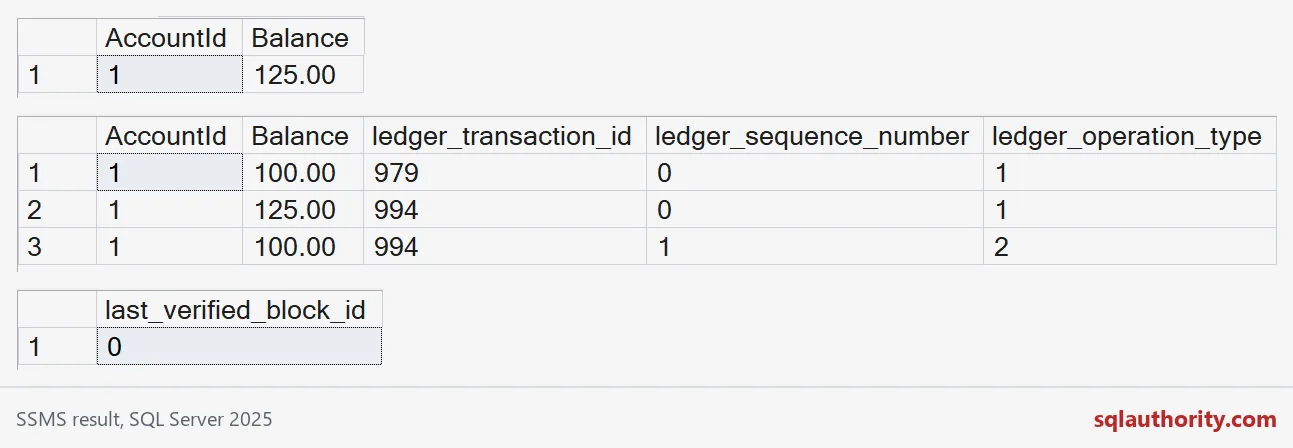

Break it on purpose
Change the balance again, take a second digest, and verify both. Verification checks every digest you pass in, so it covers the old history and the new. This time it reaches block 1.
UPDATE dbo.LedgerBalanceDemo SET Balance = 150.00 WHERE AccountId = 1;

INSERT #LedgerDigest (DatabaseDigest)
EXEC sys.sp_generate_database_ledger_digest;

DECLARE @Digests nvarchar(max) =
    N'[' + (SELECT STRING_AGG(DatabaseDigest, N',')
            WITHIN GROUP (ORDER BY DigestNo)
            FROM #LedgerDigest) + N']';

EXEC sys.sp_verify_database_ledger @Digests;
I cannot tamper with the ledger itself, which is the point. So I tamper with the saved digest. I add two characters to the newest hash. SQL Server sees the same mismatch it would see if the data had changed.
DECLARE @Bad nvarchar(max) =
    (SELECT DatabaseDigest FROM #LedgerDigest WHERE DigestNo = 2);
SET @Bad = N'[' + REPLACE(@Bad, N'"hash":"0x', N'"hash":"0x00') + N']';

EXEC sys.sp_verify_database_ledger @Bad;
Verification fails twice over. Error 37368 says the hash of block 1 does not match the digest. Error 37392 says verification failed.
What a clean result does not tell you
A successful verification supports one claim: the checked history matches the digests you kept. It does not prove every update was approved, or that the application sent the right values.
Verification recomputes hashes, so it gets heavier as history grows. Schedule it on purpose and keep the results. Also watch digest collection. If the collector stops, you have a gap in your evidence while the application keeps writing.
The last block removes the demo database and the temp table.
DROP TABLE IF EXISTS #LedgerDigest;
GO
USE master;
DROP DATABASE IF EXISTS SqlAuthorityDemo;
Next time someone asks whether the numbers changed, you will have more than a shrug to offer.
A ledger is not a lock on the data, it is a witness that can be checked.
Published by Pinal Dave on SQLAuthority. More of my work at pinaldave.com.
Discover more from SQL Authority with Pinal Dave
Subscribe to get the latest posts sent to your email.