Comma-separated role members give you one readable line per role. Preserve empty roles and identify implicit public membership. Keep the underlying pairs for a separate effective-access review.

Start with direct membership pairs
Run the report in the database you are reviewing. sys.database_role_members connects role identifiers to member identifiers. Join sys.database_principals twice to obtain both names.
SELECT r.name AS RoleName, m.name AS MemberName, m.type_desc
FROM sys.database_role_members AS rm
JOIN sys.database_principals AS r
  ON r.principal_id = rm.role_principal_id
JOIN sys.database_principals AS m
  ON m.principal_id = rm.member_principal_id
ORDER BY r.name, m.name;
A member can be a user, a group or another role. Metadata visibility also limits the result. Record the instance, database, collecting account and collection time with the export.
Order the names inside each aggregate
STRING_AGG requires SQL Server 2017 or later. Its WITHIN GROUP ordering requires database compatibility level 110 or later. An outer ORDER BY controls the role rows, not names inside each list.
SELECT r.name AS RoleName,
       STRING_AGG(CONVERT(nvarchar(max),m.name),N', ')
       WITHIN GROUP (ORDER BY m.name) AS Members
FROM sys.database_role_members AS rm
JOIN sys.database_principals AS r
  ON r.principal_id = rm.role_principal_id
JOIN sys.database_principals AS m
  ON m.principal_id = rm.member_principal_id
GROUP BY r.name
ORDER BY r.name;
The max conversion avoids the aggregate’s bounded string result. Keep the pair-based report too: a principal name can itself contain commas. Never parse the displayed list back into executable identifiers.
Retain empty roles and label public correctly
Start from role principals and use LEFT JOIN. STRING_AGG ignores NULL inputs, so COALESCE supplies the display value for empty direct membership. Public is different because every database user belongs implicitly.
SELECT r.name AS RoleName,
       CASE WHEN r.name = N'public'
            THEN N'(implicit: all database users)'
            ELSE COALESCE(STRING_AGG(CONVERT(nvarchar(max),m.name),N', ')
              WITHIN GROUP (ORDER BY m.name),N'(none)') END AS Members
FROM sys.database_principals AS r
LEFT JOIN sys.database_role_members AS rm
  ON rm.role_principal_id = r.principal_id
LEFT JOIN sys.database_principals AS m
  ON m.principal_id = rm.member_principal_id
WHERE r.type = 'R'
GROUP BY r.name
ORDER BY r.name;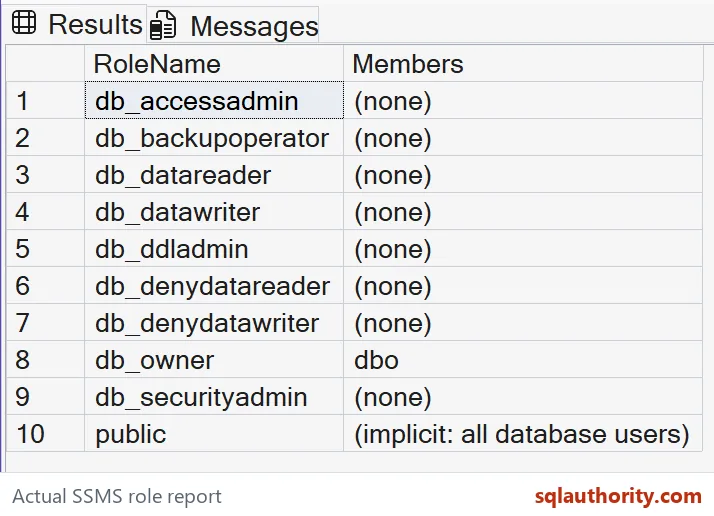
Do not filter member names in WHERE when preserving empty roles. That can discard the NULL-extended rows. An empty role still needs a purpose review before removal.

The diagram describes explicit membership. Public’s membership remains implicit, as the query labels. An empty-looking catalog bridge must not turn public into a role with no users.
Keep the instance-level report separate
Server roles use sys.server_principals and sys.server_role_members. Every login belongs implicitly to the server public role. The database and instance reports answer different membership questions.
SELECT r.name AS ServerRole,
       CASE WHEN r.name = N'public'
            THEN N'(implicit: all logins)'
            ELSE COALESCE(STRING_AGG(CONVERT(nvarchar(max),m.name),N', ')
              WITHIN GROUP (ORDER BY m.name),N'(none)') END AS Members
FROM sys.server_principals AS r
LEFT JOIN sys.server_role_members AS rm
  ON rm.role_principal_id = r.principal_id
LEFT JOIN sys.server_principals AS m
  ON m.principal_id = rm.member_principal_id
WHERE r.type = 'R'
GROUP BY r.name
ORDER BY r.name;
Know what the report leaves unresolved
These queries report direct assignments. They do not expand nested roles or directory groups. A single group principal can represent many people outside the database catalog.
An unchanged membership list also does not prove unchanged permissions. Someone can change a role’s grants while leaving its members alone. Check the relevant effective permission in the intended user context when that is the review question.
I would keep the formatted report for scanning, but reject it as an executable security script. Use principal identifiers for further processing. Any generated statement needs deliberately quoted identifiers and a separate change review.
I would run this on a test database first and see who turns up in which role.
A readable member list is not an access review, it is the starting evidence for one.
Published by Pinal Dave on SQLAuthority. More of my work at pinaldave.com.
Discover more from SQL Authority with Pinal Dave
Subscribe to get the latest posts sent to your email.