Query Store interval length decides how finely your query history is sliced. With hourly slices, a short slowdown gets averaged into a calm hour and disappears. Shorter slices keep the spike visible, but they cost more storage.

Why the hourly average hides the spike
Users tell you the app crawled around 11:15. You open the Query Store report and the hour looks fine. The slow minutes were real, but they sat inside an hour of fast ones, and the average washed them out. The slicing was too coarse for the question.
Query Store groups runtime statistics into intervals. The setting is interval_length_minutes, and it belongs to each database separately. The demo creates a database called SqlAuthorityDemo and drops it at the end. The first block reads the interval on a brand new database.
USE master;
DROP DATABASE IF EXISTS SqlAuthorityDemo;
GO
CREATE DATABASE SqlAuthorityDemo;
GO
USE SqlAuthorityDemo;
GO
SELECT actual_state_desc, interval_length_minutes
FROM sys.database_query_store_options;
On my server the new database reports READ_WRITE and an interval of 60 minutes. That is the hourly slicing from the story. Check yours before you assume anything.
Change it, and set the storage rules with it
Changing the interval is one line. Set it to 15 minutes and read it back.
ALTER DATABASE SqlAuthorityDemo SET QUERY_STORE (INTERVAL_LENGTH_MINUTES = 15);

SELECT interval_length_minutes
FROM sys.database_query_store_options;
Thinner slices mean more rows for the same workload. So change the size cap and cleanup rules in the same breath. The block below keeps the 15-minute interval, sets the maximum store size to 1024 MB, and removes queries not seen for 30 days.
ALTER DATABASE SqlAuthorityDemo SET QUERY_STORE
(INTERVAL_LENGTH_MINUTES = 15, MAX_STORAGE_SIZE_MB = 1024,
 CLEANUP_POLICY = (STALE_QUERY_THRESHOLD_DAYS = 30), SIZE_BASED_CLEANUP_MODE = AUTO);

SELECT actual_state_desc, interval_length_minutes, current_storage_size_mb, max_storage_size_mb
FROM sys.database_query_store_options;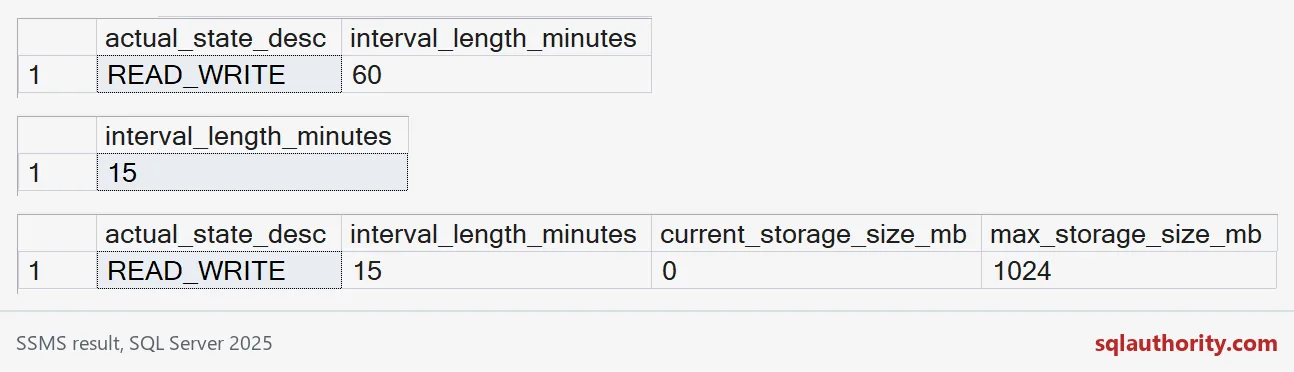
Create a spike and let it hide
Now let me show the averaging problem for real. To avoid waiting an hour, I switch the interval to one minute. The procedure counts rows from a cross join, and the @Rows parameter controls how much work it does. First, 200 quick calls. Then the flush, which writes Query Store’s in-memory data to disk so the views can see it.
ALTER DATABASE SqlAuthorityDemo SET QUERY_STORE (INTERVAL_LENGTH_MINUTES = 1);
GO
CREATE OR ALTER PROCEDURE dbo.RunWork @Rows int
AS
BEGIN
    DECLARE @c int;
    SELECT @c = COUNT(*)
    FROM (SELECT TOP (@Rows) 1 AS x
          FROM sys.all_objects AS a CROSS JOIN sys.all_objects AS b) AS t;
END;
GO
DECLARE @i int = 0;
WHILE @i < 200
BEGIN
    EXEC dbo.RunWork @Rows = 100;
    SET @i += 1;
END;
EXEC sys.sp_query_store_flush_db;
Then wait a little over a minute, so the next work lands in a new interval, and run five slow calls with a much bigger @Rows. That is our 11:15 problem in miniature.
WAITFOR DELAY '00:01:05';
GO
DECLARE @i int = 0;
WHILE @i < 5
BEGIN
    EXEC dbo.RunWork @Rows = 3000000;
    SET @i += 1;
END;
EXEC sys.sp_query_store_flush_db;
Read the history at its real grain
Group by interval and plan. Sum the executions, and weight the average duration by execution count. Averaging the avg_duration values directly would give a row with five runs the same vote as a row with 200. Durations are in microseconds.
SELECT i.start_time, i.end_time, p.plan_id,
       SUM(r.count_executions) AS Executions,
       SUM(r.avg_duration * r.count_executions) / NULLIF(SUM(r.count_executions), 0) AS WeightedAverageDurationUs,
       MAX(r.max_duration) AS MaximumDurationUs
FROM sys.query_store_runtime_stats AS r
JOIN sys.query_store_runtime_stats_interval AS i
  ON i.runtime_stats_interval_id = r.runtime_stats_interval_id
JOIN sys.query_store_plan AS p ON p.plan_id = r.plan_id
JOIN sys.query_store_query AS q ON q.query_id = p.query_id
WHERE q.object_id = OBJECT_ID(N'dbo.RunWork') AND r.execution_type = 0
GROUP BY i.start_time, i.end_time, p.plan_id
ORDER BY i.start_time, p.plan_id;
Two intervals show up. The first has 200 executions averaging a fraction of a millisecond. The second has 5 executions averaging over 100 milliseconds. On my server that is a few hundred times slower, and the spike is plain to see. The first interval looks longer than a minute in my output. It was already open when I changed the setting, so I would not read much into its end time.
Now pour everything into one bucket, which is what a 60-minute interval would have done to these two minutes.
SELECT SUM(r.count_executions) AS Executions,
       SUM(r.avg_duration * r.count_executions) / NULLIF(SUM(r.count_executions), 0) AS WeightedAverageDurationUs,
       MAX(r.max_duration) AS MaximumDurationUs
FROM sys.query_store_runtime_stats AS r
JOIN sys.query_store_plan AS p ON p.plan_id = r.plan_id
JOIN sys.query_store_query AS q ON q.query_id = p.query_id
WHERE q.object_id = OBJECT_ID(N'dbo.RunWork') AND r.execution_type = 0;
One row, 205 executions, and an average of about 3 milliseconds. Nothing looks wrong. Only the maximum column still remembers the slow runs. Always show the count and the maximum beside any average.

Pick the smallest bucket you can afford
One minute is a demo setting, not advice. Pick the interval from the questions you ask. If you chase spikes that last a few minutes, an hour is too blunt. If you only review daily trends, a coarse interval keeps the store small. Watch current_storage_size_mb after any change, and give the new setting a full business cycle before you judge it.
USE master;
DROP DATABASE IF EXISTS SqlAuthorityDemo;
Slice your history as finely as the questions you ask.
An interval average is not a trace, it is a summary of a bucket.
Published by Pinal Dave on SQLAuthority. More of my work at pinaldave.com.
Discover more from SQL Authority with Pinal Dave
Subscribe to get the latest posts sent to your email.