One default row per customer is a rule the database can enforce, so do not leave it to application code. A filtered unique index allows many addresses but only one marked default for each customer. A short transaction then moves the mark from one row to another.

The flag your application cannot protect
A customer opens two browser tabs and clicks “make this my default address” in both. The code checks “is there already a default?” in each tab, sees none, and saves. Now the customer has two defaults, and the shipping job picks whichever it finds first. Every check passed, and the data is still wrong.
The fix is a rule that lives in the database, where no two writers can slip past each other. The table is tiny. The key part is the index. It covers only rows where IsDefault is 1, and it is unique on CustomerId.
DROP TABLE IF EXISTS dbo.DefaultAddressDemo;

CREATE TABLE dbo.DefaultAddressDemo
(AddressId int PRIMARY KEY, CustomerId int NOT NULL, IsDefault bit NOT NULL);

CREATE UNIQUE INDEX UX_DefaultAddressDemo_Default
ON dbo.DefaultAddressDemo (CustomerId)
WHERE IsDefault = 1;

INSERT dbo.DefaultAddressDemo VALUES (1, 10, 1), (2, 10, 0), (3, 20, 1);
Customer 10 has two addresses, one marked. Customer 20 has one, also marked. The unmarked rows are not in the index at all, so a customer can have as many of those as they like.
Watch the index say no
Now try to add a second default for customer 10. The insert fails with error 2601, a duplicate key. The message names the index and the duplicate value, which is 10. Customer 20 is untouched, because uniqueness is per CustomerId.
BEGIN TRY
    INSERT dbo.DefaultAddressDemo VALUES (4, 10, 1);
END TRY
BEGIN CATCH
    SELECT ERROR_NUMBER() AS ErrorNumber;
    PRINT ERROR_MESSAGE();
END CATCH;

SELECT CustomerId, COUNT(*) AS MarkedRows
FROM dbo.DefaultAddressDemo
WHERE IsDefault = 1
GROUP BY CustomerId
ORDER BY CustomerId;
Each customer still has exactly one marked row. One thing to be clear about: this index promises at most one default. It does not promise that every customer has one.
Switch the default safely
To change the default, one UPDATE marks the new row and clears the old one. First, check that the address really belongs to that customer. If you skip the check, the update can clear the current default and pick nothing.
The procedure below does the check inside a transaction. The UPDLOCK and HOLDLOCK hints lock that customer’s slice of the index, so two callers take turns. If the check fails, the CATCH block rolls everything back and re-raises the error. After the call, address 2 is the default for customer 10, and address 1 is cleared.
DROP PROCEDURE IF EXISTS dbo.SetDefaultAddress;
GO
CREATE PROCEDURE dbo.SetDefaultAddress @CustomerId int, @AddressId int
AS
BEGIN
    BEGIN TRY
        BEGIN TRANSACTION;

        IF NOT EXISTS (SELECT 1 FROM dbo.DefaultAddressDemo WITH (UPDLOCK, HOLDLOCK)
                       WHERE CustomerId = @CustomerId AND AddressId = @AddressId)
            THROW 50001, 'That address does not belong to this customer.', 1;

        UPDATE dbo.DefaultAddressDemo
        SET IsDefault = CASE WHEN AddressId = @AddressId THEN 1 ELSE 0 END
        WHERE CustomerId = @CustomerId;

        COMMIT;
    END TRY
    BEGIN CATCH
        IF @@TRANCOUNT > 0 ROLLBACK;
        THROW;
    END CATCH;
END;
GO
EXEC dbo.SetDefaultAddress @CustomerId = 10, @AddressId = 2;

SELECT AddressId, CustomerId, IsDefault
FROM dbo.DefaultAddressDemo
ORDER BY CustomerId, AddressId;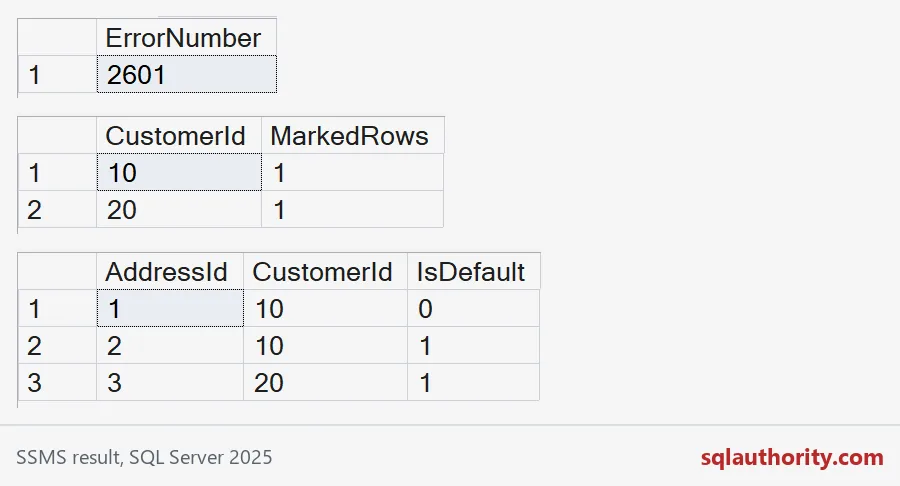
Now try the mistake. Ask for address 3, which belongs to customer 20, to become the default for customer 10. The call fails with error 50001, and the current default stays where it was.
BEGIN TRY
    EXEC dbo.SetDefaultAddress @CustomerId = 10, @AddressId = 3;
END TRY
BEGIN CATCH
    SELECT ERROR_NUMBER() AS ErrorNumber, ERROR_MESSAGE() AS ErrorText;
END CATCH;

SELECT AddressId, CustomerId, IsDefault
FROM dbo.DefaultAddressDemo
ORDER BY CustomerId, AddressId;
Every writer needs the right SET options
A filtered index is picky about session settings. Connections that write to the table need the usual ANSI options turned on. The demo turns ANSI_WARNINGS off and tries a harmless insert of an unmarked row. It still fails with error 1934.
SET ANSI_WARNINGS OFF;
INSERT dbo.DefaultAddressDemo VALUES (5, 30, 0);
GO
SET ANSI_WARNINGS ON;
SSMS has the right defaults, so your own test will pass. Old import tools and some drivers do not. The first sign is an insert that works in SSMS and fails from the application. Test with the real login and the real connection settings.
What the index does not decide for you
Deleting the marked address leaves the customer with no default. The index allows that. Decide what your business wants, and put it in the same procedure. If every customer must always have exactly one default, you need a different design, such as a default-address column on the customer table.
Test these cases before release: a duplicate default, a customer with no addresses, an address from another customer, deleting the default, and two callers at once. Check the plan of your own lookup on realistic row counts too. The demo cleans up after itself in the last block.
DROP PROCEDURE IF EXISTS dbo.SetDefaultAddress;
DROP TABLE IF EXISTS dbo.DefaultAddressDemo;
Let the database say no, and the two-tab customer stops being your problem.
A default flag is not a habit in code, it is a rule in the index.
Published by Pinal Dave on SQLAuthority. More of my work at pinaldave.com.
Discover more from SQL Authority with Pinal Dave
Subscribe to get the latest posts sent to your email.