SAVE TRANSACTION marks a point inside an open transaction that you can roll back to later. The rows written before the mark stay. The rows written after it go, and the transaction stays open. A nested BEGIN TRAN can’t do this, and the tests below show why.

What a Savepoint Is
A transaction is a group of changes that succeed or fail together. A plain ROLLBACK undoes all of them. That’s too blunt when one step in the middle can fail and the rest is fine.
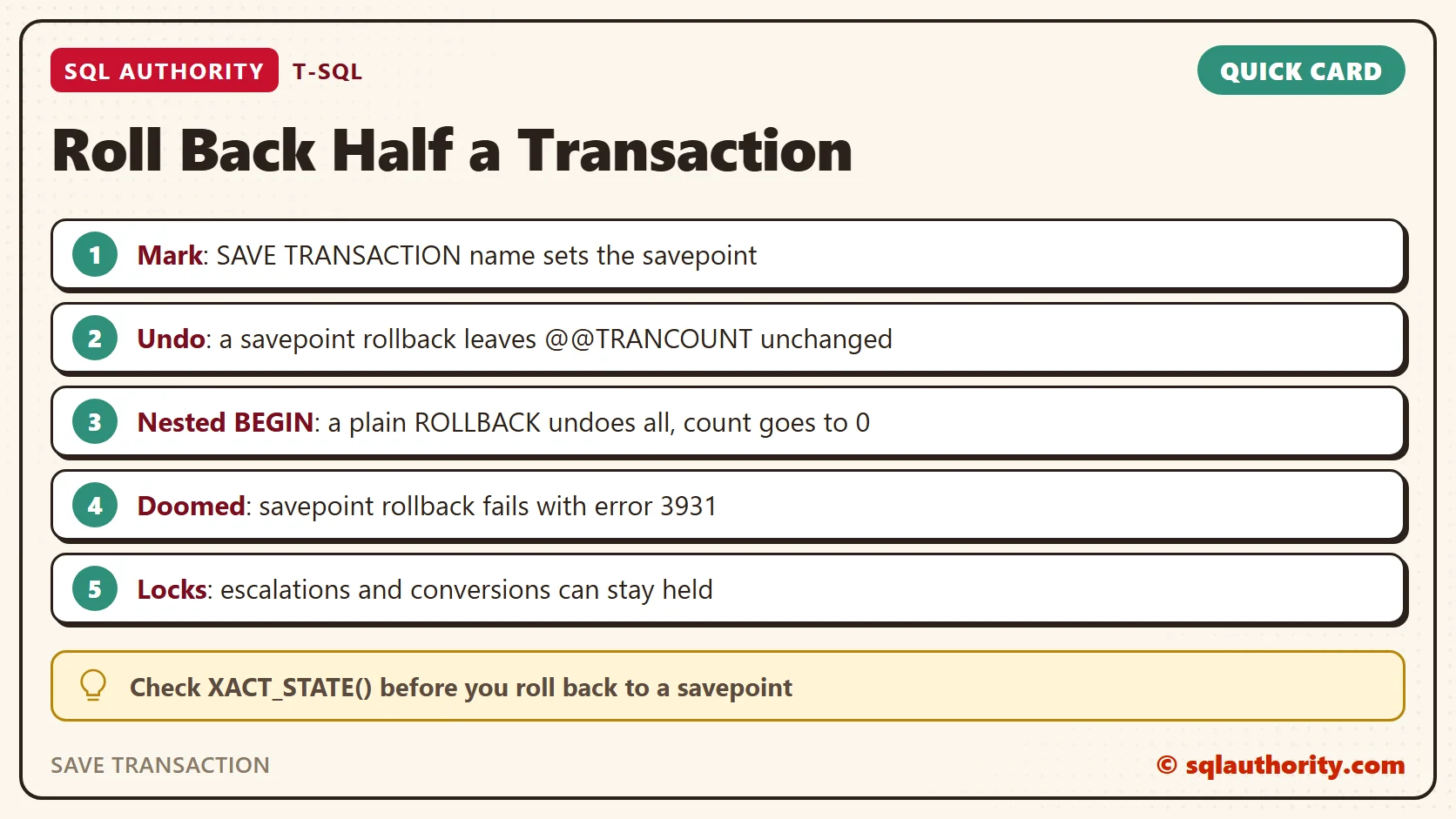
The statement SAVE TRANSACTION followed by a name sets a savepoint, a named marker inside the open transaction. ROLLBACK TRANSACTION with the same name undoes only the work done after the marker. It doesn’t change @@TRANCOUNT: two open BEGIN levels stay at 2.
I ran everything here on SQL Server 2025. To follow along on a test server, you need permission to create a database. The lock query near the end also needs VIEW SERVER PERFORMANCE STATE. The first script creates a test database.
IF DB_ID(N'SavepointDemo') IS NULL CREATE DATABASE SavepointDemo;
The second script creates a small table of basket items.
USE SavepointDemo;
GO
DROP TABLE IF EXISTS dbo.Basket;
CREATE TABLE dbo.Basket (BasketId int IDENTITY(1,1) PRIMARY KEY, Item varchar(30) NOT NULL);
Roll Back Half
The script saves two rows, sets a savepoint, and saves two more rows. Then it rolls back to the savepoint and commits. Along the way it prints the row count and @@TRANCOUNT, which is the number of open transactions.
SET NOCOUNT ON;
BEGIN TRANSACTION;
INSERT INTO dbo.Basket (Item) VALUES ('lentils'), ('rice');
SAVE TRANSACTION AfterStaples;
PRINT CONCAT('Open transactions after SAVE: ', @@TRANCOUNT);
INSERT INTO dbo.Basket (Item) VALUES ('tea'), ('oats');
DECLARE @Rows int = (SELECT COUNT(*) FROM dbo.Basket);
PRINT CONCAT('Rows before the rollback: ', @Rows, ', open transactions: ', @@TRANCOUNT);
ROLLBACK TRANSACTION AfterStaples;
SET @Rows = (SELECT COUNT(*) FROM dbo.Basket);
PRINT CONCAT('Rows after the rollback: ', @Rows, ', open transactions: ', @@TRANCOUNT);
COMMIT TRANSACTION;
PRINT CONCAT('Open transactions after COMMIT: ', @@TRANCOUNT);
SELECT BasketId, Item FROM dbo.Basket ORDER BY BasketId;
Here is what the Messages tab prints. It is output, not code to run.
Open transactions after SAVE: 1
Rows before the rollback: 4, open transactions: 1
Rows after the rollback: 2, open transactions: 1
Open transactions after COMMIT: 0
| BasketId | Item |
|---|---|
| 1 | lentils |
| 2 | rice |
Four rows became two, and @@TRANCOUNT stayed at 1 the whole time. Neither the savepoint nor the rollback to it closed the transaction. The COMMIT then kept the first two rows and brought the count to 0.
That’s the whole idea. Undo the risky part, keep the safe part, and finish in the same transaction.
A Savepoint Works Once
Rolling back to a savepoint uses it up. A second rollback to the same name fails with error 6401. Set the savepoint again when you need to go back to it a second time.
BEGIN TRANSACTION;
SAVE TRANSACTION Mark;
INSERT INTO dbo.Basket (Item) VALUES ('tea');
ROLLBACK TRANSACTION Mark;
ROLLBACK TRANSACTION Mark;
ROLLBACK TRANSACTION;
Msg 6401, Level 16, State 1, Line 5
Cannot roll back Mark. No transaction or savepoint of that name was found.
The same happens to later savepoints. When I rolled back to an earlier one, the savepoint set after it was gone too. The last line of the script ends the transaction with a plain ROLLBACK.
Why a Nested BEGIN TRAN Can’t Do It
A second BEGIN TRAN looks like a smaller unit of work. It isn’t one. It only raises the counter. This script uses the table from before, which still holds lentils and rice.
BEGIN TRANSACTION;
INSERT INTO dbo.Basket (Item) VALUES ('tea');
BEGIN TRANSACTION;
INSERT INTO dbo.Basket (Item) VALUES ('oats');
PRINT CONCAT('Inside both: ', @@TRANCOUNT);
COMMIT TRANSACTION;
PRINT CONCAT('After the inner COMMIT: ', @@TRANCOUNT);
ROLLBACK TRANSACTION;
PRINT CONCAT('After ROLLBACK: ', @@TRANCOUNT);
DECLARE @Left int = (SELECT COUNT(*) FROM dbo.Basket);
PRINT CONCAT('Rows left: ', @Left);
Here is what the Messages tab prints. It is output, not code to run.
Inside both: 2
After the inner COMMIT: 1
After ROLLBACK: 0
Rows left: 2
The count reached 2 inside. The inner COMMIT only lowered it to 1 and saved nothing.
The ROLLBACK then undid both inserts back to the outermost BEGIN, including the work the inner COMMIT seemed to finish. It also set the count to 0. The COMMIT that comes next in your code now fails.
COMMIT TRANSACTION;
Msg 3902, Level 16, State 1, Line 1
The COMMIT TRANSACTION request has no corresponding BEGIN TRANSACTION.
Naming the inner transaction doesn’t help. A ROLLBACK with the inner name finds nothing. Both transactions stay open, so the last line is a plain ROLLBACK.
BEGIN TRANSACTION Outer1;
BEGIN TRANSACTION Inner1;
ROLLBACK TRANSACTION Inner1;
ROLLBACK TRANSACTION;
Msg 6401, Level 16, State 1, Line 3
Cannot roll back Inner1. No transaction or savepoint of that name was found.
Savepoints Inside a Stored Procedure
The common pattern checks @@TRANCOUNT. When it is 0, the procedure starts a transaction and owns it.
When it is above 0, the caller owns the transaction, so the procedure sets a savepoint instead. On failure it rolls back to that savepoint and sends the error on with THROW. One limit applies: SQL Server doesn’t support savepoints in distributed transactions, including a local transaction promoted to a distributed one.
CREATE OR ALTER PROCEDURE dbo.AddExtras @Item varchar(30), @Fail bit = 0
AS
BEGIN
    SET NOCOUNT ON;
    DECLARE @Owner bit = IIF(@@TRANCOUNT = 0, 1, 0);
    IF @Owner = 1 BEGIN TRANSACTION; ELSE SAVE TRANSACTION AddExtras;
    BEGIN TRY
        INSERT INTO dbo.Basket (Item) VALUES (@Item);
        IF @Fail = 1 THROW 50001, 'Extra item rejected.', 1;
        IF @Owner = 1 COMMIT TRANSACTION;
    END TRY
    BEGIN CATCH
        PRINT CONCAT('XACT_STATE inside the procedure: ', XACT_STATE());
        IF @Owner = 1 ROLLBACK TRANSACTION; ELSE ROLLBACK TRANSACTION AddExtras;
        THROW;
    END CATCH;
END;
Called alone, the procedure commits its own work, or rolls it back when it fails. The next procedure plays the caller. It saves lentils, calls AddExtras with a forced failure, and reports what is left. The setting XACT_ABORT decides how an error treats the transaction, so the caller runs with it OFF and then ON.
CREATE OR ALTER PROCEDURE dbo.FillBasket @AbortOn bit
AS
BEGIN
    SET NOCOUNT ON;
    IF @AbortOn = 1 SET XACT_ABORT ON; ELSE SET XACT_ABORT OFF;
    TRUNCATE TABLE dbo.Basket;
    BEGIN TRANSACTION;
    INSERT INTO dbo.Basket (Item) VALUES ('lentils');
    BEGIN TRY
        EXEC dbo.AddExtras @Item = 'tea', @Fail = 1;
    END TRY
    BEGIN CATCH
        PRINT CONCAT('Caught ', ERROR_NUMBER(), ': ', ERROR_MESSAGE());
        PRINT CONCAT('XACT_STATE after the error: ', XACT_STATE());
    END CATCH;
    IF XACT_STATE() = 1 COMMIT TRANSACTION; ELSE IF @@TRANCOUNT > 0 ROLLBACK TRANSACTION;
    DECLARE @Kept int = (SELECT COUNT(*) FROM dbo.Basket);
    PRINT CONCAT('Rows kept: ', @Kept);
END;
PRINT 'XACT_ABORT OFF';
EXEC dbo.FillBasket @AbortOn = 0;
PRINT 'XACT_ABORT ON';
EXEC dbo.FillBasket @AbortOn = 1;
Here is what the Messages tab prints. It is output, not code to run.
XACT_ABORT OFF
XACT_STATE inside the procedure: 1
Caught 50001: Extra item rejected.
XACT_STATE after the error: 1
Rows kept: 1
XACT_ABORT ON
XACT_STATE inside the procedure: -1
Caught 3931: The current transaction cannot be committed and cannot be rolled back to a savepoint. Roll back the entire transaction.
XACT_STATE after the error: -1
Rows kept: 0
The function XACT_STATE() reports the state of the current transaction. It returns 1 for an open transaction that can be committed. It returns 0 for no transaction and -1 for a doomed one.
With OFF, the savepoint did its job. The lentils stayed and the tea went, and XACT_STATE() returned 1.
With ON, the same error doomed the transaction. XACT_STATE() returned -1, and a doomed transaction can only be rolled back in full. The rollback to the savepoint failed with error 3931, and the lentils were lost too. A savepoint can’t rescue a doomed transaction.
The fix is a check. Roll back to the savepoint only when XACT_STATE() is 1. When it is -1, rethrow and let the owner of the transaction roll back everything.
CREATE OR ALTER PROCEDURE dbo.AddExtras @Item varchar(30), @Fail bit = 0
AS
BEGIN
    SET NOCOUNT ON;
    DECLARE @Owner bit = IIF(@@TRANCOUNT = 0, 1, 0);
    IF @Owner = 1 BEGIN TRANSACTION; ELSE SAVE TRANSACTION AddExtras;
    BEGIN TRY
        INSERT INTO dbo.Basket (Item) VALUES (@Item);
        IF @Fail = 1 THROW 50001, 'Extra item rejected.', 1;
        IF @Owner = 1 COMMIT TRANSACTION;
    END TRY
    BEGIN CATCH
        PRINT CONCAT('XACT_STATE inside the procedure: ', XACT_STATE());
        IF @@TRANCOUNT > 0
        BEGIN
            IF @Owner = 1 ROLLBACK TRANSACTION;
            ELSE IF XACT_STATE() = 1 ROLLBACK TRANSACTION AddExtras;
        END;
        THROW;
    END CATCH;
END;
PRINT 'XACT_ABORT ON, with the check';
EXEC dbo.FillBasket @AbortOn = 1;
Here is what the Messages tab prints. It is output, not code to run.
XACT_ABORT ON, with the check
XACT_STATE inside the procedure: -1
Caught 50001: Extra item rejected.
XACT_STATE after the error: -1
Rows kept: 0
Now the caller sees the real error, 50001, and not a second one about the savepoint. The caller rolls back everything and decides what to do next. With XACT_ABORT OFF, the same procedure still rolls back to the savepoint, because XACT_STATE() is 1.
The rollbacks sit inside IF @@TRANCOUNT > 0 for one more case. A trigger can end the transaction itself and then raise its own error. A second ROLLBACK then fails with error 3903 and hides the real one.
In a separate test, a trigger that rolled back and raised 51002 reached the caller as 3903 without the guard. With the guard, the caller saw 51002.
Do Locks Go Away?
A fair question is whether the locks taken after the savepoint go away with the rows. The next script updates shelf 1 and sets a savepoint. Then it updates shelf 2 and counts the key locks of the session in sys.dm_tran_locks. It counts again after the rollback.
DROP TABLE IF EXISTS dbo.Shelf;
CREATE TABLE dbo.Shelf (ShelfId int PRIMARY KEY, Stock int NOT NULL);
INSERT INTO dbo.Shelf (ShelfId, Stock) VALUES (1, 10), (2, 20), (3, 30);
BEGIN TRANSACTION;
UPDATE dbo.Shelf SET Stock = Stock - 1 WHERE ShelfId = 1;
SAVE TRANSACTION AfterFirst;
UPDATE dbo.Shelf SET Stock = Stock - 1 WHERE ShelfId = 2;
DECLARE @Before int = (SELECT COUNT(*) FROM sys.dm_tran_locks WHERE request_session_id = @@SPID AND resource_database_id = DB_ID() AND resource_type = 'KEY');
ROLLBACK TRANSACTION AfterFirst;
DECLARE @After int = (SELECT COUNT(*) FROM sys.dm_tran_locks WHERE request_session_id = @@SPID AND resource_database_id = DB_ID() AND resource_type = 'KEY');
PRINT CONCAT('Key locks before the rollback: ', @Before);
PRINT CONCAT('Key locks after the rollback: ', @After);
COMMIT TRANSACTION;
Here is what the Messages tab prints. It is output, not code to run.
Key locks before the rollback: 2
Key locks after the rollback: 1
The lock on shelf 2 was released. The lock on shelf 1 stayed, because shelf 1 was updated before the savepoint.
I also checked from a second connection while the first transaction was still open. I set a 1.5 second lock timeout. It read shelf 2 at once, but a read of shelf 1 timed out.
An INSERT and a REPEATABLE READ select behaved the same way. There’s one exception: a lock that was converted or escalated after the savepoint can stay held.
In a separate REPEATABLE READ test, a read of shelf 3 took a shared lock. An update after the savepoint turned it into an exclusive lock. After the rollback, the stock was back to 30, but the exclusive lock stayed until COMMIT. I ran these tests on a default database, so test your own setup before you rely on lock release.
Is a Savepoint Worth the Trouble?
You could say a savepoint is extra complexity. Let the procedure fail and retry the whole transaction. Fair point.
A retry is fine when the work is short and cheap. A savepoint pays off when the first part is slow, like a long import.
A Short Checklist
- Use SAVE TRANSACTION when only part of a transaction can fail.
- Never use a nested BEGIN TRAN to get a partial rollback.
- Check @@TRANCOUNT in a procedure, so it works with or without a caller transaction.
- Read XACT_STATE() in the CATCH block before you roll back to a savepoint.
- Set the savepoint again when you need a second rollback to it.
Clean Up
USE master;
GO
ALTER DATABASE SavepointDemo SET SINGLE_USER WITH ROLLBACK IMMEDIATE;
DROP DATABASE SavepointDemo;
SAVE TRANSACTION is not a smaller transaction, it is a bookmark inside the one you already have.
Published by Pinal Dave on SQLAuthority. More of my work at pinaldave.com.
Discover more from SQL Authority with Pinal Dave
Subscribe to get the latest posts sent to your email.