
Business Days Between Dates require a defined calendar and endpoint rule. This example counts inclusive Monday-to-Friday dates for July 2021.

DECLARE @StartDate date='20210701',@EndDate date='20210731';
IF @EndDate < @StartDate OR DATEDIFF(day,@StartDate,@EndDate)>32766
    THROW 50000,'Use an ordered date range of at most 32767 days.',1;
DECLARE @SavedDateFirst int=@@DATEFIRST;
BEGIN TRY
SET DATEFIRST 7;
;WITH Dates AS
 (SELECT @StartDate AS WorkDate
  UNION ALL SELECT DATEADD(day,1,WorkDate) FROM Dates WHERE WorkDate<@EndDate)
SELECT COUNT(*) AS Weekdays FROM Dates
WHERE DATEPART(weekday,WorkDate) NOT IN (1,7)
OPTION (MAXRECURSION 32767);
SET DATEFIRST @SavedDateFirst;
END TRY
BEGIN CATCH
    SET DATEFIRST @SavedDateFirst;
    THROW;
END CATCH;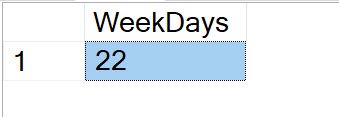
July 1 through July 31, 2021 contains 22 weekdays. DATEFIRST 7 makes Sunday 1 and Saturday 7. TRY/CATCH restores the previous setting after success or error. That avoids leaving the connection with the demonstration setting.
My earlier recursion could fail on long ranges or count reversed ranges incorrectly. The guard and bounded recursion make these limits explicit. Use an appropriate calendar for broader ranges.
Public holidays, regional weekends and closures need a maintained business-day calendar. Use that table for production reporting. Agree whether endpoints are inclusive before comparing counts.
Related reading
- SQL in Sixty Seconds
- One Scan for 3 Count Sum – SQL in Sixty Seconds #178
- SUM(1) vs COUNT(1) Performance Battle – SQL in Sixty Seconds #177
- COUNT(*) and COUNT(1): Performance Battle – SQL in Sixty Seconds #176
- COUNT(*) and Index – SQL in Sixty Seconds #175
- Index Scans – Good or Bad? – SQL in Sixty Seconds #174
- Optimize for Ad Hoc Workloads – SQL in Sixty Seconds #173
- Avoid Join Hints – SQL in Sixty Seconds #172
- One Query Many Plans – SQL in Sixty Seconds #171
A weekday count is not every organization working calendar, it is a result under explicitly chosen date rules.
Published by Pinal Dave on SQLAuthority. More of my work at pinaldave.com.
Discover more from SQL Authority with Pinal Dave
Subscribe to get the latest posts sent to your email.




2 Comments. Leave new
The Julian business day is a good trick. Number the days from whenever your calendar starts and repeat a number for a weekend or company holiday.
CREATE TABLE Calendar
(cal_date DATE NOT NULL PRIMARY KEY,
julian_business_nbr INTEGER NOT NULL,
…);
INSERT INTO Calendar
VALUES (‘2007-04-05’, 42),
(‘2007-04-06’, 43), — good Friday
(‘2007-04-07’, 43),
(‘2007-04-08’, 43), — Easter Sunday
(‘2007-04-09’, 44),
(‘2007-04-10’, 45); –Tuesday
To compute the business days from Thursday of this week to next Tuesdays:
SELECT (C2.julian_business_nbr – C1.julian_business_nbr)
FROM Calendar AS C1, Calendar AS C2
WHERE C1.cal_date = ‘2007-04-05’,
AND C2.cal_date = ‘2007-04-10’;
I’m attempting to use your script, and it’s working fine in my query, but when i attempt to build it into SSRS, it’s saying: ‘Types don’t match between the anchor and the recursive part in column “StartDate” of recursive query “dateCTE”.’
My edits to your code:
–Calculate Business days
DECLARE @WeekDays INT
;WITH dateCTE AS
(
SELECT @Date1 StartDate, DATEPART(WEEKDAY,@Date1) wkday
UNION ALL
SELECT DATEADD(day,1,StartDate) , DATEPART(WEEKDAY, DATEADD(day,1,StartDate)) wkday
FROM dateCTE
WHERE DATEADD(day,1,StartDate) <= @Date2
)
SELECT @WeekDays = COUNT(*)
FROM dateCTE
WHERE wkday NOT IN(1,7) — Execluding Sat, Sun