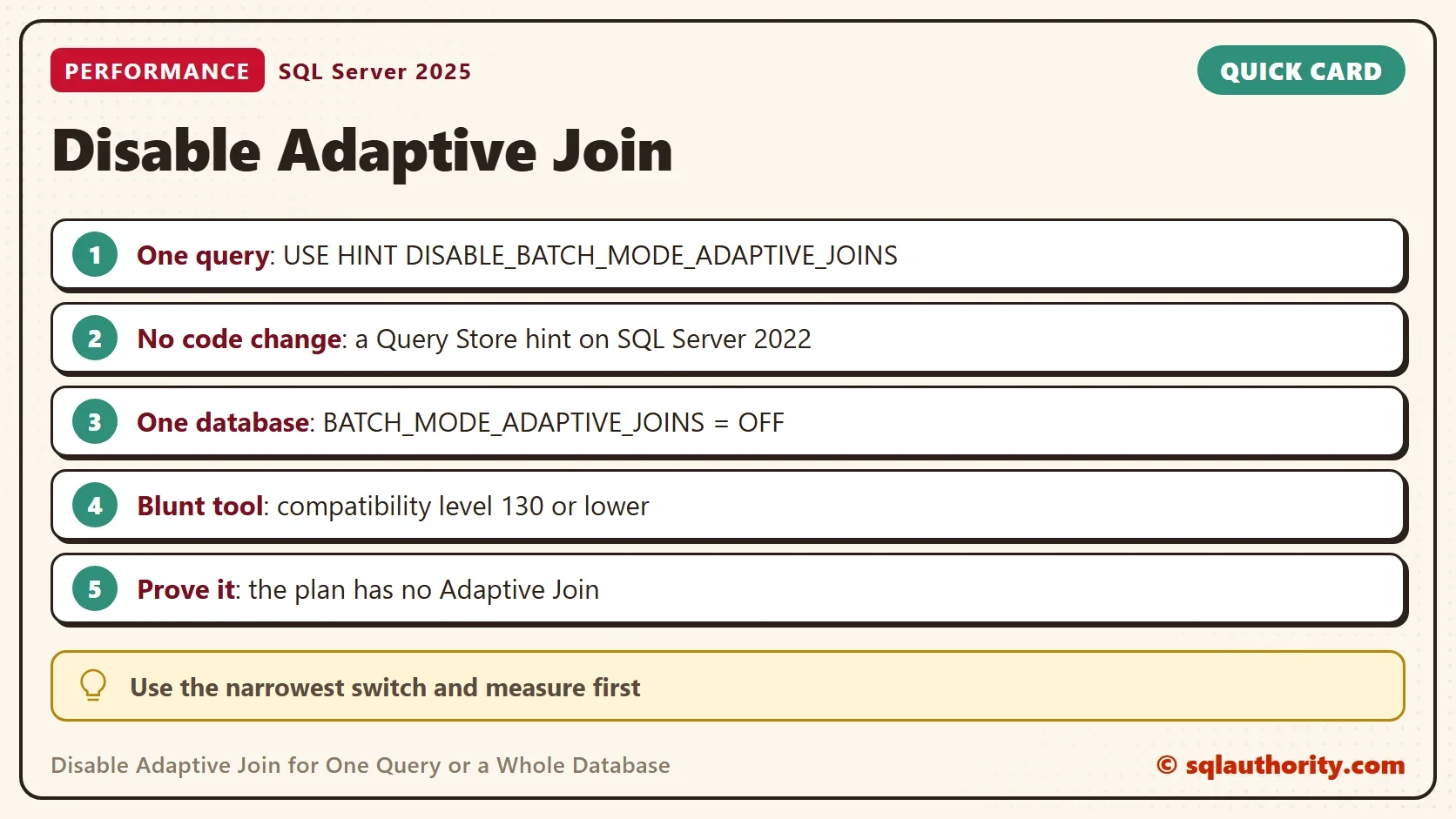
To disable adaptive join for one query, add a USE HINT to it. To disable it for a whole database, switch off one database setting. Both are one line, and both can be undone. A third route needs no code change at all.

Why Disable It at All
Adaptive joins help most queries. A client of mine moved to SQL Server 2019 and saw most queries get faster. Three queries were not among them. They ran slower with an adaptive join, and the client needed the feature off for those three. That is the right shape for the change: a narrow switch, applied after a measurement.
Two related posts cover the rest of the family. One is Adaptive Threshold Rows: How an Adaptive Join Chooses. The other is Enable Adaptive Join in SQL Server: Why It Does Not Appear.
The demo database is named AdaptiveOffDemo. It holds a sales table of 400,000 rows and a customer table of 20,000 rows. A columnstore index lets the join run in batch mode. The first script builds it. The cleanup at the end drops it.
IF DB_ID(N'AdaptiveOffDemo') IS NULL CREATE DATABASE AdaptiveOffDemo;
GO
USE AdaptiveOffDemo;
GO
DROP TABLE IF EXISTS dbo.Sale;
DROP TABLE IF EXISTS dbo.Customer;
DROP TABLE IF EXISTS dbo.ProbeLog;
CREATE TABLE dbo.Customer (CustomerID int NOT NULL PRIMARY KEY, Region nvarchar(20) NOT NULL);
CREATE TABLE dbo.Sale (SaleID int IDENTITY(1,1) NOT NULL PRIMARY KEY, CustomerID int NOT NULL, Amount decimal(10,2) NOT NULL);
CREATE TABLE dbo.ProbeLog (Setting nvarchar(40) NOT NULL, JoinInPlan nvarchar(20) NOT NULL);
WITH n AS (SELECT TOP (400000) ROW_NUMBER() OVER (ORDER BY (SELECT NULL)) AS i FROM sys.all_columns AS a CROSS JOIN sys.all_columns AS b)
INSERT INTO dbo.Customer (CustomerID, Region)
SELECT i, CHOOSE(i % 4 + 1, N'North', N'South', N'East', N'West') FROM n WHERE i <= 20000;
WITH n AS (SELECT TOP (400000) ROW_NUMBER() OVER (ORDER BY (SELECT NULL)) AS i FROM sys.all_columns AS a CROSS JOIN sys.all_columns AS b)
INSERT INTO dbo.Sale (CustomerID, Amount) SELECT i % 20000 + 1, (i % 1000) + 0.5 FROM n;
CREATE NONCLUSTERED COLUMNSTORE INDEX NCCI_Sale ON dbo.Sale (SaleID, CustomerID, Amount);
The probe procedure runs the join with an optional query clause. It then reads the cached plan by label and records whether the plan holds an Adaptive Join. Reading the plan cache needs VIEW SERVER STATE, which is VIEW SERVER PERFORMANCE STATE on SQL Server 2022 and later.
CREATE OR ALTER PROCEDURE dbo.ProbeJoin @Setting nvarchar(40), @QueryOption nvarchar(200) = N''
AS
BEGIN
    DECLARE @sql nvarchar(max) = N'SELECT COUNT(*) AS N FROM dbo.Sale AS s INNER JOIN dbo.Customer AS c ON c.CustomerID = s.CustomerID WHERE s.Amount < 20 '
        + @QueryOption + N'; -- probe ' + @Setting;
    DECLARE @ignore TABLE (n int);
    INSERT INTO @ignore EXEC (@sql);
    WITH XMLNAMESPACES (DEFAULT 'http://schemas.microsoft.com/sqlserver/2004/07/showplan')
    INSERT INTO dbo.ProbeLog (Setting, JoinInPlan)
    SELECT @Setting, CASE WHEN qp.query_plan.exist('//RelOp[@PhysicalOp="Adaptive Join"]') = 1 THEN N'Adaptive Join' ELSE N'Other join' END
    FROM sys.dm_exec_cached_plans AS cp
    CROSS APPLY sys.dm_exec_sql_text(cp.plan_handle) AS st
    CROSS APPLY sys.dm_exec_query_plan(cp.plan_handle) AS qp
    WHERE st.text = @sql;
END;
Disable Adaptive Join for One Query
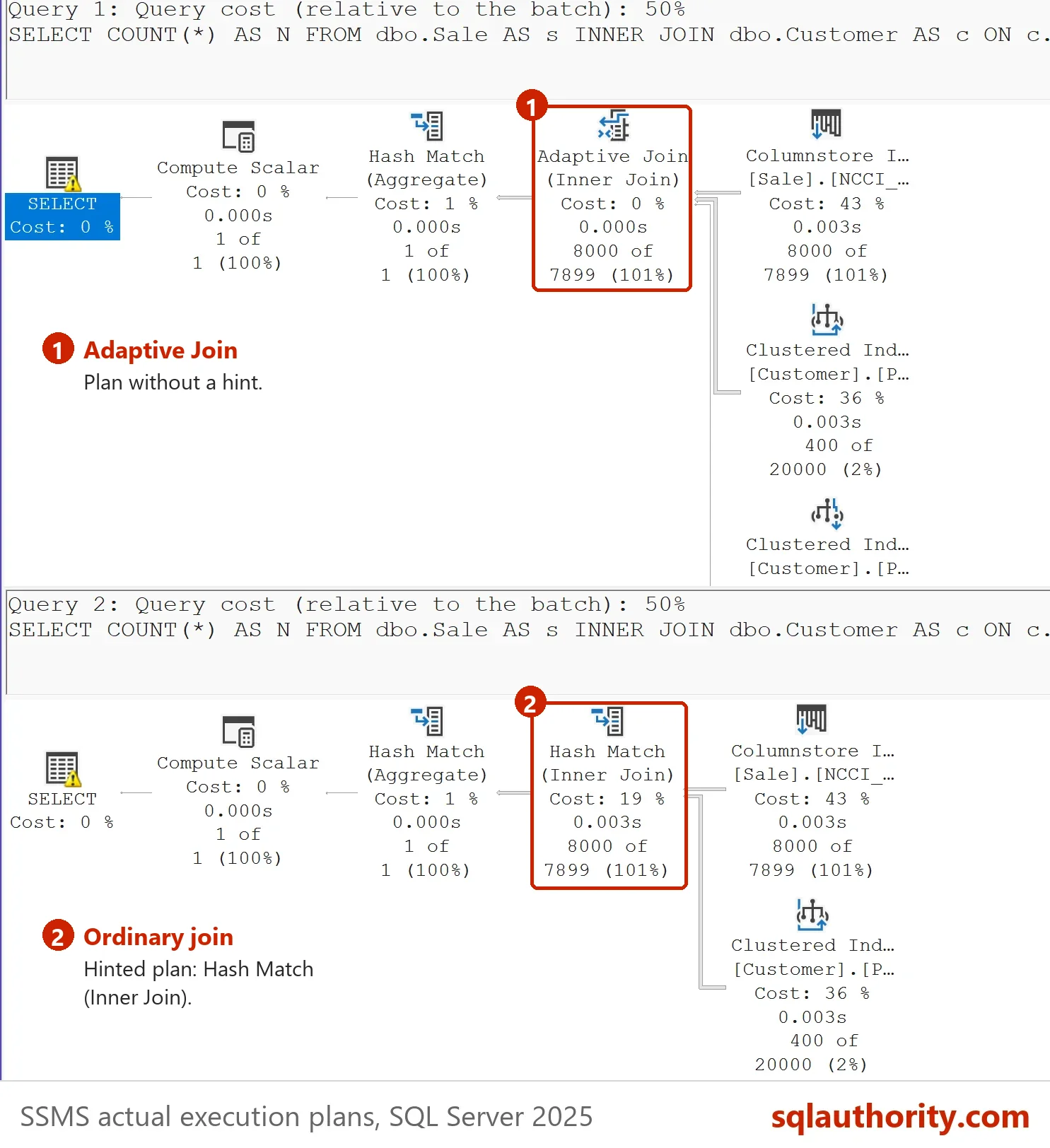
The hint DISABLE_BATCH_MODE_ADAPTIVE_JOINS goes in the OPTION clause. It affects only the statement that carries it. The probe runs the query twice, once as it is and once with the hint.
TRUNCATE TABLE dbo.ProbeLog;
EXEC dbo.ProbeJoin N'no hint';
EXEC dbo.ProbeJoin N'with hint', N'OPTION (USE HINT(''DISABLE_BATCH_MODE_ADAPTIVE_JOINS''))';
SELECT Setting, JoinInPlan FROM dbo.ProbeLog ORDER BY Setting;| Setting | JoinInPlan |
|---|---|
| no hint | Adaptive Join |
| with hint | Other join |
The plain query has an Adaptive Join. The hinted query has a normal join. The feature and the hint exist in SQL Server 2017 and later. The hint stays active while it sits in the query text. It disables one feature and leaves every other choice to the optimizer.
Skip the Code Change With a Query Store Hint
Sometimes the query lives in an application you cannot edit. To disable adaptive join there, use Query Store hints. They attach the same hint to a query by its Query Store ID. They need SQL Server 2022 or later and a database with Query Store on. A new database on SQL Server 2025 has it on. The demo captures every query, because the default capture mode skips cheap queries like this one.
ALTER DATABASE AdaptiveOffDemo SET QUERY_STORE (QUERY_CAPTURE_MODE = ALL);
GO
TRUNCATE TABLE dbo.ProbeLog;
EXEC dbo.ProbeJoin N'store before';
EXEC sys.sp_query_store_flush_db;
DECLARE @QueryId bigint = (SELECT TOP (1) q.query_id
    FROM sys.query_store_query AS q
    INNER JOIN sys.query_store_query_text AS qt ON qt.query_text_id = q.query_text_id
    WHERE qt.query_sql_text LIKE N'SELECT COUNT(*) AS N FROM dbo.Sale%' AND qt.query_sql_text NOT LIKE N'%OPTION%');
EXEC sys.sp_query_store_set_hints @query_id = @QueryId, @query_hints = N'OPTION (USE HINT(''DISABLE_BATCH_MODE_ADAPTIVE_JOINS''))';
EXEC dbo.ProbeJoin N'store after';
SELECT Setting, JoinInPlan FROM dbo.ProbeLog ORDER BY Setting;
EXEC sys.sp_query_store_clear_hints @query_id = @QueryId;| Setting | JoinInPlan |
|---|---|
| store after | Other join |
| store before | Adaptive Join |
After the Query Store hint, the same query text compiled without an Adaptive Join. The application never changed. The last line of the script undoes the hint. It calls sys.sp_query_store_clear_hints with the same query ID, so the next step starts clean.
Switch It Off for the Whole Database
To disable adaptive join for every query in a database, use the scoped configuration BATCH_MODE_ADAPTIVE_JOINS. It exists in SQL Server 2019 and later, and it is on by default. The script below turns it off, probes, turns it on, and probes again.
TRUNCATE TABLE dbo.ProbeLog;
ALTER DATABASE SCOPED CONFIGURATION SET BATCH_MODE_ADAPTIVE_JOINS = OFF;
GO
EXEC dbo.ProbeJoin N'setting off';
ALTER DATABASE SCOPED CONFIGURATION SET BATCH_MODE_ADAPTIVE_JOINS = ON;
GO
EXEC dbo.ProbeJoin N'setting on';
SELECT Setting, JoinInPlan FROM dbo.ProbeLog ORDER BY Setting;
| Setting | JoinInPlan |
|---|---|
| setting off | Other join |
| setting on | Adaptive Join |
Off gives a normal join for every query in the database, and on brings the Adaptive Join back. The setting can also be read from sys.database_scoped_configurations, where a value of 1 means the feature is on.
Find the Queries That Use It
Before you switch anything off, list the cached plans that contain an Adaptive Join. The query reads every plan of the current database from the cache. On a busy server, run it once and outside the busiest hour.
WITH XMLNAMESPACES (DEFAULT 'http://schemas.microsoft.com/sqlserver/2004/07/showplan')
SELECT TOP (5) cp.usecounts, LEFT(st.text, 80) AS QueryStart
FROM sys.dm_exec_cached_plans AS cp
CROSS APPLY sys.dm_exec_query_plan(cp.plan_handle) AS qp
CROSS APPLY sys.dm_exec_sql_text(cp.plan_handle) AS st
WHERE qp.dbid = DB_ID()
  AND qp.query_plan.exist('//RelOp[@PhysicalOp="Adaptive Join"]') = 1
ORDER BY cp.usecounts DESC;
Each row is a plan with the operator, with its use count. Start with the queries that run the most, and check the actual plan of each before you decide.
Which Scope to Pick
| Switch | Scope | Needs |
|---|---|---|
| USE HINT in OPTION | One query | A code change |
| Query Store hint | One query | SQL Server 2022 or later, Query Store on |
| BATCH_MODE_ADAPTIVE_JOINS = OFF | One database | SQL Server 2019 or later |
| Compatibility level 130 or lower | One database, every feature | A full test of the database |
Prefer the narrowest switch that fixes the problem. A lower compatibility level also removes other features of the newer level. That makes it the bluntest tool of the four.
Do You Lose Anything?
You could argue that disabling the feature gives up the benefit it was built for. For the query you disable it on, you give up the run time choice and fix one join method. If the row counts change later, the fixed method can become the slow one. Measure the query with and without the switch, using STATISTICS IO and STATISTICS TIME, and record why the switch exists.
What to Remember
Disable adaptive join at the smallest scope that works. Use the hint for one query. Use a Query Store hint when the code is out of reach. Use the database setting only when many queries regress. Confirm the change in the plan. Switching the feature back on is the same statement with ON.
USE master;
GO
IF DB_ID(N'AdaptiveOffDemo') IS NOT NULL
BEGIN
    ALTER DATABASE AdaptiveOffDemo SET SINGLE_USER WITH ROLLBACK IMMEDIATE;
    DROP DATABASE AdaptiveOffDemo;
END;
A disabled feature is not a fix, it is a measured exception with a reason attached.
Published by Pinal Dave on SQLAuthority. More of my work at pinaldave.com.
Discover more from SQL Authority with Pinal Dave
Subscribe to get the latest posts sent to your email.