
A view in SQL Server is a saved query that you can select from as though it were a table. It stores the question, not the answer. Once that sinks in, most of the surprises about views stop being surprising.
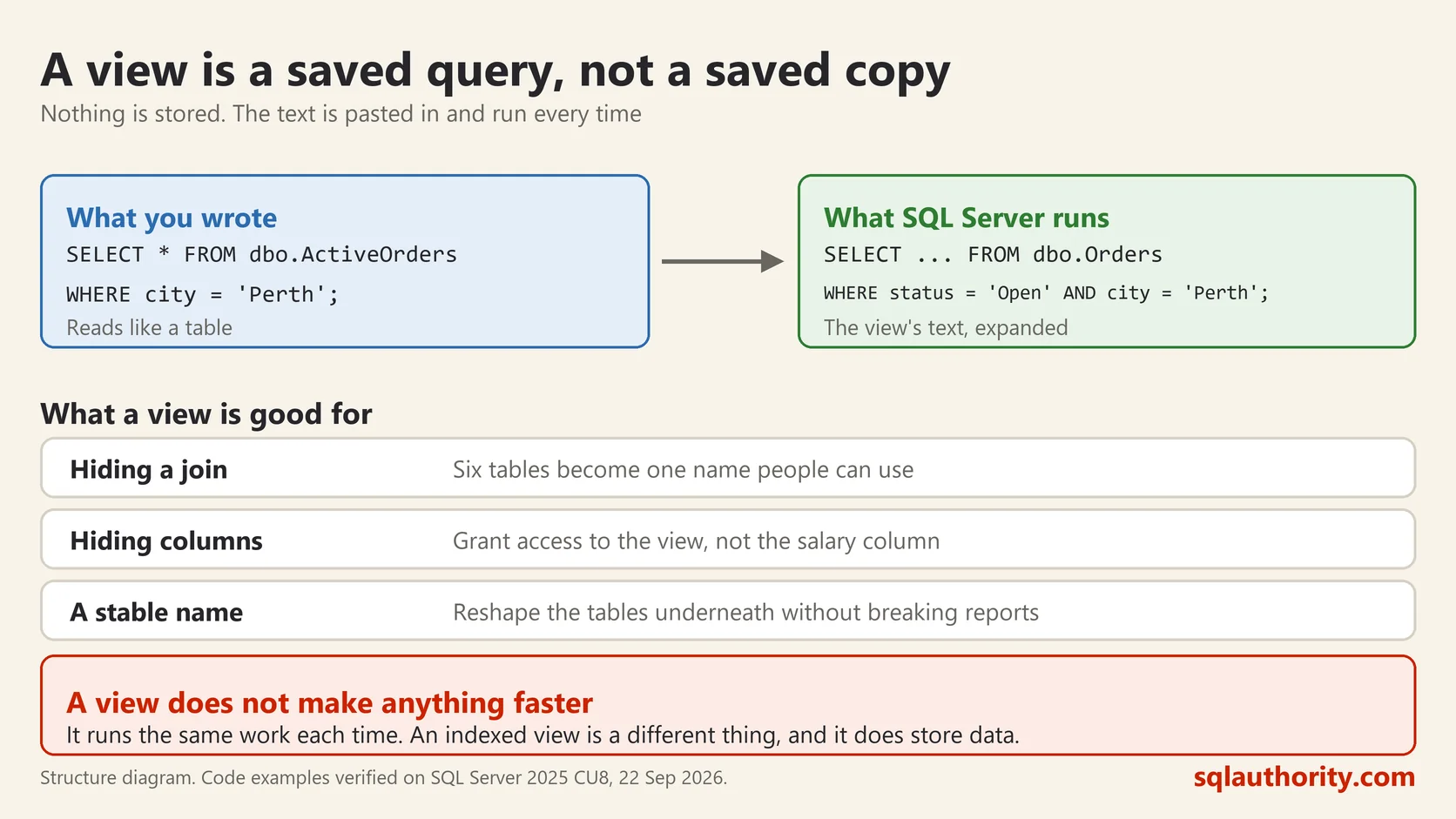
A Window, Not a Copy
Think of a window cut into a wall. The room behind it is the table. The window decides how much of the room you can see and from what angle. It holds nothing itself.
That is why a view is always current. Change a row in the table and the view shows the change immediately, because there was never a second copy to go stale.
Making One
Here is a view over an orders table of 200,000 rows, on SQL Server 2025:
CREATE VIEW dbo.BigOrders
AS
SELECT id, code, city, amount
FROM dbo.Orders
WHERE amount > 4000;
SELECT COUNT(*) AS rows_in_view FROM dbo.BigOrders;rows_in_view
40191Forty thousand rows came back, and the database stored none of them. It ran the saved query. To SQL Server the view is an object like any other:
SELECT name, type_desc FROM sys.objects WHERE name = 'BigOrders';name type_desc
BigOrders VIEWWhat Views Are Good For
Hiding complexity. A join across five tables written once, then used by everyone as a single name. The next person does not need to know the shape of the database to ask a simple question.
Controlling what people see. Grant somebody access to a view instead of the table, and they see only the rows and columns the view exposes. The salary column simply is not there.
Keeping old code working. Rename or split a table, then create a view with the old name and shape. Applications carry on while you fix them one at a time. This is the use I reach for most on real work.
What a View Does Not Do
This is where the confusion lives, so it is worth being blunt.
A view does not make anything faster. The query still runs. If the underlying query reads a million rows, so does the view, every single time somebody selects from it.
A view does not store data, so it has no size of its own. It also has no index of its own, unless you use an indexed view, which is a different and much heavier thing.
A view does not protect you from a change to the table. Drop a column the view references and the view breaks, quietly, until somebody selects from it.
The Mistake That Costs Money
Views nest. A view can select from another view, which selects from a third. It feels tidy and it reads well.
The optimizer has to flatten all of it back into one query, and each layer adds tables and conditions that may not be needed for the question actually being asked. You select three columns and the plan reads eleven tables, because every layer brought its own joins along.
I have found four levels of nesting on a client server more than once. Nobody built it that way on purpose. Each layer was reasonable, and the person adding it could not see the ones underneath. When a view is slow, the first thing to check is what it is built on.
Can You Update Through One?
Sometimes. A simple view over one table, with no aggregation and no DISTINCT, will usually accept an INSERT or UPDATE and pass it through.
Add a GROUP BY, a join, or a calculated column and SQL Server refuses, because it cannot work out which underlying row you meant. You can force the issue with an INSTEAD OF trigger, which means writing that logic by hand.
My advice is to treat views as read-only and write to the tables. A view that can be updated is a view somebody will update by accident.
A view is not a table, it is a question you saved and gave a name.
This post was rewritten from scratch in September 2026. The original, published on 2012-03-11, was a short announcement about something that no longer exists. The address is the same, the subject is now a basic idea worth keeping.
Published by Pinal Dave on SQLAuthority. More of my work at pinaldave.com.
Discover more from SQL Authority with Pinal Dave
Subscribe to get the latest posts sent to your email.



32 Comments. Leave new
Which .NET Framework does it need?
I guess we should have .Net 3.5 SP1 in order to proceed with Denali installation and the installation setup will install .Net FrameWork 4.0.
Hi Pinal,
Can you provide a link, or write a blog about how to use new SQL 2012 Extended Events equivalent to “Profiler”, I was quite Okk with profiler but I am unable to find some basic info to use Extended Events for simple query performance checking.
/ws
You are da Man :)
Hi, thanks for the links but still cannot find a download for SQL Server Management Studio 2012. Any ideas???
I’m using that one – http://download.microsoft.com/download/8/D/D/8DD7BDBA-CEF7-4D8E-8C16-D9F69527F909/ENU/x64/SQLManagementStudio_x64_ENU.exe
Hi, yeh thanks mate. I realised after I downloaded it that the WT (with Tools) package includes the Management Studio tools. It’s just that in Australia bandwidth is a premium and downloading 700Mb to test an assumption is not always the best thing. Worked out well though – thanks mate :)
its for 64bt!!! can u give the link for 32 bt for windows7
hi pinal, i have been trying to install the sql server 2012 on my windows 7 vm, but it is showing a message “The application cannot find one of its required files, possibly because it was unable to create it in the folder. Please make sure that the folder in which this application was downloaded is accessible and not read-only”. i downloaded all the 3 files for 62 bit (ENUx64SQLFULL_x64_ENU_Core.box, ENUx64SQLFULL_x64_ENU_Install.exe, ENUx64SQLFULL_x64_ENU_Lang.box ) i copied it into one single folder and run the ENUx64SQLFULL_x64_ENU_Install.exe, file. but same message, please help
Did you receive an answer to this question, I am having a similar issue I need to resolve
When I initially commented I clicked the “Notify me when new comments are added” checkbox and now
each time a comment is added I get four e-mails with the same comment.
Is there any way you can remove people from that service?
Thank you!
Hi,
I am working on Sql Server 2008 Enterprise edition.I tried to download sql server 2008 performance dashboard which i couldn’t downloaded.Later i have installed 2012 performance dashboard on sql server 2008.Will it support?
And please share the link and document for configuring sql server 2008 performance dashboard…
Thanks
Hi,
I have installed SQL Server 2012 and it was giving me option to install SSRS Native. After installation doesn’t give me option to open SSRS.
any help? Thanks.
I am looking for separate download link for MSSQL 2012 64 bit standard and enterprise edition.
Is it possible to supply one if that’s ok?
TIA
Rishi
I too am looking for a link to MSSQL 2012 64 bit enterprise edition … did you find a link for this?
Nope I haven’t so far?
Other than Express and Enterperise Evaluation all are paid version. You need to purchase them.
hi Pinal,
I purchased Microsoft standard edition 2012 and want to install it however unable to find installation source . can i use SQL Server evolution setup to install it.
Yes, you can download the Eval version and enter the license key to get it working.
Hi Pinal, Can u please send me a link of sql server 2012 web edition setup (.exe) file link. I am not able to find from Microsoft official site. Please help.
We have virtual SQL server web edition 2012 64 bit, Now we want to install new report service instance on existing DB server. Web edition I am not able to get. So If i download evolution edition and install it with existing web edition license key is it work? Please guide me.
where can I download the sql profiler?
Can you install SQL 2012 Standard and then just use an Enterprise License to enable the Enterprise features or is there a standalone iso for Enterprise?
you can do edition upgrade. Refer books online to know supported matrix. ENT can’t be downgraded to STD.
Hi Whether Evaluation edition is same as developer edition. Can you please confirm.
Feature wise both are same. There are different in terms on licensing like you can’t use developer edition for production purpose and EVAL will expire after 180 days.
Is there enterprise version trial for SQL server
This should help you – http://blog.sqlauthority.com/2016/06/01/what-you-may-and-may-not-do-with-sql-server-developer-edition/
hi, am looking for sql server 2012 standard version . ? do you knows where can i get an iso file for it ?
On MSDN
Hi
I am a new to SQL and I have been provided Enterprise MSDN license
I need to install sql server 2012 enterprise edition. Can you please provide me the link where i can see this version
how can i change compatibility level of sql db 2008 r2 to 2014 any specific script please